Using Python with Cisco APIC REST API
Some instructions on how to get started with interfacing Python with Cisco APIC REST API.
I found this blog post by Wim Wauters particularly useful, and I have used much of his material in this post:
https://blog.wimwauters.com/networkprogrammability/2020-03-19-aci_python_requests/
Initial setup
If you have not yet done so, download and install Python.
https://www.python.org/downloads/
Example 1: login to the APIC Sandbox controller
Details of how to set up the REST API required to log in to the APIC controller can be found on this blog post, including how to obtain the login username/password credentials required (described in the Initial Setup section).
For convenience, I reproduce the REST API here (the password is subject to change, so login to the sandbox URL to get the most up-to-date credentials)
POST https://sandboxapicdc.cisco.com/api/aaaLogin.json
[code language="xml"]
{
"aaaUser":{
"attributes":{
"name":"admin",
"pwd":"!v3G@!4@Y"
}
}
}
[/code]
login.py
[code language="python"]
import requests
import json
def get_token():
url = "https://sandboxapicdc.cisco.com/api/aaaLogin.json"
payload = {
"aaaUser": {
"attributes": {
"name":"admin",
"pwd":"!v3G@!4@Y"
}
}
}
headers = {
"Content-Type" : "application/json"
}
requests.packages.urllib3.disable_warnings()
response = requests.post(url,data=json.dumps(payload), headers=headers, verify=False).json()
token = response['imdata'][0]['aaaLogin']['attributes']['token']
return token
def main():
token = get_token()
print("The token is: " + token)
if __name__ == "__main__":
main()
[/code]
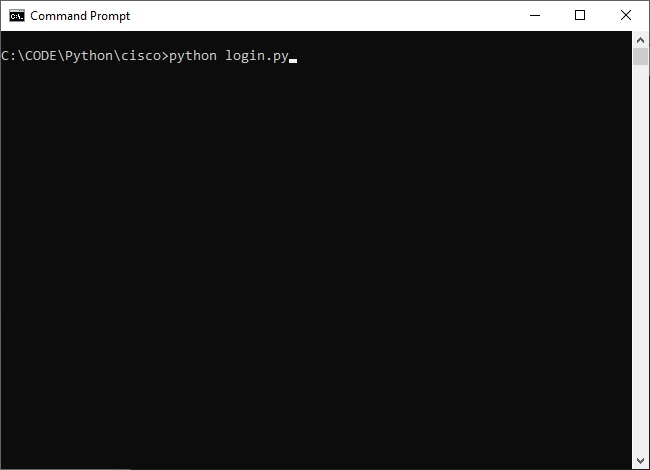
To run the python code example, open up a command prompt once you have successfully installed Python, navigate the location of the python file and run the file:
 If you are new to installing Python you may get an error complaining about ‘requests’ module not being installed.
 If this is the case just run the following command at the command prompt:
[code language="xml"]
pip install requests
[/code]
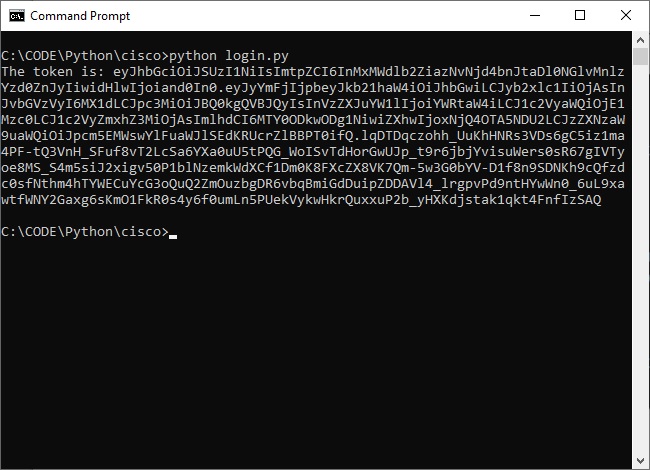
When successful, the Python program will print the token that is returned in the JSON body of the response.
If this is the case just run the following command at the command prompt:
[code language="xml"]
pip install requests
[/code]
When successful, the Python program will print the token that is returned in the JSON body of the response.
 We use this token for any subsequent REST calls that require it.
Example 2: Retrieve all ACI tenants
The REST API to retrieve the sandbox APIC tenants is reproduced here
GET https://sandboxapicdc.cisco.com/api/class/fvTenant.json
The following code retrieves all the tenants configured on our APIC sandbox.
tenants.py
[code language="python"]
import requests
import json
from login import get_token
def get_tenants():
token = get_token()
url = "https://sandboxapicdc.cisco.com/api/class/fvTenant.json"
headers = {
"Cookie" : f"APIC-Cookie={token}",
}
requests.packages.urllib3.disable_warnings()
response = requests.get(url, headers=headers, verify=False)
return response
if __name__ == "__main__":
response = get_tenants().json()
tenants = response['imdata']
for tenant in tenants:
print(f"Tenant name: {tenant['fvTenant']['attributes']['name']}")
[/code]
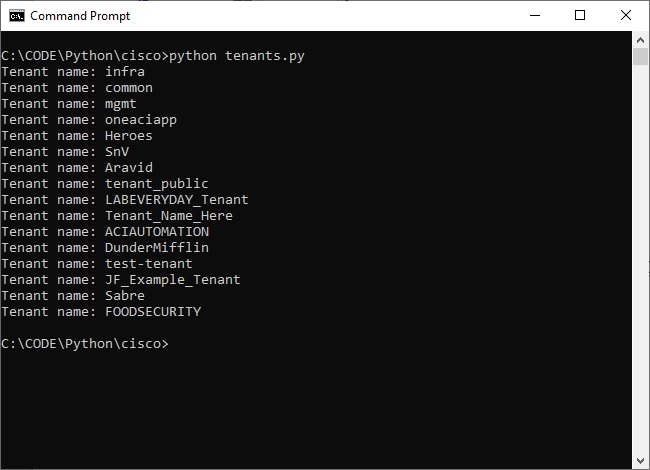
Specifically the print statement prints all references to the fvTenant > attributes > name objects within the json response, thereby giving us the list of tenants by name:
We use this token for any subsequent REST calls that require it.
Example 2: Retrieve all ACI tenants
The REST API to retrieve the sandbox APIC tenants is reproduced here
GET https://sandboxapicdc.cisco.com/api/class/fvTenant.json
The following code retrieves all the tenants configured on our APIC sandbox.
tenants.py
[code language="python"]
import requests
import json
from login import get_token
def get_tenants():
token = get_token()
url = "https://sandboxapicdc.cisco.com/api/class/fvTenant.json"
headers = {
"Cookie" : f"APIC-Cookie={token}",
}
requests.packages.urllib3.disable_warnings()
response = requests.get(url, headers=headers, verify=False)
return response
if __name__ == "__main__":
response = get_tenants().json()
tenants = response['imdata']
for tenant in tenants:
print(f"Tenant name: {tenant['fvTenant']['attributes']['name']}")
[/code]
Specifically the print statement prints all references to the fvTenant > attributes > name objects within the json response, thereby giving us the list of tenants by name:
 Example 3: Creating an ACI tenant
To create a Tenant, use the existing REST API documentation:
POST https://sandboxapicdc.cisco.com/api/mo/uni.json
[code language="xml"]
{
"fvTenant" : {
"attributes" : {
"name":"LABEVERYDAY_Tenant",
"descr":"Newly created tenant",
"nameAlias":"Andy"
}
}
}
[/code]
createTenant.py
In this code we need to retrieve the token so we use the existing get_token() function. Note that we imported that function in the third line of the script. According to the documentation, we need to pass that token in a Cookie called APIC-Cookie.
[code language="xml"]
import requests
import json
from login import get_token
tenant_name = "Tenant_Python"
def create_tenant():
token = get_token()
url = "https://sandboxapicdc.cisco.com/api/mo/uni.json"
payload = {
"fvTenant": {
"attributes": {
"name": tenant_name
}
}
}
headers = {
"Cookie" : f"APIC-Cookie={token}",
}
requests.packages.urllib3.disable_warnings()
response = requests.post(url,data=json.dumps(payload), headers=headers, verify=False)
if (response.status_code == 200):
print("Successfully created tenant")
else:
print("Issue with creating tenant")
def get_tenant():
return tenant_name
if __name__ == "__main__":
create_tenant()
[/code]
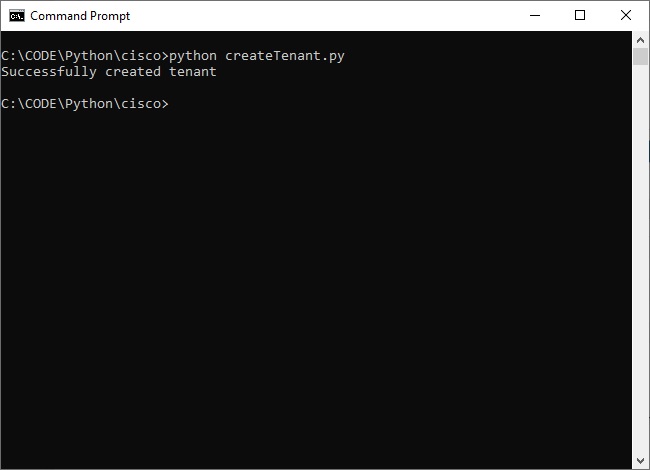
And on running this in command line see that the tenant is successfully added:
Example 3: Creating an ACI tenant
To create a Tenant, use the existing REST API documentation:
POST https://sandboxapicdc.cisco.com/api/mo/uni.json
[code language="xml"]
{
"fvTenant" : {
"attributes" : {
"name":"LABEVERYDAY_Tenant",
"descr":"Newly created tenant",
"nameAlias":"Andy"
}
}
}
[/code]
createTenant.py
In this code we need to retrieve the token so we use the existing get_token() function. Note that we imported that function in the third line of the script. According to the documentation, we need to pass that token in a Cookie called APIC-Cookie.
[code language="xml"]
import requests
import json
from login import get_token
tenant_name = "Tenant_Python"
def create_tenant():
token = get_token()
url = "https://sandboxapicdc.cisco.com/api/mo/uni.json"
payload = {
"fvTenant": {
"attributes": {
"name": tenant_name
}
}
}
headers = {
"Cookie" : f"APIC-Cookie={token}",
}
requests.packages.urllib3.disable_warnings()
response = requests.post(url,data=json.dumps(payload), headers=headers, verify=False)
if (response.status_code == 200):
print("Successfully created tenant")
else:
print("Issue with creating tenant")
def get_tenant():
return tenant_name
if __name__ == "__main__":
create_tenant()
[/code]
And on running this in command line see that the tenant is successfully added:
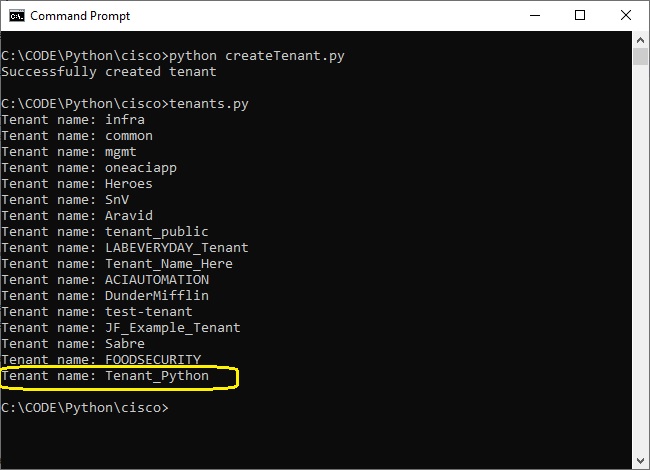 So that when we list the set of tenant again using tenants.py the new tenant gets added a shown:
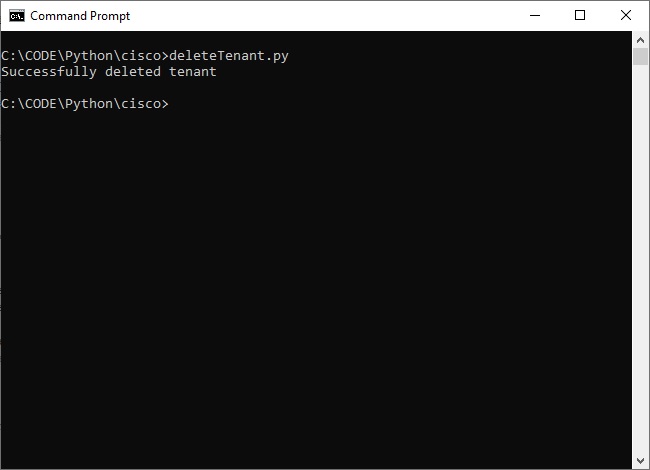 Example 4: Deleting an ACI tenant
And here is some python script to remove a tenant.
deleteTenant.py
[code language="xml"]
import requests
import json
from login import get_token
def delete_tenant():
token = get_token()
url = "https://sandboxapicdc.cisco.com/api/mo/uni.json"
payload = {
"fvTenant": {
"attributes": {
"name": "Tenant_Python",
"status": "deleted"
}
}
}
headers = {
"Cookie" : f"APIC-Cookie={token}",
}
requests.packages.urllib3.disable_warnings()
response = requests.post(url,data=json.dumps(payload), headers=headers, verify=False)
if (response.status_code == 200):
print("Successfully deleted tenant")
else:
print("Issue with deleting tenant")
if __name__ == "__main__":
delete_tenant()
[/code]
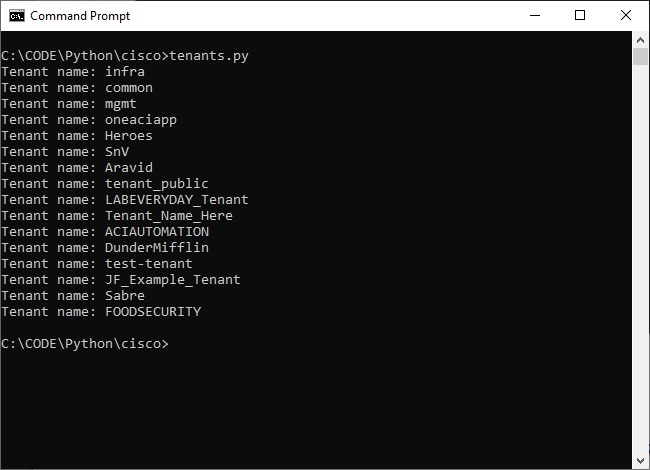
And when running the python script the tenant is deleted:
Example 4: Deleting an ACI tenant
And here is some python script to remove a tenant.
deleteTenant.py
[code language="xml"]
import requests
import json
from login import get_token
def delete_tenant():
token = get_token()
url = "https://sandboxapicdc.cisco.com/api/mo/uni.json"
payload = {
"fvTenant": {
"attributes": {
"name": "Tenant_Python",
"status": "deleted"
}
}
}
headers = {
"Cookie" : f"APIC-Cookie={token}",
}
requests.packages.urllib3.disable_warnings()
response = requests.post(url,data=json.dumps(payload), headers=headers, verify=False)
if (response.status_code == 200):
print("Successfully deleted tenant")
else:
print("Issue with deleting tenant")
if __name__ == "__main__":
delete_tenant()
[/code]
And when running the python script the tenant is deleted:
 ******************************************************************************************************************
Example 4: Cisco ACI: Authenticate, create a new domain and a new user
securityDomain.py
[code language="python"]
import requests
import json
APIC_HOST = "https://sandboxapicdc.cisco.com"
APIC_USERNAME = "admin"
APIC_PASSWORD = "!v3G@!4@Y"
def post_request(apic, cookies, uri, payload):
url = apic + uri
print("\n-----------------------------------------------------------------")
print("\nExecuting API Call: POST")
print("\nURL: {}".format(url))
print("\nBODY: {}".format(payload))
req = requests.post(url, cookies=cookies, data=payload, verify=False)
print("\nSTATUS CODE: {}".format(req.status_code))
print("\nRESPONSE: {}".format(req.text))
return req
def get_cookies(apic):
uri = "/api/aaaLogin.json"
credentials = {
"aaaUser": {"attributes": {"name": APIC_USERNAME, "pwd": APIC_PASSWORD}}
}
authenticate = post_request(
apic=apic, cookies={}, uri=uri, payload=json.dumps(credentials)
)
if not authenticate.ok:
print("\n[ERROR] Authentication failed! APIC responded with:")
print(json.dumps(json.loads(authenticate.text), indent=4))
exit()
print("\n[OK] Authentication successful!")
return authenticate.cookies
def main():
cookies = get_cookies(APIC_HOST)
# Create new security domain
secdom = {
"aaaDomain": {
# "attributes": {"name": "SECDOM-PYTHON", "descr": "Python Managed Tenants"}
}
}
path = "/api/mo/uni/userext/domain-SECDOM-PYTHON.json"
rsp = post_request(APIC_HOST, cookies, path, json.dumps(secdom))
# Create new user for security domain
user = {
"aaaUser": {
"attributes": {"name": "python", "pwd": "somePassword"},
"children": [
{
"aaaUserDomain": {
"attributes": {"name": "all"},
"children": [
{
"aaaUserRole": {
"attributes": {
"name": "read-all",
"privType": "readPriv",
}
}
}
],
}
},
{
"aaaUserDomain": {
"attributes": {"name": "common"},
"children": [
{
"aaaUserRole": {
"attributes": {
"name": "read-all",
"privType": "readPriv",
}
}
}
],
}
},
{
"aaaUserDomain": {
"attributes": {"name": "SECDOM-PYTHON"},
"children": [
{
"aaaUserRole": {
"attributes": {
"name": "tenant-ext-admin",
"privType": "writePriv",
}
}
}
],
}
},
],
}
}
path = "/api/mo/uni/userext/user-python.json"
rsp = post_request(APIC_HOST, cookies, path, json.dumps(user))
if __name__ == "__main__":
main()
[/code]
Output:
[code language="txt"]
-----------------------------------------------------------------
Executing API Call: POST
URL: https://sandboxapicdc.cisco.com/api/aaaLogin.json
BODY: {"aaaUser": {"attributes": {"name": "admin", "pwd": "!v3G@!4@Y"}}}
C:\Python\lib\site-packages\urllib3\connectionpool.py:1043: InsecureRequestWarning: Unverified HTTPS request is being made to host 'sandboxapicdc.cisco.com'. Adding certificate verification is strongly advised. See: https://urllib3.readthedocs.io/en/1.26.x/advanced-usage.html#ssl-warnings
warnings.warn(
STATUS CODE: 200
RESPONSE: {"totalCount":"1","imdata":[{"aaaLogin":{"attributes":{"token":"eyJhbGciOiJSUzI1NiIsImtpZCI6InZ5bXo5YWR1ZnFndnE1aXN1ZnQ4bDZzYnpwbXQ4NWV5IiwidHlwIjoiand0In0.eyJyYmFjIjpbeyJkb21haW4iOiJhbGwiLCJyb2xlc1IiOjAsInJvbGVzVyI6MX1dLCJpc3MiOiJBQ0kgQVBJQyIsInVzZXJuYW1lIjoiYWRtaW4iLCJ1c2VyaWQiOjE1Mzc0LCJ1c2VyZmxhZ3MiOjAsImlhdCI6MTY0OTM0MTk0NywiZXhwIjoxNjQ5MzQyNTQ3LCJzZXNzaW9uaWQiOiJVYnRmaW5jTlJqT2xwVlE0SXJXMjNnPT0ifQ.HybGBljEXdLxWIUp9qLaZo6_QQipE07PsuBUhDFVimtbp3YSZMRvHpHA_WhkeazS91zrO-nF8XgMaYta4PYflh3vxuwQgNVYMC_qnBK5w6kFHZ7MJD2qH-9sXKXxYKum3zAfuP4OqcxhOUj2DmFp4rCEQhCPQv5JJFwhsWWgwDeRryWaqp2pjkpK_UEq12UccBFHCcv69-fANJHJNdqNwkiujxy4VirUIqqWsjSZ7crs63Ph23XoCMMKc3na7Pfw7QPwn2I5x_d54M0tO7wxs3OYhDuANm_EVNhDu8UPKIFyaVwYj8CWFOVYdt7455jURXdfTLM2_y-Kf4f6PhIVEg","siteFingerprint":"vymz9adufqgvq5isuft8l6sbzpmt85ey","refreshTimeoutSeconds":"600","maximumLifetimeSeconds":"86400","guiIdleTimeoutSeconds":"1200","restTimeoutSeconds":"90","creationTime":"1649341947","firstLoginTime":"1649341947","userName":"admin","remoteUser":"false","unixUserId":"15374","sessionId":"UbtfincNRjOlpVQ4IrW23g==","lastName":"","firstName":"","changePassword":"no","version":"5.2(1g)","buildTime":"Wed Jul 28 23:09:38 UTC 2021","node":"topology/pod-1/node-1"},"children":[{"aaaUserDomain":{"attributes":{"name":"all","rolesR":"admin","rolesW":"admin"},"children":[{"aaaReadRoles":{"attributes":{}}},{"aaaWriteRoles":{"attributes":{},"children":[{"role":{"attributes":{"name":"admin"}}}]}}]}},{"DnDomainMapEntry":{"attributes":{"dn":"uni/tn-mgmt","readPrivileges":"admin","writePrivileges":"admin"}}},{"DnDomainMapEntry":{"attributes":{"dn":"uni/tn-infra","readPrivileges":"admin","writePrivileges":"admin"}}},{"DnDomainMapEntry":{"attributes":{"dn":"uni/tn-common","readPrivileges":"admin","writePrivileges":"admin"}}}]}}]}
[OK] Authentication successful!
-----------------------------------------------------------------
Executing API Call: POST
URL: https://sandboxapicdc.cisco.com/api/mo/uni/userext/domain-SECDOM-PYTHON.json
BODY: {"aaaDomain": {}}
C:\Python\lib\site-packages\urllib3\connectionpool.py:1043: InsecureRequestWarning: Unverified HTTPS request is being made to host 'sandboxapicdc.cisco.com'. Adding certificate verification is strongly advised. See: https://urllib3.readthedocs.io/en/1.26.x/advanced-usage.html#ssl-warnings
warnings.warn(
STATUS CODE: 200
RESPONSE: {"totalCount":"0","imdata":[]}
-----------------------------------------------------------------
Executing API Call: POST
URL: https://sandboxapicdc.cisco.com/api/mo/uni/userext/user-python.json
BODY: {"aaaUser": {"attributes": {"name": "python", "pwd": "somePassword"}, "children": [{"aaaUserDomain": {"attributes": {"name": "all"}, "children": [{"aaaUserRole": {"attributes": {"name": "read-all", "privType": "readPriv"}}}]}}, {"aaaUserDomain": {"attributes": {"name": "common"}, "children": [{"aaaUserRole": {"attributes": {"name": "read-all", "privType": "readPriv"}}}]}}, {"aaaUserDomain": {"attributes": {"name": "SECDOM-PYTHON"}, "children": [{"aaaUserRole": {"attributes": {"name": "tenant-ext-admin", "privType": "writePriv"}}}]}}]}}
C:\Python\lib\site-packages\urllib3\connectionpool.py:1043: InsecureRequestWarning: Unverified HTTPS request is being made to host 'sandboxapicdc.cisco.com'. Adding certificate verification is strongly advised. See: https://urllib3.readthedocs.io/en/1.26.x/advanced-usage.html#ssl-warnings
warnings.warn(
STATUS CODE: 200
RESPONSE: {"totalCount":"0","imdata":[]}
[/code]
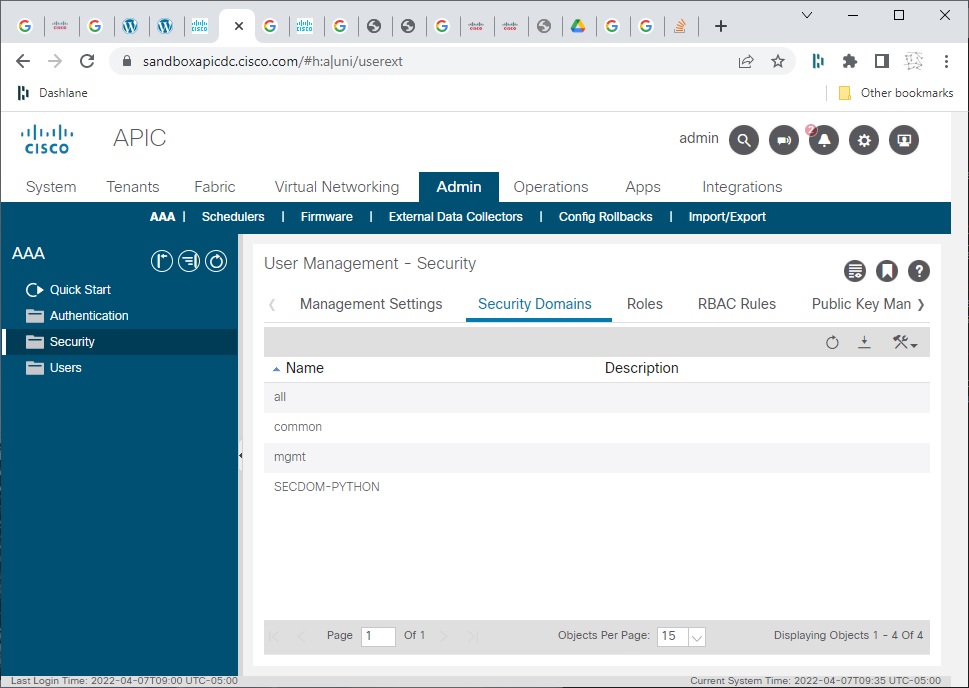
Navigate to the APIC sandbox to verify that the security domain has been created:
******************************************************************************************************************
Example 4: Cisco ACI: Authenticate, create a new domain and a new user
securityDomain.py
[code language="python"]
import requests
import json
APIC_HOST = "https://sandboxapicdc.cisco.com"
APIC_USERNAME = "admin"
APIC_PASSWORD = "!v3G@!4@Y"
def post_request(apic, cookies, uri, payload):
url = apic + uri
print("\n-----------------------------------------------------------------")
print("\nExecuting API Call: POST")
print("\nURL: {}".format(url))
print("\nBODY: {}".format(payload))
req = requests.post(url, cookies=cookies, data=payload, verify=False)
print("\nSTATUS CODE: {}".format(req.status_code))
print("\nRESPONSE: {}".format(req.text))
return req
def get_cookies(apic):
uri = "/api/aaaLogin.json"
credentials = {
"aaaUser": {"attributes": {"name": APIC_USERNAME, "pwd": APIC_PASSWORD}}
}
authenticate = post_request(
apic=apic, cookies={}, uri=uri, payload=json.dumps(credentials)
)
if not authenticate.ok:
print("\n[ERROR] Authentication failed! APIC responded with:")
print(json.dumps(json.loads(authenticate.text), indent=4))
exit()
print("\n[OK] Authentication successful!")
return authenticate.cookies
def main():
cookies = get_cookies(APIC_HOST)
# Create new security domain
secdom = {
"aaaDomain": {
# "attributes": {"name": "SECDOM-PYTHON", "descr": "Python Managed Tenants"}
}
}
path = "/api/mo/uni/userext/domain-SECDOM-PYTHON.json"
rsp = post_request(APIC_HOST, cookies, path, json.dumps(secdom))
# Create new user for security domain
user = {
"aaaUser": {
"attributes": {"name": "python", "pwd": "somePassword"},
"children": [
{
"aaaUserDomain": {
"attributes": {"name": "all"},
"children": [
{
"aaaUserRole": {
"attributes": {
"name": "read-all",
"privType": "readPriv",
}
}
}
],
}
},
{
"aaaUserDomain": {
"attributes": {"name": "common"},
"children": [
{
"aaaUserRole": {
"attributes": {
"name": "read-all",
"privType": "readPriv",
}
}
}
],
}
},
{
"aaaUserDomain": {
"attributes": {"name": "SECDOM-PYTHON"},
"children": [
{
"aaaUserRole": {
"attributes": {
"name": "tenant-ext-admin",
"privType": "writePriv",
}
}
}
],
}
},
],
}
}
path = "/api/mo/uni/userext/user-python.json"
rsp = post_request(APIC_HOST, cookies, path, json.dumps(user))
if __name__ == "__main__":
main()
[/code]
Output:
[code language="txt"]
-----------------------------------------------------------------
Executing API Call: POST
URL: https://sandboxapicdc.cisco.com/api/aaaLogin.json
BODY: {"aaaUser": {"attributes": {"name": "admin", "pwd": "!v3G@!4@Y"}}}
C:\Python\lib\site-packages\urllib3\connectionpool.py:1043: InsecureRequestWarning: Unverified HTTPS request is being made to host 'sandboxapicdc.cisco.com'. Adding certificate verification is strongly advised. See: https://urllib3.readthedocs.io/en/1.26.x/advanced-usage.html#ssl-warnings
warnings.warn(
STATUS CODE: 200
RESPONSE: {"totalCount":"1","imdata":[{"aaaLogin":{"attributes":{"token":"eyJhbGciOiJSUzI1NiIsImtpZCI6InZ5bXo5YWR1ZnFndnE1aXN1ZnQ4bDZzYnpwbXQ4NWV5IiwidHlwIjoiand0In0.eyJyYmFjIjpbeyJkb21haW4iOiJhbGwiLCJyb2xlc1IiOjAsInJvbGVzVyI6MX1dLCJpc3MiOiJBQ0kgQVBJQyIsInVzZXJuYW1lIjoiYWRtaW4iLCJ1c2VyaWQiOjE1Mzc0LCJ1c2VyZmxhZ3MiOjAsImlhdCI6MTY0OTM0MTk0NywiZXhwIjoxNjQ5MzQyNTQ3LCJzZXNzaW9uaWQiOiJVYnRmaW5jTlJqT2xwVlE0SXJXMjNnPT0ifQ.HybGBljEXdLxWIUp9qLaZo6_QQipE07PsuBUhDFVimtbp3YSZMRvHpHA_WhkeazS91zrO-nF8XgMaYta4PYflh3vxuwQgNVYMC_qnBK5w6kFHZ7MJD2qH-9sXKXxYKum3zAfuP4OqcxhOUj2DmFp4rCEQhCPQv5JJFwhsWWgwDeRryWaqp2pjkpK_UEq12UccBFHCcv69-fANJHJNdqNwkiujxy4VirUIqqWsjSZ7crs63Ph23XoCMMKc3na7Pfw7QPwn2I5x_d54M0tO7wxs3OYhDuANm_EVNhDu8UPKIFyaVwYj8CWFOVYdt7455jURXdfTLM2_y-Kf4f6PhIVEg","siteFingerprint":"vymz9adufqgvq5isuft8l6sbzpmt85ey","refreshTimeoutSeconds":"600","maximumLifetimeSeconds":"86400","guiIdleTimeoutSeconds":"1200","restTimeoutSeconds":"90","creationTime":"1649341947","firstLoginTime":"1649341947","userName":"admin","remoteUser":"false","unixUserId":"15374","sessionId":"UbtfincNRjOlpVQ4IrW23g==","lastName":"","firstName":"","changePassword":"no","version":"5.2(1g)","buildTime":"Wed Jul 28 23:09:38 UTC 2021","node":"topology/pod-1/node-1"},"children":[{"aaaUserDomain":{"attributes":{"name":"all","rolesR":"admin","rolesW":"admin"},"children":[{"aaaReadRoles":{"attributes":{}}},{"aaaWriteRoles":{"attributes":{},"children":[{"role":{"attributes":{"name":"admin"}}}]}}]}},{"DnDomainMapEntry":{"attributes":{"dn":"uni/tn-mgmt","readPrivileges":"admin","writePrivileges":"admin"}}},{"DnDomainMapEntry":{"attributes":{"dn":"uni/tn-infra","readPrivileges":"admin","writePrivileges":"admin"}}},{"DnDomainMapEntry":{"attributes":{"dn":"uni/tn-common","readPrivileges":"admin","writePrivileges":"admin"}}}]}}]}
[OK] Authentication successful!
-----------------------------------------------------------------
Executing API Call: POST
URL: https://sandboxapicdc.cisco.com/api/mo/uni/userext/domain-SECDOM-PYTHON.json
BODY: {"aaaDomain": {}}
C:\Python\lib\site-packages\urllib3\connectionpool.py:1043: InsecureRequestWarning: Unverified HTTPS request is being made to host 'sandboxapicdc.cisco.com'. Adding certificate verification is strongly advised. See: https://urllib3.readthedocs.io/en/1.26.x/advanced-usage.html#ssl-warnings
warnings.warn(
STATUS CODE: 200
RESPONSE: {"totalCount":"0","imdata":[]}
-----------------------------------------------------------------
Executing API Call: POST
URL: https://sandboxapicdc.cisco.com/api/mo/uni/userext/user-python.json
BODY: {"aaaUser": {"attributes": {"name": "python", "pwd": "somePassword"}, "children": [{"aaaUserDomain": {"attributes": {"name": "all"}, "children": [{"aaaUserRole": {"attributes": {"name": "read-all", "privType": "readPriv"}}}]}}, {"aaaUserDomain": {"attributes": {"name": "common"}, "children": [{"aaaUserRole": {"attributes": {"name": "read-all", "privType": "readPriv"}}}]}}, {"aaaUserDomain": {"attributes": {"name": "SECDOM-PYTHON"}, "children": [{"aaaUserRole": {"attributes": {"name": "tenant-ext-admin", "privType": "writePriv"}}}]}}]}}
C:\Python\lib\site-packages\urllib3\connectionpool.py:1043: InsecureRequestWarning: Unverified HTTPS request is being made to host 'sandboxapicdc.cisco.com'. Adding certificate verification is strongly advised. See: https://urllib3.readthedocs.io/en/1.26.x/advanced-usage.html#ssl-warnings
warnings.warn(
STATUS CODE: 200
RESPONSE: {"totalCount":"0","imdata":[]}
[/code]
Navigate to the APIC sandbox to verify that the security domain has been created:
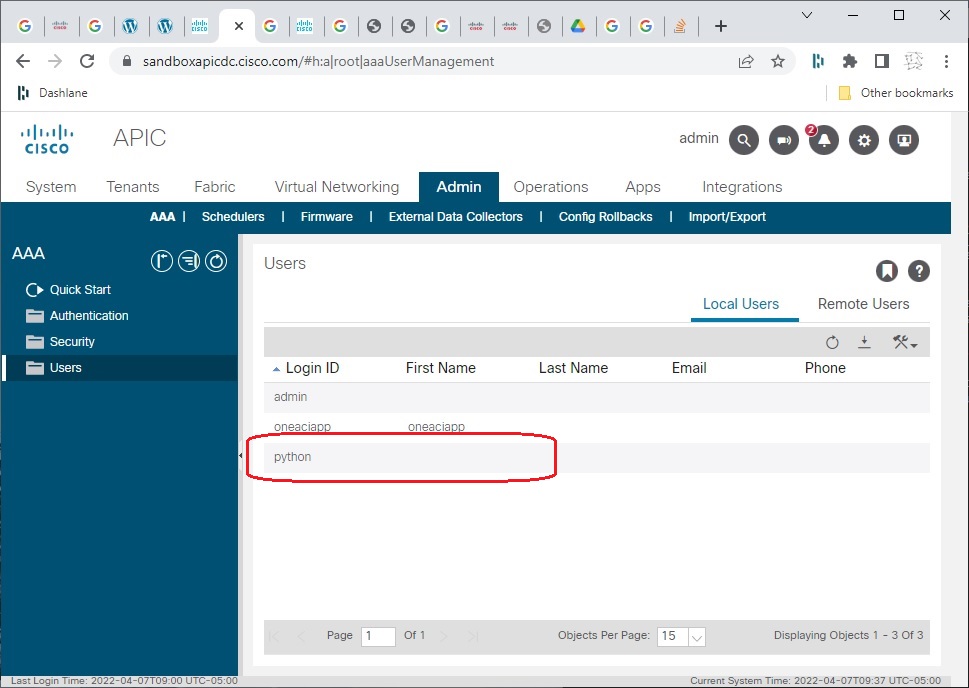
 And also that the user "python" has been created:
If you are new to installing Python you may get an error complaining about ‘requests’ module not being installed.
If this is the case just run the following command at the command prompt:
[code language="xml"]
pip install requests
[/code]
When successful, the Python program will print the token that is returned in the JSON body of the response.
We use this token for any subsequent REST calls that require it.
Example 2: Retrieve all ACI tenants
The REST API to retrieve the sandbox APIC tenants is reproduced here
GET https://sandboxapicdc.cisco.com/api/class/fvTenant.json
The following code retrieves all the tenants configured on our APIC sandbox.
tenants.py
[code language="python"]
import requests
import json
from login import get_token
def get_tenants():
token = get_token()
url = "https://sandboxapicdc.cisco.com/api/class/fvTenant.json"
headers = {
"Cookie" : f"APIC-Cookie={token}",
}
requests.packages.urllib3.disable_warnings()
response = requests.get(url, headers=headers, verify=False)
return response
if __name__ == "__main__":
response = get_tenants().json()
tenants = response['imdata']
for tenant in tenants:
print(f"Tenant name: {tenant['fvTenant']['attributes']['name']}")
[/code]
Specifically the print statement prints all references to the fvTenant > attributes > name objects within the json response, thereby giving us the list of tenants by name:
Example 3: Creating an ACI tenant
To create a Tenant, use the existing REST API documentation:
POST https://sandboxapicdc.cisco.com/api/mo/uni.json
[code language="xml"]
{
"fvTenant" : {
"attributes" : {
"name":"LABEVERYDAY_Tenant",
"descr":"Newly created tenant",
"nameAlias":"Andy"
}
}
}
[/code]
createTenant.py
In this code we need to retrieve the token so we use the existing get_token() function. Note that we imported that function in the third line of the script. According to the documentation, we need to pass that token in a Cookie called APIC-Cookie.
[code language="xml"]
import requests
import json
from login import get_token
tenant_name = "Tenant_Python"
def create_tenant():
token = get_token()
url = "https://sandboxapicdc.cisco.com/api/mo/uni.json"
payload = {
"fvTenant": {
"attributes": {
"name": tenant_name
}
}
}
headers = {
"Cookie" : f"APIC-Cookie={token}",
}
requests.packages.urllib3.disable_warnings()
response = requests.post(url,data=json.dumps(payload), headers=headers, verify=False)
if (response.status_code == 200):
print("Successfully created tenant")
else:
print("Issue with creating tenant")
def get_tenant():
return tenant_name
if __name__ == "__main__":
create_tenant()
[/code]
And on running this in command line see that the tenant is successfully added:
So that when we list the set of tenant again using tenants.py the new tenant gets added a shown:
Example 4: Deleting an ACI tenant
And here is some python script to remove a tenant.
deleteTenant.py
[code language="xml"]
import requests
import json
from login import get_token
def delete_tenant():
token = get_token()
url = "https://sandboxapicdc.cisco.com/api/mo/uni.json"
payload = {
"fvTenant": {
"attributes": {
"name": "Tenant_Python",
"status": "deleted"
}
}
}
headers = {
"Cookie" : f"APIC-Cookie={token}",
}
requests.packages.urllib3.disable_warnings()
response = requests.post(url,data=json.dumps(payload), headers=headers, verify=False)
if (response.status_code == 200):
print("Successfully deleted tenant")
else:
print("Issue with deleting tenant")
if __name__ == "__main__":
delete_tenant()
[/code]
And when running the python script the tenant is deleted:
******************************************************************************************************************
Example 4: Cisco ACI: Authenticate, create a new domain and a new user
securityDomain.py
[code language="python"]
import requests
import json
APIC_HOST = "https://sandboxapicdc.cisco.com"
APIC_USERNAME = "admin"
APIC_PASSWORD = "!v3G@!4@Y"
def post_request(apic, cookies, uri, payload):
url = apic + uri
print("\n-----------------------------------------------------------------")
print("\nExecuting API Call: POST")
print("\nURL: {}".format(url))
print("\nBODY: {}".format(payload))
req = requests.post(url, cookies=cookies, data=payload, verify=False)
print("\nSTATUS CODE: {}".format(req.status_code))
print("\nRESPONSE: {}".format(req.text))
return req
def get_cookies(apic):
uri = "/api/aaaLogin.json"
credentials = {
"aaaUser": {"attributes": {"name": APIC_USERNAME, "pwd": APIC_PASSWORD}}
}
authenticate = post_request(
apic=apic, cookies={}, uri=uri, payload=json.dumps(credentials)
)
if not authenticate.ok:
print("\n[ERROR] Authentication failed! APIC responded with:")
print(json.dumps(json.loads(authenticate.text), indent=4))
exit()
print("\n[OK] Authentication successful!")
return authenticate.cookies
def main():
cookies = get_cookies(APIC_HOST)
# Create new security domain
secdom = {
"aaaDomain": {
# "attributes": {"name": "SECDOM-PYTHON", "descr": "Python Managed Tenants"}
}
}
path = "/api/mo/uni/userext/domain-SECDOM-PYTHON.json"
rsp = post_request(APIC_HOST, cookies, path, json.dumps(secdom))
# Create new user for security domain
user = {
"aaaUser": {
"attributes": {"name": "python", "pwd": "somePassword"},
"children": [
{
"aaaUserDomain": {
"attributes": {"name": "all"},
"children": [
{
"aaaUserRole": {
"attributes": {
"name": "read-all",
"privType": "readPriv",
}
}
}
],
}
},
{
"aaaUserDomain": {
"attributes": {"name": "common"},
"children": [
{
"aaaUserRole": {
"attributes": {
"name": "read-all",
"privType": "readPriv",
}
}
}
],
}
},
{
"aaaUserDomain": {
"attributes": {"name": "SECDOM-PYTHON"},
"children": [
{
"aaaUserRole": {
"attributes": {
"name": "tenant-ext-admin",
"privType": "writePriv",
}
}
}
],
}
},
],
}
}
path = "/api/mo/uni/userext/user-python.json"
rsp = post_request(APIC_HOST, cookies, path, json.dumps(user))
if __name__ == "__main__":
main()
[/code]
Output:
[code language="txt"]
-----------------------------------------------------------------
Executing API Call: POST
URL: https://sandboxapicdc.cisco.com/api/aaaLogin.json
BODY: {"aaaUser": {"attributes": {"name": "admin", "pwd": "!v3G@!4@Y"}}}
C:\Python\lib\site-packages\urllib3\connectionpool.py:1043: InsecureRequestWarning: Unverified HTTPS request is being made to host 'sandboxapicdc.cisco.com'. Adding certificate verification is strongly advised. See: https://urllib3.readthedocs.io/en/1.26.x/advanced-usage.html#ssl-warnings
warnings.warn(
STATUS CODE: 200
RESPONSE: {"totalCount":"1","imdata":[{"aaaLogin":{"attributes":{"token":"eyJhbGciOiJSUzI1NiIsImtpZCI6InZ5bXo5YWR1ZnFndnE1aXN1ZnQ4bDZzYnpwbXQ4NWV5IiwidHlwIjoiand0In0.eyJyYmFjIjpbeyJkb21haW4iOiJhbGwiLCJyb2xlc1IiOjAsInJvbGVzVyI6MX1dLCJpc3MiOiJBQ0kgQVBJQyIsInVzZXJuYW1lIjoiYWRtaW4iLCJ1c2VyaWQiOjE1Mzc0LCJ1c2VyZmxhZ3MiOjAsImlhdCI6MTY0OTM0MTk0NywiZXhwIjoxNjQ5MzQyNTQ3LCJzZXNzaW9uaWQiOiJVYnRmaW5jTlJqT2xwVlE0SXJXMjNnPT0ifQ.HybGBljEXdLxWIUp9qLaZo6_QQipE07PsuBUhDFVimtbp3YSZMRvHpHA_WhkeazS91zrO-nF8XgMaYta4PYflh3vxuwQgNVYMC_qnBK5w6kFHZ7MJD2qH-9sXKXxYKum3zAfuP4OqcxhOUj2DmFp4rCEQhCPQv5JJFwhsWWgwDeRryWaqp2pjkpK_UEq12UccBFHCcv69-fANJHJNdqNwkiujxy4VirUIqqWsjSZ7crs63Ph23XoCMMKc3na7Pfw7QPwn2I5x_d54M0tO7wxs3OYhDuANm_EVNhDu8UPKIFyaVwYj8CWFOVYdt7455jURXdfTLM2_y-Kf4f6PhIVEg","siteFingerprint":"vymz9adufqgvq5isuft8l6sbzpmt85ey","refreshTimeoutSeconds":"600","maximumLifetimeSeconds":"86400","guiIdleTimeoutSeconds":"1200","restTimeoutSeconds":"90","creationTime":"1649341947","firstLoginTime":"1649341947","userName":"admin","remoteUser":"false","unixUserId":"15374","sessionId":"UbtfincNRjOlpVQ4IrW23g==","lastName":"","firstName":"","changePassword":"no","version":"5.2(1g)","buildTime":"Wed Jul 28 23:09:38 UTC 2021","node":"topology/pod-1/node-1"},"children":[{"aaaUserDomain":{"attributes":{"name":"all","rolesR":"admin","rolesW":"admin"},"children":[{"aaaReadRoles":{"attributes":{}}},{"aaaWriteRoles":{"attributes":{},"children":[{"role":{"attributes":{"name":"admin"}}}]}}]}},{"DnDomainMapEntry":{"attributes":{"dn":"uni/tn-mgmt","readPrivileges":"admin","writePrivileges":"admin"}}},{"DnDomainMapEntry":{"attributes":{"dn":"uni/tn-infra","readPrivileges":"admin","writePrivileges":"admin"}}},{"DnDomainMapEntry":{"attributes":{"dn":"uni/tn-common","readPrivileges":"admin","writePrivileges":"admin"}}}]}}]}
[OK] Authentication successful!
-----------------------------------------------------------------
Executing API Call: POST
URL: https://sandboxapicdc.cisco.com/api/mo/uni/userext/domain-SECDOM-PYTHON.json
BODY: {"aaaDomain": {}}
C:\Python\lib\site-packages\urllib3\connectionpool.py:1043: InsecureRequestWarning: Unverified HTTPS request is being made to host 'sandboxapicdc.cisco.com'. Adding certificate verification is strongly advised. See: https://urllib3.readthedocs.io/en/1.26.x/advanced-usage.html#ssl-warnings
warnings.warn(
STATUS CODE: 200
RESPONSE: {"totalCount":"0","imdata":[]}
-----------------------------------------------------------------
Executing API Call: POST
URL: https://sandboxapicdc.cisco.com/api/mo/uni/userext/user-python.json
BODY: {"aaaUser": {"attributes": {"name": "python", "pwd": "somePassword"}, "children": [{"aaaUserDomain": {"attributes": {"name": "all"}, "children": [{"aaaUserRole": {"attributes": {"name": "read-all", "privType": "readPriv"}}}]}}, {"aaaUserDomain": {"attributes": {"name": "common"}, "children": [{"aaaUserRole": {"attributes": {"name": "read-all", "privType": "readPriv"}}}]}}, {"aaaUserDomain": {"attributes": {"name": "SECDOM-PYTHON"}, "children": [{"aaaUserRole": {"attributes": {"name": "tenant-ext-admin", "privType": "writePriv"}}}]}}]}}
C:\Python\lib\site-packages\urllib3\connectionpool.py:1043: InsecureRequestWarning: Unverified HTTPS request is being made to host 'sandboxapicdc.cisco.com'. Adding certificate verification is strongly advised. See: https://urllib3.readthedocs.io/en/1.26.x/advanced-usage.html#ssl-warnings
warnings.warn(
STATUS CODE: 200
RESPONSE: {"totalCount":"0","imdata":[]}
[/code]
Navigate to the APIC sandbox to verify that the security domain has been created:
And also that the user "python" has been created:


Comments
Post a Comment