XSLT example cheat sheet
A cheat sheet demonstrating an XSLT example for a number of commonly used transformation technuiques.
For reference a link to a free online XSLT formatter.
Shortcuts to each XSLT example covered in this cheat sheet are listed as follows:
1. Using for-each to create a table
2. Tokenizing a delimited string using XSLT versions 1.0/2.0
3. Using apply-template to apply template to the element or element’s child nodes
4. Using the normalize-space function to remove unwanted spaces
5. Convert string to upper case or lower case
1. using for-each to create a table (Back to top)
An XSLT example to create a simple table
XML
[code language="xml"]
<?xml version = "1.0"?>
<class>
<student id= "393">
<firstname>Andrew</firstname>
<lastname>Jones</lastname>
<marks>85</marks>
</student>
<student id= "593">
<firstname>Dennis</firstname>
<lastname>Morgan</lastname>
<marks>90</marks>
</student>
</class>
[/code]
XSLT
[code language="xml"]
<?xml version = "1.0" encoding = "UTF-8"?>
<xsl:stylesheet version = "1.0" xmlns:xsl = "http://www.w3.org/1999/XSL/Transform">
<xsl:template match = "/">
<html>
<body>
<table border = "1">
<xsl:for-each select = "class/student">
<tr>
<td><xsl:value-of select = "@id"/></td>
<td><xsl:value-of select = "firstname"/></td>
<td><xsl:value-of select = "lastname"/></td>
<td><xsl:value-of select = "marks"/></td>
</tr>
</xsl:for-each>
</table>
</body>
</html>
</xsl:template>
</xsl:stylesheet>
[/code]
Output (HTML)
[code language="xml"]
<html>
<body>
<table border="1">
<tr>
<td>393</td>
<td>Andrew</td>
<td>Jones</td>
<td>85</td>
</tr>
<tr>
<td>593</td>
<td>Dennis</td>
<td>Morgan</td>
<td>90</td>
</tr>
</table>
</body>
</html>
[/code]
[caption id="attachment_9679" align="alignnone" width="276"]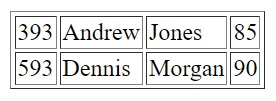 XSLT example using for-each to create a table[/caption]
2. tokenizing a delimited string using XSLT versions 1.0/2.0 (Back to top)
In each XSLT example we use versions 1.0 & 2.0 of XSLT to tokenize a comma-separated string.
StackOverflow reference here.
XML
[code language="xml"]
<mark>1,2,3,4,5</mark>
[/code]
XSLT (version 1.0)
[code language="xml"]
<xsl:stylesheet version="1.0"
xmlns:xsl="http://www.w3.org/1999/XSL/Transform"
xmlns:ext="http://exslt.org/common" exclude-result-prefixes="ext">
<xsl:output omit-xml-declaration="yes" indent="yes"/>
<xsl:template match="mark">
<xsl:variable name="vrtfSplit">
<xsl:apply-templates/>
</xsl:variable>
<xsl:for-each select="ext:node-set($vrtfSplit)/*">
<processedItem>
<xsl:value-of select="."/>
</processedItem>
</xsl:for-each>
</xsl:template>
<xsl:template match="text()" name="split">
<xsl:param name="pText" select="."/>
<xsl:if test="string-length($pText) >0">
<item>
<xsl:value-of select=
"substring-before(concat($pText, ','), ',')"/>
</item>
<xsl:call-template name="split">
<xsl:with-param name="pText" select=
"substring-after($pText, ',')"/>
</xsl:call-template>
</xsl:if>
</xsl:template>
</xsl:stylesheet>
[/code]
Output (version 1.0)
[code language="xml"]
<processedItem>1</processedItem>
<processedItem>2</processedItem>
<processedItem>3</processedItem>
<processedItem>4</processedItem>
<processedItem>5</processedItem>
[/code]
XSLT (version 2.0)
Version 2.0 enables us to write much more concise XSLT code.
[code language="xml"]
<xsl:stylesheet version="2.0"
xmlns:xsl="http://www.w3.org/1999/XSL/Transform"
xmlns:xs="http://www.w3.org/2001/XMLSchema"
exclude-result-prefixes="xs">
<xsl:output omit-xml-declaration="yes" indent="yes"/>
<xsl:template match="mark">
<xsl:for-each select="tokenize(., ',')">
<processedItem>
<xsl:sequence select="10*xs:integer(.)"/>
</processedItem>
</xsl:for-each>
</xsl:template>
</xsl:stylesheet>
[/code]
Output (version 2.0)
Exactly the same output as in the 1.0 version:
[code language="xml"]
<processedItem>1</processedItem>
<processedItem>2</processedItem>
<processedItem>3</processedItem>
<processedItem>4</processedItem>
<processedItem>5</processedItem>
[/code]
3. using apply-template to apply template to the element or element's child nodes (Back to top)
XSLT Example link from W3chools.
XML
[code language="xml"]
<?xml version="1.0" encoding="UTF-8"?>
<employees>
<employee>
<firstName>Scott</firstName>
<lastName>Adams</lastName>
</employee>
<employee>
<firstName>Fred</firstName>
<lastName>Gee</lastName>
</employee>
<employee>
<firstName>Jack</firstName>
<lastName>Jones</lastName>
</employee>
</employees>
[/code]
XSLT
In this example we use apply-templates to to match all the employee first name and last names, and apply bold styling to the last name. We also insert a space between the first name and last name using the code
[code language="xml"]
<xsl:stylesheet version = '1.0' xmlns:xsl='http://www.w3.org/1999/XSL/Transform'>
<xsl:template match="/">
<html>
<body>
<h2>My employees</h2>
<xsl:apply-templates/>
</body>
</html>
</xsl:template>
<xsl:template match="employee">
<p>
<xsl:apply-templates select="firstName"/>&#160;
<xsl:apply-templates select="lastName"/>
</p>
</xsl:template>
<xsl:template match="firstName">
<xsl:value-of select="."/>
</xsl:template>
<xsl:template match="lastName">
<b>
<xsl:value-of select="."/>
</b>
</xsl:template>
</xsl:stylesheet>
[/code]
Output
A list of first names and surnames in HTML format:
[code language="html"]
<html>
<body>
<h2>My employees</h2>
<p>Scott
<b>Adams</b>
</p>
<p>Fred
<b>Gee</b>
</p>
<p>Jack
<b>Jones</b>
</p>
</body>
</html>
[/code]
[caption id="attachment_9686" align="alignnone" width="261"]
XSLT example using for-each to create a table[/caption]
2. tokenizing a delimited string using XSLT versions 1.0/2.0 (Back to top)
In each XSLT example we use versions 1.0 & 2.0 of XSLT to tokenize a comma-separated string.
StackOverflow reference here.
XML
[code language="xml"]
<mark>1,2,3,4,5</mark>
[/code]
XSLT (version 1.0)
[code language="xml"]
<xsl:stylesheet version="1.0"
xmlns:xsl="http://www.w3.org/1999/XSL/Transform"
xmlns:ext="http://exslt.org/common" exclude-result-prefixes="ext">
<xsl:output omit-xml-declaration="yes" indent="yes"/>
<xsl:template match="mark">
<xsl:variable name="vrtfSplit">
<xsl:apply-templates/>
</xsl:variable>
<xsl:for-each select="ext:node-set($vrtfSplit)/*">
<processedItem>
<xsl:value-of select="."/>
</processedItem>
</xsl:for-each>
</xsl:template>
<xsl:template match="text()" name="split">
<xsl:param name="pText" select="."/>
<xsl:if test="string-length($pText) >0">
<item>
<xsl:value-of select=
"substring-before(concat($pText, ','), ',')"/>
</item>
<xsl:call-template name="split">
<xsl:with-param name="pText" select=
"substring-after($pText, ',')"/>
</xsl:call-template>
</xsl:if>
</xsl:template>
</xsl:stylesheet>
[/code]
Output (version 1.0)
[code language="xml"]
<processedItem>1</processedItem>
<processedItem>2</processedItem>
<processedItem>3</processedItem>
<processedItem>4</processedItem>
<processedItem>5</processedItem>
[/code]
XSLT (version 2.0)
Version 2.0 enables us to write much more concise XSLT code.
[code language="xml"]
<xsl:stylesheet version="2.0"
xmlns:xsl="http://www.w3.org/1999/XSL/Transform"
xmlns:xs="http://www.w3.org/2001/XMLSchema"
exclude-result-prefixes="xs">
<xsl:output omit-xml-declaration="yes" indent="yes"/>
<xsl:template match="mark">
<xsl:for-each select="tokenize(., ',')">
<processedItem>
<xsl:sequence select="10*xs:integer(.)"/>
</processedItem>
</xsl:for-each>
</xsl:template>
</xsl:stylesheet>
[/code]
Output (version 2.0)
Exactly the same output as in the 1.0 version:
[code language="xml"]
<processedItem>1</processedItem>
<processedItem>2</processedItem>
<processedItem>3</processedItem>
<processedItem>4</processedItem>
<processedItem>5</processedItem>
[/code]
3. using apply-template to apply template to the element or element's child nodes (Back to top)
XSLT Example link from W3chools.
XML
[code language="xml"]
<?xml version="1.0" encoding="UTF-8"?>
<employees>
<employee>
<firstName>Scott</firstName>
<lastName>Adams</lastName>
</employee>
<employee>
<firstName>Fred</firstName>
<lastName>Gee</lastName>
</employee>
<employee>
<firstName>Jack</firstName>
<lastName>Jones</lastName>
</employee>
</employees>
[/code]
XSLT
In this example we use apply-templates to to match all the employee first name and last names, and apply bold styling to the last name. We also insert a space between the first name and last name using the code
[code language="xml"]
<xsl:stylesheet version = '1.0' xmlns:xsl='http://www.w3.org/1999/XSL/Transform'>
<xsl:template match="/">
<html>
<body>
<h2>My employees</h2>
<xsl:apply-templates/>
</body>
</html>
</xsl:template>
<xsl:template match="employee">
<p>
<xsl:apply-templates select="firstName"/>&#160;
<xsl:apply-templates select="lastName"/>
</p>
</xsl:template>
<xsl:template match="firstName">
<xsl:value-of select="."/>
</xsl:template>
<xsl:template match="lastName">
<b>
<xsl:value-of select="."/>
</b>
</xsl:template>
</xsl:stylesheet>
[/code]
Output
A list of first names and surnames in HTML format:
[code language="html"]
<html>
<body>
<h2>My employees</h2>
<p>Scott
<b>Adams</b>
</p>
<p>Fred
<b>Gee</b>
</p>
<p>Jack
<b>Jones</b>
</p>
</body>
</html>
[/code]
[caption id="attachment_9686" align="alignnone" width="261"]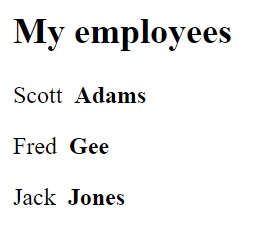 Using apply-template to apply template to the element or element's child nodes[/caption]
4. Using the normalize-space function to remove unwanted spaces (Back to top)
An XSLT example demonstrating how to trim / remove white spaces.
XML
[code language="xml"]
<?xml version = "1.0"?>
<document>
<text>
A
character string with parameters </text>
<text> Some other text </text>
</document>
[/code]
XSLT
[code language="xml"]
<xsl:stylesheet version = "1.0" xmlns:xsl = "http://www.w3.org/1999/XSL/Transform">
<xsl:output method="html" doctype-public="XSLT-compat" omit-xml-declaration="yes" encoding="UTF-8" indent="yes" />
<xsl:template match = "/document">
<html>
<body>
<xsl:for-each select="text">
<p>
<xsl:value-of select="normalize-space (.) " />
</p>
</xsl:for-each>
</body>
</html>
</xsl:template>
</xsl:stylesheet>
[/code]
Output
[code language="html"]
<!DOCTYPE html
PUBLIC "XSLT-compat">
<html>
<body>
<p>A character string with parameters</p>
<p>Some other text</p>
</body>
</html>
[/code]
[caption id="attachment_9690" align="alignnone" width="366"]
Using apply-template to apply template to the element or element's child nodes[/caption]
4. Using the normalize-space function to remove unwanted spaces (Back to top)
An XSLT example demonstrating how to trim / remove white spaces.
XML
[code language="xml"]
<?xml version = "1.0"?>
<document>
<text>
A
character string with parameters </text>
<text> Some other text </text>
</document>
[/code]
XSLT
[code language="xml"]
<xsl:stylesheet version = "1.0" xmlns:xsl = "http://www.w3.org/1999/XSL/Transform">
<xsl:output method="html" doctype-public="XSLT-compat" omit-xml-declaration="yes" encoding="UTF-8" indent="yes" />
<xsl:template match = "/document">
<html>
<body>
<xsl:for-each select="text">
<p>
<xsl:value-of select="normalize-space (.) " />
</p>
</xsl:for-each>
</body>
</html>
</xsl:template>
</xsl:stylesheet>
[/code]
Output
[code language="html"]
<!DOCTYPE html
PUBLIC "XSLT-compat">
<html>
<body>
<p>A character string with parameters</p>
<p>Some other text</p>
</body>
</html>
[/code]
[caption id="attachment_9690" align="alignnone" width="366"]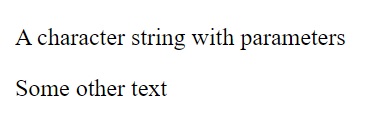 Using the normalize-space function to remove unwanted spaces[/caption]
5. Convert string to upper case or lower case (Back to top)
Example to demonstrate converting text to lower and upper cases.
StackOverflow reference
XML
[code language="xml"]
<text> sOMe texT with cOmbinATIonS oF upPer case anD LoweR casE</text>
[/code]
XSLT
[code language="xml"]
<xsl:stylesheet version = "1.0" xmlns:xsl = "http://www.w3.org/1999/XSL/Transform">
<xsl:template match = "/">
<xsl:variable name="lowercase" select="'abcdefghijklmnopqrstuvwxyz'" />
<xsl:variable name="uppercase" select="'ABCDEFGHIJKLMNOPQRSTUVWXYZ'" />
<xsl:value-of select="translate(text, $lowercase, $uppercase)" />
<xsl:text>&#xa;</xsl:text>
<xsl:value-of select="translate(text, $uppercase, $lowercase)" />
</xsl:template>
</xsl:stylesheet>
[/code]
Output
[code language="xml"]
SOME TEXT WITH COMBINATIONS OF UPPER CASE AND LOWER CASE
some text with combinations of upper case and lower case
[/code]
Using the normalize-space function to remove unwanted spaces[/caption]
5. Convert string to upper case or lower case (Back to top)
Example to demonstrate converting text to lower and upper cases.
StackOverflow reference
XML
[code language="xml"]
<text> sOMe texT with cOmbinATIonS oF upPer case anD LoweR casE</text>
[/code]
XSLT
[code language="xml"]
<xsl:stylesheet version = "1.0" xmlns:xsl = "http://www.w3.org/1999/XSL/Transform">
<xsl:template match = "/">
<xsl:variable name="lowercase" select="'abcdefghijklmnopqrstuvwxyz'" />
<xsl:variable name="uppercase" select="'ABCDEFGHIJKLMNOPQRSTUVWXYZ'" />
<xsl:value-of select="translate(text, $lowercase, $uppercase)" />
<xsl:text>&#xa;</xsl:text>
<xsl:value-of select="translate(text, $uppercase, $lowercase)" />
</xsl:template>
</xsl:stylesheet>
[/code]
Output
[code language="xml"]
SOME TEXT WITH COMBINATIONS OF UPPER CASE AND LOWER CASE
some text with combinations of upper case and lower case
[/code]
XSLT example using for-each to create a table[/caption]
2. tokenizing a delimited string using XSLT versions 1.0/2.0 (Back to top)
In each XSLT example we use versions 1.0 & 2.0 of XSLT to tokenize a comma-separated string.
StackOverflow reference here.
XML
[code language="xml"]
<mark>1,2,3,4,5</mark>
[/code]
XSLT (version 1.0)
[code language="xml"]
<xsl:stylesheet version="1.0"
xmlns:xsl="http://www.w3.org/1999/XSL/Transform"
xmlns:ext="http://exslt.org/common" exclude-result-prefixes="ext">
<xsl:output omit-xml-declaration="yes" indent="yes"/>
<xsl:template match="mark">
<xsl:variable name="vrtfSplit">
<xsl:apply-templates/>
</xsl:variable>
<xsl:for-each select="ext:node-set($vrtfSplit)/*">
<processedItem>
<xsl:value-of select="."/>
</processedItem>
</xsl:for-each>
</xsl:template>
<xsl:template match="text()" name="split">
<xsl:param name="pText" select="."/>
<xsl:if test="string-length($pText) >0">
<item>
<xsl:value-of select=
"substring-before(concat($pText, ','), ',')"/>
</item>
<xsl:call-template name="split">
<xsl:with-param name="pText" select=
"substring-after($pText, ',')"/>
</xsl:call-template>
</xsl:if>
</xsl:template>
</xsl:stylesheet>
[/code]
Output (version 1.0)
[code language="xml"]
<processedItem>1</processedItem>
<processedItem>2</processedItem>
<processedItem>3</processedItem>
<processedItem>4</processedItem>
<processedItem>5</processedItem>
[/code]
XSLT (version 2.0)
Version 2.0 enables us to write much more concise XSLT code.
[code language="xml"]
<xsl:stylesheet version="2.0"
xmlns:xsl="http://www.w3.org/1999/XSL/Transform"
xmlns:xs="http://www.w3.org/2001/XMLSchema"
exclude-result-prefixes="xs">
<xsl:output omit-xml-declaration="yes" indent="yes"/>
<xsl:template match="mark">
<xsl:for-each select="tokenize(., ',')">
<processedItem>
<xsl:sequence select="10*xs:integer(.)"/>
</processedItem>
</xsl:for-each>
</xsl:template>
</xsl:stylesheet>
[/code]
Output (version 2.0)
Exactly the same output as in the 1.0 version:
[code language="xml"]
<processedItem>1</processedItem>
<processedItem>2</processedItem>
<processedItem>3</processedItem>
<processedItem>4</processedItem>
<processedItem>5</processedItem>
[/code]
3. using apply-template to apply template to the element or element's child nodes (Back to top)
XSLT Example link from W3chools.
XML
[code language="xml"]
<?xml version="1.0" encoding="UTF-8"?>
<employees>
<employee>
<firstName>Scott</firstName>
<lastName>Adams</lastName>
</employee>
<employee>
<firstName>Fred</firstName>
<lastName>Gee</lastName>
</employee>
<employee>
<firstName>Jack</firstName>
<lastName>Jones</lastName>
</employee>
</employees>
[/code]
XSLT
In this example we use apply-templates to to match all the employee first name and last names, and apply bold styling to the last name. We also insert a space between the first name and last name using the code
[code language="xml"]
<xsl:stylesheet version = '1.0' xmlns:xsl='http://www.w3.org/1999/XSL/Transform'>
<xsl:template match="/">
<html>
<body>
<h2>My employees</h2>
<xsl:apply-templates/>
</body>
</html>
</xsl:template>
<xsl:template match="employee">
<p>
<xsl:apply-templates select="firstName"/>&#160;
<xsl:apply-templates select="lastName"/>
</p>
</xsl:template>
<xsl:template match="firstName">
<xsl:value-of select="."/>
</xsl:template>
<xsl:template match="lastName">
<b>
<xsl:value-of select="."/>
</b>
</xsl:template>
</xsl:stylesheet>
[/code]
Output
A list of first names and surnames in HTML format:
[code language="html"]
<html>
<body>
<h2>My employees</h2>
<p>Scott
<b>Adams</b>
</p>
<p>Fred
<b>Gee</b>
</p>
<p>Jack
<b>Jones</b>
</p>
</body>
</html>
[/code]
[caption id="attachment_9686" align="alignnone" width="261"] Using apply-template to apply template to the element or element's child nodes[/caption]
4. Using the normalize-space function to remove unwanted spaces (Back to top)
An XSLT example demonstrating how to trim / remove white spaces.
XML
[code language="xml"]
<?xml version = "1.0"?>
<document>
<text>
A
character string with parameters </text>
<text> Some other text </text>
</document>
[/code]
XSLT
[code language="xml"]
<xsl:stylesheet version = "1.0" xmlns:xsl = "http://www.w3.org/1999/XSL/Transform">
<xsl:output method="html" doctype-public="XSLT-compat" omit-xml-declaration="yes" encoding="UTF-8" indent="yes" />
<xsl:template match = "/document">
<html>
<body>
<xsl:for-each select="text">
<p>
<xsl:value-of select="normalize-space (.) " />
</p>
</xsl:for-each>
</body>
</html>
</xsl:template>
</xsl:stylesheet>
[/code]
Output
[code language="html"]
<!DOCTYPE html
PUBLIC "XSLT-compat">
<html>
<body>
<p>A character string with parameters</p>
<p>Some other text</p>
</body>
</html>
[/code]
[caption id="attachment_9690" align="alignnone" width="366"] Using the normalize-space function to remove unwanted spaces[/caption]
5. Convert string to upper case or lower case (Back to top)
Example to demonstrate converting text to lower and upper cases.
StackOverflow reference
XML
[code language="xml"]
<text> sOMe texT with cOmbinATIonS oF upPer case anD LoweR casE</text>
[/code]
XSLT
[code language="xml"]
<xsl:stylesheet version = "1.0" xmlns:xsl = "http://www.w3.org/1999/XSL/Transform">
<xsl:template match = "/">
<xsl:variable name="lowercase" select="'abcdefghijklmnopqrstuvwxyz'" />
<xsl:variable name="uppercase" select="'ABCDEFGHIJKLMNOPQRSTUVWXYZ'" />
<xsl:value-of select="translate(text, $lowercase, $uppercase)" />
<xsl:text>&#xa;</xsl:text>
<xsl:value-of select="translate(text, $uppercase, $lowercase)" />
</xsl:template>
</xsl:stylesheet>
[/code]
Output
[code language="xml"]
SOME TEXT WITH COMBINATIONS OF UPPER CASE AND LOWER CASE
some text with combinations of upper case and lower case
[/code]


Comments
Post a Comment