Getting started with Aurelia routing in Visual Studio Code
Some instructions on how to get started with a very simple TypeScript-based example in a Visual Studio Code development environment.
1. Create a new Aurelia project
If you're unfamiliar with creating a new Aurelia project see this existing post for more instructions:
https://www.technical-recipes.com/2019/getting-started-with-aurelia-in-visual-studio-code/
In the options presented during project creation I choose to use TypeScript.
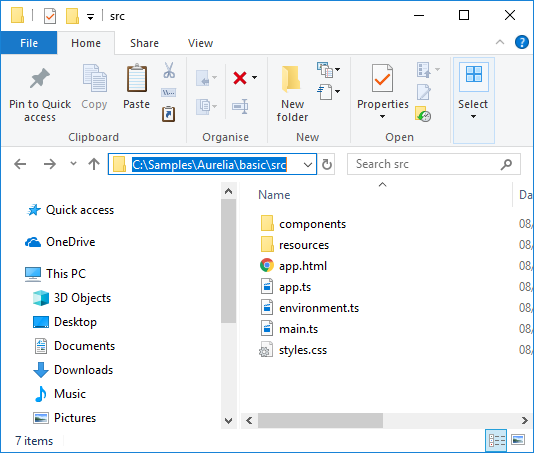
The files we are interested in modifying will be created in the src /folder as shown:
 2. Create the web pages
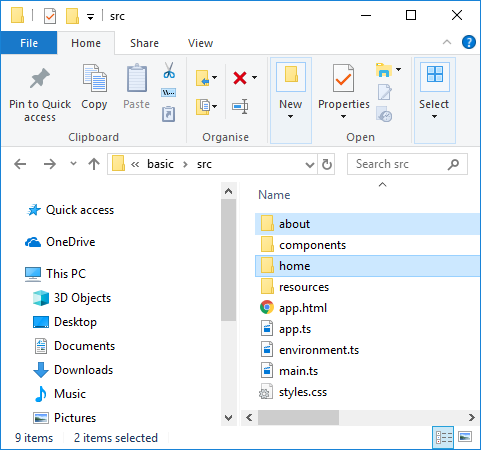
Create two more sub-folders within the src folder: 'home' and 'about':
2. Create the web pages
Create two more sub-folders within the src folder: 'home' and 'about':
 Into these folders will insert the files home.html, home.ts, about.html, about.ts:
home.html
[code lang="html"]
<template>
<h1>Home page</h1>
</template>
[/code]
home.js
[code lang="js"]
export class Home {}
[/code]
about.html
[code lang="html"]
<template>
<h1>About page</h1>
</template>
[/code]
about.js
[code lang="js"]
export class About {}
[/code]
3. Configure the router in app.ts / app.html
In the router set up we care about config.map which is used to add the routes.
app.html
[code lang="html"]
<template>
<nav>
<ul>
<li repeat.for="row of router.navigation" class="${row.isActive ? 'active' : ''}">
<a href.bind="row.href">${row.title}</a>
</li>
</ul>
</nav>
<router-view></router-view>
</template>
[/code]
app.ts
[code lang="js"]
import { RouterConfiguration, Router } from "aurelia-router";
import { PLATFORM } from "aurelia-pal";
export class App {
message = "Aurelia routing app";
router: Router;
configureRouter(config: RouterConfiguration, router: Router) {
config.title = "Aurelia";
this.router = router;
config.map([
{
route: ["", "home"],
name: "home",
moduleId: PLATFORM.moduleName("home/home"),
nav: true,
title: "Home"
},
{
route: "about",
name: "about",
moduleId: PLATFORM.moduleName("about/about"),
nav: true,
title: "About"
}
]);
}
}
[/code]
One important gotcha is when we keep getting the error "Unable find module with ID".
This has been covered at Stack Overflow:
https://stackoverflow.com/questions/46088319/getting-the-error-unable-find-module-with-id-with-aurelia-router
The fix is to basically pass the url into PLATFORM.moduleName(...).
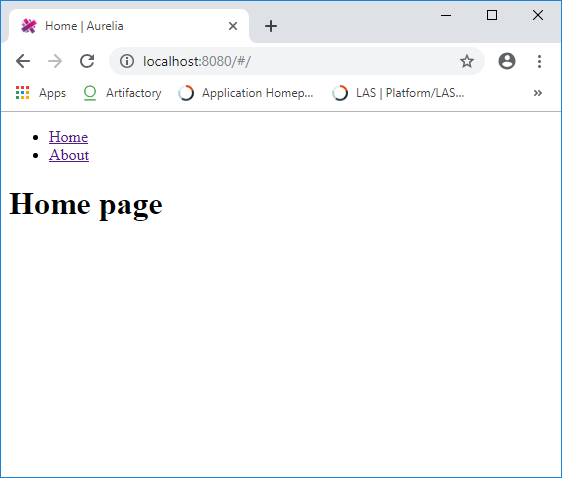
And on running the app we see that we are provided with navigable links to the two pages we created. Feel free to try this out and add more complex routes, stylings etc.
Into these folders will insert the files home.html, home.ts, about.html, about.ts:
home.html
[code lang="html"]
<template>
<h1>Home page</h1>
</template>
[/code]
home.js
[code lang="js"]
export class Home {}
[/code]
about.html
[code lang="html"]
<template>
<h1>About page</h1>
</template>
[/code]
about.js
[code lang="js"]
export class About {}
[/code]
3. Configure the router in app.ts / app.html
In the router set up we care about config.map which is used to add the routes.
app.html
[code lang="html"]
<template>
<nav>
<ul>
<li repeat.for="row of router.navigation" class="${row.isActive ? 'active' : ''}">
<a href.bind="row.href">${row.title}</a>
</li>
</ul>
</nav>
<router-view></router-view>
</template>
[/code]
app.ts
[code lang="js"]
import { RouterConfiguration, Router } from "aurelia-router";
import { PLATFORM } from "aurelia-pal";
export class App {
message = "Aurelia routing app";
router: Router;
configureRouter(config: RouterConfiguration, router: Router) {
config.title = "Aurelia";
this.router = router;
config.map([
{
route: ["", "home"],
name: "home",
moduleId: PLATFORM.moduleName("home/home"),
nav: true,
title: "Home"
},
{
route: "about",
name: "about",
moduleId: PLATFORM.moduleName("about/about"),
nav: true,
title: "About"
}
]);
}
}
[/code]
One important gotcha is when we keep getting the error "Unable find module with ID".
This has been covered at Stack Overflow:
https://stackoverflow.com/questions/46088319/getting-the-error-unable-find-module-with-id-with-aurelia-router
The fix is to basically pass the url into PLATFORM.moduleName(...).
And on running the app we see that we are provided with navigable links to the two pages we created. Feel free to try this out and add more complex routes, stylings etc.
2. Create the web pages
Create two more sub-folders within the src folder: 'home' and 'about':
Into these folders will insert the files home.html, home.ts, about.html, about.ts:
home.html
[code lang="html"]
<template>
<h1>Home page</h1>
</template>
[/code]
home.js
[code lang="js"]
export class Home {}
[/code]
about.html
[code lang="html"]
<template>
<h1>About page</h1>
</template>
[/code]
about.js
[code lang="js"]
export class About {}
[/code]
3. Configure the router in app.ts / app.html
In the router set up we care about config.map which is used to add the routes.
app.html
[code lang="html"]
<template>
<nav>
<ul>
<li repeat.for="row of router.navigation" class="${row.isActive ? 'active' : ''}">
<a href.bind="row.href">${row.title}</a>
</li>
</ul>
</nav>
<router-view></router-view>
</template>
[/code]
app.ts
[code lang="js"]
import { RouterConfiguration, Router } from "aurelia-router";
import { PLATFORM } from "aurelia-pal";
export class App {
message = "Aurelia routing app";
router: Router;
configureRouter(config: RouterConfiguration, router: Router) {
config.title = "Aurelia";
this.router = router;
config.map([
{
route: ["", "home"],
name: "home",
moduleId: PLATFORM.moduleName("home/home"),
nav: true,
title: "Home"
},
{
route: "about",
name: "about",
moduleId: PLATFORM.moduleName("about/about"),
nav: true,
title: "About"
}
]);
}
}
[/code]
One important gotcha is when we keep getting the error "Unable find module with ID".
This has been covered at Stack Overflow:
https://stackoverflow.com/questions/46088319/getting-the-error-unable-find-module-with-id-with-aurelia-router
The fix is to basically pass the url into PLATFORM.moduleName(...).
And on running the app we see that we are provided with navigable links to the two pages we created. Feel free to try this out and add more complex routes, stylings etc.


Comments
Post a Comment