Building a Tree View in Aurelia
For steps on setting up a new Aurelia project please refer to this link:
https://www.technical-recipes.com/2019/getting-started-with-aurelia-js-part-2/
(For reference I am using the TypeScript option when creating this new Aurelia project and building / running it in Visual Studio Code.)
Some other useful links on this topic can be found here:
https://www.syntaxsuccess.com/viewarticle/building-a-treeview-in-aurelia
https://gist.run/?id=53dc5b81ef1549cdcc56c3b1fa1e67ba (GistRun link)
Anyway the following are the files I added to Visual Studio Code project:
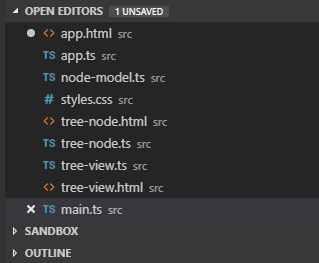 app.html
[code lang="html"]
<template>
<require from="styles.css"></require>
<require from="tree-view"></require>
<tree-view></tree-view>
</template>
[/code]
app.ts
[code lang="js"]
export class App {}
[/code]
node-model.ts
[code lang="js"]
export class NodeModel {
public id: string;
public icon: string;
public children: NodeModel[];
public expanded: boolean;
public visible: boolean;
constructor(idVal: string, children: NodeModel[]) {
this.id = idVal;
this.visible = true;
this.children = children || [];
if (this.hasChildren()) {
this.icon = "fa fa-minus";
this.expanded = true;
}
}
hasChildren() {
return this.children.length > 0;
}
toggleNode() {
for (var i = 0; i < this.children.length; i++) {
this.children[i].visible = !this.children[i].visible;
if (this.expanded) {
this.children[i].toggleNode();
}
}
this.expanded = !this.expanded;
if (this.expanded === true) {
this.icon = "fa fa-minus";
} else {
this.icon = "fa fa-plus";
}
}
}
[/code]
styles.css
[code lang="css"]
ul{
list-style-type:none;
margin:0;
}
tree-node ul:first-child{
padding-left:0;
}
.fa.fa-plus{
width: 16px;
height: 16px;
background-repeat: no-repeat;
background-image: url(data:image/png;base64,iVBORw0KGgoAAAANSUhEUgAAABAAAAAQCAYAAAAf8/9hAAAAAXNSR0IArs4c6QAAAARnQU1BAACxjwv8YQUAAAAJcEhZcwAADsMAAA7DAcdvqGQAAAAZdEVYdFNvZnR3YXJlAHBhaW50Lm5ldCA0LjAuMTJDBGvsAAAAmUlEQVQ4T6WTuw2AMBBDXbEDo7AQQ9AgISRYgRUYhIqK3wjsQHWEE5wOiJDCFa+xbEtxEhDRDVRjg7yNHPhC/DrMQr0QqqlD1scOCEEFXDKuKIbEASa4gEvmDeWUOn4WSNF7F/HrMAu+goPHLuLXYRZ84Qu1i/h1mAVfUHPuIn4dZsEX0pgKTEcwjfj7Gk0PyfSUTZ8p6DsTdnMcPQl3gNV4AAAAAElFTkSuQmCC);
display:inline-block;
}
.fa.fa-minus{
width: 16px;
height: 16px;
background-repeat: no-repeat;
background-image: url(data:image/png;base64,iVBORw0KGgoAAAANSUhEUgAAABAAAAAQCAYAAAAf8/9hAAAAGXRFWHRTb2Z0d2FyZQBBZG9iZSBJbWFnZVJlYWR5ccllPAAAAyhpVFh0WE1MOmNvbS5hZG9iZS54bXAAAAAAADw/eHBhY2tldCBiZWdpbj0i77u/IiBpZD0iVzVNME1wQ2VoaUh6cmVTek5UY3prYzlkIj8+IDx4OnhtcG1ldGEgeG1sbnM6eD0iYWRvYmU6bnM6bWV0YS8iIHg6eG1wdGs9IkFkb2JlIFhNUCBDb3JlIDUuNi1jMTMyIDc5LjE1OTI4NCwgMjAxNi8wNC8xOS0xMzoxMzo0MCAgICAgICAgIj4gPHJkZjpSREYgeG1sbnM6cmRmPSJodHRwOi8vd3d3LnczLm9yZy8xOTk5LzAyLzIyLXJkZi1zeW50YXgtbnMjIj4gPHJkZjpEZXNjcmlwdGlvbiByZGY6YWJvdXQ9IiIgeG1sbnM6eG1wPSJodHRwOi8vbnMuYWRvYmUuY29tL3hhcC8xLjAvIiB4bWxuczp4bXBNTT0iaHR0cDovL25zLmFkb2JlLmNvbS94YXAvMS4wL21tLyIgeG1sbnM6c3RSZWY9Imh0dHA6Ly9ucy5hZG9iZS5jb20veGFwLzEuMC9zVHlwZS9SZXNvdXJjZVJlZiMiIHhtcDpDcmVhdG9yVG9vbD0iQWRvYmUgUGhvdG9zaG9wIENDIDIwMTUuNSAoV2luZG93cykiIHhtcE1NOkluc3RhbmNlSUQ9InhtcC5paWQ6M0I4RDFEMDE5MDc4MTFFNjhBRkU4RjUxMTMwMTFBNDciIHhtcE1NOkRvY3VtZW50SUQ9InhtcC5kaWQ6M0I4RDFEMDI5MDc4MTFFNjhBRkU4RjUxMTMwMTFBNDciPiA8eG1wTU06RGVyaXZlZEZyb20gc3RSZWY6aW5zdGFuY2VJRD0ieG1wLmlpZDozQjhEMUNGRjkwNzgxMUU2OEFGRThGNTExMzAxMUE0NyIgc3RSZWY6ZG9jdW1lbnRJRD0ieG1wLmRpZDozQjhEMUQwMDkwNzgxMUU2OEFGRThGNTExMzAxMUE0NyIvPiA8L3JkZjpEZXNjcmlwdGlvbj4gPC9yZGY6UkRGPiA8L3g6eG1wbWV0YT4gPD94cGFja2V0IGVuZD0iciI/PtWsFOoAAACvSURBVHjaYvz//z8DJYBx6BvAwthxZSYDI3MaWbr//53FxPDjei7D/3/HSdcM1APUywRk/mL4/CMYaNpzEmx+DtYD1MsEFXrO8Ps/0JD/vwhrBqoBqQXpAQImJKnjDH//5xI0AKIG7mUmNOlZoIDBF2hgNcjRyFC/Cl0ZGwOH1gEGRiZLzEC75gAOMyTAhMUezEBFCjR0xUw4HIsIVLRAw0hIeIILOVCPD968ABBgAN4Tav6F/rCJAAAAAElFTkSuQmCC);
display:inline-block;
}
.StartOfTreeNode > tree-node > .StartOfTreeNode{
padding-left:20px;
}
.mainBack{
background:#F7F7F7;
}
.left{float:left;}
.right{float:right;}
.clear{clear:both;}
.WorkQueueDropContent{
color:#343434;
}
.EachMiniQueueWithOutCollapse{
padding:15px 10px;
border-bottom:1px solid #F1F1F1;
}
.eachMinQueueCheckSection{
margin-right:10px;
}
.leftGaptoRightElement{
margin-left:10px;
}
.lightFontForMInQueue{
color:#A8A8A8;
}
.DateOfMinQueue{
font-weight:bold;
color:#0E7EC6;
}
[/code]
tree-node.html
[code lang="html"]
<template>
<div show.bind="current.visible" class="StartOfTreeNode">
<div class="EachMiniQueueWithOutCollapse">
<span if.bind="current.hasChildren()"
click.trigger="current.toggleNode(current)"
class="${current.icon} left eachMinQueueCheckSection">
</span>
<div class="left eachMinQueueCheckSection" if.bind="!current.hasChildren()">
<label class="cb_control control--checkbox">
<input type="checkbox">
<span class="control__indicator"></span>
</label>
</div>
<div class="left">
<div class="TitleOfMinQueue">
<span class="fontBold"><b>${current.id}</b></span>
</div>
</div>
</div>
<tree-node
repeat.for="node of current.children"
current.bind="node">
</tree-node>
</div>
</template>
[/code]
tree-node.ts
[code lang="js"]
import { bindable } from "aurelia-framework";
import { NodeModel } from "node-model";
export class TreeNode {
@bindable current: NodeModel;
}
[/code]
tree-view.html
[code lang="html"]
<template>
<require from='./tree-node'></require>
<tree-node repeat.for="node of nodes" current.bind="node"></tree-node>
</template>
[/code]
tree-view.ts
[code lang="js"]
import { NodeModel } from "node-model";
export class TreeView {
public nodes: NodeModel[] = [];
constructor() {
var node1 = new NodeModel("Wiltshire", [
new NodeModel("Chippenham", null),
new NodeModel("Devizes", null),
new NodeModel("Bradford-on-Avon", null)
]);
var node3 = new NodeModel("Somerset", [
new NodeModel("Yeovil", null),
new NodeModel("Taunton", [
new NodeModel("Hestercombe House", null),
new NodeModel("Vivary Park", null)
])
]);
this.nodes = [node1, node3];
}
}
[/code]
Giving the following output:
app.html
[code lang="html"]
<template>
<require from="styles.css"></require>
<require from="tree-view"></require>
<tree-view></tree-view>
</template>
[/code]
app.ts
[code lang="js"]
export class App {}
[/code]
node-model.ts
[code lang="js"]
export class NodeModel {
public id: string;
public icon: string;
public children: NodeModel[];
public expanded: boolean;
public visible: boolean;
constructor(idVal: string, children: NodeModel[]) {
this.id = idVal;
this.visible = true;
this.children = children || [];
if (this.hasChildren()) {
this.icon = "fa fa-minus";
this.expanded = true;
}
}
hasChildren() {
return this.children.length > 0;
}
toggleNode() {
for (var i = 0; i < this.children.length; i++) {
this.children[i].visible = !this.children[i].visible;
if (this.expanded) {
this.children[i].toggleNode();
}
}
this.expanded = !this.expanded;
if (this.expanded === true) {
this.icon = "fa fa-minus";
} else {
this.icon = "fa fa-plus";
}
}
}
[/code]
styles.css
[code lang="css"]
ul{
list-style-type:none;
margin:0;
}
tree-node ul:first-child{
padding-left:0;
}
.fa.fa-plus{
width: 16px;
height: 16px;
background-repeat: no-repeat;
background-image: url(data:image/png;base64,iVBORw0KGgoAAAANSUhEUgAAABAAAAAQCAYAAAAf8/9hAAAAAXNSR0IArs4c6QAAAARnQU1BAACxjwv8YQUAAAAJcEhZcwAADsMAAA7DAcdvqGQAAAAZdEVYdFNvZnR3YXJlAHBhaW50Lm5ldCA0LjAuMTJDBGvsAAAAmUlEQVQ4T6WTuw2AMBBDXbEDo7AQQ9AgISRYgRUYhIqK3wjsQHWEE5wOiJDCFa+xbEtxEhDRDVRjg7yNHPhC/DrMQr0QqqlD1scOCEEFXDKuKIbEASa4gEvmDeWUOn4WSNF7F/HrMAu+goPHLuLXYRZ84Qu1i/h1mAVfUHPuIn4dZsEX0pgKTEcwjfj7Gk0PyfSUTZ8p6DsTdnMcPQl3gNV4AAAAAElFTkSuQmCC);
display:inline-block;
}
.fa.fa-minus{
width: 16px;
height: 16px;
background-repeat: no-repeat;
background-image: url(data:image/png;base64,iVBORw0KGgoAAAANSUhEUgAAABAAAAAQCAYAAAAf8/9hAAAAGXRFWHRTb2Z0d2FyZQBBZG9iZSBJbWFnZVJlYWR5ccllPAAAAyhpVFh0WE1MOmNvbS5hZG9iZS54bXAAAAAAADw/eHBhY2tldCBiZWdpbj0i77u/IiBpZD0iVzVNME1wQ2VoaUh6cmVTek5UY3prYzlkIj8+IDx4OnhtcG1ldGEgeG1sbnM6eD0iYWRvYmU6bnM6bWV0YS8iIHg6eG1wdGs9IkFkb2JlIFhNUCBDb3JlIDUuNi1jMTMyIDc5LjE1OTI4NCwgMjAxNi8wNC8xOS0xMzoxMzo0MCAgICAgICAgIj4gPHJkZjpSREYgeG1sbnM6cmRmPSJodHRwOi8vd3d3LnczLm9yZy8xOTk5LzAyLzIyLXJkZi1zeW50YXgtbnMjIj4gPHJkZjpEZXNjcmlwdGlvbiByZGY6YWJvdXQ9IiIgeG1sbnM6eG1wPSJodHRwOi8vbnMuYWRvYmUuY29tL3hhcC8xLjAvIiB4bWxuczp4bXBNTT0iaHR0cDovL25zLmFkb2JlLmNvbS94YXAvMS4wL21tLyIgeG1sbnM6c3RSZWY9Imh0dHA6Ly9ucy5hZG9iZS5jb20veGFwLzEuMC9zVHlwZS9SZXNvdXJjZVJlZiMiIHhtcDpDcmVhdG9yVG9vbD0iQWRvYmUgUGhvdG9zaG9wIENDIDIwMTUuNSAoV2luZG93cykiIHhtcE1NOkluc3RhbmNlSUQ9InhtcC5paWQ6M0I4RDFEMDE5MDc4MTFFNjhBRkU4RjUxMTMwMTFBNDciIHhtcE1NOkRvY3VtZW50SUQ9InhtcC5kaWQ6M0I4RDFEMDI5MDc4MTFFNjhBRkU4RjUxMTMwMTFBNDciPiA8eG1wTU06RGVyaXZlZEZyb20gc3RSZWY6aW5zdGFuY2VJRD0ieG1wLmlpZDozQjhEMUNGRjkwNzgxMUU2OEFGRThGNTExMzAxMUE0NyIgc3RSZWY6ZG9jdW1lbnRJRD0ieG1wLmRpZDozQjhEMUQwMDkwNzgxMUU2OEFGRThGNTExMzAxMUE0NyIvPiA8L3JkZjpEZXNjcmlwdGlvbj4gPC9yZGY6UkRGPiA8L3g6eG1wbWV0YT4gPD94cGFja2V0IGVuZD0iciI/PtWsFOoAAACvSURBVHjaYvz//z8DJYBx6BvAwthxZSYDI3MaWbr//53FxPDjei7D/3/HSdcM1APUywRk/mL4/CMYaNpzEmx+DtYD1MsEFXrO8Ps/0JD/vwhrBqoBqQXpAQImJKnjDH//5xI0AKIG7mUmNOlZoIDBF2hgNcjRyFC/Cl0ZGwOH1gEGRiZLzEC75gAOMyTAhMUezEBFCjR0xUw4HIsIVLRAw0hIeIILOVCPD968ABBgAN4Tav6F/rCJAAAAAElFTkSuQmCC);
display:inline-block;
}
.StartOfTreeNode > tree-node > .StartOfTreeNode{
padding-left:20px;
}
.mainBack{
background:#F7F7F7;
}
.left{float:left;}
.right{float:right;}
.clear{clear:both;}
.WorkQueueDropContent{
color:#343434;
}
.EachMiniQueueWithOutCollapse{
padding:15px 10px;
border-bottom:1px solid #F1F1F1;
}
.eachMinQueueCheckSection{
margin-right:10px;
}
.leftGaptoRightElement{
margin-left:10px;
}
.lightFontForMInQueue{
color:#A8A8A8;
}
.DateOfMinQueue{
font-weight:bold;
color:#0E7EC6;
}
[/code]
tree-node.html
[code lang="html"]
<template>
<div show.bind="current.visible" class="StartOfTreeNode">
<div class="EachMiniQueueWithOutCollapse">
<span if.bind="current.hasChildren()"
click.trigger="current.toggleNode(current)"
class="${current.icon} left eachMinQueueCheckSection">
</span>
<div class="left eachMinQueueCheckSection" if.bind="!current.hasChildren()">
<label class="cb_control control--checkbox">
<input type="checkbox">
<span class="control__indicator"></span>
</label>
</div>
<div class="left">
<div class="TitleOfMinQueue">
<span class="fontBold"><b>${current.id}</b></span>
</div>
</div>
</div>
<tree-node
repeat.for="node of current.children"
current.bind="node">
</tree-node>
</div>
</template>
[/code]
tree-node.ts
[code lang="js"]
import { bindable } from "aurelia-framework";
import { NodeModel } from "node-model";
export class TreeNode {
@bindable current: NodeModel;
}
[/code]
tree-view.html
[code lang="html"]
<template>
<require from='./tree-node'></require>
<tree-node repeat.for="node of nodes" current.bind="node"></tree-node>
</template>
[/code]
tree-view.ts
[code lang="js"]
import { NodeModel } from "node-model";
export class TreeView {
public nodes: NodeModel[] = [];
constructor() {
var node1 = new NodeModel("Wiltshire", [
new NodeModel("Chippenham", null),
new NodeModel("Devizes", null),
new NodeModel("Bradford-on-Avon", null)
]);
var node3 = new NodeModel("Somerset", [
new NodeModel("Yeovil", null),
new NodeModel("Taunton", [
new NodeModel("Hestercombe House", null),
new NodeModel("Vivary Park", null)
])
]);
this.nodes = [node1, node3];
}
}
[/code]
Giving the following output:
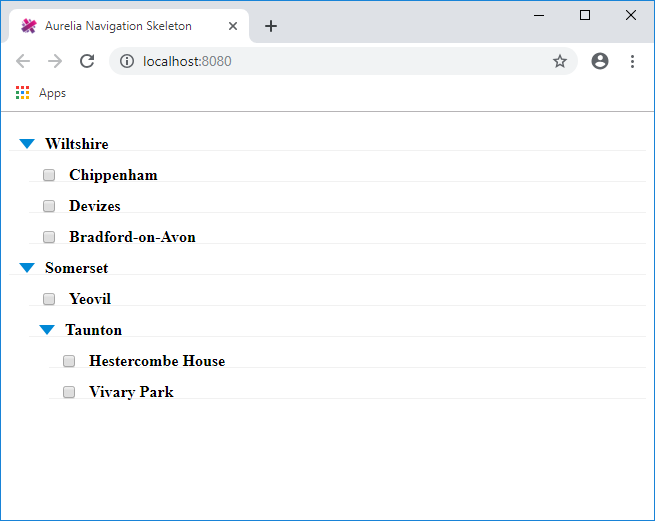
app.html
[code lang="html"]
<template>
<require from="styles.css"></require>
<require from="tree-view"></require>
<tree-view></tree-view>
</template>
[/code]
app.ts
[code lang="js"]
export class App {}
[/code]
node-model.ts
[code lang="js"]
export class NodeModel {
public id: string;
public icon: string;
public children: NodeModel[];
public expanded: boolean;
public visible: boolean;
constructor(idVal: string, children: NodeModel[]) {
this.id = idVal;
this.visible = true;
this.children = children || [];
if (this.hasChildren()) {
this.icon = "fa fa-minus";
this.expanded = true;
}
}
hasChildren() {
return this.children.length > 0;
}
toggleNode() {
for (var i = 0; i < this.children.length; i++) {
this.children[i].visible = !this.children[i].visible;
if (this.expanded) {
this.children[i].toggleNode();
}
}
this.expanded = !this.expanded;
if (this.expanded === true) {
this.icon = "fa fa-minus";
} else {
this.icon = "fa fa-plus";
}
}
}
[/code]
styles.css
[code lang="css"]
ul{
list-style-type:none;
margin:0;
}
tree-node ul:first-child{
padding-left:0;
}
.fa.fa-plus{
width: 16px;
height: 16px;
background-repeat: no-repeat;
background-image: url(data:image/png;base64,iVBORw0KGgoAAAANSUhEUgAAABAAAAAQCAYAAAAf8/9hAAAAAXNSR0IArs4c6QAAAARnQU1BAACxjwv8YQUAAAAJcEhZcwAADsMAAA7DAcdvqGQAAAAZdEVYdFNvZnR3YXJlAHBhaW50Lm5ldCA0LjAuMTJDBGvsAAAAmUlEQVQ4T6WTuw2AMBBDXbEDo7AQQ9AgISRYgRUYhIqK3wjsQHWEE5wOiJDCFa+xbEtxEhDRDVRjg7yNHPhC/DrMQr0QqqlD1scOCEEFXDKuKIbEASa4gEvmDeWUOn4WSNF7F/HrMAu+goPHLuLXYRZ84Qu1i/h1mAVfUHPuIn4dZsEX0pgKTEcwjfj7Gk0PyfSUTZ8p6DsTdnMcPQl3gNV4AAAAAElFTkSuQmCC);
display:inline-block;
}
.fa.fa-minus{
width: 16px;
height: 16px;
background-repeat: no-repeat;
background-image: url(data:image/png;base64,iVBORw0KGgoAAAANSUhEUgAAABAAAAAQCAYAAAAf8/9hAAAAGXRFWHRTb2Z0d2FyZQBBZG9iZSBJbWFnZVJlYWR5ccllPAAAAyhpVFh0WE1MOmNvbS5hZG9iZS54bXAAAAAAADw/eHBhY2tldCBiZWdpbj0i77u/IiBpZD0iVzVNME1wQ2VoaUh6cmVTek5UY3prYzlkIj8+IDx4OnhtcG1ldGEgeG1sbnM6eD0iYWRvYmU6bnM6bWV0YS8iIHg6eG1wdGs9IkFkb2JlIFhNUCBDb3JlIDUuNi1jMTMyIDc5LjE1OTI4NCwgMjAxNi8wNC8xOS0xMzoxMzo0MCAgICAgICAgIj4gPHJkZjpSREYgeG1sbnM6cmRmPSJodHRwOi8vd3d3LnczLm9yZy8xOTk5LzAyLzIyLXJkZi1zeW50YXgtbnMjIj4gPHJkZjpEZXNjcmlwdGlvbiByZGY6YWJvdXQ9IiIgeG1sbnM6eG1wPSJodHRwOi8vbnMuYWRvYmUuY29tL3hhcC8xLjAvIiB4bWxuczp4bXBNTT0iaHR0cDovL25zLmFkb2JlLmNvbS94YXAvMS4wL21tLyIgeG1sbnM6c3RSZWY9Imh0dHA6Ly9ucy5hZG9iZS5jb20veGFwLzEuMC9zVHlwZS9SZXNvdXJjZVJlZiMiIHhtcDpDcmVhdG9yVG9vbD0iQWRvYmUgUGhvdG9zaG9wIENDIDIwMTUuNSAoV2luZG93cykiIHhtcE1NOkluc3RhbmNlSUQ9InhtcC5paWQ6M0I4RDFEMDE5MDc4MTFFNjhBRkU4RjUxMTMwMTFBNDciIHhtcE1NOkRvY3VtZW50SUQ9InhtcC5kaWQ6M0I4RDFEMDI5MDc4MTFFNjhBRkU4RjUxMTMwMTFBNDciPiA8eG1wTU06RGVyaXZlZEZyb20gc3RSZWY6aW5zdGFuY2VJRD0ieG1wLmlpZDozQjhEMUNGRjkwNzgxMUU2OEFGRThGNTExMzAxMUE0NyIgc3RSZWY6ZG9jdW1lbnRJRD0ieG1wLmRpZDozQjhEMUQwMDkwNzgxMUU2OEFGRThGNTExMzAxMUE0NyIvPiA8L3JkZjpEZXNjcmlwdGlvbj4gPC9yZGY6UkRGPiA8L3g6eG1wbWV0YT4gPD94cGFja2V0IGVuZD0iciI/PtWsFOoAAACvSURBVHjaYvz//z8DJYBx6BvAwthxZSYDI3MaWbr//53FxPDjei7D/3/HSdcM1APUywRk/mL4/CMYaNpzEmx+DtYD1MsEFXrO8Ps/0JD/vwhrBqoBqQXpAQImJKnjDH//5xI0AKIG7mUmNOlZoIDBF2hgNcjRyFC/Cl0ZGwOH1gEGRiZLzEC75gAOMyTAhMUezEBFCjR0xUw4HIsIVLRAw0hIeIILOVCPD968ABBgAN4Tav6F/rCJAAAAAElFTkSuQmCC);
display:inline-block;
}
.StartOfTreeNode > tree-node > .StartOfTreeNode{
padding-left:20px;
}
.mainBack{
background:#F7F7F7;
}
.left{float:left;}
.right{float:right;}
.clear{clear:both;}
.WorkQueueDropContent{
color:#343434;
}
.EachMiniQueueWithOutCollapse{
padding:15px 10px;
border-bottom:1px solid #F1F1F1;
}
.eachMinQueueCheckSection{
margin-right:10px;
}
.leftGaptoRightElement{
margin-left:10px;
}
.lightFontForMInQueue{
color:#A8A8A8;
}
.DateOfMinQueue{
font-weight:bold;
color:#0E7EC6;
}
[/code]
tree-node.html
[code lang="html"]
<template>
<div show.bind="current.visible" class="StartOfTreeNode">
<div class="EachMiniQueueWithOutCollapse">
<span if.bind="current.hasChildren()"
click.trigger="current.toggleNode(current)"
class="${current.icon} left eachMinQueueCheckSection">
</span>
<div class="left eachMinQueueCheckSection" if.bind="!current.hasChildren()">
<label class="cb_control control--checkbox">
<input type="checkbox">
<span class="control__indicator"></span>
</label>
</div>
<div class="left">
<div class="TitleOfMinQueue">
<span class="fontBold"><b>${current.id}</b></span>
</div>
</div>
</div>
<tree-node
repeat.for="node of current.children"
current.bind="node">
</tree-node>
</div>
</template>
[/code]
tree-node.ts
[code lang="js"]
import { bindable } from "aurelia-framework";
import { NodeModel } from "node-model";
export class TreeNode {
@bindable current: NodeModel;
}
[/code]
tree-view.html
[code lang="html"]
<template>
<require from='./tree-node'></require>
<tree-node repeat.for="node of nodes" current.bind="node"></tree-node>
</template>
[/code]
tree-view.ts
[code lang="js"]
import { NodeModel } from "node-model";
export class TreeView {
public nodes: NodeModel[] = [];
constructor() {
var node1 = new NodeModel("Wiltshire", [
new NodeModel("Chippenham", null),
new NodeModel("Devizes", null),
new NodeModel("Bradford-on-Avon", null)
]);
var node3 = new NodeModel("Somerset", [
new NodeModel("Yeovil", null),
new NodeModel("Taunton", [
new NodeModel("Hestercombe House", null),
new NodeModel("Vivary Park", null)
])
]);
this.nodes = [node1, node3];
}
}
[/code]
Giving the following output:


Comments
Post a Comment