How to dynamically resize WPF tab items to fit available width
Useful StackOverflow link:
https://stackoverflow.com/questions/28496809/wpf-flexible-tabcontrol-header
Step 1: Create a new WPF application
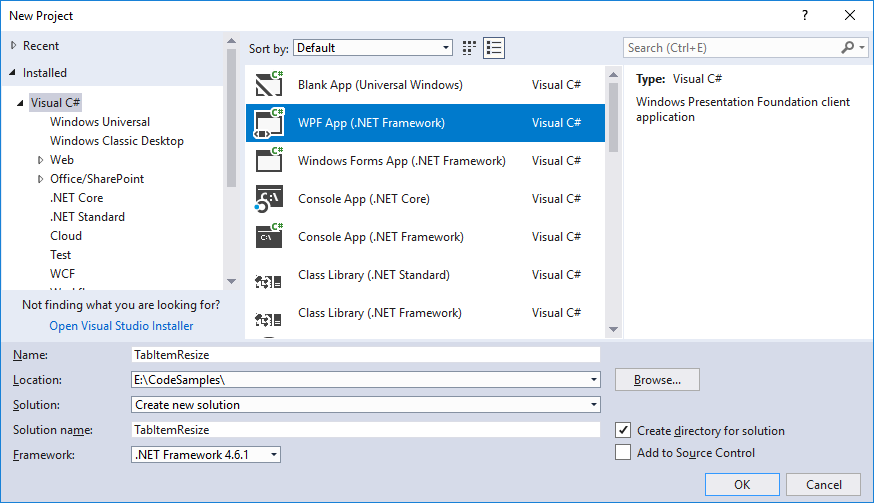 Step 2: Create an example adjustable window with tab items
Update the MainWindow.xaml to create a grid with a column section containing the tab items and a grid splitter to adjust the width of the tab item area.
MainWindow.xaml
We will get on to the step of creating the tab control style in a minute...
[code language="xml"]
<Window x:Class="TabItemResize.MainWindow"
xmlns="http://schemas.microsoft.com/winfx/2006/xaml/presentation"
xmlns:x="http://schemas.microsoft.com/winfx/2006/xaml"
xmlns:d="http://schemas.microsoft.com/expression/blend/2008"
xmlns:mc="http://schemas.openxmlformats.org/markup-compatibility/2006"
mc:Ignorable="d"
Title="MainWindow" Height="450" Width="700">
<Grid>
<Grid.ColumnDefinitions>
<ColumnDefinition Width="Auto" />
<ColumnDefinition Width="5" />
<ColumnDefinition Width="Auto" />
</Grid.ColumnDefinitions>
<TabControl Style="{DynamicResource TabControlStyle}" >
<TabItem Header="Tab no. 1" />
<TabItem Header="Tab no. 2" />
<TabItem Header="Tab no. 3" />
</TabControl>
<GridSplitter
Grid.Column="1"
ResizeDirection="Columns"
HorizontalAlignment="Stretch"
VerticalAlignment="Stretch" />
</Grid>
</Window>
[/code]
Step 3: Create a version of UniformGrid
UniformTabPanel.cs
Notice the override to obtain the Size object that is governed by the total width of the child TabItems:
[code language="csharp"]
using System.Linq;
using System.Windows;
using System.Windows.Controls;
using System.Windows.Controls.Primitives;
namespace TabItemResize
{
public class UniformTabPanel : UniformGrid
{
public UniformTabPanel()
{
IsItemsHost = true;
Rows = 1;
HorizontalAlignment = HorizontalAlignment.Stretch;
}
protected override Size MeasureOverride(Size constraint)
{
var totalMaxWidth = Children.OfType<TabItem>().Sum(tab => tab.MaxWidth);
if (!double.IsInfinity(totalMaxWidth))
HorizontalAlignment = constraint.Width > totalMaxWidth
? HorizontalAlignment.Left
: HorizontalAlignment.Stretch;
return base.MeasureOverride(constraint);
}
}
}
[/code]
Step 4: Create the style for the TabControl
App.xaml
[code language="xml"]
<Application x:Class="TabItemResize.App"
xmlns="http://schemas.microsoft.com/winfx/2006/xaml/presentation"
xmlns:x="http://schemas.microsoft.com/winfx/2006/xaml"
xmlns:local="clr-namespace:TabItemResize"
StartupUri="MainWindow.xaml">
<Application.Resources>
<Style x:Key="TabControlStyle" TargetType="{x:Type TabControl}">
<Setter Property="SnapsToDevicePixels" Value="True" />
<Setter Property="Template">
<Setter.Value>
<ControlTemplate TargetType="{x:Type TabControl}">
<Grid>
<Grid.RowDefinitions>
<RowDefinition Height="Auto" />
<RowDefinition Height="*" />
</Grid.RowDefinitions>
<Border>
<local:UniformTabPanel x:Name="HeaderPanel" />
</Border>
<Border x:Name="Border" Grid.Row="1"
BorderThickness="{TemplateBinding BorderThickness}"
Background="{TemplateBinding Background}"
BorderBrush="{TemplateBinding BorderBrush}">
<ContentPresenter x:Name="PART_SelectedContentHost" ContentSource="SelectedContent" />
</Border>
</Grid>
</ControlTemplate>
</Setter.Value>
</Setter>
</Style>
</Application.Resources>
</Application>
[/code]
On running the application see that the default widths of the tab items are displayed:
Step 2: Create an example adjustable window with tab items
Update the MainWindow.xaml to create a grid with a column section containing the tab items and a grid splitter to adjust the width of the tab item area.
MainWindow.xaml
We will get on to the step of creating the tab control style in a minute...
[code language="xml"]
<Window x:Class="TabItemResize.MainWindow"
xmlns="http://schemas.microsoft.com/winfx/2006/xaml/presentation"
xmlns:x="http://schemas.microsoft.com/winfx/2006/xaml"
xmlns:d="http://schemas.microsoft.com/expression/blend/2008"
xmlns:mc="http://schemas.openxmlformats.org/markup-compatibility/2006"
mc:Ignorable="d"
Title="MainWindow" Height="450" Width="700">
<Grid>
<Grid.ColumnDefinitions>
<ColumnDefinition Width="Auto" />
<ColumnDefinition Width="5" />
<ColumnDefinition Width="Auto" />
</Grid.ColumnDefinitions>
<TabControl Style="{DynamicResource TabControlStyle}" >
<TabItem Header="Tab no. 1" />
<TabItem Header="Tab no. 2" />
<TabItem Header="Tab no. 3" />
</TabControl>
<GridSplitter
Grid.Column="1"
ResizeDirection="Columns"
HorizontalAlignment="Stretch"
VerticalAlignment="Stretch" />
</Grid>
</Window>
[/code]
Step 3: Create a version of UniformGrid
UniformTabPanel.cs
Notice the override to obtain the Size object that is governed by the total width of the child TabItems:
[code language="csharp"]
using System.Linq;
using System.Windows;
using System.Windows.Controls;
using System.Windows.Controls.Primitives;
namespace TabItemResize
{
public class UniformTabPanel : UniformGrid
{
public UniformTabPanel()
{
IsItemsHost = true;
Rows = 1;
HorizontalAlignment = HorizontalAlignment.Stretch;
}
protected override Size MeasureOverride(Size constraint)
{
var totalMaxWidth = Children.OfType<TabItem>().Sum(tab => tab.MaxWidth);
if (!double.IsInfinity(totalMaxWidth))
HorizontalAlignment = constraint.Width > totalMaxWidth
? HorizontalAlignment.Left
: HorizontalAlignment.Stretch;
return base.MeasureOverride(constraint);
}
}
}
[/code]
Step 4: Create the style for the TabControl
App.xaml
[code language="xml"]
<Application x:Class="TabItemResize.App"
xmlns="http://schemas.microsoft.com/winfx/2006/xaml/presentation"
xmlns:x="http://schemas.microsoft.com/winfx/2006/xaml"
xmlns:local="clr-namespace:TabItemResize"
StartupUri="MainWindow.xaml">
<Application.Resources>
<Style x:Key="TabControlStyle" TargetType="{x:Type TabControl}">
<Setter Property="SnapsToDevicePixels" Value="True" />
<Setter Property="Template">
<Setter.Value>
<ControlTemplate TargetType="{x:Type TabControl}">
<Grid>
<Grid.RowDefinitions>
<RowDefinition Height="Auto" />
<RowDefinition Height="*" />
</Grid.RowDefinitions>
<Border>
<local:UniformTabPanel x:Name="HeaderPanel" />
</Border>
<Border x:Name="Border" Grid.Row="1"
BorderThickness="{TemplateBinding BorderThickness}"
Background="{TemplateBinding Background}"
BorderBrush="{TemplateBinding BorderBrush}">
<ContentPresenter x:Name="PART_SelectedContentHost" ContentSource="SelectedContent" />
</Border>
</Grid>
</ControlTemplate>
</Setter.Value>
</Setter>
</Style>
</Application.Resources>
</Application>
[/code]
On running the application see that the default widths of the tab items are displayed:
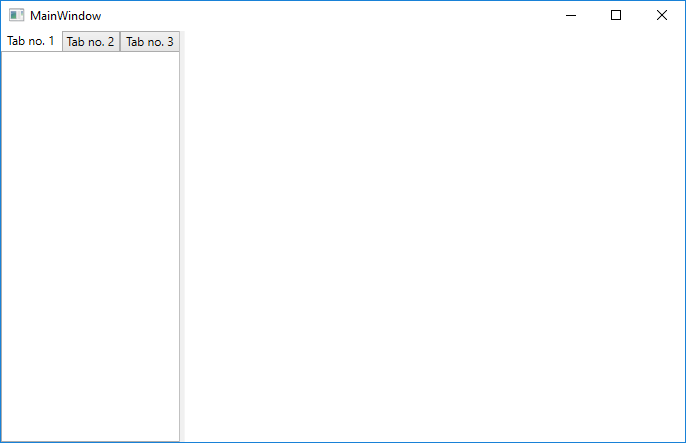 And dragging across the splitter control the widths of the tab headers are expanded accordingly:
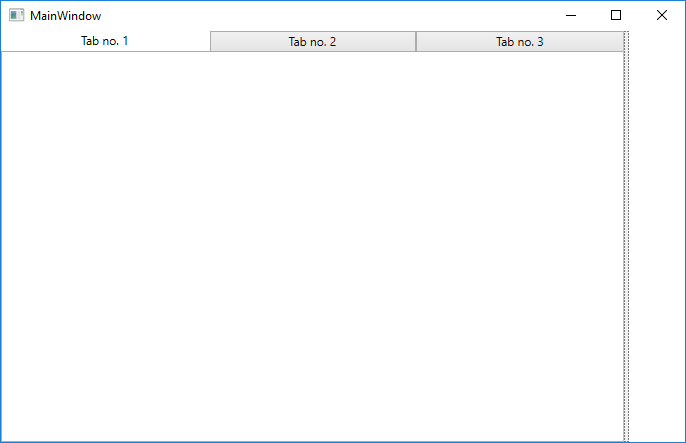
Step 2: Create an example adjustable window with tab items
Update the MainWindow.xaml to create a grid with a column section containing the tab items and a grid splitter to adjust the width of the tab item area.
MainWindow.xaml
We will get on to the step of creating the tab control style in a minute...
[code language="xml"]
<Window x:Class="TabItemResize.MainWindow"
xmlns="http://schemas.microsoft.com/winfx/2006/xaml/presentation"
xmlns:x="http://schemas.microsoft.com/winfx/2006/xaml"
xmlns:d="http://schemas.microsoft.com/expression/blend/2008"
xmlns:mc="http://schemas.openxmlformats.org/markup-compatibility/2006"
mc:Ignorable="d"
Title="MainWindow" Height="450" Width="700">
<Grid>
<Grid.ColumnDefinitions>
<ColumnDefinition Width="Auto" />
<ColumnDefinition Width="5" />
<ColumnDefinition Width="Auto" />
</Grid.ColumnDefinitions>
<TabControl Style="{DynamicResource TabControlStyle}" >
<TabItem Header="Tab no. 1" />
<TabItem Header="Tab no. 2" />
<TabItem Header="Tab no. 3" />
</TabControl>
<GridSplitter
Grid.Column="1"
ResizeDirection="Columns"
HorizontalAlignment="Stretch"
VerticalAlignment="Stretch" />
</Grid>
</Window>
[/code]
Step 3: Create a version of UniformGrid
UniformTabPanel.cs
Notice the override to obtain the Size object that is governed by the total width of the child TabItems:
[code language="csharp"]
using System.Linq;
using System.Windows;
using System.Windows.Controls;
using System.Windows.Controls.Primitives;
namespace TabItemResize
{
public class UniformTabPanel : UniformGrid
{
public UniformTabPanel()
{
IsItemsHost = true;
Rows = 1;
HorizontalAlignment = HorizontalAlignment.Stretch;
}
protected override Size MeasureOverride(Size constraint)
{
var totalMaxWidth = Children.OfType<TabItem>().Sum(tab => tab.MaxWidth);
if (!double.IsInfinity(totalMaxWidth))
HorizontalAlignment = constraint.Width > totalMaxWidth
? HorizontalAlignment.Left
: HorizontalAlignment.Stretch;
return base.MeasureOverride(constraint);
}
}
}
[/code]
Step 4: Create the style for the TabControl
App.xaml
[code language="xml"]
<Application x:Class="TabItemResize.App"
xmlns="http://schemas.microsoft.com/winfx/2006/xaml/presentation"
xmlns:x="http://schemas.microsoft.com/winfx/2006/xaml"
xmlns:local="clr-namespace:TabItemResize"
StartupUri="MainWindow.xaml">
<Application.Resources>
<Style x:Key="TabControlStyle" TargetType="{x:Type TabControl}">
<Setter Property="SnapsToDevicePixels" Value="True" />
<Setter Property="Template">
<Setter.Value>
<ControlTemplate TargetType="{x:Type TabControl}">
<Grid>
<Grid.RowDefinitions>
<RowDefinition Height="Auto" />
<RowDefinition Height="*" />
</Grid.RowDefinitions>
<Border>
<local:UniformTabPanel x:Name="HeaderPanel" />
</Border>
<Border x:Name="Border" Grid.Row="1"
BorderThickness="{TemplateBinding BorderThickness}"
Background="{TemplateBinding Background}"
BorderBrush="{TemplateBinding BorderBrush}">
<ContentPresenter x:Name="PART_SelectedContentHost" ContentSource="SelectedContent" />
</Border>
</Grid>
</ControlTemplate>
</Setter.Value>
</Setter>
</Style>
</Application.Resources>
</Application>
[/code]
On running the application see that the default widths of the tab items are displayed:
And dragging across the splitter control the widths of the tab headers are expanded accordingly:


Comments
Post a Comment