Handling mouse event commands in Listview controls in WPF / MVVM
Some instructions on how to intercept events when clicking on Listview controls in WPF / MVVM.
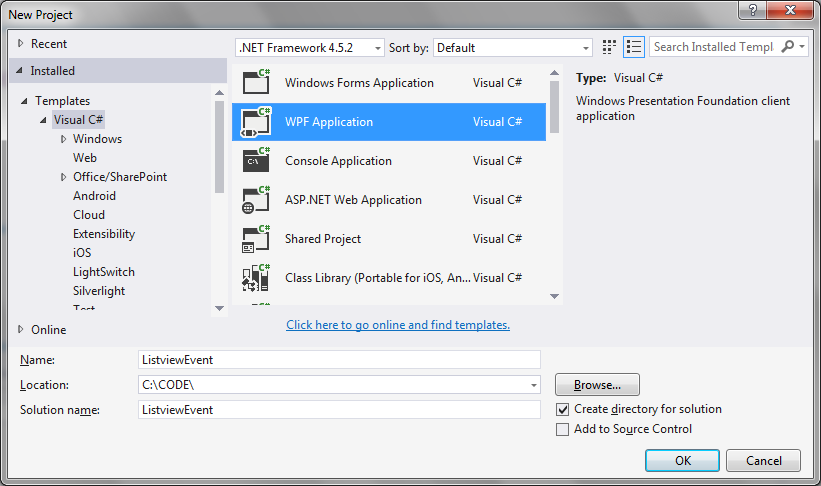
Step 1: Create a new WPF application in Visual Studio
 Step 2: Ensure necessary resources are added
System.IO.Compression
System.IO.Compression.FileSystem
Step 2: Ensure necessary resources are added
System.IO.Compression
System.IO.Compression.FileSystem
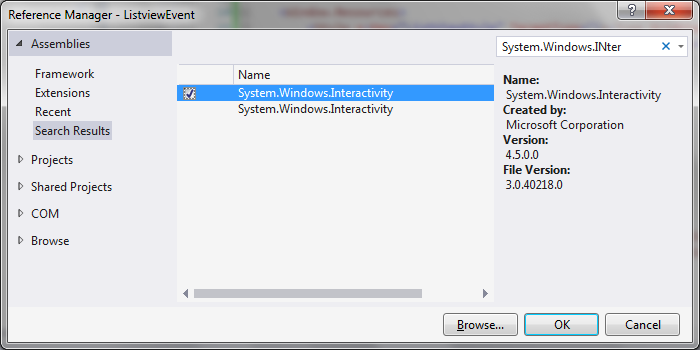
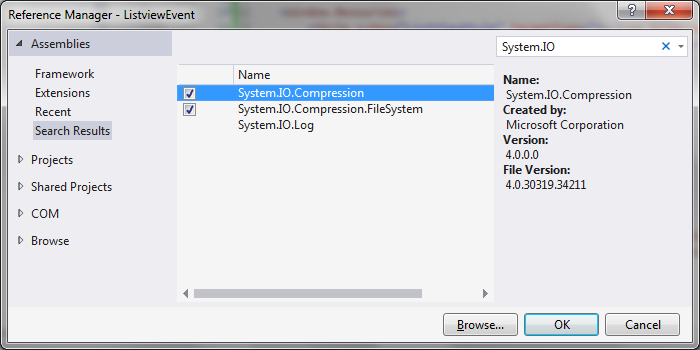 System.Windows.Interactivity
 Step 3: Add the MainWindowViewModel class
MainWindowViewModel.cs
[code language="csharp"]
using System.Collections.Generic;
using System.Windows;
using System.Windows.Input;
namespace ListviewEvent
{
public class Item
{
public Item(string name, string matches)
{
Name = name;
Matches = matches;
}
public string Name { get; set; }
public string Matches { get; set; }
}
public class ItemHandler
{
public ItemHandler()
{
Items = new List<Item>();
}
public List<Item> Items { get; private set; }
public void Add(Item item)
{
Items.Add(item);
}
}
public class MainWindowViewModel
{
private readonly ItemHandler _itemHandler;
private ICommand _command;
public MainWindowViewModel()
{
_itemHandler = new ItemHandler();
_itemHandler.Add(new Item("John Doe", "12"));
_itemHandler.Add(new Item("Jane Doe", "133"));
_itemHandler.Add(new Item("Sammy Doe", "45"));
}
public List<Item> Items
{
get { return _itemHandler.Items; }
}
public ICommand Command
{
get { return _command ?? (_command = new RelayCommand(x =>
{
DoStuff(x as Item);
})); }
}
private void DoStuff(Item item)
{
MessageBox.Show(item.Name + " element clicked");
}
}
}
[/code]
Step 4: Update the MainWindow.xaml to create the Listview example
MainWindow.xaml
[code language="csharp"]
<Window x:Class="ListviewEvent.MainWindow"
xmlns="http://schemas.microsoft.com/winfx/2006/xaml/presentation"
xmlns:x="http://schemas.microsoft.com/winfx/2006/xaml"
xmlns:d="http://schemas.microsoft.com/expression/blend/2008"
xmlns:mc="http://schemas.openxmlformats.org/markup-compatibility/2006"
xmlns:local="clr-namespace:ListviewEvent"
xmlns:i="http://schemas.microsoft.com/expression/2010/interactivity"
mc:Ignorable="d"
Title="MainWindow" Height="350" Width="525">
<Window.DataContext>
<local:MainWindowViewModel/>
</Window.DataContext>
<Window.Resources>
<Style x:Key="ListViewStyle" TargetType="{x:Type GridViewColumnHeader}">
<Setter Property="HorizontalContentAlignment" Value="Left" />
</Style>
</Window.Resources>
<Grid>
<ListView
Margin="10"
Name="ListView1"
ItemsSource="{Binding Items}"
HorizontalAlignment="Left"
HorizontalContentAlignment="Left">
<i:Interaction.Triggers>
<i:EventTrigger EventName="MouseDoubleClick">
<i:InvokeCommandAction
Command="{Binding Command}"
CommandParameter="{Binding ElementName=ListView1, Path=SelectedItem}"/>
</i:EventTrigger>
</i:Interaction.Triggers>
<ListView.View>
<GridView>
<GridViewColumn HeaderContainerStyle="{StaticResource ListViewStyle}" Header="Name" Width="320" DisplayMemberBinding="{Binding Name}" />
<GridViewColumn HeaderContainerStyle="{StaticResource ListViewStyle}" Header="Matches" Width="80" DisplayMemberBinding="{Binding Matches}" />
</GridView>
</ListView.View>
</ListView>
</Grid>
</Window>
[/code]
Step 5: Add event handling classes
EventArgs.cs
[code language="csharp"]
using System;
namespace ListviewEvent
{
public class EventArgs<T> : EventArgs
{
public EventArgs(T value)
{
Value = value;
}
public T Value { get; private set; }
}
}
[/code]
EventRaiser.cs
[code language="csharp"]
using System;
namespace ListviewEvent
{
public static class EventRaiser
{
public static void Raise(this EventHandler handler, object sender)
{
handler?.Invoke(sender, EventArgs.Empty);
}
public static void Raise<T>(this EventHandler<EventArgs<T>> handler, object sender, T value)
{
handler?.Invoke(sender, new EventArgs<T>(value));
}
public static void Raise<T>(this EventHandler<T> handler, object sender, T value) where T : EventArgs
{
handler?.Invoke(sender, value);
}
public static void Raise<T>(this EventHandler<EventArgs<T>> handler, object sender, EventArgs<T> value)
{
handler?.Invoke(sender, value);
}
}
}
[/code]
RelayCommand.cs
[code language="csharp"]
using System;
using System.Windows.Input;
namespace ListviewEvent
{
public class RelayCommand<T> : ICommand
{
private readonly Predicate<T> _canExecute;
private readonly Action<T> _execute;
public RelayCommand(Action<T> execute)
: this(execute, null)
{
_execute = execute;
}
public RelayCommand(Action<T> execute, Predicate<T> canExecute)
{
if (execute == null)
{
throw new ArgumentNullException("execute");
}
_execute = execute;
_canExecute = canExecute;
}
public bool CanExecute(object parameter)
{
return _canExecute == null || _canExecute((T)parameter);
}
public void Execute(object parameter)
{
_execute((T)parameter);
}
public event EventHandler CanExecuteChanged
{
add { CommandManager.RequerySuggested += value; }
remove { CommandManager.RequerySuggested -= value; }
}
}
public class RelayCommand : ICommand
{
private readonly Predicate<object> _canExecute;
private readonly Action<object> _execute;
public RelayCommand(Action<object> execute)
: this(execute, null)
{
_execute = execute;
}
public RelayCommand(Action<object> execute, Predicate<object> canExecute)
{
if (execute == null)
{
throw new ArgumentNullException("execute");
}
_execute = execute;
_canExecute = canExecute;
}
public bool CanExecute(object parameter)
{
return _canExecute == null || _canExecute(parameter);
}
public void Execute(object parameter)
{
_execute(parameter);
}
// Ensures WPF commanding infrastructure asks all RelayCommand objects whether their
// associated views should be enabled whenever a command is invoked
public event EventHandler CanExecuteChanged
{
add
{
CommandManager.RequerySuggested += value;
CanExecuteChangedInternal += value;
}
remove
{
CommandManager.RequerySuggested -= value;
CanExecuteChangedInternal -= value;
}
}
private event EventHandler CanExecuteChangedInternal;
public void RaiseCanExecuteChanged()
{
CanExecuteChangedInternal.Raise(this);
}
}
}
[/code]
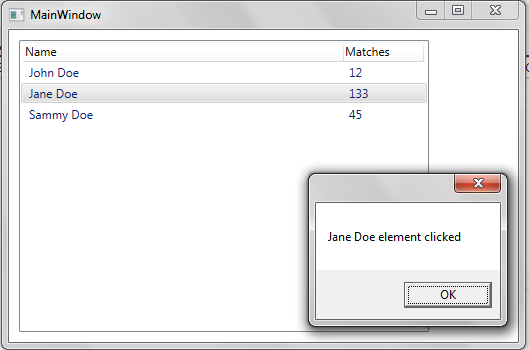
On running the application and double-clicking on one of the Listview items, see that the double-click event is intercepted and a message is shown showing details of the Listview item that was clicked on:
Step 3: Add the MainWindowViewModel class
MainWindowViewModel.cs
[code language="csharp"]
using System.Collections.Generic;
using System.Windows;
using System.Windows.Input;
namespace ListviewEvent
{
public class Item
{
public Item(string name, string matches)
{
Name = name;
Matches = matches;
}
public string Name { get; set; }
public string Matches { get; set; }
}
public class ItemHandler
{
public ItemHandler()
{
Items = new List<Item>();
}
public List<Item> Items { get; private set; }
public void Add(Item item)
{
Items.Add(item);
}
}
public class MainWindowViewModel
{
private readonly ItemHandler _itemHandler;
private ICommand _command;
public MainWindowViewModel()
{
_itemHandler = new ItemHandler();
_itemHandler.Add(new Item("John Doe", "12"));
_itemHandler.Add(new Item("Jane Doe", "133"));
_itemHandler.Add(new Item("Sammy Doe", "45"));
}
public List<Item> Items
{
get { return _itemHandler.Items; }
}
public ICommand Command
{
get { return _command ?? (_command = new RelayCommand(x =>
{
DoStuff(x as Item);
})); }
}
private void DoStuff(Item item)
{
MessageBox.Show(item.Name + " element clicked");
}
}
}
[/code]
Step 4: Update the MainWindow.xaml to create the Listview example
MainWindow.xaml
[code language="csharp"]
<Window x:Class="ListviewEvent.MainWindow"
xmlns="http://schemas.microsoft.com/winfx/2006/xaml/presentation"
xmlns:x="http://schemas.microsoft.com/winfx/2006/xaml"
xmlns:d="http://schemas.microsoft.com/expression/blend/2008"
xmlns:mc="http://schemas.openxmlformats.org/markup-compatibility/2006"
xmlns:local="clr-namespace:ListviewEvent"
xmlns:i="http://schemas.microsoft.com/expression/2010/interactivity"
mc:Ignorable="d"
Title="MainWindow" Height="350" Width="525">
<Window.DataContext>
<local:MainWindowViewModel/>
</Window.DataContext>
<Window.Resources>
<Style x:Key="ListViewStyle" TargetType="{x:Type GridViewColumnHeader}">
<Setter Property="HorizontalContentAlignment" Value="Left" />
</Style>
</Window.Resources>
<Grid>
<ListView
Margin="10"
Name="ListView1"
ItemsSource="{Binding Items}"
HorizontalAlignment="Left"
HorizontalContentAlignment="Left">
<i:Interaction.Triggers>
<i:EventTrigger EventName="MouseDoubleClick">
<i:InvokeCommandAction
Command="{Binding Command}"
CommandParameter="{Binding ElementName=ListView1, Path=SelectedItem}"/>
</i:EventTrigger>
</i:Interaction.Triggers>
<ListView.View>
<GridView>
<GridViewColumn HeaderContainerStyle="{StaticResource ListViewStyle}" Header="Name" Width="320" DisplayMemberBinding="{Binding Name}" />
<GridViewColumn HeaderContainerStyle="{StaticResource ListViewStyle}" Header="Matches" Width="80" DisplayMemberBinding="{Binding Matches}" />
</GridView>
</ListView.View>
</ListView>
</Grid>
</Window>
[/code]
Step 5: Add event handling classes
EventArgs.cs
[code language="csharp"]
using System;
namespace ListviewEvent
{
public class EventArgs<T> : EventArgs
{
public EventArgs(T value)
{
Value = value;
}
public T Value { get; private set; }
}
}
[/code]
EventRaiser.cs
[code language="csharp"]
using System;
namespace ListviewEvent
{
public static class EventRaiser
{
public static void Raise(this EventHandler handler, object sender)
{
handler?.Invoke(sender, EventArgs.Empty);
}
public static void Raise<T>(this EventHandler<EventArgs<T>> handler, object sender, T value)
{
handler?.Invoke(sender, new EventArgs<T>(value));
}
public static void Raise<T>(this EventHandler<T> handler, object sender, T value) where T : EventArgs
{
handler?.Invoke(sender, value);
}
public static void Raise<T>(this EventHandler<EventArgs<T>> handler, object sender, EventArgs<T> value)
{
handler?.Invoke(sender, value);
}
}
}
[/code]
RelayCommand.cs
[code language="csharp"]
using System;
using System.Windows.Input;
namespace ListviewEvent
{
public class RelayCommand<T> : ICommand
{
private readonly Predicate<T> _canExecute;
private readonly Action<T> _execute;
public RelayCommand(Action<T> execute)
: this(execute, null)
{
_execute = execute;
}
public RelayCommand(Action<T> execute, Predicate<T> canExecute)
{
if (execute == null)
{
throw new ArgumentNullException("execute");
}
_execute = execute;
_canExecute = canExecute;
}
public bool CanExecute(object parameter)
{
return _canExecute == null || _canExecute((T)parameter);
}
public void Execute(object parameter)
{
_execute((T)parameter);
}
public event EventHandler CanExecuteChanged
{
add { CommandManager.RequerySuggested += value; }
remove { CommandManager.RequerySuggested -= value; }
}
}
public class RelayCommand : ICommand
{
private readonly Predicate<object> _canExecute;
private readonly Action<object> _execute;
public RelayCommand(Action<object> execute)
: this(execute, null)
{
_execute = execute;
}
public RelayCommand(Action<object> execute, Predicate<object> canExecute)
{
if (execute == null)
{
throw new ArgumentNullException("execute");
}
_execute = execute;
_canExecute = canExecute;
}
public bool CanExecute(object parameter)
{
return _canExecute == null || _canExecute(parameter);
}
public void Execute(object parameter)
{
_execute(parameter);
}
// Ensures WPF commanding infrastructure asks all RelayCommand objects whether their
// associated views should be enabled whenever a command is invoked
public event EventHandler CanExecuteChanged
{
add
{
CommandManager.RequerySuggested += value;
CanExecuteChangedInternal += value;
}
remove
{
CommandManager.RequerySuggested -= value;
CanExecuteChangedInternal -= value;
}
}
private event EventHandler CanExecuteChangedInternal;
public void RaiseCanExecuteChanged()
{
CanExecuteChangedInternal.Raise(this);
}
}
}
[/code]
On running the application and double-clicking on one of the Listview items, see that the double-click event is intercepted and a message is shown showing details of the Listview item that was clicked on:
Step 2: Ensure necessary resources are added
System.IO.Compression
System.IO.Compression.FileSystem
System.Windows.Interactivity
Step 3: Add the MainWindowViewModel class
MainWindowViewModel.cs
[code language="csharp"]
using System.Collections.Generic;
using System.Windows;
using System.Windows.Input;
namespace ListviewEvent
{
public class Item
{
public Item(string name, string matches)
{
Name = name;
Matches = matches;
}
public string Name { get; set; }
public string Matches { get; set; }
}
public class ItemHandler
{
public ItemHandler()
{
Items = new List<Item>();
}
public List<Item> Items { get; private set; }
public void Add(Item item)
{
Items.Add(item);
}
}
public class MainWindowViewModel
{
private readonly ItemHandler _itemHandler;
private ICommand _command;
public MainWindowViewModel()
{
_itemHandler = new ItemHandler();
_itemHandler.Add(new Item("John Doe", "12"));
_itemHandler.Add(new Item("Jane Doe", "133"));
_itemHandler.Add(new Item("Sammy Doe", "45"));
}
public List<Item> Items
{
get { return _itemHandler.Items; }
}
public ICommand Command
{
get { return _command ?? (_command = new RelayCommand(x =>
{
DoStuff(x as Item);
})); }
}
private void DoStuff(Item item)
{
MessageBox.Show(item.Name + " element clicked");
}
}
}
[/code]
Step 4: Update the MainWindow.xaml to create the Listview example
MainWindow.xaml
[code language="csharp"]
<Window x:Class="ListviewEvent.MainWindow"
xmlns="http://schemas.microsoft.com/winfx/2006/xaml/presentation"
xmlns:x="http://schemas.microsoft.com/winfx/2006/xaml"
xmlns:d="http://schemas.microsoft.com/expression/blend/2008"
xmlns:mc="http://schemas.openxmlformats.org/markup-compatibility/2006"
xmlns:local="clr-namespace:ListviewEvent"
xmlns:i="http://schemas.microsoft.com/expression/2010/interactivity"
mc:Ignorable="d"
Title="MainWindow" Height="350" Width="525">
<Window.DataContext>
<local:MainWindowViewModel/>
</Window.DataContext>
<Window.Resources>
<Style x:Key="ListViewStyle" TargetType="{x:Type GridViewColumnHeader}">
<Setter Property="HorizontalContentAlignment" Value="Left" />
</Style>
</Window.Resources>
<Grid>
<ListView
Margin="10"
Name="ListView1"
ItemsSource="{Binding Items}"
HorizontalAlignment="Left"
HorizontalContentAlignment="Left">
<i:Interaction.Triggers>
<i:EventTrigger EventName="MouseDoubleClick">
<i:InvokeCommandAction
Command="{Binding Command}"
CommandParameter="{Binding ElementName=ListView1, Path=SelectedItem}"/>
</i:EventTrigger>
</i:Interaction.Triggers>
<ListView.View>
<GridView>
<GridViewColumn HeaderContainerStyle="{StaticResource ListViewStyle}" Header="Name" Width="320" DisplayMemberBinding="{Binding Name}" />
<GridViewColumn HeaderContainerStyle="{StaticResource ListViewStyle}" Header="Matches" Width="80" DisplayMemberBinding="{Binding Matches}" />
</GridView>
</ListView.View>
</ListView>
</Grid>
</Window>
[/code]
Step 5: Add event handling classes
EventArgs.cs
[code language="csharp"]
using System;
namespace ListviewEvent
{
public class EventArgs<T> : EventArgs
{
public EventArgs(T value)
{
Value = value;
}
public T Value { get; private set; }
}
}
[/code]
EventRaiser.cs
[code language="csharp"]
using System;
namespace ListviewEvent
{
public static class EventRaiser
{
public static void Raise(this EventHandler handler, object sender)
{
handler?.Invoke(sender, EventArgs.Empty);
}
public static void Raise<T>(this EventHandler<EventArgs<T>> handler, object sender, T value)
{
handler?.Invoke(sender, new EventArgs<T>(value));
}
public static void Raise<T>(this EventHandler<T> handler, object sender, T value) where T : EventArgs
{
handler?.Invoke(sender, value);
}
public static void Raise<T>(this EventHandler<EventArgs<T>> handler, object sender, EventArgs<T> value)
{
handler?.Invoke(sender, value);
}
}
}
[/code]
RelayCommand.cs
[code language="csharp"]
using System;
using System.Windows.Input;
namespace ListviewEvent
{
public class RelayCommand<T> : ICommand
{
private readonly Predicate<T> _canExecute;
private readonly Action<T> _execute;
public RelayCommand(Action<T> execute)
: this(execute, null)
{
_execute = execute;
}
public RelayCommand(Action<T> execute, Predicate<T> canExecute)
{
if (execute == null)
{
throw new ArgumentNullException("execute");
}
_execute = execute;
_canExecute = canExecute;
}
public bool CanExecute(object parameter)
{
return _canExecute == null || _canExecute((T)parameter);
}
public void Execute(object parameter)
{
_execute((T)parameter);
}
public event EventHandler CanExecuteChanged
{
add { CommandManager.RequerySuggested += value; }
remove { CommandManager.RequerySuggested -= value; }
}
}
public class RelayCommand : ICommand
{
private readonly Predicate<object> _canExecute;
private readonly Action<object> _execute;
public RelayCommand(Action<object> execute)
: this(execute, null)
{
_execute = execute;
}
public RelayCommand(Action<object> execute, Predicate<object> canExecute)
{
if (execute == null)
{
throw new ArgumentNullException("execute");
}
_execute = execute;
_canExecute = canExecute;
}
public bool CanExecute(object parameter)
{
return _canExecute == null || _canExecute(parameter);
}
public void Execute(object parameter)
{
_execute(parameter);
}
// Ensures WPF commanding infrastructure asks all RelayCommand objects whether their
// associated views should be enabled whenever a command is invoked
public event EventHandler CanExecuteChanged
{
add
{
CommandManager.RequerySuggested += value;
CanExecuteChangedInternal += value;
}
remove
{
CommandManager.RequerySuggested -= value;
CanExecuteChangedInternal -= value;
}
}
private event EventHandler CanExecuteChangedInternal;
public void RaiseCanExecuteChanged()
{
CanExecuteChangedInternal.Raise(this);
}
}
}
[/code]
On running the application and double-clicking on one of the Listview items, see that the double-click event is intercepted and a message is shown showing details of the Listview item that was clicked on:


Comments
Post a Comment