How to serialize and deserialize objects using NewtonSoft JSON
Some instructions on how to use Newtonsoft JSON to serialize and deserialize your objects in C#
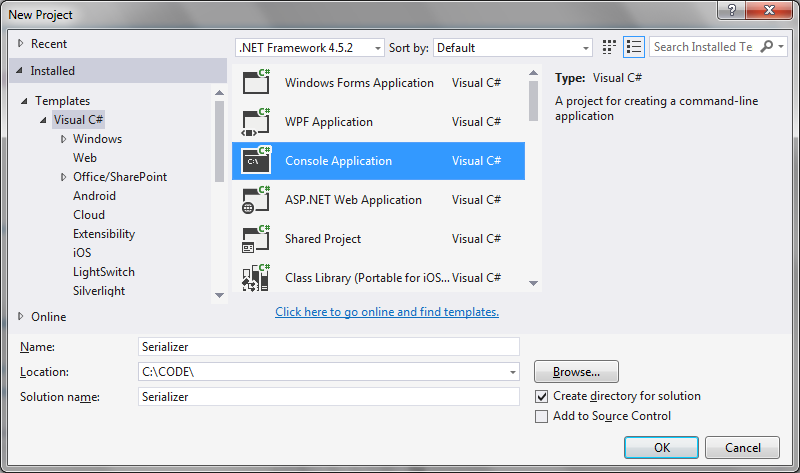
Step 1: Create a new Visual Studio project
Just a simple console application will do:
 Step 2: Install Newtonsoft Json using Nuget
Available at the NuGet site:
https://www.nuget.org/packages/newtonsoft.json/
Enter the command to install Newtonsoft Json in the Visual Studio package manager console:
[code language="xml"]
Install-Package Newtonsoft.Json -Version 11.0.2
[/code]
Step 3. Create an example class to serialize/deserialize
[code language="csharp"]
public class DataStructure
{
public string Name { get; set; }
public List<int> Identifiers { get; set; }
}
[/code]
Step 4. Create methods to serialize and deserialize
[code language="csharp"]
public static void Serialize(object obj)
{
var serializer = new JsonSerializer();
using (var sw = new StreamWriter(filePath))
using (JsonWriter writer = new JsonTextWriter(sw))
{
serializer.Serialize(writer, obj);
}
}
public static object Deserialize(string path)
{
var serializer = new JsonSerializer();
using (var sw = new StreamReader(path))
using (var reader = new JsonTextReader(sw))
{
return serializer.Deserialize(reader);
}
}
[/code]
Step 5: Try it
Putting this all together in the main program loop:
[code language="csharp"]
using Newtonsoft.Json;
using System;
using System.Collections.Generic;
using System.IO;
namespace Serializer
{
public class DataStructure
{
public string Name { get; set; }
public List<int> Identifiers { get; set; }
public void Print()
{
Console.WriteLine("Name: " + Name);
Console.WriteLine("Identifiers: " + string.Join<int>(",", Identifiers));
Console.WriteLine();
Console.WriteLine();
}
}
class Program
{
const string filePath = @"c:\dump\json.txt";
public static void Serialize(object obj)
{
var serializer = new JsonSerializer();
using (var sw = new StreamWriter(filePath))
using (JsonWriter writer = new JsonTextWriter(sw))
{
serializer.Serialize(writer, obj);
}
}
public static object Deserialize(string path)
{
var serializer = new JsonSerializer();
using (var sw = new StreamReader(path))
using (var reader = new JsonTextReader(sw))
{
return serializer.Deserialize(reader);
}
}
static void Main(string[] args)
{
var data = new DataStructure
{
Name = "Henry",
Identifiers = new List<int> { 1, 2, 3, 4 }
};
Console.WriteLine("Object before serialization:");
Console.WriteLine("----------------------------");
Console.WriteLine();
data.Print();
Serialize(data);
var deserialized = Deserialize(filePath);
Console.WriteLine("Deserialized (json) string:");
Console.WriteLine("---------------------------");
Console.WriteLine();
Console.WriteLine(deserialized);
}
}
}
[/code]
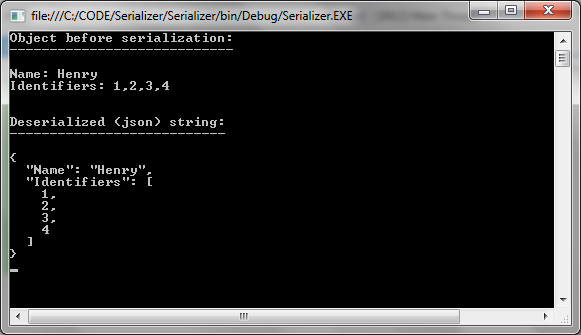
Giving the following output showing the object details before serialization, and the json string of the deserialized DataStructure object:
Step 2: Install Newtonsoft Json using Nuget
Available at the NuGet site:
https://www.nuget.org/packages/newtonsoft.json/
Enter the command to install Newtonsoft Json in the Visual Studio package manager console:
[code language="xml"]
Install-Package Newtonsoft.Json -Version 11.0.2
[/code]
Step 3. Create an example class to serialize/deserialize
[code language="csharp"]
public class DataStructure
{
public string Name { get; set; }
public List<int> Identifiers { get; set; }
}
[/code]
Step 4. Create methods to serialize and deserialize
[code language="csharp"]
public static void Serialize(object obj)
{
var serializer = new JsonSerializer();
using (var sw = new StreamWriter(filePath))
using (JsonWriter writer = new JsonTextWriter(sw))
{
serializer.Serialize(writer, obj);
}
}
public static object Deserialize(string path)
{
var serializer = new JsonSerializer();
using (var sw = new StreamReader(path))
using (var reader = new JsonTextReader(sw))
{
return serializer.Deserialize(reader);
}
}
[/code]
Step 5: Try it
Putting this all together in the main program loop:
[code language="csharp"]
using Newtonsoft.Json;
using System;
using System.Collections.Generic;
using System.IO;
namespace Serializer
{
public class DataStructure
{
public string Name { get; set; }
public List<int> Identifiers { get; set; }
public void Print()
{
Console.WriteLine("Name: " + Name);
Console.WriteLine("Identifiers: " + string.Join<int>(",", Identifiers));
Console.WriteLine();
Console.WriteLine();
}
}
class Program
{
const string filePath = @"c:\dump\json.txt";
public static void Serialize(object obj)
{
var serializer = new JsonSerializer();
using (var sw = new StreamWriter(filePath))
using (JsonWriter writer = new JsonTextWriter(sw))
{
serializer.Serialize(writer, obj);
}
}
public static object Deserialize(string path)
{
var serializer = new JsonSerializer();
using (var sw = new StreamReader(path))
using (var reader = new JsonTextReader(sw))
{
return serializer.Deserialize(reader);
}
}
static void Main(string[] args)
{
var data = new DataStructure
{
Name = "Henry",
Identifiers = new List<int> { 1, 2, 3, 4 }
};
Console.WriteLine("Object before serialization:");
Console.WriteLine("----------------------------");
Console.WriteLine();
data.Print();
Serialize(data);
var deserialized = Deserialize(filePath);
Console.WriteLine("Deserialized (json) string:");
Console.WriteLine("---------------------------");
Console.WriteLine();
Console.WriteLine(deserialized);
}
}
}
[/code]
Giving the following output showing the object details before serialization, and the json string of the deserialized DataStructure object:
Step 2: Install Newtonsoft Json using Nuget
Available at the NuGet site:
https://www.nuget.org/packages/newtonsoft.json/
Enter the command to install Newtonsoft Json in the Visual Studio package manager console:
[code language="xml"]
Install-Package Newtonsoft.Json -Version 11.0.2
[/code]
Step 3. Create an example class to serialize/deserialize
[code language="csharp"]
public class DataStructure
{
public string Name { get; set; }
public List<int> Identifiers { get; set; }
}
[/code]
Step 4. Create methods to serialize and deserialize
[code language="csharp"]
public static void Serialize(object obj)
{
var serializer = new JsonSerializer();
using (var sw = new StreamWriter(filePath))
using (JsonWriter writer = new JsonTextWriter(sw))
{
serializer.Serialize(writer, obj);
}
}
public static object Deserialize(string path)
{
var serializer = new JsonSerializer();
using (var sw = new StreamReader(path))
using (var reader = new JsonTextReader(sw))
{
return serializer.Deserialize(reader);
}
}
[/code]
Step 5: Try it
Putting this all together in the main program loop:
[code language="csharp"]
using Newtonsoft.Json;
using System;
using System.Collections.Generic;
using System.IO;
namespace Serializer
{
public class DataStructure
{
public string Name { get; set; }
public List<int> Identifiers { get; set; }
public void Print()
{
Console.WriteLine("Name: " + Name);
Console.WriteLine("Identifiers: " + string.Join<int>(",", Identifiers));
Console.WriteLine();
Console.WriteLine();
}
}
class Program
{
const string filePath = @"c:\dump\json.txt";
public static void Serialize(object obj)
{
var serializer = new JsonSerializer();
using (var sw = new StreamWriter(filePath))
using (JsonWriter writer = new JsonTextWriter(sw))
{
serializer.Serialize(writer, obj);
}
}
public static object Deserialize(string path)
{
var serializer = new JsonSerializer();
using (var sw = new StreamReader(path))
using (var reader = new JsonTextReader(sw))
{
return serializer.Deserialize(reader);
}
}
static void Main(string[] args)
{
var data = new DataStructure
{
Name = "Henry",
Identifiers = new List<int> { 1, 2, 3, 4 }
};
Console.WriteLine("Object before serialization:");
Console.WriteLine("----------------------------");
Console.WriteLine();
data.Print();
Serialize(data);
var deserialized = Deserialize(filePath);
Console.WriteLine("Deserialized (json) string:");
Console.WriteLine("---------------------------");
Console.WriteLine();
Console.WriteLine(deserialized);
}
}
}
[/code]
Giving the following output showing the object details before serialization, and the json string of the deserialized DataStructure object:


Comments
Post a Comment