Using basic authentication in a Web API application
Some instructions on how to create implement basic authentication in a Web API application.
Just follow what is shown in the steps and screenshots as shown:
Step 1: Create a new ASP.NET Web application in Visual Studio:
[caption id="attachment_8209" align="alignnone" width="826"]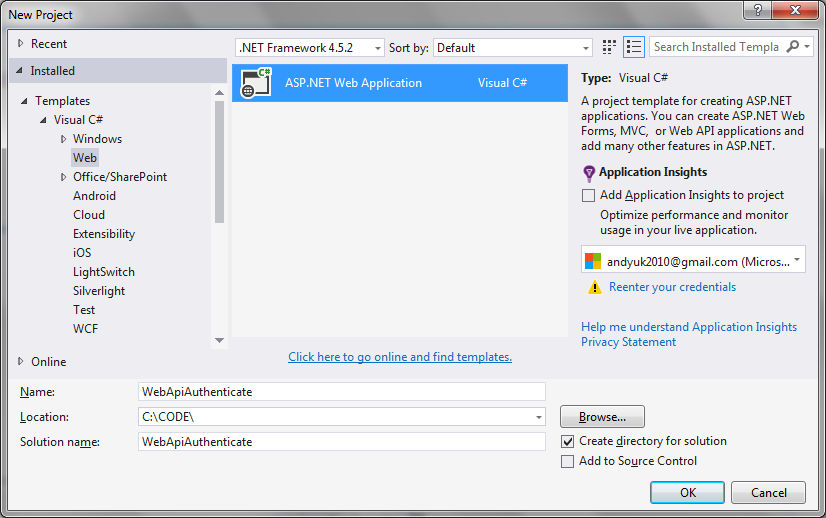 basic authentication in a Web API application[/caption]
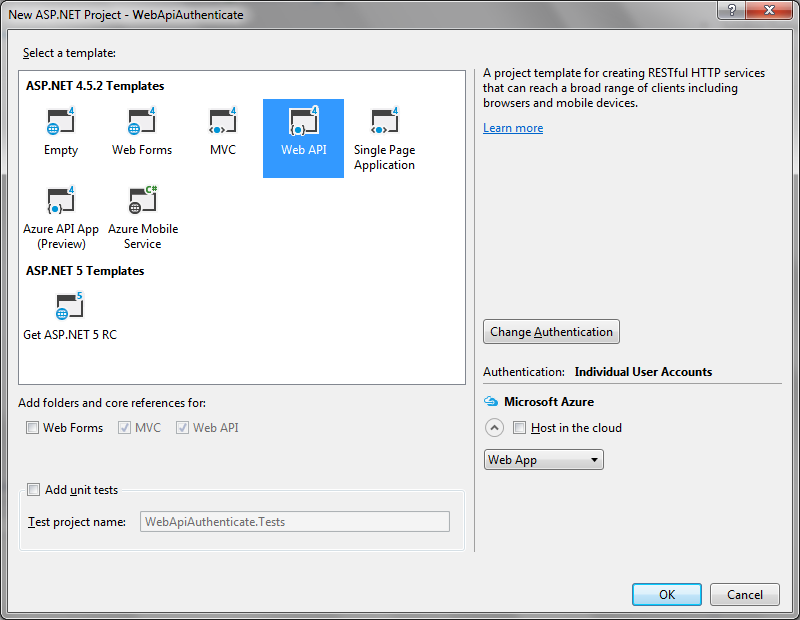 Step 2: Create a new authentication filter
I have created a new folder with which to put any new filter classes:
Step 2: Create a new authentication filter
I have created a new folder with which to put any new filter classes:
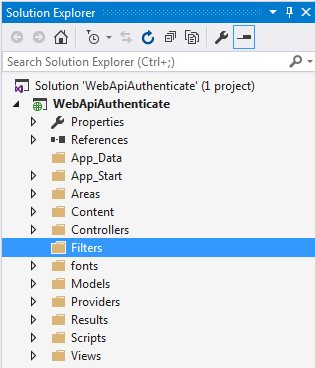 Create a new class called BasicAuthenticationAttribute. This needs to inherit from AuthorizationFilterAttribute.
[code language="csharp"]
using System;
using System.Net;
using System.Net.Http;
using System.Security.Principal;
using System.Text;
using System.Threading;
using System.Web.Http.Filters;
namespace WebApiAuthenticate.Filters
{
public class BasicAuthenticationAttribute : AuthorizationFilterAttribute
{
public override void OnAuthorization(HttpActionContext actionContext)
{
var authHeader = actionContext.Request.Headers.Authorization;
if (authHeader != null)
{
var authenticationToken = actionContext.Request.Headers.Authorization.Parameter;
var decodedAuthenticationToken = Encoding.UTF8.GetString(Convert.FromBase64String(authenticationToken));
var usernamePasswordArray = decodedAuthenticationToken.Split(':');
var userName = usernamePasswordArray[0];
var password = usernamePasswordArray[1];
// Replace this with your own system of security / means of validating credentials
var isValid = userName == "andy" && password == "password";
if (isValid)
{
var principal = new GenericPrincipal(new GenericIdentity(userName), null);
Thread.CurrentPrincipal = principal;
actionContext.Response =
actionContext.Request.CreateResponse(HttpStatusCode.OK,
"User " + userName + " successfully authenticated");
return;
}
}
HandleUnathorized(actionContext);
}
private static void HandleUnathorized(HttpActionContext actionContext)
{
actionContext.Response = actionContext.Request.CreateResponse(HttpStatusCode.Unauthorized);
actionContext.Response.Headers.Add("WWW-Authenticate", "Basic Scheme='Data' location = 'http://localhost:");
}
}
}
[/code]
Step 3: Add the filter in your WebApiConfig file
WebApiConfig.cs
[code language="csharp"]
using System;
using System.Collections.Generic;
using System.Linq;
using System.Net.Http;
using System.Web.Http;
using Microsoft.Owin.Security.OAuth;
using Newtonsoft.Json.Serialization;
using WebApiAuthenticate.Filters;
namespace WebApiAuthenticate
{
public static class WebApiConfig
{
public static void Register(HttpConfiguration config)
{
// Web API configuration and services
// Web API routes
config.MapHttpAttributeRoutes();
config.Routes.MapHttpRoute(
name: "DefaultApi",
routeTemplate: "api/{controller}/{id}",
defaults: new { id = RouteParameter.Optional }
);
config.Filters.Add(new BasicAuthenticationAttribute());
}
}
}
[/code]
Step 4: Ensure basic authentication filter is applied in Values controller
[code language="csharp"]
using System.Collections.Generic;
using System.Net.Http;
using System.Web.Http;
using WebApiAuthenticate.Filters;
namespace WebApiAuthenticate.Controllers
{
[BasicAuthentication]
[RequireHttps]
public class ValuesController : ApiController
{
// GET api/values
public IEnumerable<string> Get()
{
return new string[] { "value1", "value2" };
}
// GET api/values/5
public string Get(int id)
{
return id.ToString();
}
// POST api/values
public HttpResponseMessage Post()
{
var response = Request.CreateResponse<string>(System.Net.HttpStatusCode.Created, "Your first POST request!");
return response;
}
public HttpResponseMessage Post(int id)
{
var response = Request.CreateResponse<string>(System.Net.HttpStatusCode.Created, id.ToString());
return response;
}
// PUT api/values/5
public void Put(int id, [FromBody]string value)
{
}
// DELETE api/values/5
public void Delete(int id)
{
}
}
}
[/code]
Step 5: Create some example credentials
Example username/password credentials separated by ':' are
andy:password in this example.
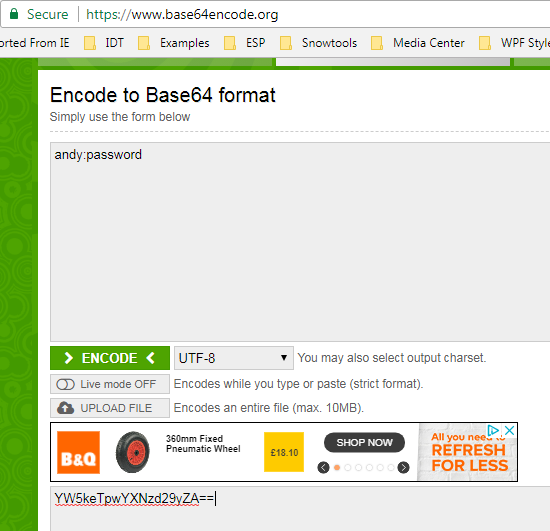
Obtain the Base64 encoding of "andy:password" using https://www.base64encode.org/
Giving the text "YW5keTpwYXNzd29yZA==" as shown:
Create a new class called BasicAuthenticationAttribute. This needs to inherit from AuthorizationFilterAttribute.
[code language="csharp"]
using System;
using System.Net;
using System.Net.Http;
using System.Security.Principal;
using System.Text;
using System.Threading;
using System.Web.Http.Filters;
namespace WebApiAuthenticate.Filters
{
public class BasicAuthenticationAttribute : AuthorizationFilterAttribute
{
public override void OnAuthorization(HttpActionContext actionContext)
{
var authHeader = actionContext.Request.Headers.Authorization;
if (authHeader != null)
{
var authenticationToken = actionContext.Request.Headers.Authorization.Parameter;
var decodedAuthenticationToken = Encoding.UTF8.GetString(Convert.FromBase64String(authenticationToken));
var usernamePasswordArray = decodedAuthenticationToken.Split(':');
var userName = usernamePasswordArray[0];
var password = usernamePasswordArray[1];
// Replace this with your own system of security / means of validating credentials
var isValid = userName == "andy" && password == "password";
if (isValid)
{
var principal = new GenericPrincipal(new GenericIdentity(userName), null);
Thread.CurrentPrincipal = principal;
actionContext.Response =
actionContext.Request.CreateResponse(HttpStatusCode.OK,
"User " + userName + " successfully authenticated");
return;
}
}
HandleUnathorized(actionContext);
}
private static void HandleUnathorized(HttpActionContext actionContext)
{
actionContext.Response = actionContext.Request.CreateResponse(HttpStatusCode.Unauthorized);
actionContext.Response.Headers.Add("WWW-Authenticate", "Basic Scheme='Data' location = 'http://localhost:");
}
}
}
[/code]
Step 3: Add the filter in your WebApiConfig file
WebApiConfig.cs
[code language="csharp"]
using System;
using System.Collections.Generic;
using System.Linq;
using System.Net.Http;
using System.Web.Http;
using Microsoft.Owin.Security.OAuth;
using Newtonsoft.Json.Serialization;
using WebApiAuthenticate.Filters;
namespace WebApiAuthenticate
{
public static class WebApiConfig
{
public static void Register(HttpConfiguration config)
{
// Web API configuration and services
// Web API routes
config.MapHttpAttributeRoutes();
config.Routes.MapHttpRoute(
name: "DefaultApi",
routeTemplate: "api/{controller}/{id}",
defaults: new { id = RouteParameter.Optional }
);
config.Filters.Add(new BasicAuthenticationAttribute());
}
}
}
[/code]
Step 4: Ensure basic authentication filter is applied in Values controller
[code language="csharp"]
using System.Collections.Generic;
using System.Net.Http;
using System.Web.Http;
using WebApiAuthenticate.Filters;
namespace WebApiAuthenticate.Controllers
{
[BasicAuthentication]
[RequireHttps]
public class ValuesController : ApiController
{
// GET api/values
public IEnumerable<string> Get()
{
return new string[] { "value1", "value2" };
}
// GET api/values/5
public string Get(int id)
{
return id.ToString();
}
// POST api/values
public HttpResponseMessage Post()
{
var response = Request.CreateResponse<string>(System.Net.HttpStatusCode.Created, "Your first POST request!");
return response;
}
public HttpResponseMessage Post(int id)
{
var response = Request.CreateResponse<string>(System.Net.HttpStatusCode.Created, id.ToString());
return response;
}
// PUT api/values/5
public void Put(int id, [FromBody]string value)
{
}
// DELETE api/values/5
public void Delete(int id)
{
}
}
}
[/code]
Step 5: Create some example credentials
Example username/password credentials separated by ':' are
andy:password in this example.
Obtain the Base64 encoding of "andy:password" using https://www.base64encode.org/
Giving the text "YW5keTpwYXNzd29yZA==" as shown:
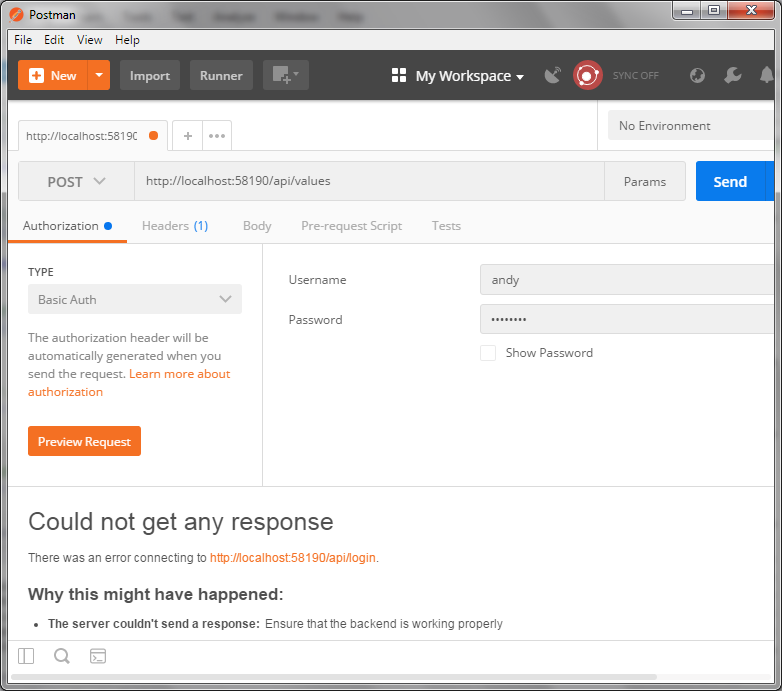
 Step 6: Test
Using Postman:
Step 6: Test
Using Postman:
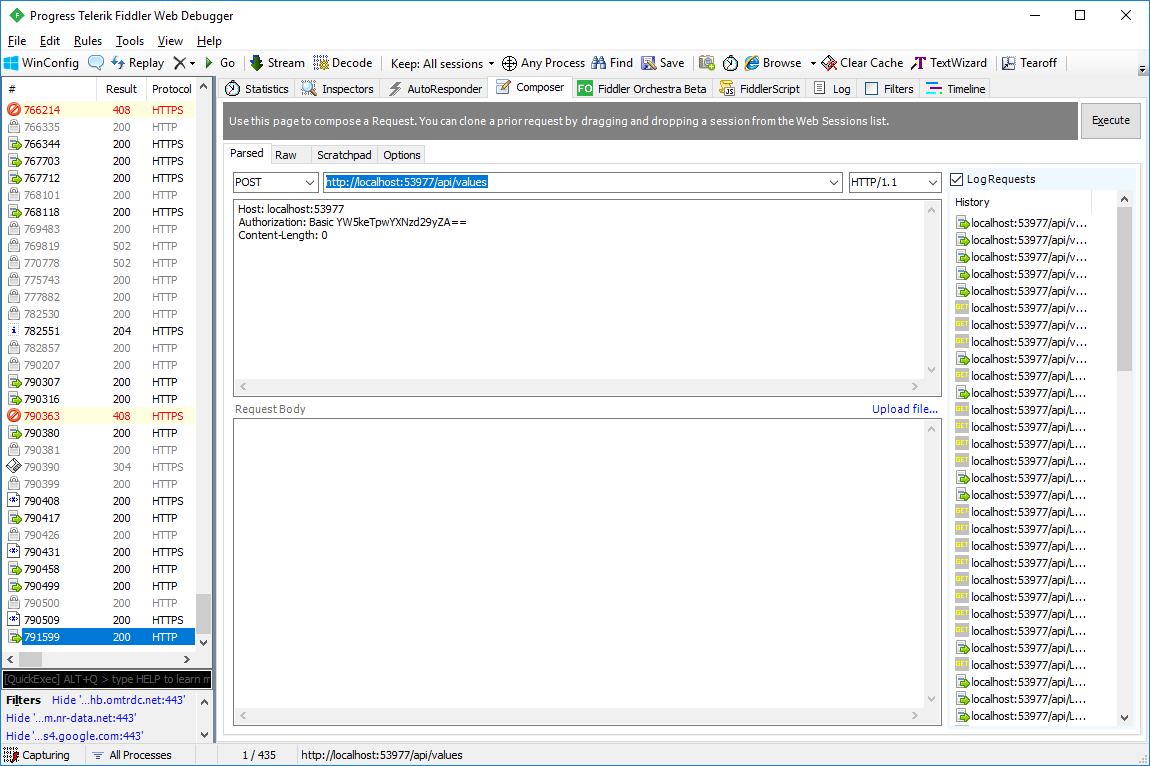
 Using Fiddler
In the Compose window I make sure the Basic Authentication is set, along with the Base-64 encrypted username:password pair:
[code language="language="]
Host: localhost:53977
Authorization: Basic YW5keTpwYXNzd29yZA==
Content-Length: 0
[/code]
Using Fiddler
In the Compose window I make sure the Basic Authentication is set, along with the Base-64 encrypted username:password pair:
[code language="language="]
Host: localhost:53977
Authorization: Basic YW5keTpwYXNzd29yZA==
Content-Length: 0
[/code]
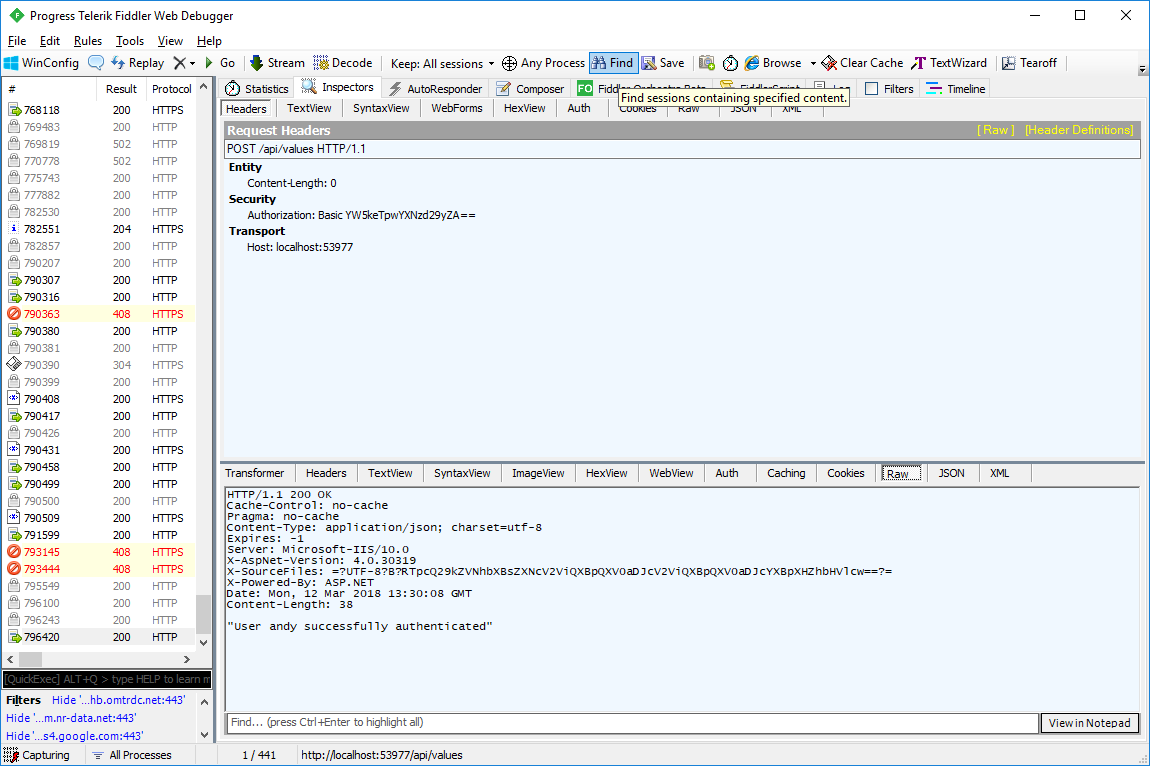
 On pressing the Execute button we can read the request response contained in the 'Raw' window:
 And to allow it to return the values, just remove the response code from BasicAuthenticationAttribute class as shown:
[code language="csharp"]
using System;
using System.Net;
using System.Net.Http;
using System.Security.Principal;
using System.Text;
using System.Threading;
using System.Web.Http.Filters;
namespace WebApiAuthenticate.Filters
{
public class BasicAuthenticationAttribute : AuthorizationFilterAttribute
{
public override void OnAuthorization(HttpActionContext actionContext)
{
var authHeader = actionContext.Request.Headers.Authorization;
if (authHeader != null)
{
var authenticationToken = actionContext.Request.Headers.Authorization.Parameter;
var decodedAuthenticationToken = Encoding.UTF8.GetString(Convert.FromBase64String(authenticationToken));
var usernamePasswordArray = decodedAuthenticationToken.Split(':');
var userName = usernamePasswordArray[0];
var password = usernamePasswordArray[1];
// Replace this with your own system of security / means of validating credentials
var isValid = userName == "andy" && password == "password";
if (isValid)
{
var principal = new GenericPrincipal(new GenericIdentity(userName), null);
Thread.CurrentPrincipal = principal;
return;
}
}
HandleUnathorized(actionContext);
}
private static void HandleUnathorized(HttpActionContext actionContext)
{
actionContext.Response = actionContext.Request.CreateResponse(HttpStatusCode.Unauthorized);
actionContext.Response.Headers.Add("WWW-Authenticate", "Basic Scheme='Data' location = 'http://localhost:");
}
}
}
[/code]
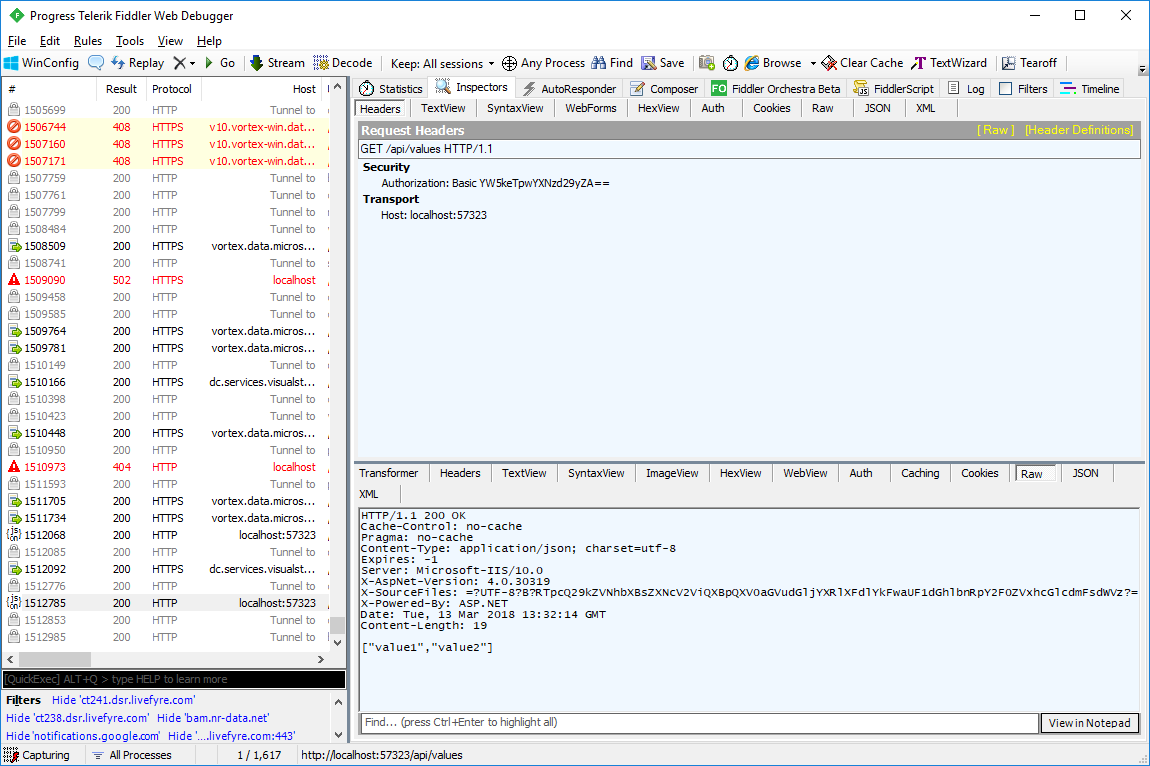
So that on re-running the GET command in Fiddler we get the values returned as shown:
And to allow it to return the values, just remove the response code from BasicAuthenticationAttribute class as shown:
[code language="csharp"]
using System;
using System.Net;
using System.Net.Http;
using System.Security.Principal;
using System.Text;
using System.Threading;
using System.Web.Http.Filters;
namespace WebApiAuthenticate.Filters
{
public class BasicAuthenticationAttribute : AuthorizationFilterAttribute
{
public override void OnAuthorization(HttpActionContext actionContext)
{
var authHeader = actionContext.Request.Headers.Authorization;
if (authHeader != null)
{
var authenticationToken = actionContext.Request.Headers.Authorization.Parameter;
var decodedAuthenticationToken = Encoding.UTF8.GetString(Convert.FromBase64String(authenticationToken));
var usernamePasswordArray = decodedAuthenticationToken.Split(':');
var userName = usernamePasswordArray[0];
var password = usernamePasswordArray[1];
// Replace this with your own system of security / means of validating credentials
var isValid = userName == "andy" && password == "password";
if (isValid)
{
var principal = new GenericPrincipal(new GenericIdentity(userName), null);
Thread.CurrentPrincipal = principal;
return;
}
}
HandleUnathorized(actionContext);
}
private static void HandleUnathorized(HttpActionContext actionContext)
{
actionContext.Response = actionContext.Request.CreateResponse(HttpStatusCode.Unauthorized);
actionContext.Response.Headers.Add("WWW-Authenticate", "Basic Scheme='Data' location = 'http://localhost:");
}
}
}
[/code]
So that on re-running the GET command in Fiddler we get the values returned as shown:
 Consuming the Web Api web service from a console application
A good way of debugging your web service is to consume it from a console app.
Run the Web Api project in one instance of Visual Studio, and in another run the console application as shown:
[code language="csharp"]
using System;
using System.Net.Http;
using System.Net.Http.Headers;
namespace WebApiClient
{
class Program
{
public static void Main(string[] args)
{
Console.WriteLine("Enter to continue");
Console.ReadLine();
DoIt();
Console.ReadLine();
}
private static async void DoIt()
{
using (var stringContent = new StringContent("{ \"firstName\": \"Andy\" }", System.Text.Encoding.UTF8,
"application/json"))
using (var client = new HttpClient())
{
try
{
client.DefaultRequestHeaders.Authorization =
new AuthenticationHeaderValue(
"Basic",
Convert.ToBase64String(
System.Text.Encoding.ASCII.GetBytes(
string.Format("{0}:{1}", "andy", "password"))));
// 1. Consume the POST command
var response = await client.PostAsync("https://localhost:44363/api/values/33", stringContent);
var result = await response.Content.ReadAsStringAsync();
Console.WriteLine("Result from POST command: " + result);
// 2. Consume the GET command
response = await client.GetAsync("https://localhost:44363/api/values/33");
if (response.IsSuccessStatusCode)
{
var id = await response.Content.ReadAsStringAsync();
Console.WriteLine("Result from GET command: " + result);
}
}
catch (Exception ex)
{
Console.ForegroundColor = ConsoleColor.Red;
Console.WriteLine(ex.Message);
Console.ResetColor();
}
}
}
}
}
[/code]
Giving the following output:
[caption id="attachment_8876" align="alignnone" width="581"]
Consuming the Web Api web service from a console application
A good way of debugging your web service is to consume it from a console app.
Run the Web Api project in one instance of Visual Studio, and in another run the console application as shown:
[code language="csharp"]
using System;
using System.Net.Http;
using System.Net.Http.Headers;
namespace WebApiClient
{
class Program
{
public static void Main(string[] args)
{
Console.WriteLine("Enter to continue");
Console.ReadLine();
DoIt();
Console.ReadLine();
}
private static async void DoIt()
{
using (var stringContent = new StringContent("{ \"firstName\": \"Andy\" }", System.Text.Encoding.UTF8,
"application/json"))
using (var client = new HttpClient())
{
try
{
client.DefaultRequestHeaders.Authorization =
new AuthenticationHeaderValue(
"Basic",
Convert.ToBase64String(
System.Text.Encoding.ASCII.GetBytes(
string.Format("{0}:{1}", "andy", "password"))));
// 1. Consume the POST command
var response = await client.PostAsync("https://localhost:44363/api/values/33", stringContent);
var result = await response.Content.ReadAsStringAsync();
Console.WriteLine("Result from POST command: " + result);
// 2. Consume the GET command
response = await client.GetAsync("https://localhost:44363/api/values/33");
if (response.IsSuccessStatusCode)
{
var id = await response.Content.ReadAsStringAsync();
Console.WriteLine("Result from GET command: " + result);
}
}
catch (Exception ex)
{
Console.ForegroundColor = ConsoleColor.Red;
Console.WriteLine(ex.Message);
Console.ResetColor();
}
}
}
}
}
[/code]
Giving the following output:
[caption id="attachment_8876" align="alignnone" width="581"]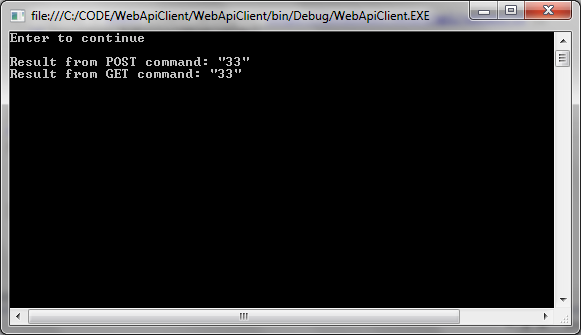 Consume web api service[/caption]
basic authentication in a Web API application[/caption]
Step 2: Create a new authentication filter
I have created a new folder with which to put any new filter classes:
Create a new class called BasicAuthenticationAttribute. This needs to inherit from AuthorizationFilterAttribute.
[code language="csharp"]
using System;
using System.Net;
using System.Net.Http;
using System.Security.Principal;
using System.Text;
using System.Threading;
using System.Web.Http.Filters;
namespace WebApiAuthenticate.Filters
{
public class BasicAuthenticationAttribute : AuthorizationFilterAttribute
{
public override void OnAuthorization(HttpActionContext actionContext)
{
var authHeader = actionContext.Request.Headers.Authorization;
if (authHeader != null)
{
var authenticationToken = actionContext.Request.Headers.Authorization.Parameter;
var decodedAuthenticationToken = Encoding.UTF8.GetString(Convert.FromBase64String(authenticationToken));
var usernamePasswordArray = decodedAuthenticationToken.Split(':');
var userName = usernamePasswordArray[0];
var password = usernamePasswordArray[1];
// Replace this with your own system of security / means of validating credentials
var isValid = userName == "andy" && password == "password";
if (isValid)
{
var principal = new GenericPrincipal(new GenericIdentity(userName), null);
Thread.CurrentPrincipal = principal;
actionContext.Response =
actionContext.Request.CreateResponse(HttpStatusCode.OK,
"User " + userName + " successfully authenticated");
return;
}
}
HandleUnathorized(actionContext);
}
private static void HandleUnathorized(HttpActionContext actionContext)
{
actionContext.Response = actionContext.Request.CreateResponse(HttpStatusCode.Unauthorized);
actionContext.Response.Headers.Add("WWW-Authenticate", "Basic Scheme='Data' location = 'http://localhost:");
}
}
}
[/code]
Step 3: Add the filter in your WebApiConfig file
WebApiConfig.cs
[code language="csharp"]
using System;
using System.Collections.Generic;
using System.Linq;
using System.Net.Http;
using System.Web.Http;
using Microsoft.Owin.Security.OAuth;
using Newtonsoft.Json.Serialization;
using WebApiAuthenticate.Filters;
namespace WebApiAuthenticate
{
public static class WebApiConfig
{
public static void Register(HttpConfiguration config)
{
// Web API configuration and services
// Web API routes
config.MapHttpAttributeRoutes();
config.Routes.MapHttpRoute(
name: "DefaultApi",
routeTemplate: "api/{controller}/{id}",
defaults: new { id = RouteParameter.Optional }
);
config.Filters.Add(new BasicAuthenticationAttribute());
}
}
}
[/code]
Step 4: Ensure basic authentication filter is applied in Values controller
[code language="csharp"]
using System.Collections.Generic;
using System.Net.Http;
using System.Web.Http;
using WebApiAuthenticate.Filters;
namespace WebApiAuthenticate.Controllers
{
[BasicAuthentication]
[RequireHttps]
public class ValuesController : ApiController
{
// GET api/values
public IEnumerable<string> Get()
{
return new string[] { "value1", "value2" };
}
// GET api/values/5
public string Get(int id)
{
return id.ToString();
}
// POST api/values
public HttpResponseMessage Post()
{
var response = Request.CreateResponse<string>(System.Net.HttpStatusCode.Created, "Your first POST request!");
return response;
}
public HttpResponseMessage Post(int id)
{
var response = Request.CreateResponse<string>(System.Net.HttpStatusCode.Created, id.ToString());
return response;
}
// PUT api/values/5
public void Put(int id, [FromBody]string value)
{
}
// DELETE api/values/5
public void Delete(int id)
{
}
}
}
[/code]
Step 5: Create some example credentials
Example username/password credentials separated by ':' are
andy:password in this example.
Obtain the Base64 encoding of "andy:password" using https://www.base64encode.org/
Giving the text "YW5keTpwYXNzd29yZA==" as shown:
Step 6: Test
Using Postman:
Using Fiddler
In the Compose window I make sure the Basic Authentication is set, along with the Base-64 encrypted username:password pair:
[code language="language="]
Host: localhost:53977
Authorization: Basic YW5keTpwYXNzd29yZA==
Content-Length: 0
[/code]
On pressing the Execute button we can read the request response contained in the 'Raw' window:
And to allow it to return the values, just remove the response code from BasicAuthenticationAttribute class as shown:
[code language="csharp"]
using System;
using System.Net;
using System.Net.Http;
using System.Security.Principal;
using System.Text;
using System.Threading;
using System.Web.Http.Filters;
namespace WebApiAuthenticate.Filters
{
public class BasicAuthenticationAttribute : AuthorizationFilterAttribute
{
public override void OnAuthorization(HttpActionContext actionContext)
{
var authHeader = actionContext.Request.Headers.Authorization;
if (authHeader != null)
{
var authenticationToken = actionContext.Request.Headers.Authorization.Parameter;
var decodedAuthenticationToken = Encoding.UTF8.GetString(Convert.FromBase64String(authenticationToken));
var usernamePasswordArray = decodedAuthenticationToken.Split(':');
var userName = usernamePasswordArray[0];
var password = usernamePasswordArray[1];
// Replace this with your own system of security / means of validating credentials
var isValid = userName == "andy" && password == "password";
if (isValid)
{
var principal = new GenericPrincipal(new GenericIdentity(userName), null);
Thread.CurrentPrincipal = principal;
return;
}
}
HandleUnathorized(actionContext);
}
private static void HandleUnathorized(HttpActionContext actionContext)
{
actionContext.Response = actionContext.Request.CreateResponse(HttpStatusCode.Unauthorized);
actionContext.Response.Headers.Add("WWW-Authenticate", "Basic Scheme='Data' location = 'http://localhost:");
}
}
}
[/code]
So that on re-running the GET command in Fiddler we get the values returned as shown:
Consuming the Web Api web service from a console application
A good way of debugging your web service is to consume it from a console app.
Run the Web Api project in one instance of Visual Studio, and in another run the console application as shown:
[code language="csharp"]
using System;
using System.Net.Http;
using System.Net.Http.Headers;
namespace WebApiClient
{
class Program
{
public static void Main(string[] args)
{
Console.WriteLine("Enter to continue");
Console.ReadLine();
DoIt();
Console.ReadLine();
}
private static async void DoIt()
{
using (var stringContent = new StringContent("{ \"firstName\": \"Andy\" }", System.Text.Encoding.UTF8,
"application/json"))
using (var client = new HttpClient())
{
try
{
client.DefaultRequestHeaders.Authorization =
new AuthenticationHeaderValue(
"Basic",
Convert.ToBase64String(
System.Text.Encoding.ASCII.GetBytes(
string.Format("{0}:{1}", "andy", "password"))));
// 1. Consume the POST command
var response = await client.PostAsync("https://localhost:44363/api/values/33", stringContent);
var result = await response.Content.ReadAsStringAsync();
Console.WriteLine("Result from POST command: " + result);
// 2. Consume the GET command
response = await client.GetAsync("https://localhost:44363/api/values/33");
if (response.IsSuccessStatusCode)
{
var id = await response.Content.ReadAsStringAsync();
Console.WriteLine("Result from GET command: " + result);
}
}
catch (Exception ex)
{
Console.ForegroundColor = ConsoleColor.Red;
Console.WriteLine(ex.Message);
Console.ResetColor();
}
}
}
}
}
[/code]
Giving the following output:
[caption id="attachment_8876" align="alignnone" width="581"] Consume web api service[/caption]


Comments
Post a Comment