How to enforce Https in Web Api server applications
See this post for creating simple Web Api application
https://www.technical-recipes.com/2018/getting-started-with-creating-asp-net-web-api-services/
Step 1: Create new Web API project
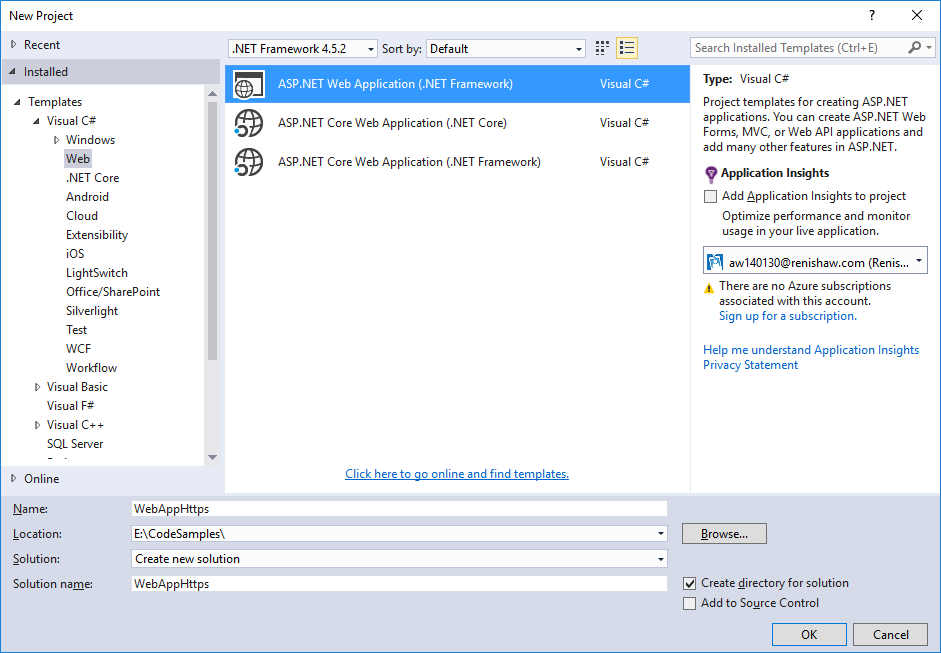
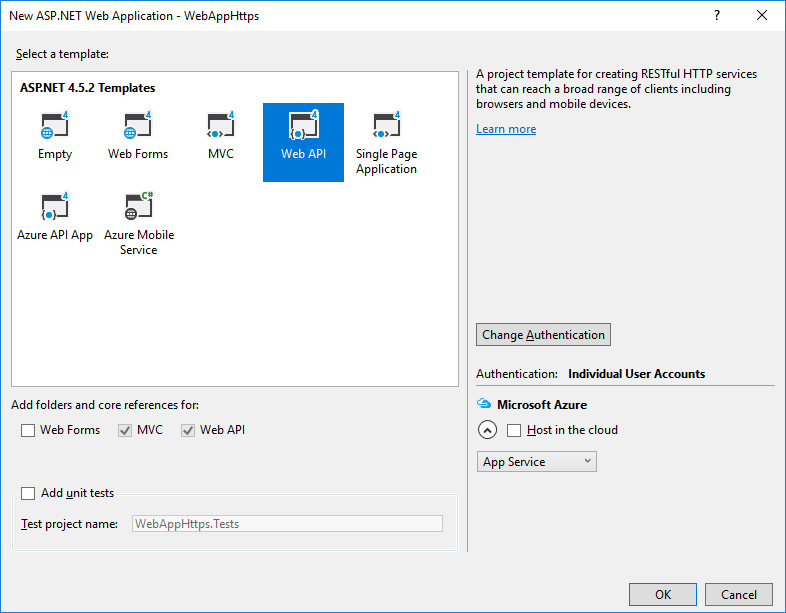 Step 2: Modify the Values controller
Comment out [Authorize] requirement and add the [RequireHttps] requirement in ValuesController.cs
ValuesController.cs.
ValuesController.cs
[code language="csharp"]
using System.Collections.Generic;
using System.Web.Http;
namespace WebAppHttps.Controllers
{
[RequireHttps]
public class ValuesController : ApiController
{
// GET api/values
public IEnumerable<string> Get()
{
return new string[] { "value1", "value2" };
}
// GET api/values/5
public string Get(int id)
{
return "value";
}
// POST api/values
public void Post([FromBody]string value)
{
}
// PUT api/values/5
public void Put(int id, [FromBody]string value)
{
}
// DELETE api/values/5
public void Delete(int id)
{
}
}
}
[/code]
Step 3: Create a new filter
Create new Filter Folder:
Step 2: Modify the Values controller
Comment out [Authorize] requirement and add the [RequireHttps] requirement in ValuesController.cs
ValuesController.cs.
ValuesController.cs
[code language="csharp"]
using System.Collections.Generic;
using System.Web.Http;
namespace WebAppHttps.Controllers
{
[RequireHttps]
public class ValuesController : ApiController
{
// GET api/values
public IEnumerable<string> Get()
{
return new string[] { "value1", "value2" };
}
// GET api/values/5
public string Get(int id)
{
return "value";
}
// POST api/values
public void Post([FromBody]string value)
{
}
// PUT api/values/5
public void Put(int id, [FromBody]string value)
{
}
// DELETE api/values/5
public void Delete(int id)
{
}
}
}
[/code]
Step 3: Create a new filter
Create new Filter Folder:
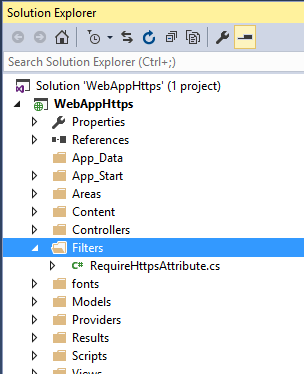 Add new class RequireHttpsAttribute
RequireHttpsAttribute.cs
[code language="csharp"]
using System;
using System.Net;
using System.Net.Http;
using System.Text;
using System.Web.Http.Controllers;
using System.Web.Http.Filters;
namespace WebAppHttps.Filters
{
public class RequireHttpsAttribute : AuthorizationFilterAttribute
{
public override void OnAuthorization(HttpActionContext actionContext)
{
var req = actionContext.Request;
if (req.RequestUri.Scheme == Uri.UriSchemeHttps) return;
var html = "<p>Https required.</p>";
if (req.Method.Method == "GET")
{
actionContext.Response = req.CreateResponse(HttpStatusCode.Found);
actionContext.Response.Content = new StringContent(html, Encoding.UTF8, "text/html");
var uriBuilder = new UriBuilder(req.RequestUri)
{
Scheme = Uri.UriSchemeHttps,
Port = 443
};
actionContext.Response.Headers.Location = uriBuilder.Uri;
}
else
{
actionContext.Response = req.CreateResponse(HttpStatusCode.NotFound);
actionContext.Response.Content = new StringContent(html, Encoding.UTF8, "text/html");
}
}
}
}
[/code]
Step 4: Update WebApiConfig
WebApiConfig.cs
[code language="csharp"]
using System.Web.Http;
using WebAppHttps.Filters;
namespace WebAppHttps
{
public static class WebApiConfig
{
public static void Register(HttpConfiguration config)
{
// Web API configuration and services
// Web API routes
config.MapHttpAttributeRoutes();
config.Routes.MapHttpRoute(
"DefaultApi",
"api/{controller}/{id}",
new {id = RouteParameter.Optional}
);
config.Filters.Add(new RequireHttpsAttribute());
}
}
}
[/code]
Step 5: Try the application
Open the Browser and observe that this particular api cannot be reached:
Add new class RequireHttpsAttribute
RequireHttpsAttribute.cs
[code language="csharp"]
using System;
using System.Net;
using System.Net.Http;
using System.Text;
using System.Web.Http.Controllers;
using System.Web.Http.Filters;
namespace WebAppHttps.Filters
{
public class RequireHttpsAttribute : AuthorizationFilterAttribute
{
public override void OnAuthorization(HttpActionContext actionContext)
{
var req = actionContext.Request;
if (req.RequestUri.Scheme == Uri.UriSchemeHttps) return;
var html = "<p>Https required.</p>";
if (req.Method.Method == "GET")
{
actionContext.Response = req.CreateResponse(HttpStatusCode.Found);
actionContext.Response.Content = new StringContent(html, Encoding.UTF8, "text/html");
var uriBuilder = new UriBuilder(req.RequestUri)
{
Scheme = Uri.UriSchemeHttps,
Port = 443
};
actionContext.Response.Headers.Location = uriBuilder.Uri;
}
else
{
actionContext.Response = req.CreateResponse(HttpStatusCode.NotFound);
actionContext.Response.Content = new StringContent(html, Encoding.UTF8, "text/html");
}
}
}
}
[/code]
Step 4: Update WebApiConfig
WebApiConfig.cs
[code language="csharp"]
using System.Web.Http;
using WebAppHttps.Filters;
namespace WebAppHttps
{
public static class WebApiConfig
{
public static void Register(HttpConfiguration config)
{
// Web API configuration and services
// Web API routes
config.MapHttpAttributeRoutes();
config.Routes.MapHttpRoute(
"DefaultApi",
"api/{controller}/{id}",
new {id = RouteParameter.Optional}
);
config.Filters.Add(new RequireHttpsAttribute());
}
}
}
[/code]
Step 5: Try the application
Open the Browser and observe that this particular api cannot be reached:
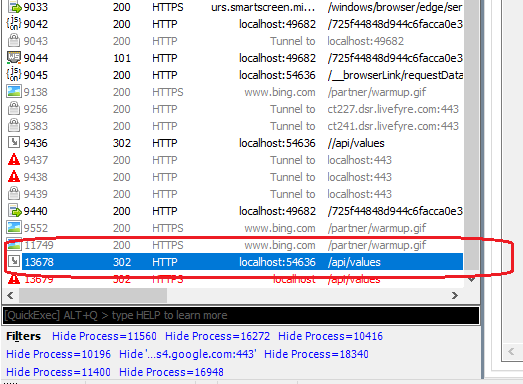
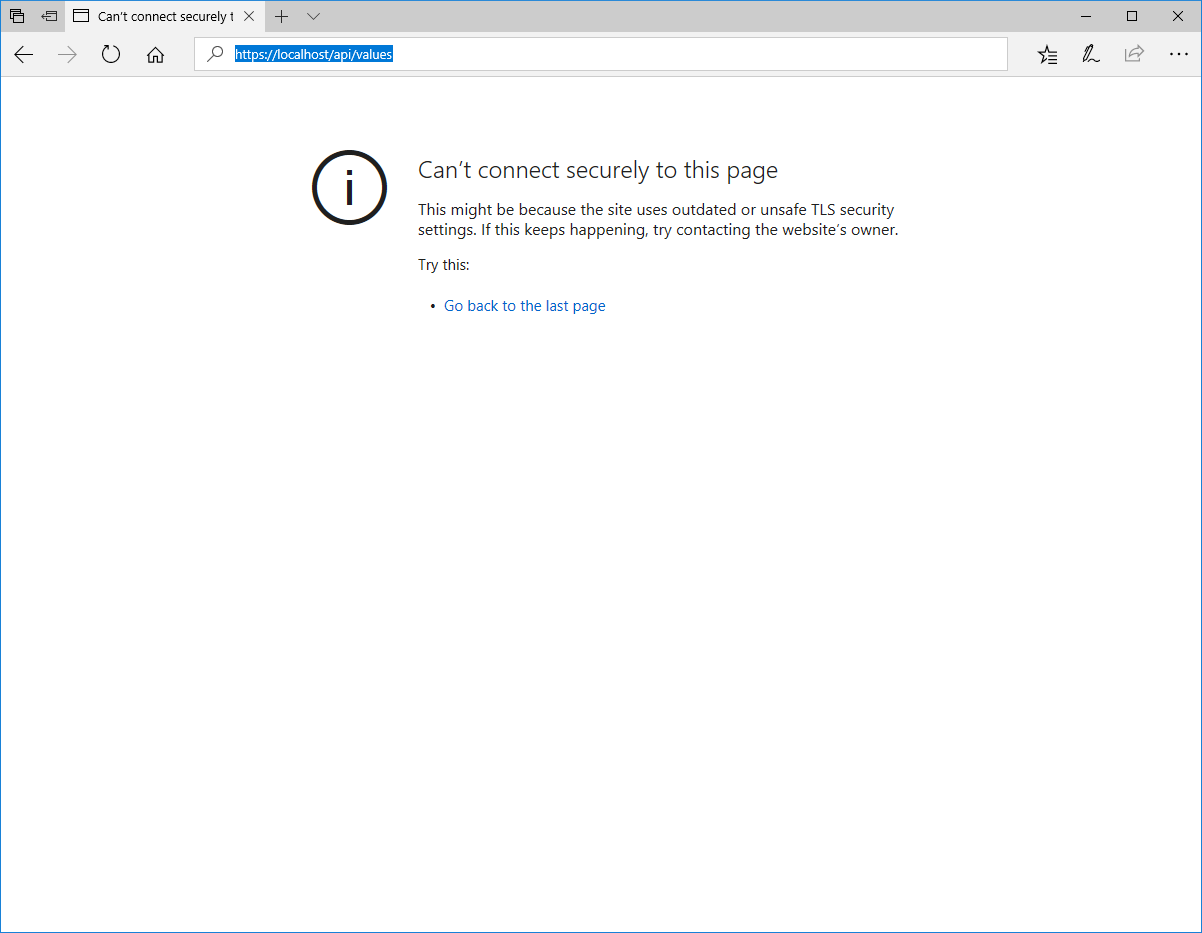 To see why, open the Fiddler application and inspect the 302 error that the request returns, by double-clicking on it:
 Navigate to the ‘Raw’ tab to view the request information:
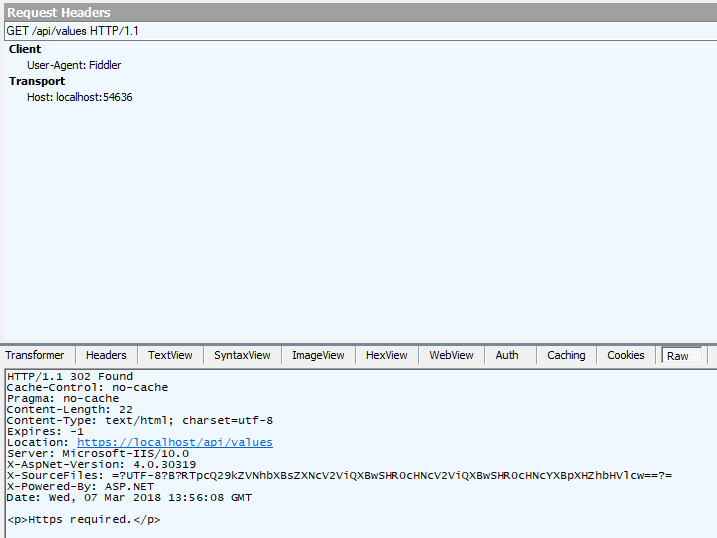 So that we no see that it has created a new Url for us, but with ‘https’ added instead of ‘http’. It took that new Url and attempted to find it, which it did not, as expected. And also that additional html markup text has been appended to the response.
When we request it changed the uri to the https, because it got the Found header plus the location so it already knew where it was supposed to be located at.
So that we no see that it has created a new Url for us, but with ‘https’ added instead of ‘http’. It took that new Url and attempted to find it, which it did not, as expected. And also that additional html markup text has been appended to the response.
When we request it changed the uri to the https, because it got the Found header plus the location so it already knew where it was supposed to be located at.
Step 2: Modify the Values controller
Comment out [Authorize] requirement and add the [RequireHttps] requirement in ValuesController.cs
ValuesController.cs.
ValuesController.cs
[code language="csharp"]
using System.Collections.Generic;
using System.Web.Http;
namespace WebAppHttps.Controllers
{
[RequireHttps]
public class ValuesController : ApiController
{
// GET api/values
public IEnumerable<string> Get()
{
return new string[] { "value1", "value2" };
}
// GET api/values/5
public string Get(int id)
{
return "value";
}
// POST api/values
public void Post([FromBody]string value)
{
}
// PUT api/values/5
public void Put(int id, [FromBody]string value)
{
}
// DELETE api/values/5
public void Delete(int id)
{
}
}
}
[/code]
Step 3: Create a new filter
Create new Filter Folder:
Add new class RequireHttpsAttribute
RequireHttpsAttribute.cs
[code language="csharp"]
using System;
using System.Net;
using System.Net.Http;
using System.Text;
using System.Web.Http.Controllers;
using System.Web.Http.Filters;
namespace WebAppHttps.Filters
{
public class RequireHttpsAttribute : AuthorizationFilterAttribute
{
public override void OnAuthorization(HttpActionContext actionContext)
{
var req = actionContext.Request;
if (req.RequestUri.Scheme == Uri.UriSchemeHttps) return;
var html = "<p>Https required.</p>";
if (req.Method.Method == "GET")
{
actionContext.Response = req.CreateResponse(HttpStatusCode.Found);
actionContext.Response.Content = new StringContent(html, Encoding.UTF8, "text/html");
var uriBuilder = new UriBuilder(req.RequestUri)
{
Scheme = Uri.UriSchemeHttps,
Port = 443
};
actionContext.Response.Headers.Location = uriBuilder.Uri;
}
else
{
actionContext.Response = req.CreateResponse(HttpStatusCode.NotFound);
actionContext.Response.Content = new StringContent(html, Encoding.UTF8, "text/html");
}
}
}
}
[/code]
Step 4: Update WebApiConfig
WebApiConfig.cs
[code language="csharp"]
using System.Web.Http;
using WebAppHttps.Filters;
namespace WebAppHttps
{
public static class WebApiConfig
{
public static void Register(HttpConfiguration config)
{
// Web API configuration and services
// Web API routes
config.MapHttpAttributeRoutes();
config.Routes.MapHttpRoute(
"DefaultApi",
"api/{controller}/{id}",
new {id = RouteParameter.Optional}
);
config.Filters.Add(new RequireHttpsAttribute());
}
}
}
[/code]
Step 5: Try the application
Open the Browser and observe that this particular api cannot be reached:
To see why, open the Fiddler application and inspect the 302 error that the request returns, by double-clicking on it:
Navigate to the ‘Raw’ tab to view the request information:
So that we no see that it has created a new Url for us, but with ‘https’ added instead of ‘http’. It took that new Url and attempted to find it, which it did not, as expected. And also that additional html markup text has been appended to the response.
When we request it changed the uri to the https, because it got the Found header plus the location so it already knew where it was supposed to be located at.


Comments
Post a Comment