How to encrypt basic authentication credentials in a Web Api application
This post shows you how to handle encrypted user credentials in a Web Api application and offer further security
by enforcing https for all REST api calls.
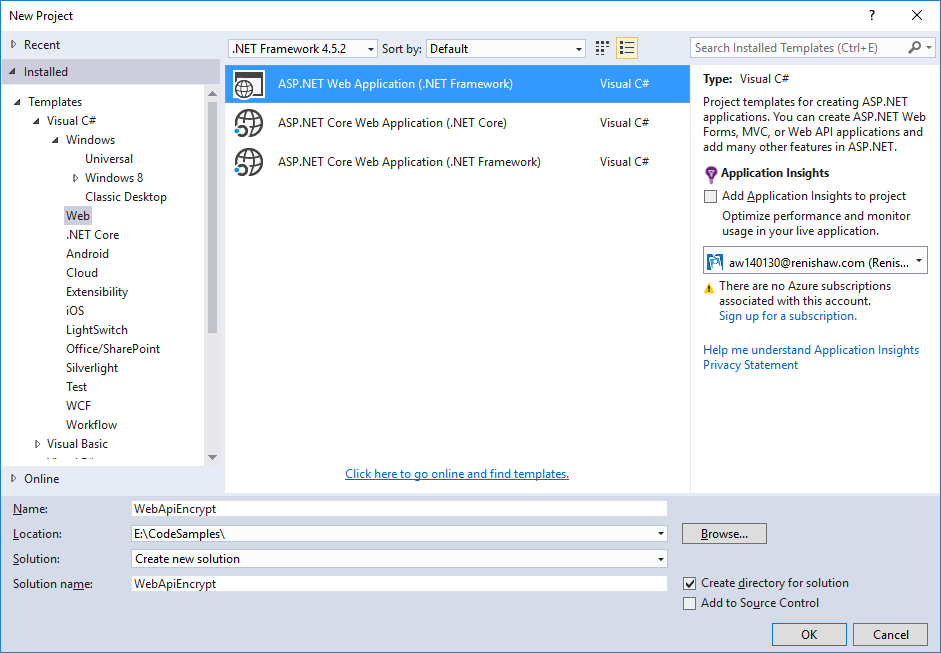
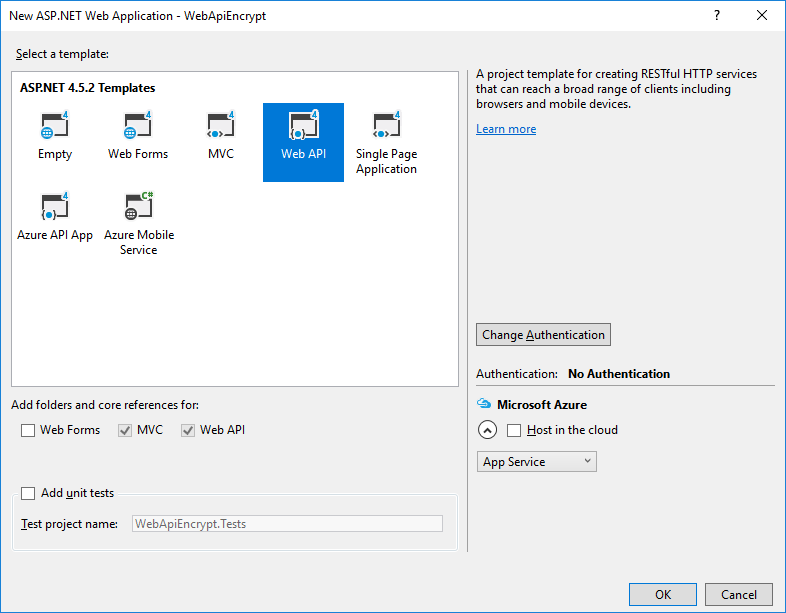
Step 1: Create a new Web Api application:
This is our web service that will need to authenticate encrypted user credentials.
 Step 2: Add a class for handling encryption and decryption
Crypto.cs
[code language="csharp"]
using System;
using System.Linq;
using System.Security.Cryptography;
using System.Text;
namespace WebApiEncrypt.Models
{
public static class Crypto
{
private const string PrivateKey =
"<RSAKeyValue><Modulus>s6lpjspk+3o2GOK5TM7JySARhhxE5gB96e9XLSSRuWY2W9F951MfistKRzVtg0cjJTdSk5mnWAVHLfKOEqp8PszpJx9z4IaRCwQ937KJmn2/2VyjcUsCsor+fdbIHOiJpaxBlsuI9N++4MgF/jb0tOVudiUutDqqDut7rhrB/oc=</Modulus><Exponent>AQAB</Exponent><P>3J2+VWMVWcuLjjnLULe5TmSN7ts0n/TPJqe+bg9avuewu1rDsz+OBfP66/+rpYMs5+JolDceZSiOT+ACW2Neuw==</P><Q>0HogL5BnWjj9BlfpILQt8ajJnBHYrCiPaJ4npghdD5n/JYV8BNOiOP1T7u1xmvtr2U4mMObE17rZjNOTa1rQpQ==</Q><DP>jbXh2dVQlKJznUMwf0PUiy96IDC8R/cnzQu4/ddtEe2fj2lJBe3QG7DRwCA1sJZnFPhQ9svFAXOgnlwlB3D4Gw==</DP><DQ>evrP6b8BeNONTySkvUoMoDW1WH+elVAH6OsC8IqWexGY1YV8t0wwsfWegZ9IGOifojzbgpVfIPN0SgK1P+r+kQ==</DQ><InverseQ>LeEoFGI+IOY/J+9SjCPKAKduP280epOTeSKxs115gW1b9CP4glavkUcfQTzkTPe2t21kl1OrnvXEe5Wrzkk8rA==</InverseQ><D>HD0rn0sGtlROPnkcgQsbwmYs+vRki/ZV1DhPboQJ96cuMh5qeLqjAZDUev7V2MWMq6PXceW73OTvfDRcymhLoNvobE4Ekiwc87+TwzS3811mOmt5DJya9SliqU/ro+iEicjO4v3nC+HujdpDh9CVXfUAWebKnd7Vo5p6LwC9nIk=</D></RSAKeyValue>"
;
private const string PublicKey =
"<RSAKeyValue><Modulus>s6lpjspk+3o2GOK5TM7JySARhhxE5gB96e9XLSSRuWY2W9F951MfistKRzVtg0cjJTdSk5mnWAVHLfKOEqp8PszpJx9z4IaRCwQ937KJmn2/2VyjcUsCsor+fdbIHOiJpaxBlsuI9N++4MgF/jb0tOVudiUutDqqDut7rhrB/oc=</Modulus><Exponent>AQAB</Exponent></RSAKeyValue>"
;
private static readonly UnicodeEncoding Encoder = new UnicodeEncoding();
public static string Decrypt(string data)
{
var rsa = new RSACryptoServiceProvider();
var dataArray = data.Split(',');
var dataByte = new byte[dataArray.Length];
for (var i = 0; i < dataArray.Length; i++)
dataByte[i] = Convert.ToByte(dataArray[i]);
rsa.FromXmlString(PrivateKey);
var decryptedByte = rsa.Decrypt(dataByte, false);
return Encoder.GetString(decryptedByte);
}
public static string Encrypt(string data)
{
var rsa = new RSACryptoServiceProvider();
rsa.FromXmlString(PublicKey);
var dataToEncrypt = Encoder.GetBytes(data);
var encryptedByteArray = rsa.Encrypt(dataToEncrypt, false).ToArray();
var length = encryptedByteArray.Length;
var item = 0;
var sb = new StringBuilder();
foreach (var x in encryptedByteArray)
{
item++;
sb.Append(x);
if (item < length)
sb.Append(",");
}
return sb.ToString();
}
}
}
[/code]
Step 3: Create a new Authentication filter
I have created a new folder with which to put any new filter classes:
Step 2: Add a class for handling encryption and decryption
Crypto.cs
[code language="csharp"]
using System;
using System.Linq;
using System.Security.Cryptography;
using System.Text;
namespace WebApiEncrypt.Models
{
public static class Crypto
{
private const string PrivateKey =
"<RSAKeyValue><Modulus>s6lpjspk+3o2GOK5TM7JySARhhxE5gB96e9XLSSRuWY2W9F951MfistKRzVtg0cjJTdSk5mnWAVHLfKOEqp8PszpJx9z4IaRCwQ937KJmn2/2VyjcUsCsor+fdbIHOiJpaxBlsuI9N++4MgF/jb0tOVudiUutDqqDut7rhrB/oc=</Modulus><Exponent>AQAB</Exponent><P>3J2+VWMVWcuLjjnLULe5TmSN7ts0n/TPJqe+bg9avuewu1rDsz+OBfP66/+rpYMs5+JolDceZSiOT+ACW2Neuw==</P><Q>0HogL5BnWjj9BlfpILQt8ajJnBHYrCiPaJ4npghdD5n/JYV8BNOiOP1T7u1xmvtr2U4mMObE17rZjNOTa1rQpQ==</Q><DP>jbXh2dVQlKJznUMwf0PUiy96IDC8R/cnzQu4/ddtEe2fj2lJBe3QG7DRwCA1sJZnFPhQ9svFAXOgnlwlB3D4Gw==</DP><DQ>evrP6b8BeNONTySkvUoMoDW1WH+elVAH6OsC8IqWexGY1YV8t0wwsfWegZ9IGOifojzbgpVfIPN0SgK1P+r+kQ==</DQ><InverseQ>LeEoFGI+IOY/J+9SjCPKAKduP280epOTeSKxs115gW1b9CP4glavkUcfQTzkTPe2t21kl1OrnvXEe5Wrzkk8rA==</InverseQ><D>HD0rn0sGtlROPnkcgQsbwmYs+vRki/ZV1DhPboQJ96cuMh5qeLqjAZDUev7V2MWMq6PXceW73OTvfDRcymhLoNvobE4Ekiwc87+TwzS3811mOmt5DJya9SliqU/ro+iEicjO4v3nC+HujdpDh9CVXfUAWebKnd7Vo5p6LwC9nIk=</D></RSAKeyValue>"
;
private const string PublicKey =
"<RSAKeyValue><Modulus>s6lpjspk+3o2GOK5TM7JySARhhxE5gB96e9XLSSRuWY2W9F951MfistKRzVtg0cjJTdSk5mnWAVHLfKOEqp8PszpJx9z4IaRCwQ937KJmn2/2VyjcUsCsor+fdbIHOiJpaxBlsuI9N++4MgF/jb0tOVudiUutDqqDut7rhrB/oc=</Modulus><Exponent>AQAB</Exponent></RSAKeyValue>"
;
private static readonly UnicodeEncoding Encoder = new UnicodeEncoding();
public static string Decrypt(string data)
{
var rsa = new RSACryptoServiceProvider();
var dataArray = data.Split(',');
var dataByte = new byte[dataArray.Length];
for (var i = 0; i < dataArray.Length; i++)
dataByte[i] = Convert.ToByte(dataArray[i]);
rsa.FromXmlString(PrivateKey);
var decryptedByte = rsa.Decrypt(dataByte, false);
return Encoder.GetString(decryptedByte);
}
public static string Encrypt(string data)
{
var rsa = new RSACryptoServiceProvider();
rsa.FromXmlString(PublicKey);
var dataToEncrypt = Encoder.GetBytes(data);
var encryptedByteArray = rsa.Encrypt(dataToEncrypt, false).ToArray();
var length = encryptedByteArray.Length;
var item = 0;
var sb = new StringBuilder();
foreach (var x in encryptedByteArray)
{
item++;
sb.Append(x);
if (item < length)
sb.Append(",");
}
return sb.ToString();
}
}
}
[/code]
Step 3: Create a new Authentication filter
I have created a new folder with which to put any new filter classes:
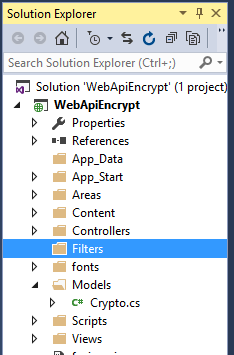 Into this new Filters folder create a new class called BasicAuthenticationAttribute. This needs to inherit from AuthorizationFilterAttribute.
BasicAuthenticationAttribute.cs
[code language="csharp"]
using System;
using System.Net;
using System.Net.Http;
using System.Security.Principal;
using System.Text;
using System.Threading;
using System.Web.Http.Controllers;
using System.Web.Http.Filters;
namespace WebApiEncrypt.Filters
{
public class BasicAuthenticationAttribute : AuthorizationFilterAttribute
{
public override void OnAuthorization(HttpActionContext actionContext)
{
var authHeader = actionContext.Request.Headers.Authorization;
if (authHeader != null)
{
var authenticationToken = actionContext.Request.Headers.Authorization.Parameter;
var decodedAuthenticationToken = Encoding.UTF8.GetString(Convert.FromBase64String(authenticationToken));
var decryptedAuthenticationToken = Crypto.Crypto.Decrypt(decodedAuthenticationToken);
var usernamePasswordArray = decryptedAuthenticationToken.Split(':');
var userName = usernamePasswordArray[0];
var password = usernamePasswordArray[1];
// Replace this with your own system of security / means of validating credentials
var isValid = userName == "andy" && password == "password";
if (isValid)
{
var principal = new GenericPrincipal(new GenericIdentity(userName), null);
Thread.CurrentPrincipal = principal;
//actionContext.Response =
// actionContext.Request.CreateResponse(HttpStatusCode.OK,
// "User " + userName + " successfully authenticated");
return;
}
}
HandleUnathorized(actionContext);
}
private static void HandleUnathorized(HttpActionContext actionContext)
{
actionContext.Response = actionContext.Request.CreateResponse(HttpStatusCode.Unauthorized);
actionContext.Response.Headers.Add("WWW-Authenticate", "Basic Scheme='Data' location = 'http://localhost:");
}
}
}
[/code]
Step 4: Ensure basic authentication filter is applied in Values controller
Insert wherever you need this authentication to be enforced - globally or per function.
ValuesController.cs
[code language="csharp"]
using System.Collections.Generic;
using System.Web.Http;
using WebApiEncrypt.Filters;
namespace WebApiEncrypt.Controllers
{
[BasicAuthentication]
public class ValuesController : ApiController
{
// GET api/values
public IEnumerable<string> Get()
{
return new[] {"value1", "value2"};
}
// GET api/values/5
public string Get(int id)
{
return "value";
}
// POST api/values
public void Post([FromBody] string value)
{
}
// PUT api/values/5
public void Put(int id, [FromBody] string value)
{
}
// DELETE api/values/5
public void Delete(int id)
{
}
}
}
[/code]
Step 5: Add a require https authorization filter attribute
First add a new Add a require https authorization filter attribute class:
RequireHttpsAttribute.cs
[code language="csharp"]
using System;
using System.Net;
using System.Net.Http;
using System.Text;
using System.Web.Http.Controllers;
using System.Web.Http.Filters;
namespace WebApiEncrypt.Filters
{
public class RequireHttpsAttribute : AuthorizationFilterAttribute
{
public override void OnAuthorization(HttpActionContext actionContext)
{
var req = actionContext.Request;
if (req.RequestUri.Scheme == Uri.UriSchemeHttps) return;
var html = "<p>Https required.</p>";
if (req.Method.Method == "GET")
{
actionContext.Response = req.CreateResponse(HttpStatusCode.Found);
actionContext.Response.Content = new StringContent(html, Encoding.UTF8, "text/html");
var uriBuilder = new UriBuilder(req.RequestUri)
{
Scheme = Uri.UriSchemeHttps,
Port = 443
};
actionContext.Response.Headers.Location = uriBuilder.Uri;
}
else
{
actionContext.Response = req.CreateResponse(HttpStatusCode.NotFound);
actionContext.Response.Content = new StringContent(html, Encoding.UTF8, "text/html");
}
}
}
}
[/code]
Then update WebApiConfig.cs to ensure the require https is enforced globally:
WebApiConfig.cs
[code language="csharp"]
using System.Web.Http;
using WebApiEncrypt.Filters;
namespace WebApiEncrypt
{
public static class WebApiConfig
{
public static void Register(HttpConfiguration config)
{
config.MapHttpAttributeRoutes();
config.Routes.MapHttpRoute(
name: "DefaultApi",
routeTemplate: "api/{controller}/{id}",
defaults: new { id = RouteParameter.Optional }
);
config.Filters.Add(new RequireHttpsAttribute());
}
}
}
[/code]
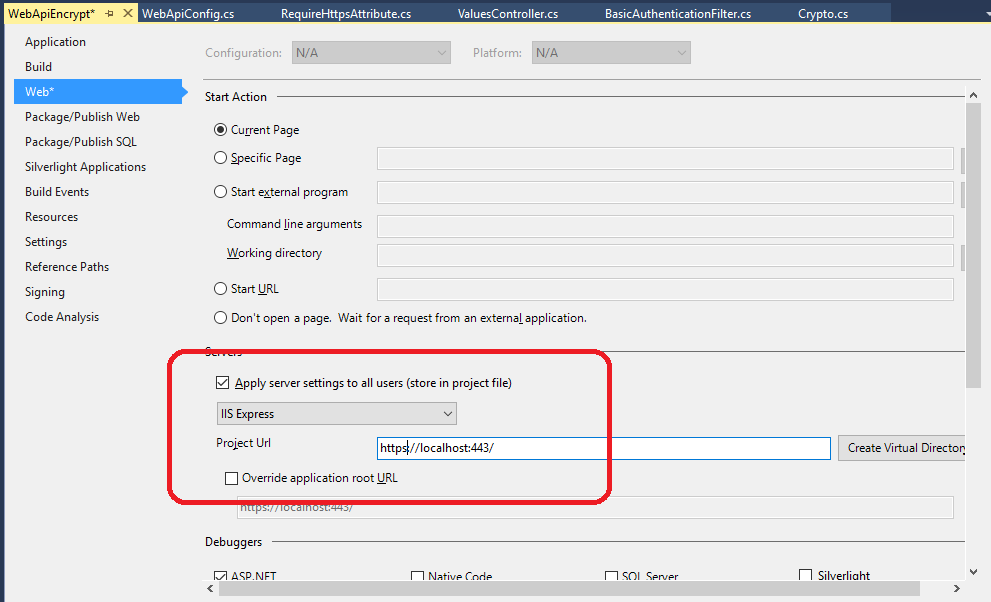
Step 6: Set the project properties
Into this new Filters folder create a new class called BasicAuthenticationAttribute. This needs to inherit from AuthorizationFilterAttribute.
BasicAuthenticationAttribute.cs
[code language="csharp"]
using System;
using System.Net;
using System.Net.Http;
using System.Security.Principal;
using System.Text;
using System.Threading;
using System.Web.Http.Controllers;
using System.Web.Http.Filters;
namespace WebApiEncrypt.Filters
{
public class BasicAuthenticationAttribute : AuthorizationFilterAttribute
{
public override void OnAuthorization(HttpActionContext actionContext)
{
var authHeader = actionContext.Request.Headers.Authorization;
if (authHeader != null)
{
var authenticationToken = actionContext.Request.Headers.Authorization.Parameter;
var decodedAuthenticationToken = Encoding.UTF8.GetString(Convert.FromBase64String(authenticationToken));
var decryptedAuthenticationToken = Crypto.Crypto.Decrypt(decodedAuthenticationToken);
var usernamePasswordArray = decryptedAuthenticationToken.Split(':');
var userName = usernamePasswordArray[0];
var password = usernamePasswordArray[1];
// Replace this with your own system of security / means of validating credentials
var isValid = userName == "andy" && password == "password";
if (isValid)
{
var principal = new GenericPrincipal(new GenericIdentity(userName), null);
Thread.CurrentPrincipal = principal;
//actionContext.Response =
// actionContext.Request.CreateResponse(HttpStatusCode.OK,
// "User " + userName + " successfully authenticated");
return;
}
}
HandleUnathorized(actionContext);
}
private static void HandleUnathorized(HttpActionContext actionContext)
{
actionContext.Response = actionContext.Request.CreateResponse(HttpStatusCode.Unauthorized);
actionContext.Response.Headers.Add("WWW-Authenticate", "Basic Scheme='Data' location = 'http://localhost:");
}
}
}
[/code]
Step 4: Ensure basic authentication filter is applied in Values controller
Insert wherever you need this authentication to be enforced - globally or per function.
ValuesController.cs
[code language="csharp"]
using System.Collections.Generic;
using System.Web.Http;
using WebApiEncrypt.Filters;
namespace WebApiEncrypt.Controllers
{
[BasicAuthentication]
public class ValuesController : ApiController
{
// GET api/values
public IEnumerable<string> Get()
{
return new[] {"value1", "value2"};
}
// GET api/values/5
public string Get(int id)
{
return "value";
}
// POST api/values
public void Post([FromBody] string value)
{
}
// PUT api/values/5
public void Put(int id, [FromBody] string value)
{
}
// DELETE api/values/5
public void Delete(int id)
{
}
}
}
[/code]
Step 5: Add a require https authorization filter attribute
First add a new Add a require https authorization filter attribute class:
RequireHttpsAttribute.cs
[code language="csharp"]
using System;
using System.Net;
using System.Net.Http;
using System.Text;
using System.Web.Http.Controllers;
using System.Web.Http.Filters;
namespace WebApiEncrypt.Filters
{
public class RequireHttpsAttribute : AuthorizationFilterAttribute
{
public override void OnAuthorization(HttpActionContext actionContext)
{
var req = actionContext.Request;
if (req.RequestUri.Scheme == Uri.UriSchemeHttps) return;
var html = "<p>Https required.</p>";
if (req.Method.Method == "GET")
{
actionContext.Response = req.CreateResponse(HttpStatusCode.Found);
actionContext.Response.Content = new StringContent(html, Encoding.UTF8, "text/html");
var uriBuilder = new UriBuilder(req.RequestUri)
{
Scheme = Uri.UriSchemeHttps,
Port = 443
};
actionContext.Response.Headers.Location = uriBuilder.Uri;
}
else
{
actionContext.Response = req.CreateResponse(HttpStatusCode.NotFound);
actionContext.Response.Content = new StringContent(html, Encoding.UTF8, "text/html");
}
}
}
}
[/code]
Then update WebApiConfig.cs to ensure the require https is enforced globally:
WebApiConfig.cs
[code language="csharp"]
using System.Web.Http;
using WebApiEncrypt.Filters;
namespace WebApiEncrypt
{
public static class WebApiConfig
{
public static void Register(HttpConfiguration config)
{
config.MapHttpAttributeRoutes();
config.Routes.MapHttpRoute(
name: "DefaultApi",
routeTemplate: "api/{controller}/{id}",
defaults: new { id = RouteParameter.Optional }
);
config.Filters.Add(new RequireHttpsAttribute());
}
}
}
[/code]
Step 6: Set the project properties
 Step 7: Test
So in this example, the username:password combination I want to test is "andy:password"
Using the 'Crypto' facility, this would encrypt to:
[code language="text"]
63,127,47,68,12,186,31,83,59,235,103,58,43,65,231,137,16,139,161,134,225,181,241,74,187,20,159,69,37,132,133,181,162,61,251,86,107,5,133,121,228,3,226,112,249,134,85,253,131,103,218,145,237,174,238,89,175,95,220,36,177,7,173,170,208,199,43,243,125,58,164,235,143,139,180,42,142,240,36,167,164,164,191,147,242,145,234,120,159,66,61,76,40,21,88,68,167,42,24,4,20,115,130,141,63,145,82,154,171,193,247,214,183,2,147,236,25,123,6,71,96,112,207,91,89,152,29,168
[/code]
And the Base 64 encoding of the encrypted text is :
[code language="text"]
MTEyLDUsNjYsOTYsMTMsNjksMjI4LDEzLDE2OSwyNDIsMjIyLDQ0LDIwNywyNDcsMTk4LDY1LDEyMiwxNTMsMjM4LDE1NSw2MCwxMiw1MCwxMzcsMTM3LDQ1LDE2MSwxODQsMzIsNzIsMjAsMjMxLDIxMSw5OSwxMzMsMTYxLDE2LDE0Myw1MCwxMjgsNjQsMTgzLDEzMyw2NCw4NiwyMDEsMjUwLDIzOCw0MywxNTAsNzYsOTIsMTIzLDAsMjA5LDE1MiwzNywxNywyMTIsMTE0LDExNiw1OSwxNCwxMTQsMCwyMzgsNzAsMTcyLDI0NiwxODcsMTU3LDEzMiw2MywyNDksNjEsMjAxLDg3LDI1MSwxOTMsMjM2LDIyNCwxOTUsMjI2LDEyLDExNSwxOTEsMzAsODEsMjM0LDIyMiwxMjIsMTI1LDYsNCwyMTUsMTg1LDYsMyw5OCwxODYsMTM3LDEzNywxNjUsMjUsMTIyLDg4LDI0NCw2NywxMjksMjEzLDgsMTQ5LDcyLDMsMTA3LDI0LDIxNCwyNywyMTIsMjEyLDc3LDIxNCwyOSwxNTksMjksMjExLDQ4LDcw
[/code]
Example link for doing Base 64 encoding: https://www.base64encode.org/
I use this encoding as part of the basic authentication header used in the example GET command in Fiddler:
Step 7: Test
So in this example, the username:password combination I want to test is "andy:password"
Using the 'Crypto' facility, this would encrypt to:
[code language="text"]
63,127,47,68,12,186,31,83,59,235,103,58,43,65,231,137,16,139,161,134,225,181,241,74,187,20,159,69,37,132,133,181,162,61,251,86,107,5,133,121,228,3,226,112,249,134,85,253,131,103,218,145,237,174,238,89,175,95,220,36,177,7,173,170,208,199,43,243,125,58,164,235,143,139,180,42,142,240,36,167,164,164,191,147,242,145,234,120,159,66,61,76,40,21,88,68,167,42,24,4,20,115,130,141,63,145,82,154,171,193,247,214,183,2,147,236,25,123,6,71,96,112,207,91,89,152,29,168
[/code]
And the Base 64 encoding of the encrypted text is :
[code language="text"]
MTEyLDUsNjYsOTYsMTMsNjksMjI4LDEzLDE2OSwyNDIsMjIyLDQ0LDIwNywyNDcsMTk4LDY1LDEyMiwxNTMsMjM4LDE1NSw2MCwxMiw1MCwxMzcsMTM3LDQ1LDE2MSwxODQsMzIsNzIsMjAsMjMxLDIxMSw5OSwxMzMsMTYxLDE2LDE0Myw1MCwxMjgsNjQsMTgzLDEzMyw2NCw4NiwyMDEsMjUwLDIzOCw0MywxNTAsNzYsOTIsMTIzLDAsMjA5LDE1MiwzNywxNywyMTIsMTE0LDExNiw1OSwxNCwxMTQsMCwyMzgsNzAsMTcyLDI0NiwxODcsMTU3LDEzMiw2MywyNDksNjEsMjAxLDg3LDI1MSwxOTMsMjM2LDIyNCwxOTUsMjI2LDEyLDExNSwxOTEsMzAsODEsMjM0LDIyMiwxMjIsMTI1LDYsNCwyMTUsMTg1LDYsMyw5OCwxODYsMTM3LDEzNywxNjUsMjUsMTIyLDg4LDI0NCw2NywxMjksMjEzLDgsMTQ5LDcyLDMsMTA3LDI0LDIxNCwyNywyMTIsMjEyLDc3LDIxNCwyOSwxNTksMjksMjExLDQ4LDcw
[/code]
Example link for doing Base 64 encoding: https://www.base64encode.org/
I use this encoding as part of the basic authentication header used in the example GET command in Fiddler:
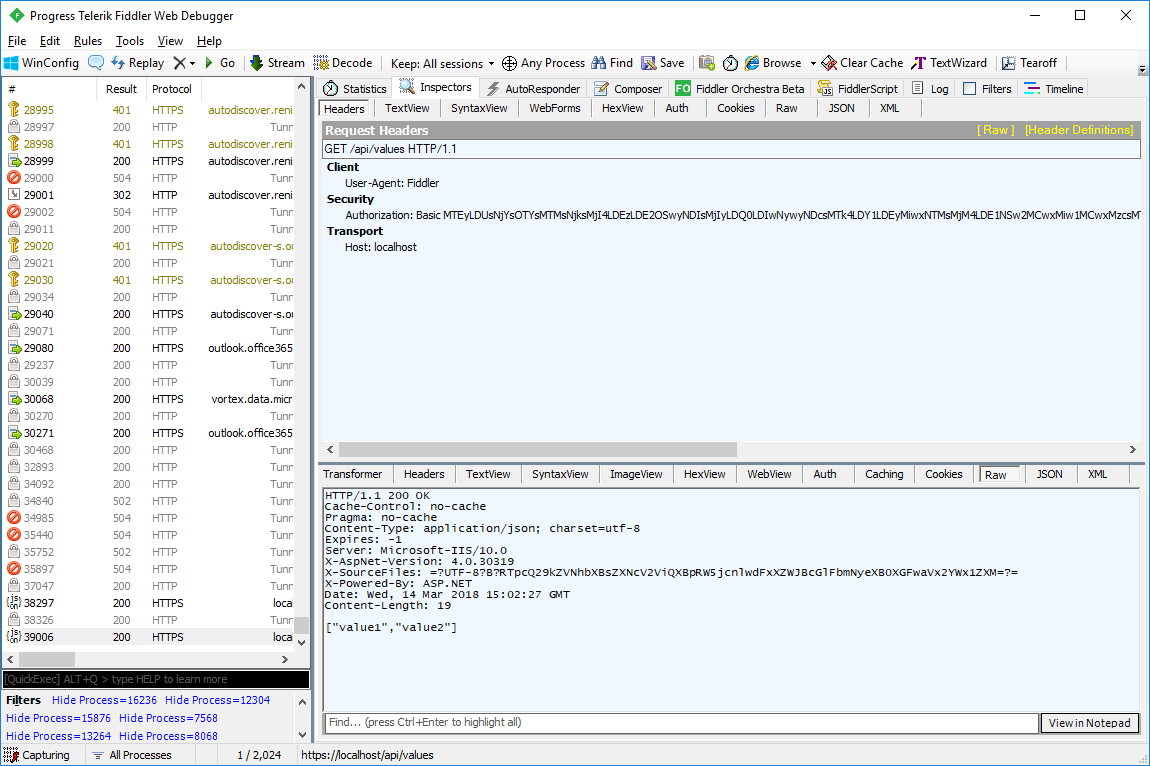
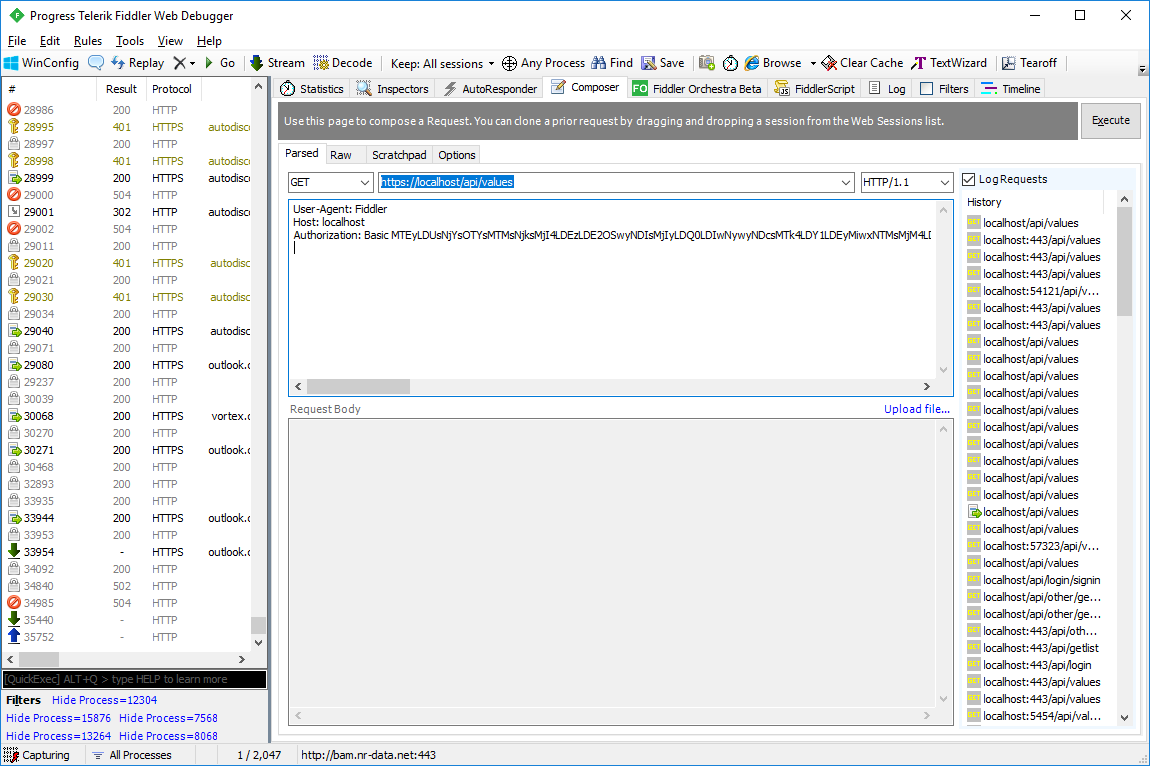 On inspecting the raw output in Fiddler see that the command has satisfied both the authentication and https requirements and the GET command has returned the values as shown:
 Also shown is an example console app with which to test the web service:
[code language="csharp"]
using System;
using System.Net;
using System.Text;
namespace WebAppConsumer
{
internal static class Program
{
private static void Main()
{
var path = "https://localhost/api/values";
// Update your local service port no. / service APIs etc in the following line
var encrypted = Crypto.Encrypt("andy:password");
var encoded = Convert.ToBase64String(Encoding.UTF8.GetBytes(encrypted));
try
{
var webClient = new WebClient();
webClient.Headers.Add(HttpRequestHeader.Authorization,
"Basic " + encoded);
// Sometimes when you get security certificate trouble but you still need to debug
//ServicePointManager.ServerCertificateValidationCallback +=
// (sender, certificate, chain, sslPolicyErrors) => true;
var result = webClient.DownloadString(path);
Console.WriteLine(result);
}
catch (Exception e)
{
Console.WriteLine(e.Message);
}
Console.ReadLine();
}
}
}
[/code]
Also shown is an example console app with which to test the web service:
[code language="csharp"]
using System;
using System.Net;
using System.Text;
namespace WebAppConsumer
{
internal static class Program
{
private static void Main()
{
var path = "https://localhost/api/values";
// Update your local service port no. / service APIs etc in the following line
var encrypted = Crypto.Encrypt("andy:password");
var encoded = Convert.ToBase64String(Encoding.UTF8.GetBytes(encrypted));
try
{
var webClient = new WebClient();
webClient.Headers.Add(HttpRequestHeader.Authorization,
"Basic " + encoded);
// Sometimes when you get security certificate trouble but you still need to debug
//ServicePointManager.ServerCertificateValidationCallback +=
// (sender, certificate, chain, sslPolicyErrors) => true;
var result = webClient.DownloadString(path);
Console.WriteLine(result);
}
catch (Exception e)
{
Console.WriteLine(e.Message);
}
Console.ReadLine();
}
}
}
[/code]
Step 2: Add a class for handling encryption and decryption
Crypto.cs
[code language="csharp"]
using System;
using System.Linq;
using System.Security.Cryptography;
using System.Text;
namespace WebApiEncrypt.Models
{
public static class Crypto
{
private const string PrivateKey =
"<RSAKeyValue><Modulus>s6lpjspk+3o2GOK5TM7JySARhhxE5gB96e9XLSSRuWY2W9F951MfistKRzVtg0cjJTdSk5mnWAVHLfKOEqp8PszpJx9z4IaRCwQ937KJmn2/2VyjcUsCsor+fdbIHOiJpaxBlsuI9N++4MgF/jb0tOVudiUutDqqDut7rhrB/oc=</Modulus><Exponent>AQAB</Exponent><P>3J2+VWMVWcuLjjnLULe5TmSN7ts0n/TPJqe+bg9avuewu1rDsz+OBfP66/+rpYMs5+JolDceZSiOT+ACW2Neuw==</P><Q>0HogL5BnWjj9BlfpILQt8ajJnBHYrCiPaJ4npghdD5n/JYV8BNOiOP1T7u1xmvtr2U4mMObE17rZjNOTa1rQpQ==</Q><DP>jbXh2dVQlKJznUMwf0PUiy96IDC8R/cnzQu4/ddtEe2fj2lJBe3QG7DRwCA1sJZnFPhQ9svFAXOgnlwlB3D4Gw==</DP><DQ>evrP6b8BeNONTySkvUoMoDW1WH+elVAH6OsC8IqWexGY1YV8t0wwsfWegZ9IGOifojzbgpVfIPN0SgK1P+r+kQ==</DQ><InverseQ>LeEoFGI+IOY/J+9SjCPKAKduP280epOTeSKxs115gW1b9CP4glavkUcfQTzkTPe2t21kl1OrnvXEe5Wrzkk8rA==</InverseQ><D>HD0rn0sGtlROPnkcgQsbwmYs+vRki/ZV1DhPboQJ96cuMh5qeLqjAZDUev7V2MWMq6PXceW73OTvfDRcymhLoNvobE4Ekiwc87+TwzS3811mOmt5DJya9SliqU/ro+iEicjO4v3nC+HujdpDh9CVXfUAWebKnd7Vo5p6LwC9nIk=</D></RSAKeyValue>"
;
private const string PublicKey =
"<RSAKeyValue><Modulus>s6lpjspk+3o2GOK5TM7JySARhhxE5gB96e9XLSSRuWY2W9F951MfistKRzVtg0cjJTdSk5mnWAVHLfKOEqp8PszpJx9z4IaRCwQ937KJmn2/2VyjcUsCsor+fdbIHOiJpaxBlsuI9N++4MgF/jb0tOVudiUutDqqDut7rhrB/oc=</Modulus><Exponent>AQAB</Exponent></RSAKeyValue>"
;
private static readonly UnicodeEncoding Encoder = new UnicodeEncoding();
public static string Decrypt(string data)
{
var rsa = new RSACryptoServiceProvider();
var dataArray = data.Split(',');
var dataByte = new byte[dataArray.Length];
for (var i = 0; i < dataArray.Length; i++)
dataByte[i] = Convert.ToByte(dataArray[i]);
rsa.FromXmlString(PrivateKey);
var decryptedByte = rsa.Decrypt(dataByte, false);
return Encoder.GetString(decryptedByte);
}
public static string Encrypt(string data)
{
var rsa = new RSACryptoServiceProvider();
rsa.FromXmlString(PublicKey);
var dataToEncrypt = Encoder.GetBytes(data);
var encryptedByteArray = rsa.Encrypt(dataToEncrypt, false).ToArray();
var length = encryptedByteArray.Length;
var item = 0;
var sb = new StringBuilder();
foreach (var x in encryptedByteArray)
{
item++;
sb.Append(x);
if (item < length)
sb.Append(",");
}
return sb.ToString();
}
}
}
[/code]
Step 3: Create a new Authentication filter
I have created a new folder with which to put any new filter classes:
Into this new Filters folder create a new class called BasicAuthenticationAttribute. This needs to inherit from AuthorizationFilterAttribute.
BasicAuthenticationAttribute.cs
[code language="csharp"]
using System;
using System.Net;
using System.Net.Http;
using System.Security.Principal;
using System.Text;
using System.Threading;
using System.Web.Http.Controllers;
using System.Web.Http.Filters;
namespace WebApiEncrypt.Filters
{
public class BasicAuthenticationAttribute : AuthorizationFilterAttribute
{
public override void OnAuthorization(HttpActionContext actionContext)
{
var authHeader = actionContext.Request.Headers.Authorization;
if (authHeader != null)
{
var authenticationToken = actionContext.Request.Headers.Authorization.Parameter;
var decodedAuthenticationToken = Encoding.UTF8.GetString(Convert.FromBase64String(authenticationToken));
var decryptedAuthenticationToken = Crypto.Crypto.Decrypt(decodedAuthenticationToken);
var usernamePasswordArray = decryptedAuthenticationToken.Split(':');
var userName = usernamePasswordArray[0];
var password = usernamePasswordArray[1];
// Replace this with your own system of security / means of validating credentials
var isValid = userName == "andy" && password == "password";
if (isValid)
{
var principal = new GenericPrincipal(new GenericIdentity(userName), null);
Thread.CurrentPrincipal = principal;
//actionContext.Response =
// actionContext.Request.CreateResponse(HttpStatusCode.OK,
// "User " + userName + " successfully authenticated");
return;
}
}
HandleUnathorized(actionContext);
}
private static void HandleUnathorized(HttpActionContext actionContext)
{
actionContext.Response = actionContext.Request.CreateResponse(HttpStatusCode.Unauthorized);
actionContext.Response.Headers.Add("WWW-Authenticate", "Basic Scheme='Data' location = 'http://localhost:");
}
}
}
[/code]
Step 4: Ensure basic authentication filter is applied in Values controller
Insert wherever you need this authentication to be enforced - globally or per function.
ValuesController.cs
[code language="csharp"]
using System.Collections.Generic;
using System.Web.Http;
using WebApiEncrypt.Filters;
namespace WebApiEncrypt.Controllers
{
[BasicAuthentication]
public class ValuesController : ApiController
{
// GET api/values
public IEnumerable<string> Get()
{
return new[] {"value1", "value2"};
}
// GET api/values/5
public string Get(int id)
{
return "value";
}
// POST api/values
public void Post([FromBody] string value)
{
}
// PUT api/values/5
public void Put(int id, [FromBody] string value)
{
}
// DELETE api/values/5
public void Delete(int id)
{
}
}
}
[/code]
Step 5: Add a require https authorization filter attribute
First add a new Add a require https authorization filter attribute class:
RequireHttpsAttribute.cs
[code language="csharp"]
using System;
using System.Net;
using System.Net.Http;
using System.Text;
using System.Web.Http.Controllers;
using System.Web.Http.Filters;
namespace WebApiEncrypt.Filters
{
public class RequireHttpsAttribute : AuthorizationFilterAttribute
{
public override void OnAuthorization(HttpActionContext actionContext)
{
var req = actionContext.Request;
if (req.RequestUri.Scheme == Uri.UriSchemeHttps) return;
var html = "<p>Https required.</p>";
if (req.Method.Method == "GET")
{
actionContext.Response = req.CreateResponse(HttpStatusCode.Found);
actionContext.Response.Content = new StringContent(html, Encoding.UTF8, "text/html");
var uriBuilder = new UriBuilder(req.RequestUri)
{
Scheme = Uri.UriSchemeHttps,
Port = 443
};
actionContext.Response.Headers.Location = uriBuilder.Uri;
}
else
{
actionContext.Response = req.CreateResponse(HttpStatusCode.NotFound);
actionContext.Response.Content = new StringContent(html, Encoding.UTF8, "text/html");
}
}
}
}
[/code]
Then update WebApiConfig.cs to ensure the require https is enforced globally:
WebApiConfig.cs
[code language="csharp"]
using System.Web.Http;
using WebApiEncrypt.Filters;
namespace WebApiEncrypt
{
public static class WebApiConfig
{
public static void Register(HttpConfiguration config)
{
config.MapHttpAttributeRoutes();
config.Routes.MapHttpRoute(
name: "DefaultApi",
routeTemplate: "api/{controller}/{id}",
defaults: new { id = RouteParameter.Optional }
);
config.Filters.Add(new RequireHttpsAttribute());
}
}
}
[/code]
Step 6: Set the project properties
Step 7: Test
So in this example, the username:password combination I want to test is "andy:password"
Using the 'Crypto' facility, this would encrypt to:
[code language="text"]
63,127,47,68,12,186,31,83,59,235,103,58,43,65,231,137,16,139,161,134,225,181,241,74,187,20,159,69,37,132,133,181,162,61,251,86,107,5,133,121,228,3,226,112,249,134,85,253,131,103,218,145,237,174,238,89,175,95,220,36,177,7,173,170,208,199,43,243,125,58,164,235,143,139,180,42,142,240,36,167,164,164,191,147,242,145,234,120,159,66,61,76,40,21,88,68,167,42,24,4,20,115,130,141,63,145,82,154,171,193,247,214,183,2,147,236,25,123,6,71,96,112,207,91,89,152,29,168
[/code]
And the Base 64 encoding of the encrypted text is :
[code language="text"]
MTEyLDUsNjYsOTYsMTMsNjksMjI4LDEzLDE2OSwyNDIsMjIyLDQ0LDIwNywyNDcsMTk4LDY1LDEyMiwxNTMsMjM4LDE1NSw2MCwxMiw1MCwxMzcsMTM3LDQ1LDE2MSwxODQsMzIsNzIsMjAsMjMxLDIxMSw5OSwxMzMsMTYxLDE2LDE0Myw1MCwxMjgsNjQsMTgzLDEzMyw2NCw4NiwyMDEsMjUwLDIzOCw0MywxNTAsNzYsOTIsMTIzLDAsMjA5LDE1MiwzNywxNywyMTIsMTE0LDExNiw1OSwxNCwxMTQsMCwyMzgsNzAsMTcyLDI0NiwxODcsMTU3LDEzMiw2MywyNDksNjEsMjAxLDg3LDI1MSwxOTMsMjM2LDIyNCwxOTUsMjI2LDEyLDExNSwxOTEsMzAsODEsMjM0LDIyMiwxMjIsMTI1LDYsNCwyMTUsMTg1LDYsMyw5OCwxODYsMTM3LDEzNywxNjUsMjUsMTIyLDg4LDI0NCw2NywxMjksMjEzLDgsMTQ5LDcyLDMsMTA3LDI0LDIxNCwyNywyMTIsMjEyLDc3LDIxNCwyOSwxNTksMjksMjExLDQ4LDcw
[/code]
Example link for doing Base 64 encoding: https://www.base64encode.org/
I use this encoding as part of the basic authentication header used in the example GET command in Fiddler:
On inspecting the raw output in Fiddler see that the command has satisfied both the authentication and https requirements and the GET command has returned the values as shown:
Also shown is an example console app with which to test the web service:
[code language="csharp"]
using System;
using System.Net;
using System.Text;
namespace WebAppConsumer
{
internal static class Program
{
private static void Main()
{
var path = "https://localhost/api/values";
// Update your local service port no. / service APIs etc in the following line
var encrypted = Crypto.Encrypt("andy:password");
var encoded = Convert.ToBase64String(Encoding.UTF8.GetBytes(encrypted));
try
{
var webClient = new WebClient();
webClient.Headers.Add(HttpRequestHeader.Authorization,
"Basic " + encoded);
// Sometimes when you get security certificate trouble but you still need to debug
//ServicePointManager.ServerCertificateValidationCallback +=
// (sender, certificate, chain, sslPolicyErrors) => true;
var result = webClient.DownloadString(path);
Console.WriteLine(result);
}
catch (Exception e)
{
Console.WriteLine(e.Message);
}
Console.ReadLine();
}
}
}
[/code]


Comments
Post a Comment