A simple example of using dependency injection using Unity in WPF
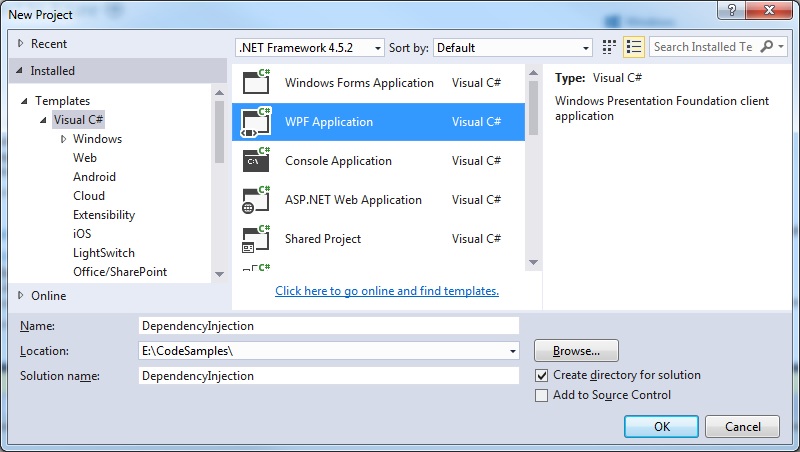
Step 1: Create a new Visual Studio project
 Step 2: Add the necessary Unity reference
Select Tools > NuGet Package Manager.
Type in the following command:
[code language="txt"]
Install-Package Unity -Version 4.0.1
[/code]
Unity website for NuGet can be found here:
https://www.nuget.org/packages/Unity/
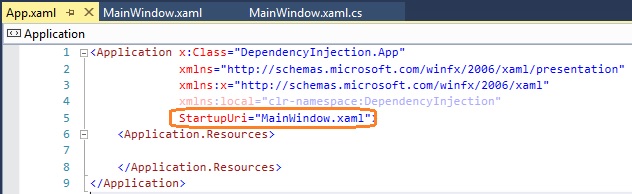
Step 3: Remove the startup URL
In App.xaml get rid of the StartupUri value:
Step 2: Add the necessary Unity reference
Select Tools > NuGet Package Manager.
Type in the following command:
[code language="txt"]
Install-Package Unity -Version 4.0.1
[/code]
Unity website for NuGet can be found here:
https://www.nuget.org/packages/Unity/
Step 3: Remove the startup URL
In App.xaml get rid of the StartupUri value:
 Step 4: Add the Model class / interface
IModel.cs
[code language="csharp"]
namespace DependencyInjection
{
public interface IModel
{
}
}
[/code]
Model.cs
[code language="csharp"]
namespace DependencyInjection
{
public class Model : IModel
{
public Model()
{
Text = "Hello";
}
public string Text { get; set; }
}
}
[/code]
Step 5: Add the ViewModel class
To deal with the error that we receive in the XAML when a ViewModel has "No parameterless constructor defined for this object" - be sure to create a parameterless constructor that will call the standard constructor.
MainWindowViewModel.cs
[code language="csharp"]
namespace DependencyInjection
{
public class MainWindowViewModel
{
private Model _model;
public MainWindowViewModel()
{
}
public MainWindowViewModel(Model model)
{
_model = model;
}
}
}
[/code]
Step 6: Initialise the View Model on application startup
Here app.xaml.cs is modified as follows:
[code language="csharp"]
using System.Windows;
using Microsoft.Practices.Unity;
namespace DependencyInjection
{
/// <summary>
/// Interaction logic for App.xaml
/// </summary>
public partial class App : Application
{
protected override void OnStartup(StartupEventArgs e)
{
base.OnStartup(e);
IUnityContainer container = new UnityContainer();
container.RegisterType<IModel, Model>();
var mainWindowViewModel = container.Resolve<MainWindowViewModel>();
var window = new MainWindow {DataContext = mainWindowViewModel};
window.Show();
}
}
}
[/code]
And that is all there is to it.
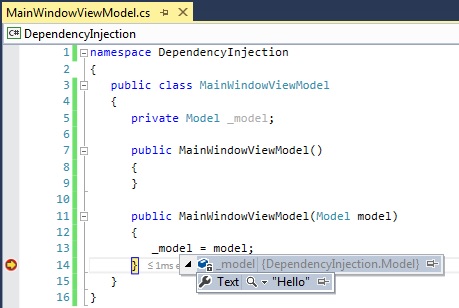
On debugging notice that on startup the ViewModel is dependency injected with the Model:
Step 4: Add the Model class / interface
IModel.cs
[code language="csharp"]
namespace DependencyInjection
{
public interface IModel
{
}
}
[/code]
Model.cs
[code language="csharp"]
namespace DependencyInjection
{
public class Model : IModel
{
public Model()
{
Text = "Hello";
}
public string Text { get; set; }
}
}
[/code]
Step 5: Add the ViewModel class
To deal with the error that we receive in the XAML when a ViewModel has "No parameterless constructor defined for this object" - be sure to create a parameterless constructor that will call the standard constructor.
MainWindowViewModel.cs
[code language="csharp"]
namespace DependencyInjection
{
public class MainWindowViewModel
{
private Model _model;
public MainWindowViewModel()
{
}
public MainWindowViewModel(Model model)
{
_model = model;
}
}
}
[/code]
Step 6: Initialise the View Model on application startup
Here app.xaml.cs is modified as follows:
[code language="csharp"]
using System.Windows;
using Microsoft.Practices.Unity;
namespace DependencyInjection
{
/// <summary>
/// Interaction logic for App.xaml
/// </summary>
public partial class App : Application
{
protected override void OnStartup(StartupEventArgs e)
{
base.OnStartup(e);
IUnityContainer container = new UnityContainer();
container.RegisterType<IModel, Model>();
var mainWindowViewModel = container.Resolve<MainWindowViewModel>();
var window = new MainWindow {DataContext = mainWindowViewModel};
window.Show();
}
}
}
[/code]
And that is all there is to it.
On debugging notice that on startup the ViewModel is dependency injected with the Model:
Step 2: Add the necessary Unity reference
Select Tools > NuGet Package Manager.
Type in the following command:
[code language="txt"]
Install-Package Unity -Version 4.0.1
[/code]
Unity website for NuGet can be found here:
https://www.nuget.org/packages/Unity/
Step 3: Remove the startup URL
In App.xaml get rid of the StartupUri value:
Step 4: Add the Model class / interface
IModel.cs
[code language="csharp"]
namespace DependencyInjection
{
public interface IModel
{
}
}
[/code]
Model.cs
[code language="csharp"]
namespace DependencyInjection
{
public class Model : IModel
{
public Model()
{
Text = "Hello";
}
public string Text { get; set; }
}
}
[/code]
Step 5: Add the ViewModel class
To deal with the error that we receive in the XAML when a ViewModel has "No parameterless constructor defined for this object" - be sure to create a parameterless constructor that will call the standard constructor.
MainWindowViewModel.cs
[code language="csharp"]
namespace DependencyInjection
{
public class MainWindowViewModel
{
private Model _model;
public MainWindowViewModel()
{
}
public MainWindowViewModel(Model model)
{
_model = model;
}
}
}
[/code]
Step 6: Initialise the View Model on application startup
Here app.xaml.cs is modified as follows:
[code language="csharp"]
using System.Windows;
using Microsoft.Practices.Unity;
namespace DependencyInjection
{
/// <summary>
/// Interaction logic for App.xaml
/// </summary>
public partial class App : Application
{
protected override void OnStartup(StartupEventArgs e)
{
base.OnStartup(e);
IUnityContainer container = new UnityContainer();
container.RegisterType<IModel, Model>();
var mainWindowViewModel = container.Resolve<MainWindowViewModel>();
var window = new MainWindow {DataContext = mainWindowViewModel};
window.Show();
}
}
}
[/code]
And that is all there is to it.
On debugging notice that on startup the ViewModel is dependency injected with the Model:


Comments
Post a Comment