Using the HTML Agility Package to modify web pages
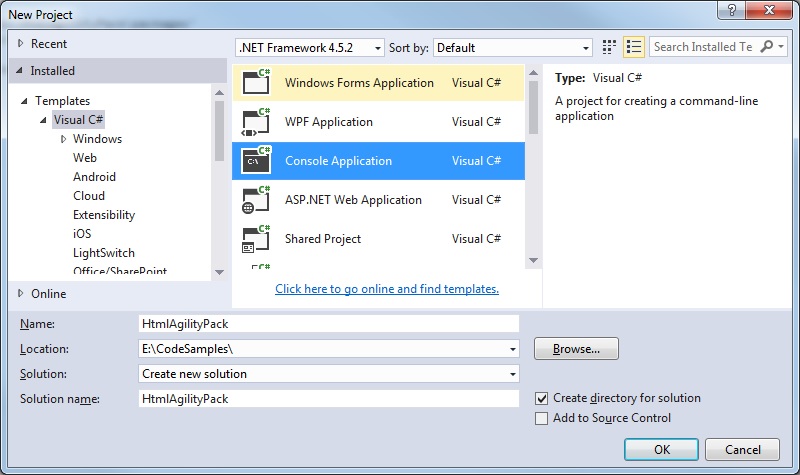
Step 1: Create a new Visual Studio project
Create a new Console application:
 Step 2: Use the Package Manager console to install the HTML Agility package.
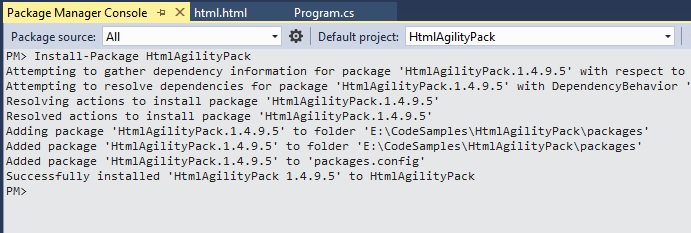
Select Tools > NuGet Package Manager > Package Manager Consol
Enter: Install-Package HtmlAgilityPack
Step 2: Use the Package Manager console to install the HTML Agility package.
Select Tools > NuGet Package Manager > Package Manager Consol
Enter: Install-Package HtmlAgilityPack
 Step 3: Add the reference to the HtmlAgilityPack.dll
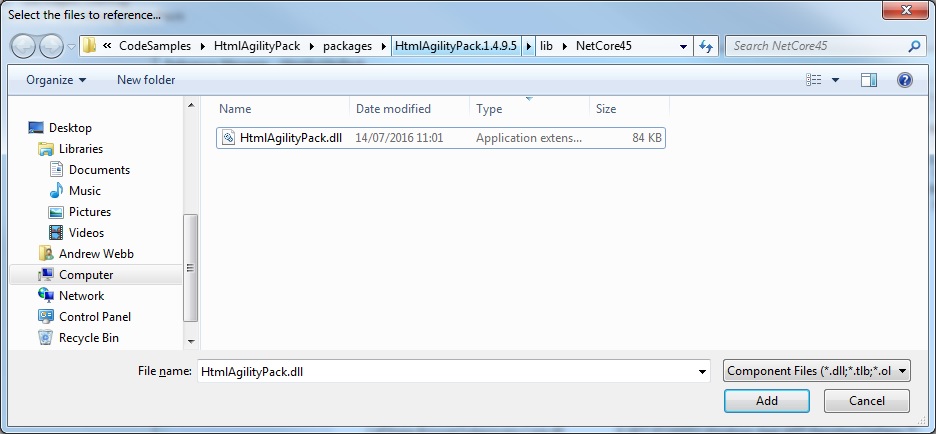
Right click you References folder, and browse to the HtmlAgilityPack.dll file that gets installed to the 'packages' folder in your Visual Studio project.
Select and add this file:
Step 3: Add the reference to the HtmlAgilityPack.dll
Right click you References folder, and browse to the HtmlAgilityPack.dll file that gets installed to the 'packages' folder in your Visual Studio project.
Select and add this file:
 Step 4: Try it on some examples
1. Insert the 'DOCTYPE' comment before the main tag and insert a "
Step 4: Try it on some examples
1. Insert the 'DOCTYPE' comment before the main tag and insert a "
Step 2: Use the Package Manager console to install the HTML Agility package.
Select Tools > NuGet Package Manager > Package Manager Consol
Enter: Install-Package HtmlAgilityPack
Step 3: Add the reference to the HtmlAgilityPack.dll
Right click you References folder, and browse to the HtmlAgilityPack.dll file that gets installed to the 'packages' folder in your Visual Studio project.
Select and add this file:
Step 4: Try it on some examples
1. Insert the 'DOCTYPE' comment before the main tag and insert a "


