How to orient WrapPanel items within ItemsControl lists vertically and horizontally
Some prefer to display items contained inside a WPF WrapPanel so that they can be scrolled vertically, others prefer horizontal scrolling.
This post shows how to do both, by way of some simple tweaks.
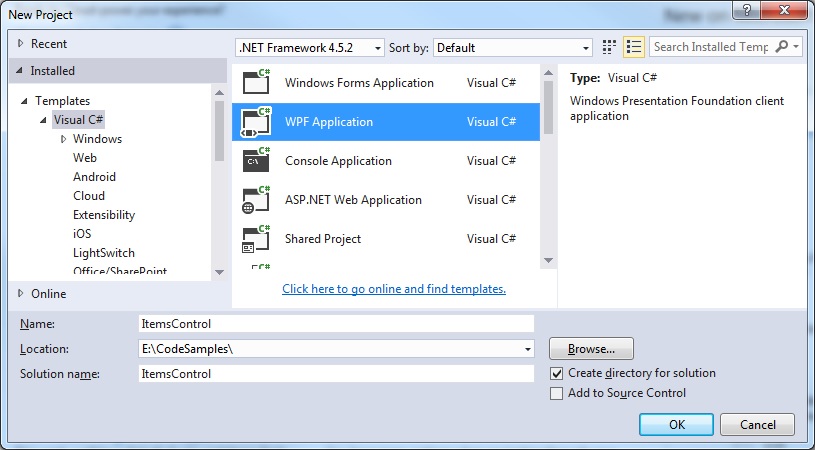
Step 1: Create a new Visual Studio project
 Step 2: Create a ViewModel
Create a ViewModel class which we use to contain details about the items we wish to display in the WrapPanel.
This could include image data, text etc. To keep things simple I'll just maintain a list of strings representing the title text of each displayed item.
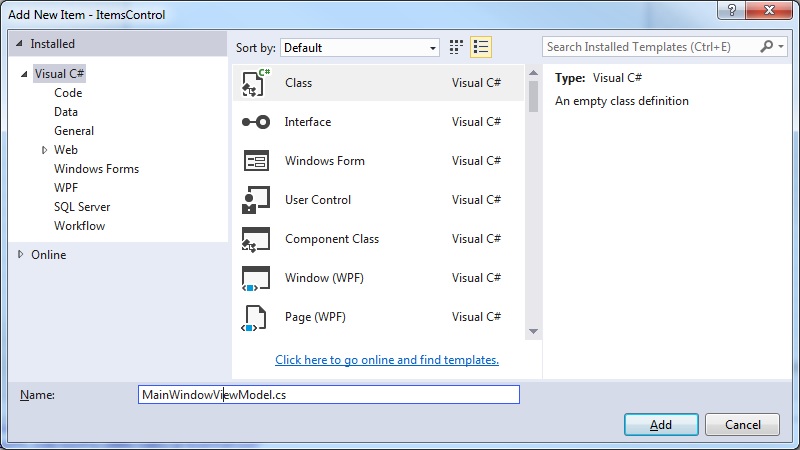
Right-click your project and select Add > New Item. Create our MainWindowViewModel.cs class:
Step 2: Create a ViewModel
Create a ViewModel class which we use to contain details about the items we wish to display in the WrapPanel.
This could include image data, text etc. To keep things simple I'll just maintain a list of strings representing the title text of each displayed item.
Right-click your project and select Add > New Item. Create our MainWindowViewModel.cs class:
 MainWindowViewModel.cs
[code language="csharp"]
using System.Collections.Generic;
namespace ItemsControl
{
public class Item
{
public Item(string title)
{
Title = title;
}
public string Title { get; set; }
}
public class MainWindowViewModel
{
public MainWindowViewModel()
{
Titles = new List<Item>()
{
new Item("Slide 1"),
new Item("Slide 2"),
new Item("Slide 3"),
new Item("Slide 4"),
new Item("Slide 5"),
new Item("Slide 6"),
new Item("Slide 7"),
new Item("Slide 8"),
};
}
public List<Item> Titles { get; set; }
}
}
[/code]
Step 3: Update the MainWindow xaml (Vertical scrolling)
Full code listing for vertical scrolling configuration:
MainWindow.xaml
[code language="xml"]
<Window x:Class="ItemsControl.MainWindow"
xmlns="http://schemas.microsoft.com/winfx/2006/xaml/presentation"
xmlns:x="http://schemas.microsoft.com/winfx/2006/xaml"
xmlns:d="http://schemas.microsoft.com/expression/blend/2008"
xmlns:mc="http://schemas.openxmlformats.org/markup-compatibility/2006"
xmlns:local="clr-namespace:ItemsControl"
mc:Ignorable="d"
Title="MainWindow" Height="400" Width="400">
<Window.DataContext>
<local:MainWindowViewModel />
</Window.DataContext>
<Grid Margin="5">
<ScrollViewer >
<ItemsControl
x:Name="SearchResultList"
ScrollViewer.HorizontalScrollBarVisibility="Disabled"
ItemsSource="{Binding Titles}">
<ItemsControl.ItemsPanel>
<ItemsPanelTemplate>
<WrapPanel />
</ItemsPanelTemplate>
</ItemsControl.ItemsPanel>
<ItemsControl.ItemTemplate>
<DataTemplate>
<Border
Margin="5"
BorderThickness="1"
BorderBrush="Aqua">
<TextBlock
Text="{Binding Title}"
HorizontalAlignment="Center"
VerticalAlignment="Top"
FontSize="12"
TextWrapping="Wrap"
TextAlignment="Center"
FontWeight="DemiBold"
Width="150"
Height="150" />
</Border>
</DataTemplate>
</ItemsControl.ItemTemplate>
</ItemsControl>
</ScrollViewer>
</Grid>
</Window>
[/code]
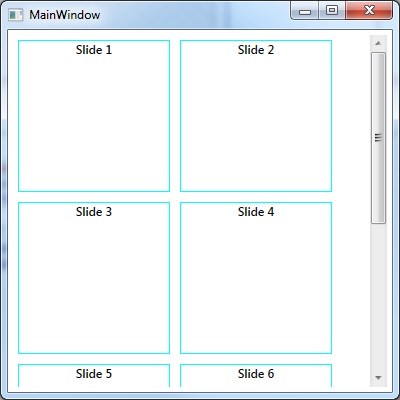
Running the program we can see that the items arranged that the overspill is handled via vertical scrolling:
MainWindowViewModel.cs
[code language="csharp"]
using System.Collections.Generic;
namespace ItemsControl
{
public class Item
{
public Item(string title)
{
Title = title;
}
public string Title { get; set; }
}
public class MainWindowViewModel
{
public MainWindowViewModel()
{
Titles = new List<Item>()
{
new Item("Slide 1"),
new Item("Slide 2"),
new Item("Slide 3"),
new Item("Slide 4"),
new Item("Slide 5"),
new Item("Slide 6"),
new Item("Slide 7"),
new Item("Slide 8"),
};
}
public List<Item> Titles { get; set; }
}
}
[/code]
Step 3: Update the MainWindow xaml (Vertical scrolling)
Full code listing for vertical scrolling configuration:
MainWindow.xaml
[code language="xml"]
<Window x:Class="ItemsControl.MainWindow"
xmlns="http://schemas.microsoft.com/winfx/2006/xaml/presentation"
xmlns:x="http://schemas.microsoft.com/winfx/2006/xaml"
xmlns:d="http://schemas.microsoft.com/expression/blend/2008"
xmlns:mc="http://schemas.openxmlformats.org/markup-compatibility/2006"
xmlns:local="clr-namespace:ItemsControl"
mc:Ignorable="d"
Title="MainWindow" Height="400" Width="400">
<Window.DataContext>
<local:MainWindowViewModel />
</Window.DataContext>
<Grid Margin="5">
<ScrollViewer >
<ItemsControl
x:Name="SearchResultList"
ScrollViewer.HorizontalScrollBarVisibility="Disabled"
ItemsSource="{Binding Titles}">
<ItemsControl.ItemsPanel>
<ItemsPanelTemplate>
<WrapPanel />
</ItemsPanelTemplate>
</ItemsControl.ItemsPanel>
<ItemsControl.ItemTemplate>
<DataTemplate>
<Border
Margin="5"
BorderThickness="1"
BorderBrush="Aqua">
<TextBlock
Text="{Binding Title}"
HorizontalAlignment="Center"
VerticalAlignment="Top"
FontSize="12"
TextWrapping="Wrap"
TextAlignment="Center"
FontWeight="DemiBold"
Width="150"
Height="150" />
</Border>
</DataTemplate>
</ItemsControl.ItemTemplate>
</ItemsControl>
</ScrollViewer>
</Grid>
</Window>
[/code]
Running the program we can see that the items arranged that the overspill is handled via vertical scrolling:
 Step 4: Update the MainWindow xaml (Horizontal scrolling)
MainWindow.xaml
[code language="xml"]
<Window x:Class="ItemsControl.MainWindow"
xmlns="http://schemas.microsoft.com/winfx/2006/xaml/presentation"
xmlns:x="http://schemas.microsoft.com/winfx/2006/xaml"
xmlns:d="http://schemas.microsoft.com/expression/blend/2008"
xmlns:mc="http://schemas.openxmlformats.org/markup-compatibility/2006"
xmlns:local="clr-namespace:ItemsControl"
mc:Ignorable="d"
Title="MainWindow" Height="400" Width="400">
<Window.DataContext>
<local:MainWindowViewModel />
</Window.DataContext>
<Grid Margin="5">
<ScrollViewer
VerticalScrollBarVisibility="Disabled"
HorizontalScrollBarVisibility="Auto">
<ItemsControl
x:Name="SearchResultList"
ItemsSource="{Binding Titles}">
<ItemsControl.ItemsPanel>
<ItemsPanelTemplate>
<WrapPanel Orientation="Vertical"/>
</ItemsPanelTemplate>
</ItemsControl.ItemsPanel>
<ItemsControl.ItemTemplate>
<DataTemplate>
<Border
Margin="5"
BorderThickness="1"
BorderBrush="Aqua">
<TextBlock
Text="{Binding Title}"
HorizontalAlignment="Center"
VerticalAlignment="Top"
FontSize="12"
TextWrapping="Wrap"
TextAlignment="Center"
FontWeight="DemiBold"
Width="150"
Height="150" />
</Border>
</DataTemplate>
</ItemsControl.ItemTemplate>
</ItemsControl>
</ScrollViewer>
</Grid>
</Window>
[/code]
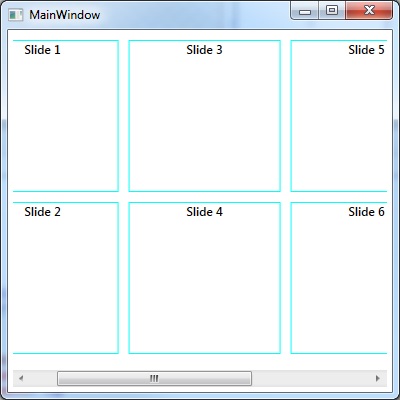
This time the overspill is handled via horizontal scrolling:
Step 4: Update the MainWindow xaml (Horizontal scrolling)
MainWindow.xaml
[code language="xml"]
<Window x:Class="ItemsControl.MainWindow"
xmlns="http://schemas.microsoft.com/winfx/2006/xaml/presentation"
xmlns:x="http://schemas.microsoft.com/winfx/2006/xaml"
xmlns:d="http://schemas.microsoft.com/expression/blend/2008"
xmlns:mc="http://schemas.openxmlformats.org/markup-compatibility/2006"
xmlns:local="clr-namespace:ItemsControl"
mc:Ignorable="d"
Title="MainWindow" Height="400" Width="400">
<Window.DataContext>
<local:MainWindowViewModel />
</Window.DataContext>
<Grid Margin="5">
<ScrollViewer
VerticalScrollBarVisibility="Disabled"
HorizontalScrollBarVisibility="Auto">
<ItemsControl
x:Name="SearchResultList"
ItemsSource="{Binding Titles}">
<ItemsControl.ItemsPanel>
<ItemsPanelTemplate>
<WrapPanel Orientation="Vertical"/>
</ItemsPanelTemplate>
</ItemsControl.ItemsPanel>
<ItemsControl.ItemTemplate>
<DataTemplate>
<Border
Margin="5"
BorderThickness="1"
BorderBrush="Aqua">
<TextBlock
Text="{Binding Title}"
HorizontalAlignment="Center"
VerticalAlignment="Top"
FontSize="12"
TextWrapping="Wrap"
TextAlignment="Center"
FontWeight="DemiBold"
Width="150"
Height="150" />
</Border>
</DataTemplate>
</ItemsControl.ItemTemplate>
</ItemsControl>
</ScrollViewer>
</Grid>
</Window>
[/code]
This time the overspill is handled via horizontal scrolling:
Step 2: Create a ViewModel
Create a ViewModel class which we use to contain details about the items we wish to display in the WrapPanel.
This could include image data, text etc. To keep things simple I'll just maintain a list of strings representing the title text of each displayed item.
Right-click your project and select Add > New Item. Create our MainWindowViewModel.cs class:
MainWindowViewModel.cs
[code language="csharp"]
using System.Collections.Generic;
namespace ItemsControl
{
public class Item
{
public Item(string title)
{
Title = title;
}
public string Title { get; set; }
}
public class MainWindowViewModel
{
public MainWindowViewModel()
{
Titles = new List<Item>()
{
new Item("Slide 1"),
new Item("Slide 2"),
new Item("Slide 3"),
new Item("Slide 4"),
new Item("Slide 5"),
new Item("Slide 6"),
new Item("Slide 7"),
new Item("Slide 8"),
};
}
public List<Item> Titles { get; set; }
}
}
[/code]
Step 3: Update the MainWindow xaml (Vertical scrolling)
Full code listing for vertical scrolling configuration:
MainWindow.xaml
[code language="xml"]
<Window x:Class="ItemsControl.MainWindow"
xmlns="http://schemas.microsoft.com/winfx/2006/xaml/presentation"
xmlns:x="http://schemas.microsoft.com/winfx/2006/xaml"
xmlns:d="http://schemas.microsoft.com/expression/blend/2008"
xmlns:mc="http://schemas.openxmlformats.org/markup-compatibility/2006"
xmlns:local="clr-namespace:ItemsControl"
mc:Ignorable="d"
Title="MainWindow" Height="400" Width="400">
<Window.DataContext>
<local:MainWindowViewModel />
</Window.DataContext>
<Grid Margin="5">
<ScrollViewer >
<ItemsControl
x:Name="SearchResultList"
ScrollViewer.HorizontalScrollBarVisibility="Disabled"
ItemsSource="{Binding Titles}">
<ItemsControl.ItemsPanel>
<ItemsPanelTemplate>
<WrapPanel />
</ItemsPanelTemplate>
</ItemsControl.ItemsPanel>
<ItemsControl.ItemTemplate>
<DataTemplate>
<Border
Margin="5"
BorderThickness="1"
BorderBrush="Aqua">
<TextBlock
Text="{Binding Title}"
HorizontalAlignment="Center"
VerticalAlignment="Top"
FontSize="12"
TextWrapping="Wrap"
TextAlignment="Center"
FontWeight="DemiBold"
Width="150"
Height="150" />
</Border>
</DataTemplate>
</ItemsControl.ItemTemplate>
</ItemsControl>
</ScrollViewer>
</Grid>
</Window>
[/code]
Running the program we can see that the items arranged that the overspill is handled via vertical scrolling:
Step 4: Update the MainWindow xaml (Horizontal scrolling)
MainWindow.xaml
[code language="xml"]
<Window x:Class="ItemsControl.MainWindow"
xmlns="http://schemas.microsoft.com/winfx/2006/xaml/presentation"
xmlns:x="http://schemas.microsoft.com/winfx/2006/xaml"
xmlns:d="http://schemas.microsoft.com/expression/blend/2008"
xmlns:mc="http://schemas.openxmlformats.org/markup-compatibility/2006"
xmlns:local="clr-namespace:ItemsControl"
mc:Ignorable="d"
Title="MainWindow" Height="400" Width="400">
<Window.DataContext>
<local:MainWindowViewModel />
</Window.DataContext>
<Grid Margin="5">
<ScrollViewer
VerticalScrollBarVisibility="Disabled"
HorizontalScrollBarVisibility="Auto">
<ItemsControl
x:Name="SearchResultList"
ItemsSource="{Binding Titles}">
<ItemsControl.ItemsPanel>
<ItemsPanelTemplate>
<WrapPanel Orientation="Vertical"/>
</ItemsPanelTemplate>
</ItemsControl.ItemsPanel>
<ItemsControl.ItemTemplate>
<DataTemplate>
<Border
Margin="5"
BorderThickness="1"
BorderBrush="Aqua">
<TextBlock
Text="{Binding Title}"
HorizontalAlignment="Center"
VerticalAlignment="Top"
FontSize="12"
TextWrapping="Wrap"
TextAlignment="Center"
FontWeight="DemiBold"
Width="150"
Height="150" />
</Border>
</DataTemplate>
</ItemsControl.ItemTemplate>
</ItemsControl>
</ScrollViewer>
</Grid>
</Window>
[/code]
This time the overspill is handled via horizontal scrolling:


Comments
Post a Comment