How to bind the WindowState property of a window in WPF using MVVM
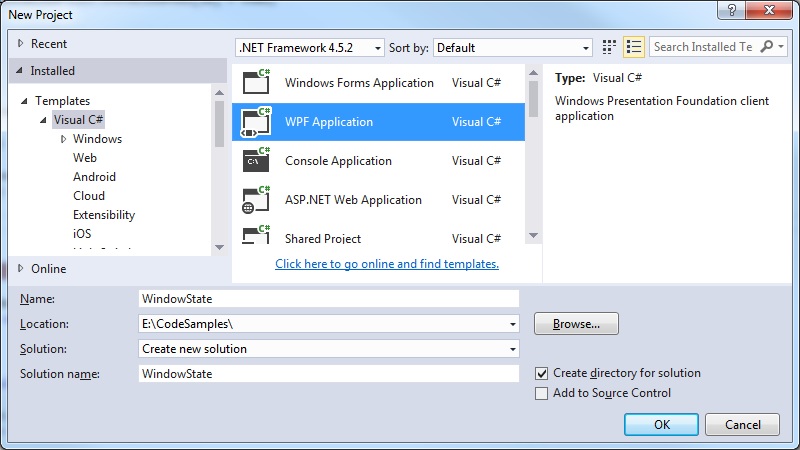
Step 1: Create a new WPF project
 Step 2: Create the ViewModel classes
Add the ViewModel classes that are used to do the bindings with the User Interface components
MainWindowViewModel.cs
This includes the WindowState property and setting this state to maximized upon construction:
[code language="csharp"]
namespace WindowState
{
public class MainWindowViewModel : ViewModelBase
{
private System.Windows.WindowState _windowState;
public MainWindowViewModel()
{
WindowState = System.Windows.WindowState.Maximized;
}
public System.Windows.WindowState WindowState
{
get { return _windowState; }
set
{
_windowState = value;
OnPropertyChanged("WindowState");
}
}
}
}
[/code]
ViewModelBase.cs
[code language="csharp"]
using System.ComponentModel;
namespace WindowState
{
public class ViewModelBase : INotifyPropertyChanged
{
public event PropertyChangedEventHandler PropertyChanged;
protected void OnPropertyChanged(string propertyName)
{
var handler = PropertyChanged;
if (handler != null)
handler(this, new PropertyChangedEventArgs(propertyName));
}
}
}
[/code]
Step 3: Update the MainWindow.xaml - add the DataContent
[code language="xml"]
<Window x:Class="WindowState.MainWindow"
xmlns="http://schemas.microsoft.com/winfx/2006/xaml/presentation"
xmlns:x="http://schemas.microsoft.com/winfx/2006/xaml"
xmlns:d="http://schemas.microsoft.com/expression/blend/2008"
xmlns:mc="http://schemas.openxmlformats.org/markup-compatibility/2006"
xmlns:local="clr-namespace:WindowState"
mc:Ignorable="d"
WindowState="{Binding WindowState, Mode=TwoWay}"
Title="MainWindow" Height="350" Width="525">
<Window.DataContext>
<local:MainWindowViewModel />
</Window.DataContext>
<Grid>
</Grid>
</Window>
[/code]
So that on building and running the project, the window is set to the 'maximized' state:
Step 2: Create the ViewModel classes
Add the ViewModel classes that are used to do the bindings with the User Interface components
MainWindowViewModel.cs
This includes the WindowState property and setting this state to maximized upon construction:
[code language="csharp"]
namespace WindowState
{
public class MainWindowViewModel : ViewModelBase
{
private System.Windows.WindowState _windowState;
public MainWindowViewModel()
{
WindowState = System.Windows.WindowState.Maximized;
}
public System.Windows.WindowState WindowState
{
get { return _windowState; }
set
{
_windowState = value;
OnPropertyChanged("WindowState");
}
}
}
}
[/code]
ViewModelBase.cs
[code language="csharp"]
using System.ComponentModel;
namespace WindowState
{
public class ViewModelBase : INotifyPropertyChanged
{
public event PropertyChangedEventHandler PropertyChanged;
protected void OnPropertyChanged(string propertyName)
{
var handler = PropertyChanged;
if (handler != null)
handler(this, new PropertyChangedEventArgs(propertyName));
}
}
}
[/code]
Step 3: Update the MainWindow.xaml - add the DataContent
[code language="xml"]
<Window x:Class="WindowState.MainWindow"
xmlns="http://schemas.microsoft.com/winfx/2006/xaml/presentation"
xmlns:x="http://schemas.microsoft.com/winfx/2006/xaml"
xmlns:d="http://schemas.microsoft.com/expression/blend/2008"
xmlns:mc="http://schemas.openxmlformats.org/markup-compatibility/2006"
xmlns:local="clr-namespace:WindowState"
mc:Ignorable="d"
WindowState="{Binding WindowState, Mode=TwoWay}"
Title="MainWindow" Height="350" Width="525">
<Window.DataContext>
<local:MainWindowViewModel />
</Window.DataContext>
<Grid>
</Grid>
</Window>
[/code]
So that on building and running the project, the window is set to the 'maximized' state:

Step 2: Create the ViewModel classes
Add the ViewModel classes that are used to do the bindings with the User Interface components
MainWindowViewModel.cs
This includes the WindowState property and setting this state to maximized upon construction:
[code language="csharp"]
namespace WindowState
{
public class MainWindowViewModel : ViewModelBase
{
private System.Windows.WindowState _windowState;
public MainWindowViewModel()
{
WindowState = System.Windows.WindowState.Maximized;
}
public System.Windows.WindowState WindowState
{
get { return _windowState; }
set
{
_windowState = value;
OnPropertyChanged("WindowState");
}
}
}
}
[/code]
ViewModelBase.cs
[code language="csharp"]
using System.ComponentModel;
namespace WindowState
{
public class ViewModelBase : INotifyPropertyChanged
{
public event PropertyChangedEventHandler PropertyChanged;
protected void OnPropertyChanged(string propertyName)
{
var handler = PropertyChanged;
if (handler != null)
handler(this, new PropertyChangedEventArgs(propertyName));
}
}
}
[/code]
Step 3: Update the MainWindow.xaml - add the DataContent
[code language="xml"]
<Window x:Class="WindowState.MainWindow"
xmlns="http://schemas.microsoft.com/winfx/2006/xaml/presentation"
xmlns:x="http://schemas.microsoft.com/winfx/2006/xaml"
xmlns:d="http://schemas.microsoft.com/expression/blend/2008"
xmlns:mc="http://schemas.openxmlformats.org/markup-compatibility/2006"
xmlns:local="clr-namespace:WindowState"
mc:Ignorable="d"
WindowState="{Binding WindowState, Mode=TwoWay}"
Title="MainWindow" Height="350" Width="525">
<Window.DataContext>
<local:MainWindowViewModel />
</Window.DataContext>
<Grid>
</Grid>
</Window>
[/code]
So that on building and running the project, the window is set to the 'maximized' state:


Comments
Post a Comment