Embedding PowerPoint documents in WPF
Some instruction on how to embed a PowerPoint presentation within a WPF application by converting the file to a XPS format and displaying this using DocumentViewer.
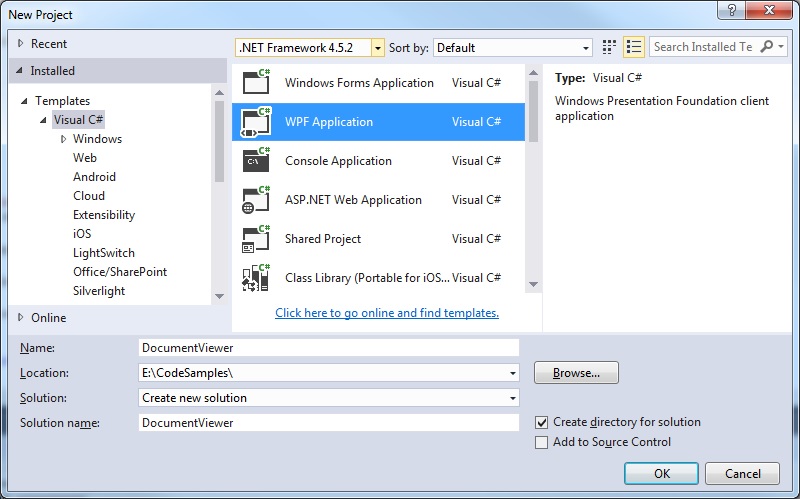
Step 1: Create a WPF Application
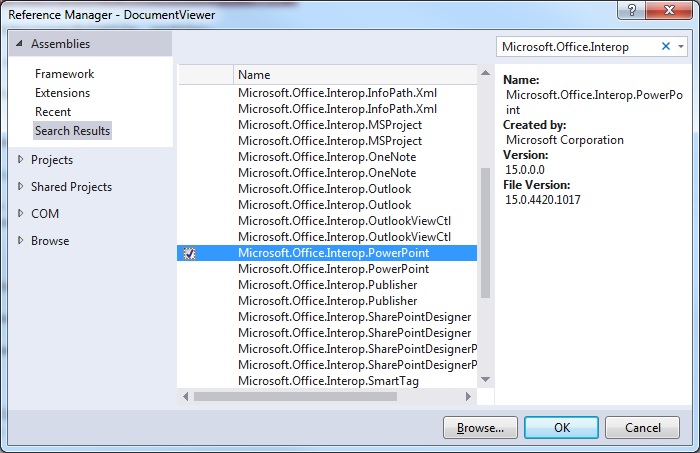
 Step 2. Include the necessary references
Microsoft.Office.Interop.PowerPoint
Step 2. Include the necessary references
Microsoft.Office.Interop.PowerPoint
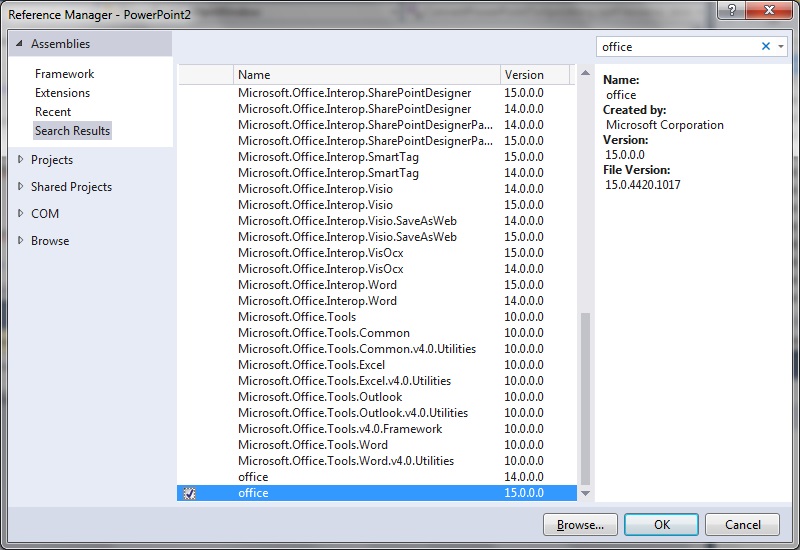
 Office
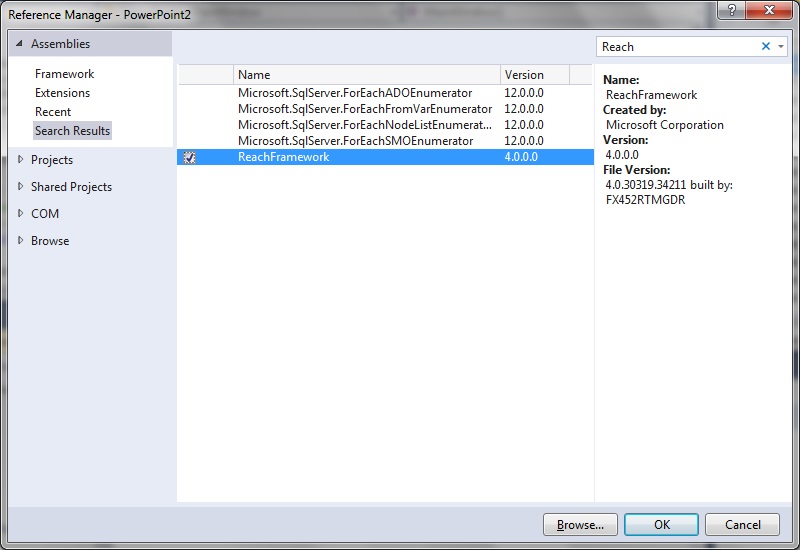
 ReachFramework
 Step 3: Insert DocumentViewer control into MainWindow.xaml
[code language="xml"]
<Window x:Class="DocumentViewer.MainWindow"
xmlns="http://schemas.microsoft.com/winfx/2006/xaml/presentation"
xmlns:x="http://schemas.microsoft.com/winfx/2006/xaml"
xmlns:d="http://schemas.microsoft.com/expression/blend/2008"
xmlns:mc="http://schemas.openxmlformats.org/markup-compatibility/2006"
mc:Ignorable="d"
Title="MainWindow" Height="350" Width="525">
<Grid>
<DocumentViewer
Name="DocumentviewPowerPoint"
VerticalAlignment="Top"
HorizontalAlignment="Left" />
</Grid>
</Window>
[/code]
Step 4: Convert the PowerPoint file to XPS format and point the DocumentView.Document to it
As demonstrated in the following code snippet.
For MVVM style applications it would be very similar, except we would need to bind the 'Document' to some object property in the ViewModel.
[code language="csharp"]
using System;
using System.IO;
using System.Windows;
using System.Windows.Xps.Packaging;
using Microsoft.Office.Core;
using Microsoft.Office.Interop.PowerPoint;
using Application = Microsoft.Office.Interop.PowerPoint.Application;
namespace DocumentViewer
{
public partial class MainWindow : Window
{
public MainWindow()
{
InitializeComponent();
const string powerPointFile = @"E:\temp\powerpoint.pptx";
var xpsFile = Path.GetTempPath() + Guid.NewGuid() + ".xps";
var xpsDocument = ConvertPowerPointToXps(powerPointFile, xpsFile);
DocumentviewPowerPoint.Document = xpsDocument.GetFixedDocumentSequence();
}
private static XpsDocument ConvertPowerPointToXps(string pptFilename, string xpsFilename)
{
var pptApp = new Application();
var presentation = pptApp.Presentations.Open(pptFilename, MsoTriState.msoTrue, MsoTriState.msoFalse,
MsoTriState.msoFalse);
try
{
presentation.ExportAsFixedFormat(xpsFilename, PpFixedFormatType.ppFixedFormatTypeXPS);
}
catch (Exception ex)
{
MessageBox.Show("Failed to export to XPS format: " + ex);
}
finally
{
presentation.Close();
pptApp.Quit();
}
return new XpsDocument(xpsFilename, FileAccess.Read);
}
}
}
[/code]
Running the sample program using a sample PowerPoint file shows that the PowerPoint is indeed embedded in the WPF application as shown:
Step 3: Insert DocumentViewer control into MainWindow.xaml
[code language="xml"]
<Window x:Class="DocumentViewer.MainWindow"
xmlns="http://schemas.microsoft.com/winfx/2006/xaml/presentation"
xmlns:x="http://schemas.microsoft.com/winfx/2006/xaml"
xmlns:d="http://schemas.microsoft.com/expression/blend/2008"
xmlns:mc="http://schemas.openxmlformats.org/markup-compatibility/2006"
mc:Ignorable="d"
Title="MainWindow" Height="350" Width="525">
<Grid>
<DocumentViewer
Name="DocumentviewPowerPoint"
VerticalAlignment="Top"
HorizontalAlignment="Left" />
</Grid>
</Window>
[/code]
Step 4: Convert the PowerPoint file to XPS format and point the DocumentView.Document to it
As demonstrated in the following code snippet.
For MVVM style applications it would be very similar, except we would need to bind the 'Document' to some object property in the ViewModel.
[code language="csharp"]
using System;
using System.IO;
using System.Windows;
using System.Windows.Xps.Packaging;
using Microsoft.Office.Core;
using Microsoft.Office.Interop.PowerPoint;
using Application = Microsoft.Office.Interop.PowerPoint.Application;
namespace DocumentViewer
{
public partial class MainWindow : Window
{
public MainWindow()
{
InitializeComponent();
const string powerPointFile = @"E:\temp\powerpoint.pptx";
var xpsFile = Path.GetTempPath() + Guid.NewGuid() + ".xps";
var xpsDocument = ConvertPowerPointToXps(powerPointFile, xpsFile);
DocumentviewPowerPoint.Document = xpsDocument.GetFixedDocumentSequence();
}
private static XpsDocument ConvertPowerPointToXps(string pptFilename, string xpsFilename)
{
var pptApp = new Application();
var presentation = pptApp.Presentations.Open(pptFilename, MsoTriState.msoTrue, MsoTriState.msoFalse,
MsoTriState.msoFalse);
try
{
presentation.ExportAsFixedFormat(xpsFilename, PpFixedFormatType.ppFixedFormatTypeXPS);
}
catch (Exception ex)
{
MessageBox.Show("Failed to export to XPS format: " + ex);
}
finally
{
presentation.Close();
pptApp.Quit();
}
return new XpsDocument(xpsFilename, FileAccess.Read);
}
}
}
[/code]
Running the sample program using a sample PowerPoint file shows that the PowerPoint is indeed embedded in the WPF application as shown:

Step 2. Include the necessary references
Microsoft.Office.Interop.PowerPoint
Office
ReachFramework
Step 3: Insert DocumentViewer control into MainWindow.xaml
[code language="xml"]
<Window x:Class="DocumentViewer.MainWindow"
xmlns="http://schemas.microsoft.com/winfx/2006/xaml/presentation"
xmlns:x="http://schemas.microsoft.com/winfx/2006/xaml"
xmlns:d="http://schemas.microsoft.com/expression/blend/2008"
xmlns:mc="http://schemas.openxmlformats.org/markup-compatibility/2006"
mc:Ignorable="d"
Title="MainWindow" Height="350" Width="525">
<Grid>
<DocumentViewer
Name="DocumentviewPowerPoint"
VerticalAlignment="Top"
HorizontalAlignment="Left" />
</Grid>
</Window>
[/code]
Step 4: Convert the PowerPoint file to XPS format and point the DocumentView.Document to it
As demonstrated in the following code snippet.
For MVVM style applications it would be very similar, except we would need to bind the 'Document' to some object property in the ViewModel.
[code language="csharp"]
using System;
using System.IO;
using System.Windows;
using System.Windows.Xps.Packaging;
using Microsoft.Office.Core;
using Microsoft.Office.Interop.PowerPoint;
using Application = Microsoft.Office.Interop.PowerPoint.Application;
namespace DocumentViewer
{
public partial class MainWindow : Window
{
public MainWindow()
{
InitializeComponent();
const string powerPointFile = @"E:\temp\powerpoint.pptx";
var xpsFile = Path.GetTempPath() + Guid.NewGuid() + ".xps";
var xpsDocument = ConvertPowerPointToXps(powerPointFile, xpsFile);
DocumentviewPowerPoint.Document = xpsDocument.GetFixedDocumentSequence();
}
private static XpsDocument ConvertPowerPointToXps(string pptFilename, string xpsFilename)
{
var pptApp = new Application();
var presentation = pptApp.Presentations.Open(pptFilename, MsoTriState.msoTrue, MsoTriState.msoFalse,
MsoTriState.msoFalse);
try
{
presentation.ExportAsFixedFormat(xpsFilename, PpFixedFormatType.ppFixedFormatTypeXPS);
}
catch (Exception ex)
{
MessageBox.Show("Failed to export to XPS format: " + ex);
}
finally
{
presentation.Close();
pptApp.Quit();
}
return new XpsDocument(xpsFilename, FileAccess.Read);
}
}
}
[/code]
Running the sample program using a sample PowerPoint file shows that the PowerPoint is indeed embedded in the WPF application as shown:


Comments
Post a Comment