Using embedded MediaElement controls to play videos in WPF / MVVM
Essentially the same as these instructions, but using a purely MVVM approach and without the additional stop / start / pause etc buttons - the application just 'sees' the MP4 media file it needs to play and plays it upon startup.
Step 1: Create a new WPF Application
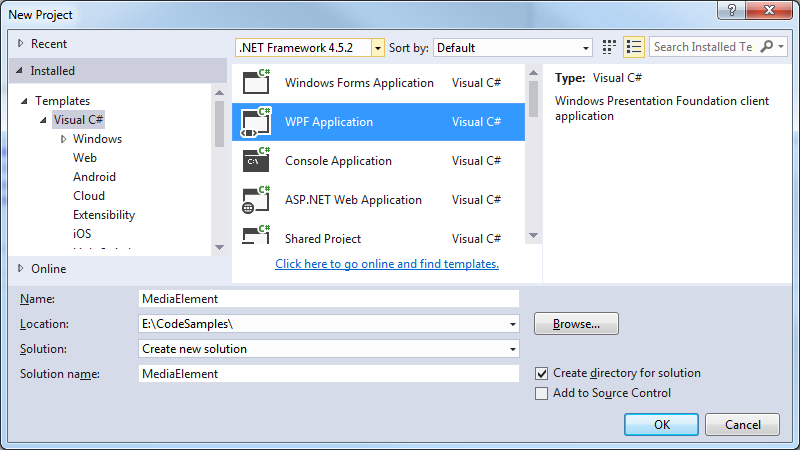 Step 2: Create the Main Window ViewModel classes
Add the following classes to your project:
MainWindowViewModel.cs
[code language="csharp"]
namespace MediaElement
{
public class MainWindowViewModel : BaseViewModel
{
private string _url;
public MainWindowViewModel()
{
Url = "E:\\temp\\SampleMp4File.mp4";
}
public string Url
{
get { return _url; }
set
{
if (_url == value) return;
_url = value;
OnPropertyChanged("Url");
}
}
}
}
[/code]
BaseViewModel.cs
[code language="csharp"]
using System;
using System.ComponentModel;
using System.Diagnostics;
namespace MediaElement
{
public abstract class BaseViewModel : INotifyPropertyChanged
{
#region INotifyPropertyChanged Members
public event PropertyChangedEventHandler PropertyChanged;
#endregion
protected void OnPropertyChanged(string propertyName)
{
VerifyPropertyName(propertyName);
var handler = PropertyChanged;
if (handler != null)
handler(this, new PropertyChangedEventArgs(propertyName));
}
protected void OnPropertyChanged(int propertyValue)
{
VerifyPropertyName(propertyValue);
var handler = PropertyChanged;
if (handler != null)
handler(this, new PropertyChangedEventArgs(propertyValue.ToString()));
}
[Conditional("DEBUG")]
private void VerifyPropertyName(string propertyName)
{
if (TypeDescriptor.GetProperties(this)[propertyName] == null)
throw new ArgumentNullException(GetType().Name + " does not contain property: " + propertyName);
}
[Conditional("DEBUG")]
private void VerifyPropertyName(int propertyValue)
{
if (TypeDescriptor.GetProperties(this)[propertyValue] == null)
throw new ArgumentNullException(GetType().Name + " does not contain property: " + propertyValue);
}
}
}
[/code]
Step 3: Add infrastructure to handle the even raising etc.
Just add the following classes to your project:
EventArgs.cs
[code language="csharp"]
using System;
namespace MediaElement
{
public class EventArgs<T> : EventArgs
{
public EventArgs(T value)
{
Value = value;
}
public T Value { get; private set; }
}
}
[/code]
EventRaiser.cs
[code language="csharp"]
using System;
namespace MediaElement
{
public static class EventRaiser
{
public static void Raise(this EventHandler handler, object sender)
{
if (handler != null)
handler(sender, EventArgs.Empty);
}
public static void Raise<T>(this EventHandler<EventArgs<T>> handler, object sender, T value)
{
if (handler != null)
handler(sender, new EventArgs<T>(value));
}
public static void Raise<T>(this EventHandler<T> handler, object sender, T value) where T : EventArgs
{
if (handler != null)
handler(sender, value);
}
public static void Raise<T>(this EventHandler<EventArgs<T>> handler, object sender, EventArgs<T> value)
{
if (handler != null)
handler(sender, value);
}
}
}
[/code]
RelayCommand.cs
[code language="csharp"]
using System;
using System.Windows.Input;
namespace MediaElement
{
public class RelayCommand<T> : ICommand
{
private readonly Predicate<T> _canExecute;
private readonly Action<T> _execute;
public RelayCommand(Action<T> execute)
: this(execute, null)
{
_execute = execute;
}
public RelayCommand(Action<T> execute, Predicate<T> canExecute)
{
if (execute == null)
throw new ArgumentNullException("execute");
_execute = execute;
_canExecute = canExecute;
}
public bool CanExecute(object parameter)
{
return (_canExecute == null) || _canExecute((T) parameter);
}
public void Execute(object parameter)
{
_execute((T) parameter);
}
public event EventHandler CanExecuteChanged
{
add { CommandManager.RequerySuggested += value; }
remove { CommandManager.RequerySuggested -= value; }
}
}
public class RelayCommand : ICommand
{
private readonly Predicate<object> _canExecute;
private readonly Action<object> _execute;
public RelayCommand(Action<object> execute)
: this(execute, null)
{
_execute = execute;
}
public RelayCommand(Action<object> execute, Predicate<object> canExecute)
{
if (execute == null)
throw new ArgumentNullException("execute");
_execute = execute;
_canExecute = canExecute;
}
public bool CanExecute(object parameter)
{
return (_canExecute == null) || _canExecute(parameter);
}
public void Execute(object parameter)
{
_execute(parameter);
}
// Ensures WPF commanding infrastructure asks all RelayCommand objects whether their
// associated views should be enabled whenever a command is invoked
public event EventHandler CanExecuteChanged
{
add
{
CommandManager.RequerySuggested += value;
CanExecuteChangedInternal += value;
}
remove
{
CommandManager.RequerySuggested -= value;
CanExecuteChangedInternal -= value;
}
}
private event EventHandler CanExecuteChangedInternal;
public void RaiseCanExecuteChanged()
{
CanExecuteChangedInternal.Raise(this);
}
}
}
[/code]
Step 4: Embed the MediaElement control in your MainWindow.xaml
[code language="xml"]
<Window x:Class="MediaElement.MainWindow"
xmlns="http://schemas.microsoft.com/winfx/2006/xaml/presentation"
xmlns:x="http://schemas.microsoft.com/winfx/2006/xaml"
xmlns:d="http://schemas.microsoft.com/expression/blend/2008"
xmlns:mc="http://schemas.openxmlformats.org/markup-compatibility/2006"
xmlns:local="clr-namespace:MediaElement"
mc:Ignorable="d"
Title="MainWindow" Height="350" Width="525">
<Window.DataContext>
<local:MainWindowViewModel/>
</Window.DataContext>
<Grid>
<Grid.RowDefinitions>
<RowDefinition Height="320*"/>
</Grid.RowDefinitions>
<MediaElement
Grid.RowSpan="1"
Source="{Binding Url}"
LoadedBehavior="Play"/>
</Grid>
</Window>
[/code]
Step 5: Run it!
Step 2: Create the Main Window ViewModel classes
Add the following classes to your project:
MainWindowViewModel.cs
[code language="csharp"]
namespace MediaElement
{
public class MainWindowViewModel : BaseViewModel
{
private string _url;
public MainWindowViewModel()
{
Url = "E:\\temp\\SampleMp4File.mp4";
}
public string Url
{
get { return _url; }
set
{
if (_url == value) return;
_url = value;
OnPropertyChanged("Url");
}
}
}
}
[/code]
BaseViewModel.cs
[code language="csharp"]
using System;
using System.ComponentModel;
using System.Diagnostics;
namespace MediaElement
{
public abstract class BaseViewModel : INotifyPropertyChanged
{
#region INotifyPropertyChanged Members
public event PropertyChangedEventHandler PropertyChanged;
#endregion
protected void OnPropertyChanged(string propertyName)
{
VerifyPropertyName(propertyName);
var handler = PropertyChanged;
if (handler != null)
handler(this, new PropertyChangedEventArgs(propertyName));
}
protected void OnPropertyChanged(int propertyValue)
{
VerifyPropertyName(propertyValue);
var handler = PropertyChanged;
if (handler != null)
handler(this, new PropertyChangedEventArgs(propertyValue.ToString()));
}
[Conditional("DEBUG")]
private void VerifyPropertyName(string propertyName)
{
if (TypeDescriptor.GetProperties(this)[propertyName] == null)
throw new ArgumentNullException(GetType().Name + " does not contain property: " + propertyName);
}
[Conditional("DEBUG")]
private void VerifyPropertyName(int propertyValue)
{
if (TypeDescriptor.GetProperties(this)[propertyValue] == null)
throw new ArgumentNullException(GetType().Name + " does not contain property: " + propertyValue);
}
}
}
[/code]
Step 3: Add infrastructure to handle the even raising etc.
Just add the following classes to your project:
EventArgs.cs
[code language="csharp"]
using System;
namespace MediaElement
{
public class EventArgs<T> : EventArgs
{
public EventArgs(T value)
{
Value = value;
}
public T Value { get; private set; }
}
}
[/code]
EventRaiser.cs
[code language="csharp"]
using System;
namespace MediaElement
{
public static class EventRaiser
{
public static void Raise(this EventHandler handler, object sender)
{
if (handler != null)
handler(sender, EventArgs.Empty);
}
public static void Raise<T>(this EventHandler<EventArgs<T>> handler, object sender, T value)
{
if (handler != null)
handler(sender, new EventArgs<T>(value));
}
public static void Raise<T>(this EventHandler<T> handler, object sender, T value) where T : EventArgs
{
if (handler != null)
handler(sender, value);
}
public static void Raise<T>(this EventHandler<EventArgs<T>> handler, object sender, EventArgs<T> value)
{
if (handler != null)
handler(sender, value);
}
}
}
[/code]
RelayCommand.cs
[code language="csharp"]
using System;
using System.Windows.Input;
namespace MediaElement
{
public class RelayCommand<T> : ICommand
{
private readonly Predicate<T> _canExecute;
private readonly Action<T> _execute;
public RelayCommand(Action<T> execute)
: this(execute, null)
{
_execute = execute;
}
public RelayCommand(Action<T> execute, Predicate<T> canExecute)
{
if (execute == null)
throw new ArgumentNullException("execute");
_execute = execute;
_canExecute = canExecute;
}
public bool CanExecute(object parameter)
{
return (_canExecute == null) || _canExecute((T) parameter);
}
public void Execute(object parameter)
{
_execute((T) parameter);
}
public event EventHandler CanExecuteChanged
{
add { CommandManager.RequerySuggested += value; }
remove { CommandManager.RequerySuggested -= value; }
}
}
public class RelayCommand : ICommand
{
private readonly Predicate<object> _canExecute;
private readonly Action<object> _execute;
public RelayCommand(Action<object> execute)
: this(execute, null)
{
_execute = execute;
}
public RelayCommand(Action<object> execute, Predicate<object> canExecute)
{
if (execute == null)
throw new ArgumentNullException("execute");
_execute = execute;
_canExecute = canExecute;
}
public bool CanExecute(object parameter)
{
return (_canExecute == null) || _canExecute(parameter);
}
public void Execute(object parameter)
{
_execute(parameter);
}
// Ensures WPF commanding infrastructure asks all RelayCommand objects whether their
// associated views should be enabled whenever a command is invoked
public event EventHandler CanExecuteChanged
{
add
{
CommandManager.RequerySuggested += value;
CanExecuteChangedInternal += value;
}
remove
{
CommandManager.RequerySuggested -= value;
CanExecuteChangedInternal -= value;
}
}
private event EventHandler CanExecuteChangedInternal;
public void RaiseCanExecuteChanged()
{
CanExecuteChangedInternal.Raise(this);
}
}
}
[/code]
Step 4: Embed the MediaElement control in your MainWindow.xaml
[code language="xml"]
<Window x:Class="MediaElement.MainWindow"
xmlns="http://schemas.microsoft.com/winfx/2006/xaml/presentation"
xmlns:x="http://schemas.microsoft.com/winfx/2006/xaml"
xmlns:d="http://schemas.microsoft.com/expression/blend/2008"
xmlns:mc="http://schemas.openxmlformats.org/markup-compatibility/2006"
xmlns:local="clr-namespace:MediaElement"
mc:Ignorable="d"
Title="MainWindow" Height="350" Width="525">
<Window.DataContext>
<local:MainWindowViewModel/>
</Window.DataContext>
<Grid>
<Grid.RowDefinitions>
<RowDefinition Height="320*"/>
</Grid.RowDefinitions>
<MediaElement
Grid.RowSpan="1"
Source="{Binding Url}"
LoadedBehavior="Play"/>
</Grid>
</Window>
[/code]
Step 5: Run it!
Step 2: Create the Main Window ViewModel classes
Add the following classes to your project:
MainWindowViewModel.cs
[code language="csharp"]
namespace MediaElement
{
public class MainWindowViewModel : BaseViewModel
{
private string _url;
public MainWindowViewModel()
{
Url = "E:\\temp\\SampleMp4File.mp4";
}
public string Url
{
get { return _url; }
set
{
if (_url == value) return;
_url = value;
OnPropertyChanged("Url");
}
}
}
}
[/code]
BaseViewModel.cs
[code language="csharp"]
using System;
using System.ComponentModel;
using System.Diagnostics;
namespace MediaElement
{
public abstract class BaseViewModel : INotifyPropertyChanged
{
#region INotifyPropertyChanged Members
public event PropertyChangedEventHandler PropertyChanged;
#endregion
protected void OnPropertyChanged(string propertyName)
{
VerifyPropertyName(propertyName);
var handler = PropertyChanged;
if (handler != null)
handler(this, new PropertyChangedEventArgs(propertyName));
}
protected void OnPropertyChanged(int propertyValue)
{
VerifyPropertyName(propertyValue);
var handler = PropertyChanged;
if (handler != null)
handler(this, new PropertyChangedEventArgs(propertyValue.ToString()));
}
[Conditional("DEBUG")]
private void VerifyPropertyName(string propertyName)
{
if (TypeDescriptor.GetProperties(this)[propertyName] == null)
throw new ArgumentNullException(GetType().Name + " does not contain property: " + propertyName);
}
[Conditional("DEBUG")]
private void VerifyPropertyName(int propertyValue)
{
if (TypeDescriptor.GetProperties(this)[propertyValue] == null)
throw new ArgumentNullException(GetType().Name + " does not contain property: " + propertyValue);
}
}
}
[/code]
Step 3: Add infrastructure to handle the even raising etc.
Just add the following classes to your project:
EventArgs.cs
[code language="csharp"]
using System;
namespace MediaElement
{
public class EventArgs<T> : EventArgs
{
public EventArgs(T value)
{
Value = value;
}
public T Value { get; private set; }
}
}
[/code]
EventRaiser.cs
[code language="csharp"]
using System;
namespace MediaElement
{
public static class EventRaiser
{
public static void Raise(this EventHandler handler, object sender)
{
if (handler != null)
handler(sender, EventArgs.Empty);
}
public static void Raise<T>(this EventHandler<EventArgs<T>> handler, object sender, T value)
{
if (handler != null)
handler(sender, new EventArgs<T>(value));
}
public static void Raise<T>(this EventHandler<T> handler, object sender, T value) where T : EventArgs
{
if (handler != null)
handler(sender, value);
}
public static void Raise<T>(this EventHandler<EventArgs<T>> handler, object sender, EventArgs<T> value)
{
if (handler != null)
handler(sender, value);
}
}
}
[/code]
RelayCommand.cs
[code language="csharp"]
using System;
using System.Windows.Input;
namespace MediaElement
{
public class RelayCommand<T> : ICommand
{
private readonly Predicate<T> _canExecute;
private readonly Action<T> _execute;
public RelayCommand(Action<T> execute)
: this(execute, null)
{
_execute = execute;
}
public RelayCommand(Action<T> execute, Predicate<T> canExecute)
{
if (execute == null)
throw new ArgumentNullException("execute");
_execute = execute;
_canExecute = canExecute;
}
public bool CanExecute(object parameter)
{
return (_canExecute == null) || _canExecute((T) parameter);
}
public void Execute(object parameter)
{
_execute((T) parameter);
}
public event EventHandler CanExecuteChanged
{
add { CommandManager.RequerySuggested += value; }
remove { CommandManager.RequerySuggested -= value; }
}
}
public class RelayCommand : ICommand
{
private readonly Predicate<object> _canExecute;
private readonly Action<object> _execute;
public RelayCommand(Action<object> execute)
: this(execute, null)
{
_execute = execute;
}
public RelayCommand(Action<object> execute, Predicate<object> canExecute)
{
if (execute == null)
throw new ArgumentNullException("execute");
_execute = execute;
_canExecute = canExecute;
}
public bool CanExecute(object parameter)
{
return (_canExecute == null) || _canExecute(parameter);
}
public void Execute(object parameter)
{
_execute(parameter);
}
// Ensures WPF commanding infrastructure asks all RelayCommand objects whether their
// associated views should be enabled whenever a command is invoked
public event EventHandler CanExecuteChanged
{
add
{
CommandManager.RequerySuggested += value;
CanExecuteChangedInternal += value;
}
remove
{
CommandManager.RequerySuggested -= value;
CanExecuteChangedInternal -= value;
}
}
private event EventHandler CanExecuteChangedInternal;
public void RaiseCanExecuteChanged()
{
CanExecuteChangedInternal.Raise(this);
}
}
}
[/code]
Step 4: Embed the MediaElement control in your MainWindow.xaml
[code language="xml"]
<Window x:Class="MediaElement.MainWindow"
xmlns="http://schemas.microsoft.com/winfx/2006/xaml/presentation"
xmlns:x="http://schemas.microsoft.com/winfx/2006/xaml"
xmlns:d="http://schemas.microsoft.com/expression/blend/2008"
xmlns:mc="http://schemas.openxmlformats.org/markup-compatibility/2006"
xmlns:local="clr-namespace:MediaElement"
mc:Ignorable="d"
Title="MainWindow" Height="350" Width="525">
<Window.DataContext>
<local:MainWindowViewModel/>
</Window.DataContext>
<Grid>
<Grid.RowDefinitions>
<RowDefinition Height="320*"/>
</Grid.RowDefinitions>
<MediaElement
Grid.RowSpan="1"
Source="{Binding Url}"
LoadedBehavior="Play"/>
</Grid>
</Window>
[/code]
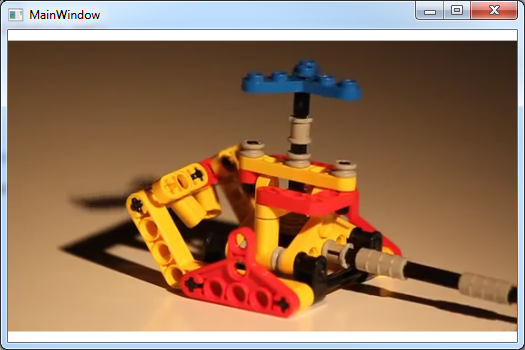
Step 5: Run it!


Comments
Post a Comment