How to embed the IE WebBrowser control in WPF / XAML
Firstly credit, must go to Thomas Freudenberg's splendid 2010 blog posting : Binding WebBrowser content in WPF
I have merely tweaked it a little, so that instead of using this technique to set the HTML content, which I don't need. I just want it such that I can get it to bind to the URL link I am interested in.
Step 1: Create a new WPF project in Visual Studio:
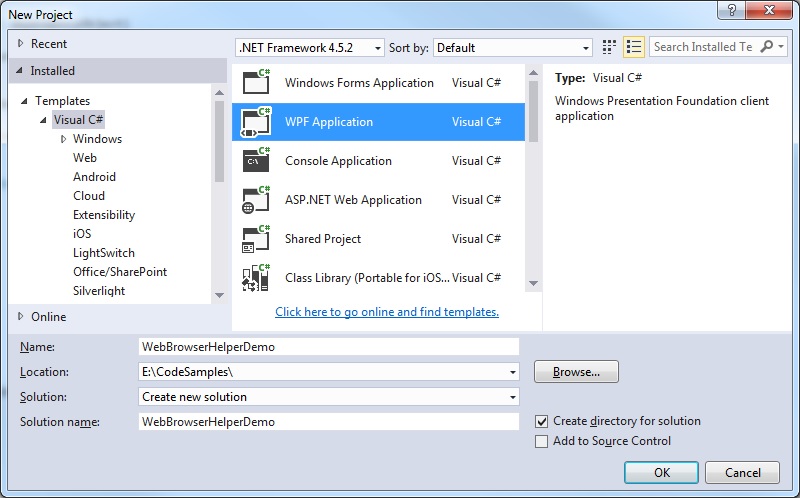 Step 2: Write a helper class to handle the attached properties
WebBrowser.Source is not a DependencyProperty. A known workaround is to use AttachedProperty to enable this ability.
[code language="csharp"]
using System;
using System.Windows;
using System.Windows.Controls;
namespace WebBrowserHelperDemo
{
public static class WebBrowserHelper
{
public static readonly DependencyProperty UrlProperty =
DependencyProperty.RegisterAttached("Url", typeof(string), typeof(WebBrowserHelper),
new PropertyMetadata(OnUrlChanged));
public static string GetUrl(DependencyObject dependencyObject)
{
return (string) dependencyObject.GetValue(UrlProperty);
}
public static void SetUrl(DependencyObject dependencyObject, string body)
{
dependencyObject.SetValue(UrlProperty, body);
}
private static void OnUrlChanged(DependencyObject d, DependencyPropertyChangedEventArgs e)
{
var browser = d as WebBrowser;
if (browser == null) return;
Uri uri = null;
var s = e.NewValue as string;
if (s != null)
{
var uriString = s;
uri = string.IsNullOrWhiteSpace(uriString) ? null : new Uri(uriString);
}
else if (e.NewValue is Uri)
{
uri = (Uri) e.NewValue;
}
browser.Source = uri;
}
}
}
[/code]
Step 3: Update your MainWindow.xaml to include your WebBrowser control and its bindings
[code language="xml"]
<Window x:Class="WebBrowserHelperDemo.MainWindow"
xmlns="http://schemas.microsoft.com/winfx/2006/xaml/presentation"
xmlns:x="http://schemas.microsoft.com/winfx/2006/xaml"
xmlns:d="http://schemas.microsoft.com/expression/blend/2008"
xmlns:mc="http://schemas.openxmlformats.org/markup-compatibility/2006"
xmlns:local="clr-namespace:WebBrowserHelperDemo"
mc:Ignorable="d"
Title="WebBrowserHelperDemo" Height="350" Width="525"
d:DataContext="{d:DesignInstance Type=local:MainWindowViewModel, IsDesignTimeCreatable=True}">
<Window.DataContext>
<local:MainWindowViewModel/>
</Window.DataContext>
<Grid>
<Grid.RowDefinitions>
<RowDefinition Height="280"/>
<RowDefinition Height="25*"/>
</Grid.RowDefinitions>
<WebBrowser
Grid.Row="0"
local:WebBrowserHelper.Url="{Binding Url}" />
<Button
Grid.Row="1"
Command="{Binding Command}"
VerticalAlignment="Center"
Width="100" Height="30"
Content="Browse!" />
</Grid>
</Window>
[/code]
Step 4: Create a main window view model
In our view model class we handle any command bindings plus commands to set the value of the web page Uri, in this
the Google home page:
[code language="csharp"]
using System.ComponentModel;
using System.Windows.Input;
namespace WebBrowserHelperDemo
{
public class MainWindowViewModel : INotifyPropertyChanged
{
private string _url;
private ICommand _command;
public ICommand Command
{
get
{
return _command ?? (_command = new RelayCommand(
x =>
{
LaunchGoogle();
}));
}
}
private void LaunchGoogle()
{
Url = "http://www.google.co.uk";
}
public string Url
{
get
{
return _url;
}
set
{
if (_url == value) return;
_url = value;
RaisePropertyChanged("Url");
}
}
public event PropertyChangedEventHandler PropertyChanged;
public void RaisePropertyChanged(string propertyName)
{
var handler = PropertyChanged;
if (handler != null)
{
handler(this, new PropertyChangedEventArgs(propertyName));
}
}
}
}
[/code]
Step 5: Add classes and infrastructure to handle the RelayCommand, event raising etc:
EventArgs.cs
[code language="csharp"]
using System;
namespace WebBrowserHelperDemo
{
public class EventArgs<T> : EventArgs
{
public EventArgs(T value)
{
Value = value;
}
public T Value { get; private set; }
}
}
[/code]
EventRaiser.cs
[code language="csharp"]
using System;
namespace WebBrowserHelperDemo
{
public static class EventRaiser
{
public static void Raise(this EventHandler handler, object sender)
{
if (handler != null)
{
handler(sender, EventArgs.Empty);
}
}
public static void Raise<T>(this EventHandler<EventArgs<T>> handler, object sender, T value)
{
if (handler != null)
{
handler(sender, new EventArgs<T>(value));
}
}
public static void Raise<T>(this EventHandler<T> handler, object sender, T value) where T : EventArgs
{
if (handler != null)
{
handler(sender, value);
}
}
public static void Raise<T>(this EventHandler<EventArgs<T>> handler, object sender, EventArgs<T> value)
{
if (handler != null)
{
handler(sender, value);
}
}
}
}
[/code]
RelayCommand.cs
[code language="csharp"]
using System;
using System.Windows.Input;
namespace WebBrowserHelperDemo
{
public class RelayCommand<T> : ICommand
{
private readonly Predicate<T> _canExecute;
private readonly Action<T> _execute;
public RelayCommand(Action<T> execute)
: this(execute, null)
{
_execute = execute;
}
public RelayCommand(Action<T> execute, Predicate<T> canExecute)
{
if (execute == null)
{
throw new ArgumentNullException("execute");
}
_execute = execute;
_canExecute = canExecute;
}
public bool CanExecute(object parameter)
{
return _canExecute == null || _canExecute((T)parameter);
}
public void Execute(object parameter)
{
_execute((T)parameter);
}
public event EventHandler CanExecuteChanged
{
add { CommandManager.RequerySuggested += value; }
remove { CommandManager.RequerySuggested -= value; }
}
}
public class RelayCommand : ICommand
{
private readonly Predicate<object> _canExecute;
private readonly Action<object> _execute;
public RelayCommand(Action<object> execute)
: this(execute, null)
{
_execute = execute;
}
public RelayCommand(Action<object> execute, Predicate<object> canExecute)
{
if (execute == null)
{
throw new ArgumentNullException("execute");
}
_execute = execute;
_canExecute = canExecute;
}
public bool CanExecute(object parameter)
{
return _canExecute == null || _canExecute(parameter);
}
public void Execute(object parameter)
{
_execute(parameter);
}
// Ensures WPF commanding infrastructure asks all RelayCommand objects whether their
// associated views should be enabled whenever a command is invoked
public event EventHandler CanExecuteChanged
{
add
{
CommandManager.RequerySuggested += value;
CanExecuteChangedInternal += value;
}
remove
{
CommandManager.RequerySuggested -= value;
CanExecuteChangedInternal -= value;
}
}
private event EventHandler CanExecuteChangedInternal;
public void RaiseCanExecuteChanged()
{
CanExecuteChangedInternal.Raise(this);
}
}
}
[/code]
Step 6: Try it
So when the program is first run, the Uri link is not set yet, so the web browser control is still blank:
Step 2: Write a helper class to handle the attached properties
WebBrowser.Source is not a DependencyProperty. A known workaround is to use AttachedProperty to enable this ability.
[code language="csharp"]
using System;
using System.Windows;
using System.Windows.Controls;
namespace WebBrowserHelperDemo
{
public static class WebBrowserHelper
{
public static readonly DependencyProperty UrlProperty =
DependencyProperty.RegisterAttached("Url", typeof(string), typeof(WebBrowserHelper),
new PropertyMetadata(OnUrlChanged));
public static string GetUrl(DependencyObject dependencyObject)
{
return (string) dependencyObject.GetValue(UrlProperty);
}
public static void SetUrl(DependencyObject dependencyObject, string body)
{
dependencyObject.SetValue(UrlProperty, body);
}
private static void OnUrlChanged(DependencyObject d, DependencyPropertyChangedEventArgs e)
{
var browser = d as WebBrowser;
if (browser == null) return;
Uri uri = null;
var s = e.NewValue as string;
if (s != null)
{
var uriString = s;
uri = string.IsNullOrWhiteSpace(uriString) ? null : new Uri(uriString);
}
else if (e.NewValue is Uri)
{
uri = (Uri) e.NewValue;
}
browser.Source = uri;
}
}
}
[/code]
Step 3: Update your MainWindow.xaml to include your WebBrowser control and its bindings
[code language="xml"]
<Window x:Class="WebBrowserHelperDemo.MainWindow"
xmlns="http://schemas.microsoft.com/winfx/2006/xaml/presentation"
xmlns:x="http://schemas.microsoft.com/winfx/2006/xaml"
xmlns:d="http://schemas.microsoft.com/expression/blend/2008"
xmlns:mc="http://schemas.openxmlformats.org/markup-compatibility/2006"
xmlns:local="clr-namespace:WebBrowserHelperDemo"
mc:Ignorable="d"
Title="WebBrowserHelperDemo" Height="350" Width="525"
d:DataContext="{d:DesignInstance Type=local:MainWindowViewModel, IsDesignTimeCreatable=True}">
<Window.DataContext>
<local:MainWindowViewModel/>
</Window.DataContext>
<Grid>
<Grid.RowDefinitions>
<RowDefinition Height="280"/>
<RowDefinition Height="25*"/>
</Grid.RowDefinitions>
<WebBrowser
Grid.Row="0"
local:WebBrowserHelper.Url="{Binding Url}" />
<Button
Grid.Row="1"
Command="{Binding Command}"
VerticalAlignment="Center"
Width="100" Height="30"
Content="Browse!" />
</Grid>
</Window>
[/code]
Step 4: Create a main window view model
In our view model class we handle any command bindings plus commands to set the value of the web page Uri, in this
the Google home page:
[code language="csharp"]
using System.ComponentModel;
using System.Windows.Input;
namespace WebBrowserHelperDemo
{
public class MainWindowViewModel : INotifyPropertyChanged
{
private string _url;
private ICommand _command;
public ICommand Command
{
get
{
return _command ?? (_command = new RelayCommand(
x =>
{
LaunchGoogle();
}));
}
}
private void LaunchGoogle()
{
Url = "http://www.google.co.uk";
}
public string Url
{
get
{
return _url;
}
set
{
if (_url == value) return;
_url = value;
RaisePropertyChanged("Url");
}
}
public event PropertyChangedEventHandler PropertyChanged;
public void RaisePropertyChanged(string propertyName)
{
var handler = PropertyChanged;
if (handler != null)
{
handler(this, new PropertyChangedEventArgs(propertyName));
}
}
}
}
[/code]
Step 5: Add classes and infrastructure to handle the RelayCommand, event raising etc:
EventArgs.cs
[code language="csharp"]
using System;
namespace WebBrowserHelperDemo
{
public class EventArgs<T> : EventArgs
{
public EventArgs(T value)
{
Value = value;
}
public T Value { get; private set; }
}
}
[/code]
EventRaiser.cs
[code language="csharp"]
using System;
namespace WebBrowserHelperDemo
{
public static class EventRaiser
{
public static void Raise(this EventHandler handler, object sender)
{
if (handler != null)
{
handler(sender, EventArgs.Empty);
}
}
public static void Raise<T>(this EventHandler<EventArgs<T>> handler, object sender, T value)
{
if (handler != null)
{
handler(sender, new EventArgs<T>(value));
}
}
public static void Raise<T>(this EventHandler<T> handler, object sender, T value) where T : EventArgs
{
if (handler != null)
{
handler(sender, value);
}
}
public static void Raise<T>(this EventHandler<EventArgs<T>> handler, object sender, EventArgs<T> value)
{
if (handler != null)
{
handler(sender, value);
}
}
}
}
[/code]
RelayCommand.cs
[code language="csharp"]
using System;
using System.Windows.Input;
namespace WebBrowserHelperDemo
{
public class RelayCommand<T> : ICommand
{
private readonly Predicate<T> _canExecute;
private readonly Action<T> _execute;
public RelayCommand(Action<T> execute)
: this(execute, null)
{
_execute = execute;
}
public RelayCommand(Action<T> execute, Predicate<T> canExecute)
{
if (execute == null)
{
throw new ArgumentNullException("execute");
}
_execute = execute;
_canExecute = canExecute;
}
public bool CanExecute(object parameter)
{
return _canExecute == null || _canExecute((T)parameter);
}
public void Execute(object parameter)
{
_execute((T)parameter);
}
public event EventHandler CanExecuteChanged
{
add { CommandManager.RequerySuggested += value; }
remove { CommandManager.RequerySuggested -= value; }
}
}
public class RelayCommand : ICommand
{
private readonly Predicate<object> _canExecute;
private readonly Action<object> _execute;
public RelayCommand(Action<object> execute)
: this(execute, null)
{
_execute = execute;
}
public RelayCommand(Action<object> execute, Predicate<object> canExecute)
{
if (execute == null)
{
throw new ArgumentNullException("execute");
}
_execute = execute;
_canExecute = canExecute;
}
public bool CanExecute(object parameter)
{
return _canExecute == null || _canExecute(parameter);
}
public void Execute(object parameter)
{
_execute(parameter);
}
// Ensures WPF commanding infrastructure asks all RelayCommand objects whether their
// associated views should be enabled whenever a command is invoked
public event EventHandler CanExecuteChanged
{
add
{
CommandManager.RequerySuggested += value;
CanExecuteChangedInternal += value;
}
remove
{
CommandManager.RequerySuggested -= value;
CanExecuteChangedInternal -= value;
}
}
private event EventHandler CanExecuteChangedInternal;
public void RaiseCanExecuteChanged()
{
CanExecuteChangedInternal.Raise(this);
}
}
}
[/code]
Step 6: Try it
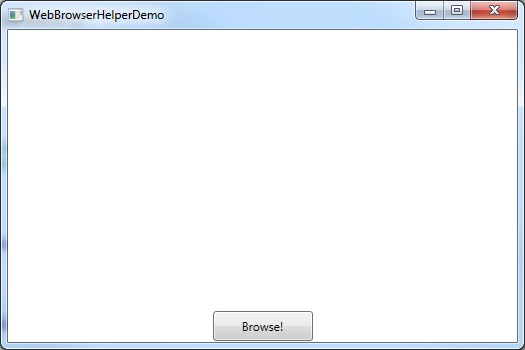
So when the program is first run, the Uri link is not set yet, so the web browser control is still blank:
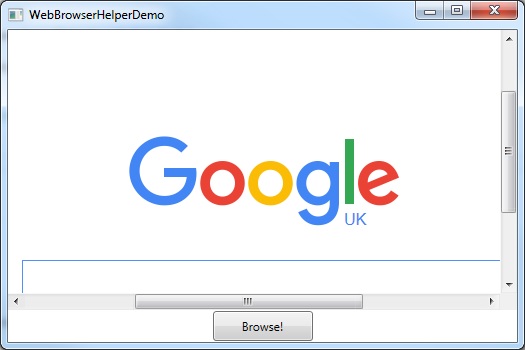
 When the User clicks the button, the XAML command binding via the button causes the Uri property to get set, the web browser helper class then receives the 'on property changed' style notification in order to set the WebBrowser.Source and the Google page is launched:
Step 2: Write a helper class to handle the attached properties
WebBrowser.Source is not a DependencyProperty. A known workaround is to use AttachedProperty to enable this ability.
[code language="csharp"]
using System;
using System.Windows;
using System.Windows.Controls;
namespace WebBrowserHelperDemo
{
public static class WebBrowserHelper
{
public static readonly DependencyProperty UrlProperty =
DependencyProperty.RegisterAttached("Url", typeof(string), typeof(WebBrowserHelper),
new PropertyMetadata(OnUrlChanged));
public static string GetUrl(DependencyObject dependencyObject)
{
return (string) dependencyObject.GetValue(UrlProperty);
}
public static void SetUrl(DependencyObject dependencyObject, string body)
{
dependencyObject.SetValue(UrlProperty, body);
}
private static void OnUrlChanged(DependencyObject d, DependencyPropertyChangedEventArgs e)
{
var browser = d as WebBrowser;
if (browser == null) return;
Uri uri = null;
var s = e.NewValue as string;
if (s != null)
{
var uriString = s;
uri = string.IsNullOrWhiteSpace(uriString) ? null : new Uri(uriString);
}
else if (e.NewValue is Uri)
{
uri = (Uri) e.NewValue;
}
browser.Source = uri;
}
}
}
[/code]
Step 3: Update your MainWindow.xaml to include your WebBrowser control and its bindings
[code language="xml"]
<Window x:Class="WebBrowserHelperDemo.MainWindow"
xmlns="http://schemas.microsoft.com/winfx/2006/xaml/presentation"
xmlns:x="http://schemas.microsoft.com/winfx/2006/xaml"
xmlns:d="http://schemas.microsoft.com/expression/blend/2008"
xmlns:mc="http://schemas.openxmlformats.org/markup-compatibility/2006"
xmlns:local="clr-namespace:WebBrowserHelperDemo"
mc:Ignorable="d"
Title="WebBrowserHelperDemo" Height="350" Width="525"
d:DataContext="{d:DesignInstance Type=local:MainWindowViewModel, IsDesignTimeCreatable=True}">
<Window.DataContext>
<local:MainWindowViewModel/>
</Window.DataContext>
<Grid>
<Grid.RowDefinitions>
<RowDefinition Height="280"/>
<RowDefinition Height="25*"/>
</Grid.RowDefinitions>
<WebBrowser
Grid.Row="0"
local:WebBrowserHelper.Url="{Binding Url}" />
<Button
Grid.Row="1"
Command="{Binding Command}"
VerticalAlignment="Center"
Width="100" Height="30"
Content="Browse!" />
</Grid>
</Window>
[/code]
Step 4: Create a main window view model
In our view model class we handle any command bindings plus commands to set the value of the web page Uri, in this
the Google home page:
[code language="csharp"]
using System.ComponentModel;
using System.Windows.Input;
namespace WebBrowserHelperDemo
{
public class MainWindowViewModel : INotifyPropertyChanged
{
private string _url;
private ICommand _command;
public ICommand Command
{
get
{
return _command ?? (_command = new RelayCommand(
x =>
{
LaunchGoogle();
}));
}
}
private void LaunchGoogle()
{
Url = "http://www.google.co.uk";
}
public string Url
{
get
{
return _url;
}
set
{
if (_url == value) return;
_url = value;
RaisePropertyChanged("Url");
}
}
public event PropertyChangedEventHandler PropertyChanged;
public void RaisePropertyChanged(string propertyName)
{
var handler = PropertyChanged;
if (handler != null)
{
handler(this, new PropertyChangedEventArgs(propertyName));
}
}
}
}
[/code]
Step 5: Add classes and infrastructure to handle the RelayCommand, event raising etc:
EventArgs.cs
[code language="csharp"]
using System;
namespace WebBrowserHelperDemo
{
public class EventArgs<T> : EventArgs
{
public EventArgs(T value)
{
Value = value;
}
public T Value { get; private set; }
}
}
[/code]
EventRaiser.cs
[code language="csharp"]
using System;
namespace WebBrowserHelperDemo
{
public static class EventRaiser
{
public static void Raise(this EventHandler handler, object sender)
{
if (handler != null)
{
handler(sender, EventArgs.Empty);
}
}
public static void Raise<T>(this EventHandler<EventArgs<T>> handler, object sender, T value)
{
if (handler != null)
{
handler(sender, new EventArgs<T>(value));
}
}
public static void Raise<T>(this EventHandler<T> handler, object sender, T value) where T : EventArgs
{
if (handler != null)
{
handler(sender, value);
}
}
public static void Raise<T>(this EventHandler<EventArgs<T>> handler, object sender, EventArgs<T> value)
{
if (handler != null)
{
handler(sender, value);
}
}
}
}
[/code]
RelayCommand.cs
[code language="csharp"]
using System;
using System.Windows.Input;
namespace WebBrowserHelperDemo
{
public class RelayCommand<T> : ICommand
{
private readonly Predicate<T> _canExecute;
private readonly Action<T> _execute;
public RelayCommand(Action<T> execute)
: this(execute, null)
{
_execute = execute;
}
public RelayCommand(Action<T> execute, Predicate<T> canExecute)
{
if (execute == null)
{
throw new ArgumentNullException("execute");
}
_execute = execute;
_canExecute = canExecute;
}
public bool CanExecute(object parameter)
{
return _canExecute == null || _canExecute((T)parameter);
}
public void Execute(object parameter)
{
_execute((T)parameter);
}
public event EventHandler CanExecuteChanged
{
add { CommandManager.RequerySuggested += value; }
remove { CommandManager.RequerySuggested -= value; }
}
}
public class RelayCommand : ICommand
{
private readonly Predicate<object> _canExecute;
private readonly Action<object> _execute;
public RelayCommand(Action<object> execute)
: this(execute, null)
{
_execute = execute;
}
public RelayCommand(Action<object> execute, Predicate<object> canExecute)
{
if (execute == null)
{
throw new ArgumentNullException("execute");
}
_execute = execute;
_canExecute = canExecute;
}
public bool CanExecute(object parameter)
{
return _canExecute == null || _canExecute(parameter);
}
public void Execute(object parameter)
{
_execute(parameter);
}
// Ensures WPF commanding infrastructure asks all RelayCommand objects whether their
// associated views should be enabled whenever a command is invoked
public event EventHandler CanExecuteChanged
{
add
{
CommandManager.RequerySuggested += value;
CanExecuteChangedInternal += value;
}
remove
{
CommandManager.RequerySuggested -= value;
CanExecuteChangedInternal -= value;
}
}
private event EventHandler CanExecuteChangedInternal;
public void RaiseCanExecuteChanged()
{
CanExecuteChangedInternal.Raise(this);
}
}
}
[/code]
Step 6: Try it
So when the program is first run, the Uri link is not set yet, so the web browser control is still blank:
When the User clicks the button, the XAML command binding via the button causes the Uri property to get set, the web browser helper class then receives the 'on property changed' style notification in order to set the WebBrowser.Source and the Google page is launched:


Comments
Post a Comment