Using HttpClient to download files from the internet
A simple console application to demonstrate the downloading of files form the internet.
It is pretty much the same as the example at the dot net pearls website, with some screenshots for further clarification.
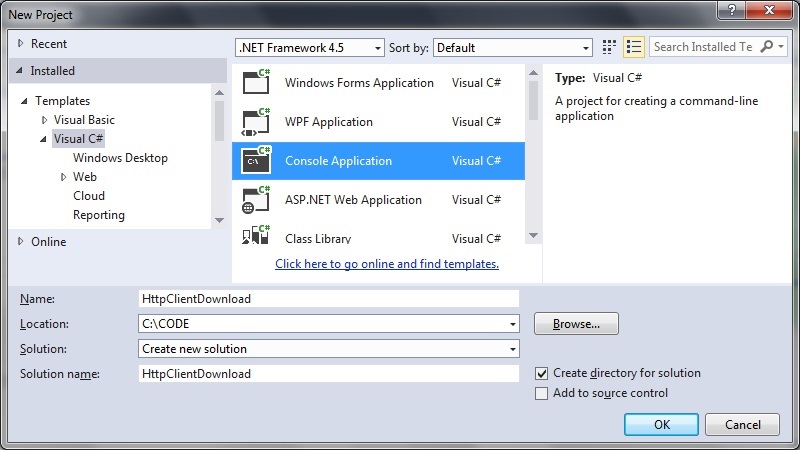
Step 1: Create a new console application:
 Step 2: Add the System.Net.Http reference
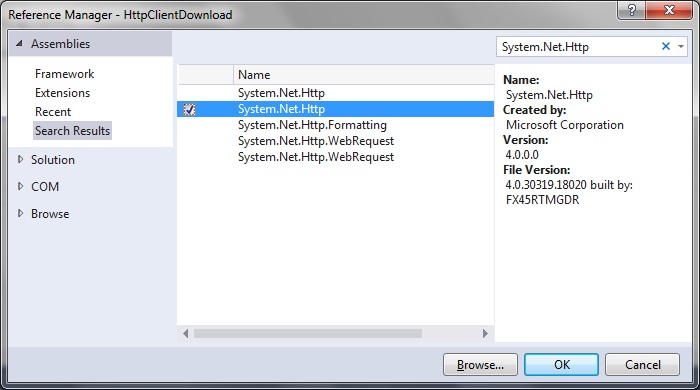
Make sure this reference has been added to your project.
Right-click on References and select Add reference. Add the System.Net.Http reference:
Step 2: Add the System.Net.Http reference
Make sure this reference has been added to your project.
Right-click on References and select Add reference. Add the System.Net.Http reference:
 Step 3: Full code listing
This uses the HttpClient class and GetAsynch method plus the await keyword to do the actual download:
[code language="csharp"]
using System;
using System.Net.Http;
using System.Threading.Tasks;
namespace HttpClientDownload
{
internal class Program
{
private static void Main()
{
var t = new Task(DownloadPageAsync);
t.Start();
Console.WriteLine("Downloading page...");
Console.ReadLine();
}
public static async void DownloadPageAsync()
{
var page = "http://en.wikipedia.org/";
using (var client = new HttpClient())
{
using (var response = await client.GetAsync(page))
{
using (var content = response.Content)
{
var result = await content.ReadAsStringAsync();
if (result != null)
{
Console.WriteLine(result);
}
}
}
}
}
}
}
[/code]
Giving the following output:
Step 3: Full code listing
This uses the HttpClient class and GetAsynch method plus the await keyword to do the actual download:
[code language="csharp"]
using System;
using System.Net.Http;
using System.Threading.Tasks;
namespace HttpClientDownload
{
internal class Program
{
private static void Main()
{
var t = new Task(DownloadPageAsync);
t.Start();
Console.WriteLine("Downloading page...");
Console.ReadLine();
}
public static async void DownloadPageAsync()
{
var page = "http://en.wikipedia.org/";
using (var client = new HttpClient())
{
using (var response = await client.GetAsync(page))
{
using (var content = response.Content)
{
var result = await content.ReadAsStringAsync();
if (result != null)
{
Console.WriteLine(result);
}
}
}
}
}
}
}
[/code]
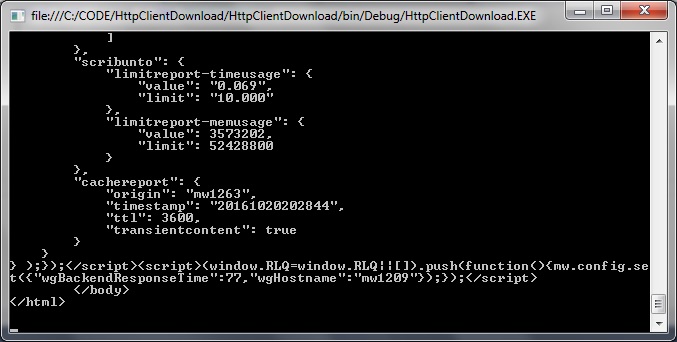
Giving the following output:
Step 2: Add the System.Net.Http reference
Make sure this reference has been added to your project.
Right-click on References and select Add reference. Add the System.Net.Http reference:
Step 3: Full code listing
This uses the HttpClient class and GetAsynch method plus the await keyword to do the actual download:
[code language="csharp"]
using System;
using System.Net.Http;
using System.Threading.Tasks;
namespace HttpClientDownload
{
internal class Program
{
private static void Main()
{
var t = new Task(DownloadPageAsync);
t.Start();
Console.WriteLine("Downloading page...");
Console.ReadLine();
}
public static async void DownloadPageAsync()
{
var page = "http://en.wikipedia.org/";
using (var client = new HttpClient())
{
using (var response = await client.GetAsync(page))
{
using (var content = response.Content)
{
var result = await content.ReadAsStringAsync();
if (result != null)
{
Console.WriteLine(result);
}
}
}
}
}
}
}
[/code]
Giving the following output:


Comments
Post a Comment