Running a WPF Progress bar as a background worker thread
How to run a WPF progress bar as a background worker thread.
This code uses ICommand to respond to the user's request to both and pause start the progress bar background process.
Step 1: Create a new WPF application
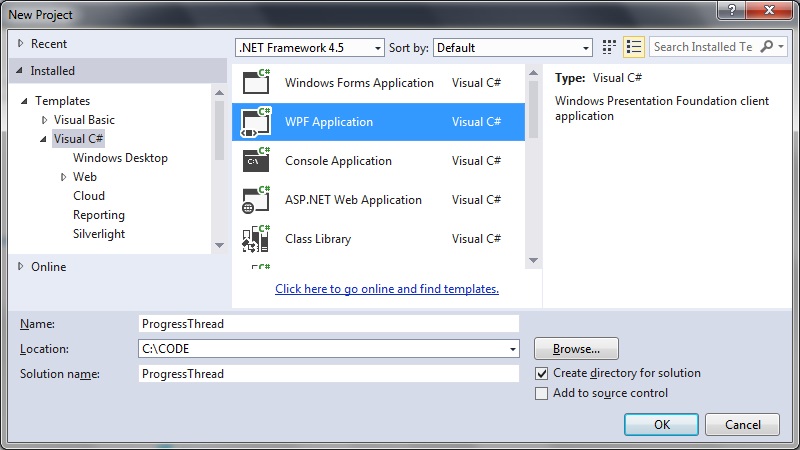 Step 2: Create the MainWindow.xaml user interface components
[code language="csharp"]
<Window x:Class="ProgressThread.MainWindow"
xmlns="http://schemas.microsoft.com/winfx/2006/xaml/presentation"
xmlns:x="http://schemas.microsoft.com/winfx/2006/xaml"
xmlns:d="http://schemas.microsoft.com/expression/blend/2008"
xmlns:mc="http://schemas.openxmlformats.org/markup-compatibility/2006"
xmlns:local="clr-namespace:ProgressThread"
mc:Ignorable="d"
Title="MainWindow"
Height="250" Width="525">
<Window.DataContext>
<local:MainWindowViewModel/>
</Window.DataContext>
<Grid >
<Grid.RowDefinitions>
<RowDefinition Height="*" />
<RowDefinition Height="*" />
</Grid.RowDefinitions>
<ProgressBar
Value="{Binding CurrentProgress, Mode=OneWay}"
Visibility="Visible"
VerticalAlignment="Center"
Grid.Row="0"
Height="60" Width="300"
Minimum="0" Maximum="100"
Name="pbStatus" />
<Button
Grid.Row="1"
Width="150" Height="50"
Command="{Binding Command}"
Content="{Binding ButtonLabel}"/>
</Grid>
</Window>
[/code]
Step 3: Create the ViewModel classes
BaseViewModel.cs
[code language="csharp"]
using System;
using System.ComponentModel;
using System.Diagnostics;
namespace ProgressThread
{
public abstract class BaseViewModel : INotifyPropertyChanged
{
#region INotifyPropertyChanged Members
public event PropertyChangedEventHandler PropertyChanged;
#endregion
protected void OnPropertyChanged(string propertyName)
{
VerifyPropertyName(propertyName);
PropertyChangedEventHandler handler = PropertyChanged;
if (handler != null)
{
handler(this, new PropertyChangedEventArgs(propertyName));
}
}
protected void OnPropertyChanged(int propertyValue)
{
VerifyPropertyName(propertyValue);
PropertyChangedEventHandler handler = PropertyChanged;
if (handler != null)
{
handler(this, new PropertyChangedEventArgs(propertyValue.ToString()));
}
}
[Conditional("DEBUG")]
private void VerifyPropertyName(string propertyName)
{
if (TypeDescriptor.GetProperties(this)[propertyName] == null)
throw new ArgumentNullException(GetType().Name + " does not contain property: " + propertyName);
}
[Conditional("DEBUG")]
private void VerifyPropertyName(int propertyValue)
{
if (TypeDescriptor.GetProperties(this)[propertyValue] == null)
throw new ArgumentNullException(GetType().Name + " does not contain property: " + propertyValue.ToString());
}
}
}
[/code]
MainWindowViewModel.cs
[code language="csharp"]
using System.ComponentModel;
using System.Threading;
using System.Windows;
using System.Windows.Input;
namespace ProgressThread
{
public class MainWindowViewModel : BaseViewModel
{
private static bool _isRunning;
private string _buttonLabel;
private int currentProgress;
private ICommand _command;
private BackgroundWorker worker = new BackgroundWorker();
public MainWindowViewModel()
{
worker.DoWork += DoWork;
worker.ProgressChanged += ProgressChanged;
worker.WorkerReportsProgress = true;
worker.WorkerSupportsCancellation = true;
CurrentProgress = 0;
_isRunning = true;
ButtonLabel = "GO";
}
private void ProgressChanged(object sender, ProgressChangedEventArgs e)
{
CurrentProgress = e.ProgressPercentage;
}
private void DoWork(object sender, DoWorkEventArgs e)
{
if (CurrentProgress >= 100)
{
CurrentProgress = 0;
}
while (CurrentProgress < 100 && !_isRunning)
{
worker.ReportProgress(CurrentProgress);
Thread.Sleep(100);
CurrentProgress++;
}
_isRunning = true;
}
public ICommand Command
{
get
{
return _command ?? (_command = new RelayCommand(x =>
{
_isRunning = !_isRunning;
if (!_isRunning)
{
DoStuff();
}
else
{
ButtonLabel = "PAUSED";
}
}));
}
}
public int CurrentProgress
{
get { return currentProgress; }
private set
{
if (currentProgress != value)
{
currentProgress = value;
OnPropertyChanged("CurrentProgress");
}
}
}
public string ButtonLabel
{
get { return _buttonLabel; }
private set
{
if (_buttonLabel != value)
{
_buttonLabel = value;
OnPropertyChanged("ButtonLabel");
}
}
}
private void DoStuff()
{
ButtonLabel = "GO";
worker.RunWorkerAsync();
}
}
}
[/code]
Step 3: Add the event handling infratructure
EventArgs.cs
[code language="csharp"]
using System;
namespace ProgressThread
{
public class EventArgs<T> : EventArgs
{
public EventArgs(T value)
{
Value = value;
}
public T Value { get; private set; }
}
}
[/code]
EventRaiser.cs
[code language="csharp"]
using System;
using System.Collections.Generic;
using System.Linq;
using System.Text;
using System.Threading.Tasks;
namespace ProgressThread
{
public static class EventRaiser
{
public static void Raise(this EventHandler handler, object sender)
{
if (handler != null)
{
handler(sender, EventArgs.Empty);
}
}
public static void Raise<T>(this EventHandler<EventArgs<T>> handler, object sender, T value)
{
if (handler != null)
{
handler(sender, new EventArgs<T>(value));
}
}
public static void Raise<T>(this EventHandler<T> handler, object sender, T value) where T : EventArgs
{
if (handler != null)
{
handler(sender, value);
}
}
public static void Raise<T>(this EventHandler<EventArgs<T>> handler, object sender, EventArgs<T> value)
{
if (handler != null)
{
handler(sender, value);
}
}
}
}
[/code]
RelayCommand.cs
[code language="csharp"]
using System;
using System.Windows.Input;
namespace ProgressThread
{
public class RelayCommand<T> : ICommand
{
private readonly Predicate<T> _canExecute;
private readonly Action<T> _execute;
public RelayCommand(Action<T> execute)
: this(execute, null)
{
_execute = execute;
}
public RelayCommand(Action<T> execute, Predicate<T> canExecute)
{
if (execute == null)
{
throw new ArgumentNullException("execute");
}
_execute = execute;
_canExecute = canExecute;
}
public bool CanExecute(object parameter)
{
return _canExecute == null || _canExecute((T)parameter);
}
public void Execute(object parameter)
{
_execute((T)parameter);
}
public event EventHandler CanExecuteChanged
{
add { CommandManager.RequerySuggested += value; }
remove { CommandManager.RequerySuggested -= value; }
}
}
public class RelayCommand : ICommand
{
private readonly Predicate<object> _canExecute;
private readonly Action<object> _execute;
public RelayCommand(Action<object> execute)
: this(execute, null)
{
_execute = execute;
}
public RelayCommand(Action<object> execute, Predicate<object> canExecute)
{
if (execute == null)
{
throw new ArgumentNullException("execute");
}
_execute = execute;
_canExecute = canExecute;
}
public bool CanExecute(object parameter)
{
return _canExecute == null || _canExecute(parameter);
}
public void Execute(object parameter)
{
_execute(parameter);
}
// Ensures WPF commanding infrastructure asks all RelayCommand objects whether their
// associated views should be enabled whenever a command is invoked
public event EventHandler CanExecuteChanged
{
add
{
CommandManager.RequerySuggested += value;
CanExecuteChangedInternal += value;
}
remove
{
CommandManager.RequerySuggested -= value;
CanExecuteChangedInternal -= value;
}
}
private event EventHandler CanExecuteChangedInternal;
public void RaiseCanExecuteChanged()
{
CanExecuteChangedInternal.Raise(this);
}
}
}
[/code]
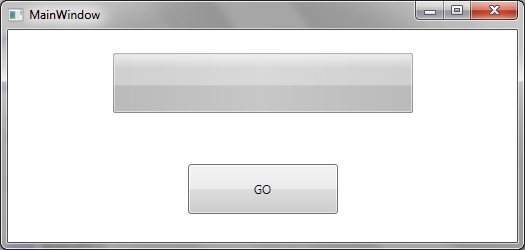
So that when running we initially have the zero-progress as shown:
Step 2: Create the MainWindow.xaml user interface components
[code language="csharp"]
<Window x:Class="ProgressThread.MainWindow"
xmlns="http://schemas.microsoft.com/winfx/2006/xaml/presentation"
xmlns:x="http://schemas.microsoft.com/winfx/2006/xaml"
xmlns:d="http://schemas.microsoft.com/expression/blend/2008"
xmlns:mc="http://schemas.openxmlformats.org/markup-compatibility/2006"
xmlns:local="clr-namespace:ProgressThread"
mc:Ignorable="d"
Title="MainWindow"
Height="250" Width="525">
<Window.DataContext>
<local:MainWindowViewModel/>
</Window.DataContext>
<Grid >
<Grid.RowDefinitions>
<RowDefinition Height="*" />
<RowDefinition Height="*" />
</Grid.RowDefinitions>
<ProgressBar
Value="{Binding CurrentProgress, Mode=OneWay}"
Visibility="Visible"
VerticalAlignment="Center"
Grid.Row="0"
Height="60" Width="300"
Minimum="0" Maximum="100"
Name="pbStatus" />
<Button
Grid.Row="1"
Width="150" Height="50"
Command="{Binding Command}"
Content="{Binding ButtonLabel}"/>
</Grid>
</Window>
[/code]
Step 3: Create the ViewModel classes
BaseViewModel.cs
[code language="csharp"]
using System;
using System.ComponentModel;
using System.Diagnostics;
namespace ProgressThread
{
public abstract class BaseViewModel : INotifyPropertyChanged
{
#region INotifyPropertyChanged Members
public event PropertyChangedEventHandler PropertyChanged;
#endregion
protected void OnPropertyChanged(string propertyName)
{
VerifyPropertyName(propertyName);
PropertyChangedEventHandler handler = PropertyChanged;
if (handler != null)
{
handler(this, new PropertyChangedEventArgs(propertyName));
}
}
protected void OnPropertyChanged(int propertyValue)
{
VerifyPropertyName(propertyValue);
PropertyChangedEventHandler handler = PropertyChanged;
if (handler != null)
{
handler(this, new PropertyChangedEventArgs(propertyValue.ToString()));
}
}
[Conditional("DEBUG")]
private void VerifyPropertyName(string propertyName)
{
if (TypeDescriptor.GetProperties(this)[propertyName] == null)
throw new ArgumentNullException(GetType().Name + " does not contain property: " + propertyName);
}
[Conditional("DEBUG")]
private void VerifyPropertyName(int propertyValue)
{
if (TypeDescriptor.GetProperties(this)[propertyValue] == null)
throw new ArgumentNullException(GetType().Name + " does not contain property: " + propertyValue.ToString());
}
}
}
[/code]
MainWindowViewModel.cs
[code language="csharp"]
using System.ComponentModel;
using System.Threading;
using System.Windows;
using System.Windows.Input;
namespace ProgressThread
{
public class MainWindowViewModel : BaseViewModel
{
private static bool _isRunning;
private string _buttonLabel;
private int currentProgress;
private ICommand _command;
private BackgroundWorker worker = new BackgroundWorker();
public MainWindowViewModel()
{
worker.DoWork += DoWork;
worker.ProgressChanged += ProgressChanged;
worker.WorkerReportsProgress = true;
worker.WorkerSupportsCancellation = true;
CurrentProgress = 0;
_isRunning = true;
ButtonLabel = "GO";
}
private void ProgressChanged(object sender, ProgressChangedEventArgs e)
{
CurrentProgress = e.ProgressPercentage;
}
private void DoWork(object sender, DoWorkEventArgs e)
{
if (CurrentProgress >= 100)
{
CurrentProgress = 0;
}
while (CurrentProgress < 100 && !_isRunning)
{
worker.ReportProgress(CurrentProgress);
Thread.Sleep(100);
CurrentProgress++;
}
_isRunning = true;
}
public ICommand Command
{
get
{
return _command ?? (_command = new RelayCommand(x =>
{
_isRunning = !_isRunning;
if (!_isRunning)
{
DoStuff();
}
else
{
ButtonLabel = "PAUSED";
}
}));
}
}
public int CurrentProgress
{
get { return currentProgress; }
private set
{
if (currentProgress != value)
{
currentProgress = value;
OnPropertyChanged("CurrentProgress");
}
}
}
public string ButtonLabel
{
get { return _buttonLabel; }
private set
{
if (_buttonLabel != value)
{
_buttonLabel = value;
OnPropertyChanged("ButtonLabel");
}
}
}
private void DoStuff()
{
ButtonLabel = "GO";
worker.RunWorkerAsync();
}
}
}
[/code]
Step 3: Add the event handling infratructure
EventArgs.cs
[code language="csharp"]
using System;
namespace ProgressThread
{
public class EventArgs<T> : EventArgs
{
public EventArgs(T value)
{
Value = value;
}
public T Value { get; private set; }
}
}
[/code]
EventRaiser.cs
[code language="csharp"]
using System;
using System.Collections.Generic;
using System.Linq;
using System.Text;
using System.Threading.Tasks;
namespace ProgressThread
{
public static class EventRaiser
{
public static void Raise(this EventHandler handler, object sender)
{
if (handler != null)
{
handler(sender, EventArgs.Empty);
}
}
public static void Raise<T>(this EventHandler<EventArgs<T>> handler, object sender, T value)
{
if (handler != null)
{
handler(sender, new EventArgs<T>(value));
}
}
public static void Raise<T>(this EventHandler<T> handler, object sender, T value) where T : EventArgs
{
if (handler != null)
{
handler(sender, value);
}
}
public static void Raise<T>(this EventHandler<EventArgs<T>> handler, object sender, EventArgs<T> value)
{
if (handler != null)
{
handler(sender, value);
}
}
}
}
[/code]
RelayCommand.cs
[code language="csharp"]
using System;
using System.Windows.Input;
namespace ProgressThread
{
public class RelayCommand<T> : ICommand
{
private readonly Predicate<T> _canExecute;
private readonly Action<T> _execute;
public RelayCommand(Action<T> execute)
: this(execute, null)
{
_execute = execute;
}
public RelayCommand(Action<T> execute, Predicate<T> canExecute)
{
if (execute == null)
{
throw new ArgumentNullException("execute");
}
_execute = execute;
_canExecute = canExecute;
}
public bool CanExecute(object parameter)
{
return _canExecute == null || _canExecute((T)parameter);
}
public void Execute(object parameter)
{
_execute((T)parameter);
}
public event EventHandler CanExecuteChanged
{
add { CommandManager.RequerySuggested += value; }
remove { CommandManager.RequerySuggested -= value; }
}
}
public class RelayCommand : ICommand
{
private readonly Predicate<object> _canExecute;
private readonly Action<object> _execute;
public RelayCommand(Action<object> execute)
: this(execute, null)
{
_execute = execute;
}
public RelayCommand(Action<object> execute, Predicate<object> canExecute)
{
if (execute == null)
{
throw new ArgumentNullException("execute");
}
_execute = execute;
_canExecute = canExecute;
}
public bool CanExecute(object parameter)
{
return _canExecute == null || _canExecute(parameter);
}
public void Execute(object parameter)
{
_execute(parameter);
}
// Ensures WPF commanding infrastructure asks all RelayCommand objects whether their
// associated views should be enabled whenever a command is invoked
public event EventHandler CanExecuteChanged
{
add
{
CommandManager.RequerySuggested += value;
CanExecuteChangedInternal += value;
}
remove
{
CommandManager.RequerySuggested -= value;
CanExecuteChangedInternal -= value;
}
}
private event EventHandler CanExecuteChangedInternal;
public void RaiseCanExecuteChanged()
{
CanExecuteChangedInternal.Raise(this);
}
}
}
[/code]
So that when running we initially have the zero-progress as shown:
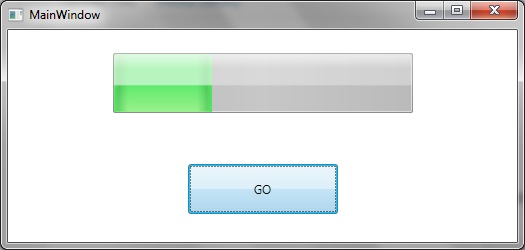
 Clicking on the "GO" button initiates the progress bar thread as shown:
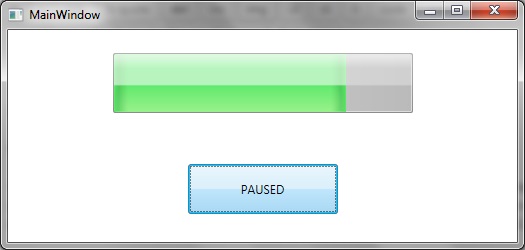
 We can interrupt the progress by clicking on the "GO" button, which stops the background thread and switches the button label to "PAUSED":
Step 2: Create the MainWindow.xaml user interface components
[code language="csharp"]
<Window x:Class="ProgressThread.MainWindow"
xmlns="http://schemas.microsoft.com/winfx/2006/xaml/presentation"
xmlns:x="http://schemas.microsoft.com/winfx/2006/xaml"
xmlns:d="http://schemas.microsoft.com/expression/blend/2008"
xmlns:mc="http://schemas.openxmlformats.org/markup-compatibility/2006"
xmlns:local="clr-namespace:ProgressThread"
mc:Ignorable="d"
Title="MainWindow"
Height="250" Width="525">
<Window.DataContext>
<local:MainWindowViewModel/>
</Window.DataContext>
<Grid >
<Grid.RowDefinitions>
<RowDefinition Height="*" />
<RowDefinition Height="*" />
</Grid.RowDefinitions>
<ProgressBar
Value="{Binding CurrentProgress, Mode=OneWay}"
Visibility="Visible"
VerticalAlignment="Center"
Grid.Row="0"
Height="60" Width="300"
Minimum="0" Maximum="100"
Name="pbStatus" />
<Button
Grid.Row="1"
Width="150" Height="50"
Command="{Binding Command}"
Content="{Binding ButtonLabel}"/>
</Grid>
</Window>
[/code]
Step 3: Create the ViewModel classes
BaseViewModel.cs
[code language="csharp"]
using System;
using System.ComponentModel;
using System.Diagnostics;
namespace ProgressThread
{
public abstract class BaseViewModel : INotifyPropertyChanged
{
#region INotifyPropertyChanged Members
public event PropertyChangedEventHandler PropertyChanged;
#endregion
protected void OnPropertyChanged(string propertyName)
{
VerifyPropertyName(propertyName);
PropertyChangedEventHandler handler = PropertyChanged;
if (handler != null)
{
handler(this, new PropertyChangedEventArgs(propertyName));
}
}
protected void OnPropertyChanged(int propertyValue)
{
VerifyPropertyName(propertyValue);
PropertyChangedEventHandler handler = PropertyChanged;
if (handler != null)
{
handler(this, new PropertyChangedEventArgs(propertyValue.ToString()));
}
}
[Conditional("DEBUG")]
private void VerifyPropertyName(string propertyName)
{
if (TypeDescriptor.GetProperties(this)[propertyName] == null)
throw new ArgumentNullException(GetType().Name + " does not contain property: " + propertyName);
}
[Conditional("DEBUG")]
private void VerifyPropertyName(int propertyValue)
{
if (TypeDescriptor.GetProperties(this)[propertyValue] == null)
throw new ArgumentNullException(GetType().Name + " does not contain property: " + propertyValue.ToString());
}
}
}
[/code]
MainWindowViewModel.cs
[code language="csharp"]
using System.ComponentModel;
using System.Threading;
using System.Windows;
using System.Windows.Input;
namespace ProgressThread
{
public class MainWindowViewModel : BaseViewModel
{
private static bool _isRunning;
private string _buttonLabel;
private int currentProgress;
private ICommand _command;
private BackgroundWorker worker = new BackgroundWorker();
public MainWindowViewModel()
{
worker.DoWork += DoWork;
worker.ProgressChanged += ProgressChanged;
worker.WorkerReportsProgress = true;
worker.WorkerSupportsCancellation = true;
CurrentProgress = 0;
_isRunning = true;
ButtonLabel = "GO";
}
private void ProgressChanged(object sender, ProgressChangedEventArgs e)
{
CurrentProgress = e.ProgressPercentage;
}
private void DoWork(object sender, DoWorkEventArgs e)
{
if (CurrentProgress >= 100)
{
CurrentProgress = 0;
}
while (CurrentProgress < 100 && !_isRunning)
{
worker.ReportProgress(CurrentProgress);
Thread.Sleep(100);
CurrentProgress++;
}
_isRunning = true;
}
public ICommand Command
{
get
{
return _command ?? (_command = new RelayCommand(x =>
{
_isRunning = !_isRunning;
if (!_isRunning)
{
DoStuff();
}
else
{
ButtonLabel = "PAUSED";
}
}));
}
}
public int CurrentProgress
{
get { return currentProgress; }
private set
{
if (currentProgress != value)
{
currentProgress = value;
OnPropertyChanged("CurrentProgress");
}
}
}
public string ButtonLabel
{
get { return _buttonLabel; }
private set
{
if (_buttonLabel != value)
{
_buttonLabel = value;
OnPropertyChanged("ButtonLabel");
}
}
}
private void DoStuff()
{
ButtonLabel = "GO";
worker.RunWorkerAsync();
}
}
}
[/code]
Step 3: Add the event handling infratructure
EventArgs.cs
[code language="csharp"]
using System;
namespace ProgressThread
{
public class EventArgs<T> : EventArgs
{
public EventArgs(T value)
{
Value = value;
}
public T Value { get; private set; }
}
}
[/code]
EventRaiser.cs
[code language="csharp"]
using System;
using System.Collections.Generic;
using System.Linq;
using System.Text;
using System.Threading.Tasks;
namespace ProgressThread
{
public static class EventRaiser
{
public static void Raise(this EventHandler handler, object sender)
{
if (handler != null)
{
handler(sender, EventArgs.Empty);
}
}
public static void Raise<T>(this EventHandler<EventArgs<T>> handler, object sender, T value)
{
if (handler != null)
{
handler(sender, new EventArgs<T>(value));
}
}
public static void Raise<T>(this EventHandler<T> handler, object sender, T value) where T : EventArgs
{
if (handler != null)
{
handler(sender, value);
}
}
public static void Raise<T>(this EventHandler<EventArgs<T>> handler, object sender, EventArgs<T> value)
{
if (handler != null)
{
handler(sender, value);
}
}
}
}
[/code]
RelayCommand.cs
[code language="csharp"]
using System;
using System.Windows.Input;
namespace ProgressThread
{
public class RelayCommand<T> : ICommand
{
private readonly Predicate<T> _canExecute;
private readonly Action<T> _execute;
public RelayCommand(Action<T> execute)
: this(execute, null)
{
_execute = execute;
}
public RelayCommand(Action<T> execute, Predicate<T> canExecute)
{
if (execute == null)
{
throw new ArgumentNullException("execute");
}
_execute = execute;
_canExecute = canExecute;
}
public bool CanExecute(object parameter)
{
return _canExecute == null || _canExecute((T)parameter);
}
public void Execute(object parameter)
{
_execute((T)parameter);
}
public event EventHandler CanExecuteChanged
{
add { CommandManager.RequerySuggested += value; }
remove { CommandManager.RequerySuggested -= value; }
}
}
public class RelayCommand : ICommand
{
private readonly Predicate<object> _canExecute;
private readonly Action<object> _execute;
public RelayCommand(Action<object> execute)
: this(execute, null)
{
_execute = execute;
}
public RelayCommand(Action<object> execute, Predicate<object> canExecute)
{
if (execute == null)
{
throw new ArgumentNullException("execute");
}
_execute = execute;
_canExecute = canExecute;
}
public bool CanExecute(object parameter)
{
return _canExecute == null || _canExecute(parameter);
}
public void Execute(object parameter)
{
_execute(parameter);
}
// Ensures WPF commanding infrastructure asks all RelayCommand objects whether their
// associated views should be enabled whenever a command is invoked
public event EventHandler CanExecuteChanged
{
add
{
CommandManager.RequerySuggested += value;
CanExecuteChangedInternal += value;
}
remove
{
CommandManager.RequerySuggested -= value;
CanExecuteChangedInternal -= value;
}
}
private event EventHandler CanExecuteChangedInternal;
public void RaiseCanExecuteChanged()
{
CanExecuteChangedInternal.Raise(this);
}
}
}
[/code]
So that when running we initially have the zero-progress as shown:
Clicking on the "GO" button initiates the progress bar thread as shown:
We can interrupt the progress by clicking on the "GO" button, which stops the background thread and switches the button label to "PAUSED":


Comments
Post a Comment