Using the .NET WebBrowser Control in a WinForms project
Very easy to do. Just execute the following steps:
1. Create a new WinForms Project
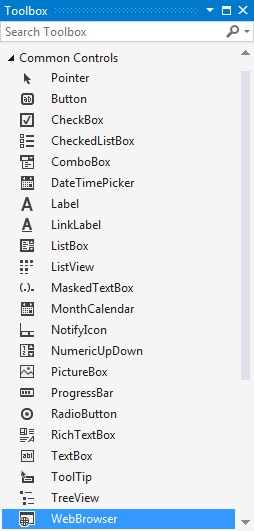
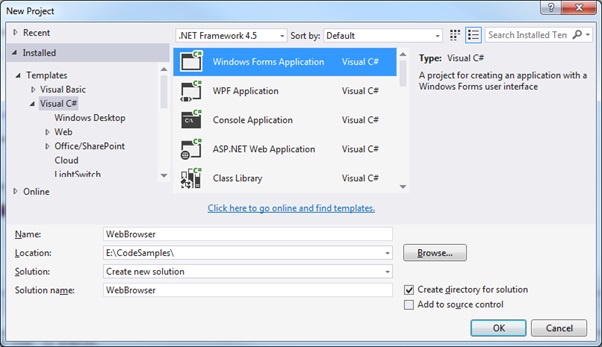 2. Add the WebBrowser control from the ToolBox.
Select View > ToolBox.
Select WebBrowser in the Common Controls:
2. Add the WebBrowser control from the ToolBox.
Select View > ToolBox.
Select WebBrowser in the Common Controls:
 3. Drag the WebBroswer control on to your form
Like so:
3. Drag the WebBroswer control on to your form
Like so:
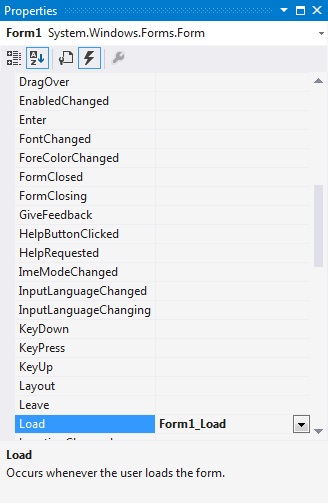
 4. Add Event handling methods.
Add an event for the form loaded:
4. Add Event handling methods.
Add an event for the form loaded:
 5. Update the event handling code
In Form.cs updates as follows. I have also included the option to apply zooming to the selected web page:
[code language="csharp"]
using System;
using System.Collections.Generic;
using System.ComponentModel;
using System.Data;
using System.Drawing;
using System.Linq;
using System.Text;
using System.Threading.Tasks;
using System.Windows.Forms;
namespace WebBrowser
{
public partial class Form1 : Form
{
public Form1()
{
InitializeComponent();
webBrowser1.Navigate("www.google.co.uk");
}
private void Form1_Load(object sender, EventArgs e)
{
if (webBrowser1.Document == null)
return;
if (webBrowser1.Document.Body != null)
webBrowser1.Document.Body.Style = "zoom:90%;";
}
}
}
[/code]
6. Run the application:
5. Update the event handling code
In Form.cs updates as follows. I have also included the option to apply zooming to the selected web page:
[code language="csharp"]
using System;
using System.Collections.Generic;
using System.ComponentModel;
using System.Data;
using System.Drawing;
using System.Linq;
using System.Text;
using System.Threading.Tasks;
using System.Windows.Forms;
namespace WebBrowser
{
public partial class Form1 : Form
{
public Form1()
{
InitializeComponent();
webBrowser1.Navigate("www.google.co.uk");
}
private void Form1_Load(object sender, EventArgs e)
{
if (webBrowser1.Document == null)
return;
if (webBrowser1.Document.Body != null)
webBrowser1.Document.Body.Style = "zoom:90%;";
}
}
}
[/code]
6. Run the application:

2. Add the WebBrowser control from the ToolBox.
Select View > ToolBox.
Select WebBrowser in the Common Controls:
3. Drag the WebBroswer control on to your form
Like so:
4. Add Event handling methods.
Add an event for the form loaded:
5. Update the event handling code
In Form.cs updates as follows. I have also included the option to apply zooming to the selected web page:
[code language="csharp"]
using System;
using System.Collections.Generic;
using System.ComponentModel;
using System.Data;
using System.Drawing;
using System.Linq;
using System.Text;
using System.Threading.Tasks;
using System.Windows.Forms;
namespace WebBrowser
{
public partial class Form1 : Form
{
public Form1()
{
InitializeComponent();
webBrowser1.Navigate("www.google.co.uk");
}
private void Form1_Load(object sender, EventArgs e)
{
if (webBrowser1.Document == null)
return;
if (webBrowser1.Document.Body != null)
webBrowser1.Document.Body.Style = "zoom:90%;";
}
}
}
[/code]
6. Run the application:


Comments
Post a Comment