Serializing data in C# using Migrant
Antmicro Migrant is available from here:
https://github.com/antmicro/Migrant
To get started do the following steps:
1. Create a new console application in Visual Studio:
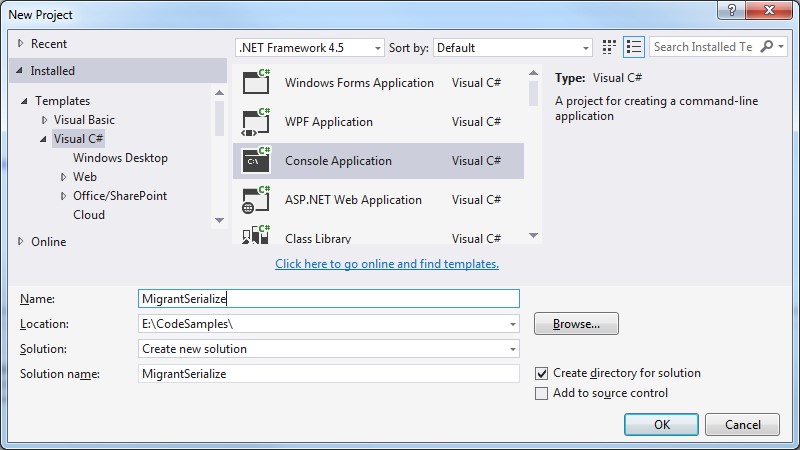 2. Install the ‘Migrant’ NuGet package
Select Tools > NuGet Package Manager > Package Manager Console:
2. Install the ‘Migrant’ NuGet package
Select Tools > NuGet Package Manager > Package Manager Console:
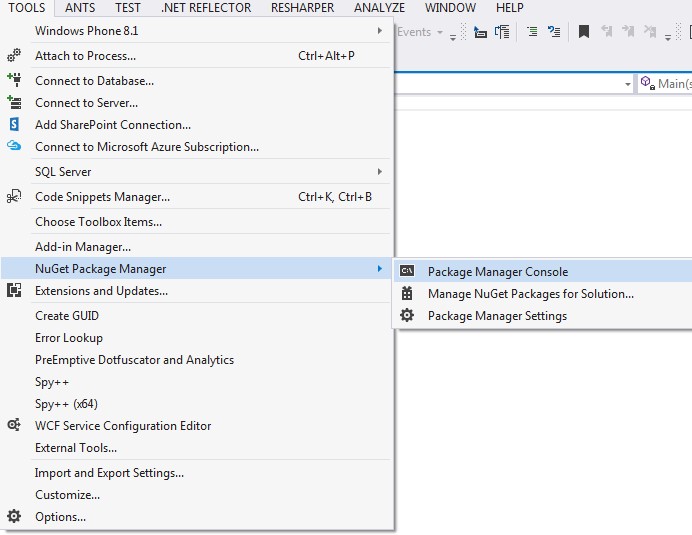 Install Migrant by typing ‘install-package migrant’
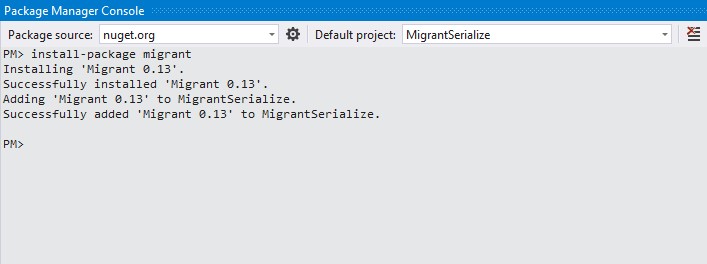 3. A simple serialization example.
Modify your Program.cs to perform a basic serialize / deserialize example as shown:
[code language="csharp"]
using System;
using System.IO;
using Antmicro.Migrant;
namespace MigrantSerialize
{
internal class Program
{
private static void Main(string[] args)
{
var serializer = new Serializer();
var stream = new MemoryStream();
var obj = new MyClass
{
Name = "XYZ", Value = 111
};
serializer.Serialize(obj, stream);
stream.Seek(0, SeekOrigin.Begin);
var deserializedObj = serializer.Deserialize<MyClass>(stream);
Console.WriteLine("De-serialised object: \n");
Console.WriteLine("Name: " + deserializedObj.Name + "\nValue: " + deserializedObj.Value);
}
#region Nested type: MyClass
public class MyClass
{
public string Name { get; set; }
public int Value { get; set; }
}
#endregion
}
}
[/code]
Giving the following output:
3. A simple serialization example.
Modify your Program.cs to perform a basic serialize / deserialize example as shown:
[code language="csharp"]
using System;
using System.IO;
using Antmicro.Migrant;
namespace MigrantSerialize
{
internal class Program
{
private static void Main(string[] args)
{
var serializer = new Serializer();
var stream = new MemoryStream();
var obj = new MyClass
{
Name = "XYZ", Value = 111
};
serializer.Serialize(obj, stream);
stream.Seek(0, SeekOrigin.Begin);
var deserializedObj = serializer.Deserialize<MyClass>(stream);
Console.WriteLine("De-serialised object: \n");
Console.WriteLine("Name: " + deserializedObj.Name + "\nValue: " + deserializedObj.Value);
}
#region Nested type: MyClass
public class MyClass
{
public string Name { get; set; }
public int Value { get; set; }
}
#endregion
}
}
[/code]
Giving the following output:
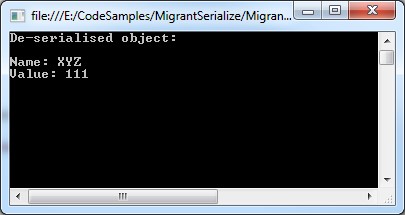 4. An example using FileStream to serialize/de-serialize a collection of objects
[code language="csharp"]
using System;
using System.Collections.Generic;
using System.IO;
using Antmicro.Migrant;
namespace MigrantSerialize
{
internal class Program
{
private static void Main(string[] args)
{
var serializer = new Serializer();
const string FilePath = @"C:\temp\text.txt";
if (File.Exists(FilePath))
{
File.Delete(FilePath);
}
var stream = File.Create(FilePath);
var objects = new List<MyClass>
{
new MyClass
{
Name = "ABC", Value = 321
},
new MyClass
{
Name = "XYZ", Value = 222
},
new MyClass
{
Name = "IJK", Value = 101
}
};
serializer.Serialize(objects, stream);
stream.Seek(0, SeekOrigin.Begin);
var deserializedObj = serializer.Deserialize<IEnumerable<MyClass>>(stream);
Console.WriteLine("De-serialised objects: \n");
foreach (var deserializedObject in objects)
{
Console.WriteLine("Name: " + deserializedObject.Name + "\tValue: " + deserializedObject.Value);
}
}
#region Nested type: MyClass
public class MyClass
{
public string Name { get; set; }
public int Value { get; set; }
}
#endregion
}
}
[/code]
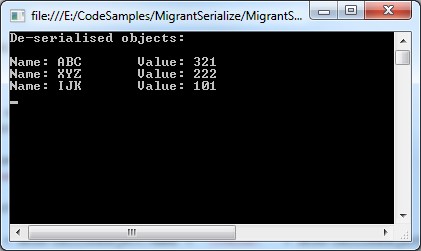
Giving the following output:
4. An example using FileStream to serialize/de-serialize a collection of objects
[code language="csharp"]
using System;
using System.Collections.Generic;
using System.IO;
using Antmicro.Migrant;
namespace MigrantSerialize
{
internal class Program
{
private static void Main(string[] args)
{
var serializer = new Serializer();
const string FilePath = @"C:\temp\text.txt";
if (File.Exists(FilePath))
{
File.Delete(FilePath);
}
var stream = File.Create(FilePath);
var objects = new List<MyClass>
{
new MyClass
{
Name = "ABC", Value = 321
},
new MyClass
{
Name = "XYZ", Value = 222
},
new MyClass
{
Name = "IJK", Value = 101
}
};
serializer.Serialize(objects, stream);
stream.Seek(0, SeekOrigin.Begin);
var deserializedObj = serializer.Deserialize<IEnumerable<MyClass>>(stream);
Console.WriteLine("De-serialised objects: \n");
foreach (var deserializedObject in objects)
{
Console.WriteLine("Name: " + deserializedObject.Name + "\tValue: " + deserializedObject.Value);
}
}
#region Nested type: MyClass
public class MyClass
{
public string Name { get; set; }
public int Value { get; set; }
}
#endregion
}
}
[/code]
Giving the following output:
 5. Serializing and de-serializing a tree-like data structure
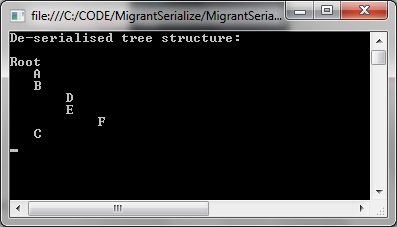
Migrant does the job on tree structures too. In this example a 'TreeNode' data structure that contains a list of 'TreeNode' structures. TreeNode also contains a method to recursively print its contents as well, indenting the node names by the level of recursion:
[code language="csharp"]
using Antmicro.Migrant;
using System;
using System.Collections.Generic;
using System.IO;
using System.Linq;
using System.Text;
using System.Threading.Tasks;
namespace MigrantSerialize
{
public class TreeNode
{
public string Name { get; set; }
public List<TreeNode> Children = new List<TreeNode>();
public void Print(TreeNode node, int level)
{
if (level == 1)
{
Console.WriteLine(node.Name);
}
if (node.Children == null)
return;
foreach (var childNode in node.Children)
{
var textWithPadding = childNode.Name.PadLeft(level * 4, ' ');
Console.WriteLine(textWithPadding);
Print(childNode, level + 1);
}
}
}
internal class Program
{
private static void Main(string[] args)
{
var serializer = new Serializer();
const string FilePath = @"C:\temp\text.txt";
if (File.Exists(FilePath))
{
File.Delete(FilePath);
}
var stream = File.Create(FilePath);
var node1 = new TreeNode { Name = "A" };
var node2 = new TreeNode { Name = "B" };
var node3 = new TreeNode { Name = "C" };
var node4 = new TreeNode { Name = "D" };
var node5 = new TreeNode { Name = "E" };
var node6 = new TreeNode { Name = "F" };
var children1 = new List<TreeNode>() { node1, node2, node3 };
var children2 = new List<TreeNode>() { node4, node5 };
var children3 = new List<TreeNode>() { node6 };
var root = new TreeNode { Name = "Root" };
node5.Children = children3;
node2.Children = children2;
root.Children = children1;
serializer.Serialize(root, stream);
stream.Seek(0, SeekOrigin.Begin);
var deserializedObj = serializer.Deserialize<TreeNode>(stream);
Console.WriteLine("De-serialised tree structure: \n");
deserializedObj.Print(deserializedObj, 1);
}
}
}
[/code]
Giving the following output:
5. Serializing and de-serializing a tree-like data structure
Migrant does the job on tree structures too. In this example a 'TreeNode' data structure that contains a list of 'TreeNode' structures. TreeNode also contains a method to recursively print its contents as well, indenting the node names by the level of recursion:
[code language="csharp"]
using Antmicro.Migrant;
using System;
using System.Collections.Generic;
using System.IO;
using System.Linq;
using System.Text;
using System.Threading.Tasks;
namespace MigrantSerialize
{
public class TreeNode
{
public string Name { get; set; }
public List<TreeNode> Children = new List<TreeNode>();
public void Print(TreeNode node, int level)
{
if (level == 1)
{
Console.WriteLine(node.Name);
}
if (node.Children == null)
return;
foreach (var childNode in node.Children)
{
var textWithPadding = childNode.Name.PadLeft(level * 4, ' ');
Console.WriteLine(textWithPadding);
Print(childNode, level + 1);
}
}
}
internal class Program
{
private static void Main(string[] args)
{
var serializer = new Serializer();
const string FilePath = @"C:\temp\text.txt";
if (File.Exists(FilePath))
{
File.Delete(FilePath);
}
var stream = File.Create(FilePath);
var node1 = new TreeNode { Name = "A" };
var node2 = new TreeNode { Name = "B" };
var node3 = new TreeNode { Name = "C" };
var node4 = new TreeNode { Name = "D" };
var node5 = new TreeNode { Name = "E" };
var node6 = new TreeNode { Name = "F" };
var children1 = new List<TreeNode>() { node1, node2, node3 };
var children2 = new List<TreeNode>() { node4, node5 };
var children3 = new List<TreeNode>() { node6 };
var root = new TreeNode { Name = "Root" };
node5.Children = children3;
node2.Children = children2;
root.Children = children1;
serializer.Serialize(root, stream);
stream.Seek(0, SeekOrigin.Begin);
var deserializedObj = serializer.Deserialize<TreeNode>(stream);
Console.WriteLine("De-serialised tree structure: \n");
deserializedObj.Print(deserializedObj, 1);
}
}
}
[/code]
Giving the following output:
 6. Customising the settings
As an example, you may want to allow for differences in GUID -that can result from different compilations of the same library.
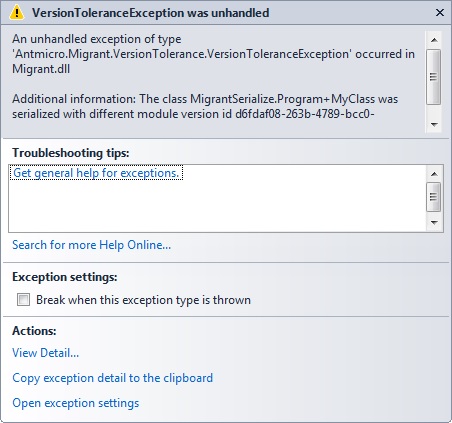
Without setting the version tolerance level your program will probably throw an exception when you re-compile the same code and try to de-serialize the same data file again, precisely because of the mismatch in GUIDs:
[code language="txt"]
Antmicro.Migrant.VersionTolerance.VersionToleranceException was unhandled
HResult=-2146233088
Message=The class MigrantSerialize.Program+MyClass was serialized with different module version id d6fdaf08-263b-4789-bcc0-372b532d05f6, current one is b1e6b693-a4f4-4a2d-9aad-738eb43cc831.
Source=Migrant
[/code]
6. Customising the settings
As an example, you may want to allow for differences in GUID -that can result from different compilations of the same library.
Without setting the version tolerance level your program will probably throw an exception when you re-compile the same code and try to de-serialize the same data file again, precisely because of the mismatch in GUIDs:
[code language="txt"]
Antmicro.Migrant.VersionTolerance.VersionToleranceException was unhandled
HResult=-2146233088
Message=The class MigrantSerialize.Program+MyClass was serialized with different module version id d6fdaf08-263b-4789-bcc0-372b532d05f6, current one is b1e6b693-a4f4-4a2d-9aad-738eb43cc831.
Source=Migrant
[/code]
 To overcome this you can set the VersionToleranceLevel enum to allow for GUID changes:
[code language="csharp"]
const VersionToleranceLevel VersionToleranceLevel = VersionToleranceLevel.AllowGuidChange;
[/code]
and use this when creating your custom settings for serialization/deserialization and version tolerance levels:
[code language="csharp"]
var customSettings = new Settings(Method.Generated, Method.Generated, VersionToleranceLevel);
[/code]
Full code listing shown, that uses the version tolerance. Using this you can re-compile and re-run without the exception:
[code language="csharp"]
using System;
using System.IO;
using Antmicro.Migrant;
using Antmicro.Migrant.Customization;
namespace MigrantSerialize
{
internal class Program
{
public const string FilePath = @"E:\temp\datafile.dat";
private static void Main(string[] args)
{
var obj = new MyClass
{
Key = "XYZ", Value = 111,
};
Serialize(obj);
Deserialize();
}
private static Settings CustomSettings { get; set; }
#region Nested type: MyClass
public class MyClass
{
public string Key { get; set; }
public int Value { get; set; }
}
#endregion
public static void Serialize(object obj)
{
if (File.Exists(FilePath))
{
return;
}
var serializer = new Serializer();
using (var stream = File.Create(FilePath))
{
serializer.Serialize(obj, stream);
stream.Seek(0, SeekOrigin.Begin);
}
}
public static void Deserialize()
{
const Method SerializationMethod = Method.Generated;
const Method DeserializationMethod = Method.Generated;
const VersionToleranceLevel VersionToleranceLevel = VersionToleranceLevel.AllowGuidChange;
var settings = new Settings(SerializationMethod, DeserializationMethod, VersionToleranceLevel);
var deserializer = new Serializer(settings);
using (var stream = File.OpenRead(FilePath))
{
var deserializedObj = deserializer.Deserialize<MyClass>(stream);
Console.WriteLine("De-serialised object: \n");
Console.WriteLine("Key: " + deserializedObj.Key + "\nValue: " + deserializedObj.Value);
}
}
}
}
[/code]
To overcome this you can set the VersionToleranceLevel enum to allow for GUID changes:
[code language="csharp"]
const VersionToleranceLevel VersionToleranceLevel = VersionToleranceLevel.AllowGuidChange;
[/code]
and use this when creating your custom settings for serialization/deserialization and version tolerance levels:
[code language="csharp"]
var customSettings = new Settings(Method.Generated, Method.Generated, VersionToleranceLevel);
[/code]
Full code listing shown, that uses the version tolerance. Using this you can re-compile and re-run without the exception:
[code language="csharp"]
using System;
using System.IO;
using Antmicro.Migrant;
using Antmicro.Migrant.Customization;
namespace MigrantSerialize
{
internal class Program
{
public const string FilePath = @"E:\temp\datafile.dat";
private static void Main(string[] args)
{
var obj = new MyClass
{
Key = "XYZ", Value = 111,
};
Serialize(obj);
Deserialize();
}
private static Settings CustomSettings { get; set; }
#region Nested type: MyClass
public class MyClass
{
public string Key { get; set; }
public int Value { get; set; }
}
#endregion
public static void Serialize(object obj)
{
if (File.Exists(FilePath))
{
return;
}
var serializer = new Serializer();
using (var stream = File.Create(FilePath))
{
serializer.Serialize(obj, stream);
stream.Seek(0, SeekOrigin.Begin);
}
}
public static void Deserialize()
{
const Method SerializationMethod = Method.Generated;
const Method DeserializationMethod = Method.Generated;
const VersionToleranceLevel VersionToleranceLevel = VersionToleranceLevel.AllowGuidChange;
var settings = new Settings(SerializationMethod, DeserializationMethod, VersionToleranceLevel);
var deserializer = new Serializer(settings);
using (var stream = File.OpenRead(FilePath))
{
var deserializedObj = deserializer.Deserialize<MyClass>(stream);
Console.WriteLine("De-serialised object: \n");
Console.WriteLine("Key: " + deserializedObj.Key + "\nValue: " + deserializedObj.Value);
}
}
}
}
[/code]
2. Install the ‘Migrant’ NuGet package
Select Tools > NuGet Package Manager > Package Manager Console:
Install Migrant by typing ‘install-package migrant’
3. A simple serialization example.
Modify your Program.cs to perform a basic serialize / deserialize example as shown:
[code language="csharp"]
using System;
using System.IO;
using Antmicro.Migrant;
namespace MigrantSerialize
{
internal class Program
{
private static void Main(string[] args)
{
var serializer = new Serializer();
var stream = new MemoryStream();
var obj = new MyClass
{
Name = "XYZ", Value = 111
};
serializer.Serialize(obj, stream);
stream.Seek(0, SeekOrigin.Begin);
var deserializedObj = serializer.Deserialize<MyClass>(stream);
Console.WriteLine("De-serialised object: \n");
Console.WriteLine("Name: " + deserializedObj.Name + "\nValue: " + deserializedObj.Value);
}
#region Nested type: MyClass
public class MyClass
{
public string Name { get; set; }
public int Value { get; set; }
}
#endregion
}
}
[/code]
Giving the following output:
4. An example using FileStream to serialize/de-serialize a collection of objects
[code language="csharp"]
using System;
using System.Collections.Generic;
using System.IO;
using Antmicro.Migrant;
namespace MigrantSerialize
{
internal class Program
{
private static void Main(string[] args)
{
var serializer = new Serializer();
const string FilePath = @"C:\temp\text.txt";
if (File.Exists(FilePath))
{
File.Delete(FilePath);
}
var stream = File.Create(FilePath);
var objects = new List<MyClass>
{
new MyClass
{
Name = "ABC", Value = 321
},
new MyClass
{
Name = "XYZ", Value = 222
},
new MyClass
{
Name = "IJK", Value = 101
}
};
serializer.Serialize(objects, stream);
stream.Seek(0, SeekOrigin.Begin);
var deserializedObj = serializer.Deserialize<IEnumerable<MyClass>>(stream);
Console.WriteLine("De-serialised objects: \n");
foreach (var deserializedObject in objects)
{
Console.WriteLine("Name: " + deserializedObject.Name + "\tValue: " + deserializedObject.Value);
}
}
#region Nested type: MyClass
public class MyClass
{
public string Name { get; set; }
public int Value { get; set; }
}
#endregion
}
}
[/code]
Giving the following output:
5. Serializing and de-serializing a tree-like data structure
Migrant does the job on tree structures too. In this example a 'TreeNode' data structure that contains a list of 'TreeNode' structures. TreeNode also contains a method to recursively print its contents as well, indenting the node names by the level of recursion:
[code language="csharp"]
using Antmicro.Migrant;
using System;
using System.Collections.Generic;
using System.IO;
using System.Linq;
using System.Text;
using System.Threading.Tasks;
namespace MigrantSerialize
{
public class TreeNode
{
public string Name { get; set; }
public List<TreeNode> Children = new List<TreeNode>();
public void Print(TreeNode node, int level)
{
if (level == 1)
{
Console.WriteLine(node.Name);
}
if (node.Children == null)
return;
foreach (var childNode in node.Children)
{
var textWithPadding = childNode.Name.PadLeft(level * 4, ' ');
Console.WriteLine(textWithPadding);
Print(childNode, level + 1);
}
}
}
internal class Program
{
private static void Main(string[] args)
{
var serializer = new Serializer();
const string FilePath = @"C:\temp\text.txt";
if (File.Exists(FilePath))
{
File.Delete(FilePath);
}
var stream = File.Create(FilePath);
var node1 = new TreeNode { Name = "A" };
var node2 = new TreeNode { Name = "B" };
var node3 = new TreeNode { Name = "C" };
var node4 = new TreeNode { Name = "D" };
var node5 = new TreeNode { Name = "E" };
var node6 = new TreeNode { Name = "F" };
var children1 = new List<TreeNode>() { node1, node2, node3 };
var children2 = new List<TreeNode>() { node4, node5 };
var children3 = new List<TreeNode>() { node6 };
var root = new TreeNode { Name = "Root" };
node5.Children = children3;
node2.Children = children2;
root.Children = children1;
serializer.Serialize(root, stream);
stream.Seek(0, SeekOrigin.Begin);
var deserializedObj = serializer.Deserialize<TreeNode>(stream);
Console.WriteLine("De-serialised tree structure: \n");
deserializedObj.Print(deserializedObj, 1);
}
}
}
[/code]
Giving the following output:
6. Customising the settings
As an example, you may want to allow for differences in GUID -that can result from different compilations of the same library.
Without setting the version tolerance level your program will probably throw an exception when you re-compile the same code and try to de-serialize the same data file again, precisely because of the mismatch in GUIDs:
[code language="txt"]
Antmicro.Migrant.VersionTolerance.VersionToleranceException was unhandled
HResult=-2146233088
Message=The class MigrantSerialize.Program+MyClass was serialized with different module version id d6fdaf08-263b-4789-bcc0-372b532d05f6, current one is b1e6b693-a4f4-4a2d-9aad-738eb43cc831.
Source=Migrant
[/code]
To overcome this you can set the VersionToleranceLevel enum to allow for GUID changes:
[code language="csharp"]
const VersionToleranceLevel VersionToleranceLevel = VersionToleranceLevel.AllowGuidChange;
[/code]
and use this when creating your custom settings for serialization/deserialization and version tolerance levels:
[code language="csharp"]
var customSettings = new Settings(Method.Generated, Method.Generated, VersionToleranceLevel);
[/code]
Full code listing shown, that uses the version tolerance. Using this you can re-compile and re-run without the exception:
[code language="csharp"]
using System;
using System.IO;
using Antmicro.Migrant;
using Antmicro.Migrant.Customization;
namespace MigrantSerialize
{
internal class Program
{
public const string FilePath = @"E:\temp\datafile.dat";
private static void Main(string[] args)
{
var obj = new MyClass
{
Key = "XYZ", Value = 111,
};
Serialize(obj);
Deserialize();
}
private static Settings CustomSettings { get; set; }
#region Nested type: MyClass
public class MyClass
{
public string Key { get; set; }
public int Value { get; set; }
}
#endregion
public static void Serialize(object obj)
{
if (File.Exists(FilePath))
{
return;
}
var serializer = new Serializer();
using (var stream = File.Create(FilePath))
{
serializer.Serialize(obj, stream);
stream.Seek(0, SeekOrigin.Begin);
}
}
public static void Deserialize()
{
const Method SerializationMethod = Method.Generated;
const Method DeserializationMethod = Method.Generated;
const VersionToleranceLevel VersionToleranceLevel = VersionToleranceLevel.AllowGuidChange;
var settings = new Settings(SerializationMethod, DeserializationMethod, VersionToleranceLevel);
var deserializer = new Serializer(settings);
using (var stream = File.OpenRead(FilePath))
{
var deserializedObj = deserializer.Deserialize<MyClass>(stream);
Console.WriteLine("De-serialised object: \n");
Console.WriteLine("Key: " + deserializedObj.Key + "\nValue: " + deserializedObj.Value);
}
}
}
}
[/code]


Comments
Post a Comment