How to run processes and obtain the output in C#
Example process: fsutil.
Very useful link on obtaining and setting fsutil behaviour and properties at this following link:
http://blogs.microsoft.co.il/skepper/2014/07/16/symbolic_link/
Typically contained in the System32 folder: C:\Windows\System32
It is quite simple to do and consists of two main steps:
Step 1: Create Process object and set its StartInfo object accordingly
[code language="csharp"]
var process = new Process
{
StartInfo = new ProcessStartInfo
{
FileName = "C:\\Windows\\System32\\fsutil.exe",
Arguments = "behavior query SymlinkEvaluation",
UseShellExecute = false, RedirectStandardOutput = true,
CreateNoWindow = true
}
};
[/code]
Step 2: Start the process and read each line obtained from it:
[code language="csharp"]
process.Start();
while (!process.StandardOutput.EndOfStream)
{
var line = process.StandardOutput.ReadLine();
Console.WriteLine(line);
}
[/code]
Full Code listing:
[code language="csharp"]
using System;
using System.Diagnostics;
namespace RunProcess
{
internal class Program
{
private static void Main(string[] args)
{
try
{
var process = new Process
{
StartInfo = new ProcessStartInfo
{
FileName = "C:\\Windows\\System32\\fsutil.exe",
Arguments = "behavior query SymlinkEvaluation",
UseShellExecute = false, RedirectStandardOutput = true,
CreateNoWindow = true
}
};
process.Start();
while (!process.StandardOutput.EndOfStream)
{
var line = process.StandardOutput.ReadLine();
Console.WriteLine(line);
}
process.WaitForExit();
}
catch (Exception e)
{
Console.WriteLine(e.Message);
}
}
}
}
[/code]
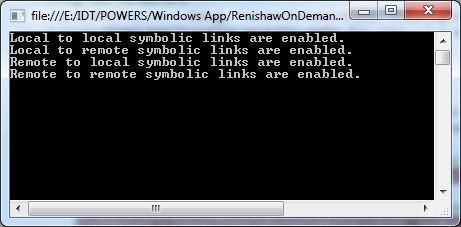
For our example I wanted to see what the SymbolicLinkStatus was for remote -> local etc:
Console output as follows:


Comments
Post a Comment