How to make an HTTP request to an HTTP-based service in C#
A minimalist explanation as follows.
1. Create the HTTP Web Request
Create the WebRequest object from the from the Universal Resource Identifier (URI) you supply eg
[code language="csharp"]
const string Url = "http://www.microsoft.com";
var webRequest = WebRequest.Create(Url);
[/code]
2. Send the HTTP request and wait for the response
[code language="csharp"]
var responseStream = webRequest.GetResponse().GetResponseStream();
[/code]
3. Create a StreamReader object
The StreamReader object is used to read back the text characters from the HTTP response:
I use the ‘using’ statement as a convenient means of ensure the object is subsequently disposed.
[code language="csharp"]
using(var streamReader = new StreamReader(responseStream))
{
// Return next available character or -1 if there are no characters to be read
while (streamReader.Peek() > -1)
{
Console.WriteLine(streamReader.ReadLine());
}
}
[/code]
Complete code listing:
[code language="csharp"]
using System;
using System.IO;
using System.Net;
namespace GetRequest
{
internal class Program
{
private static void Main(string[] args)
{
// Create the http request
const string Url = "http://www.microsoft.com";
var webRequest = WebRequest.Create(Url);
// Send the http request and wait for the response
var responseStream = webRequest.GetResponse().GetResponseStream();
// Displays the response stream text
if (responseStream != null)
{
using(var streamReader = new StreamReader(responseStream))
{
// Return next available character or -1 if there are no characters to be read
while (streamReader.Peek() > -1)
{
Console.WriteLine(streamReader.ReadLine());
}
}
}
Console.ReadLine();
}
}
}
[/code]
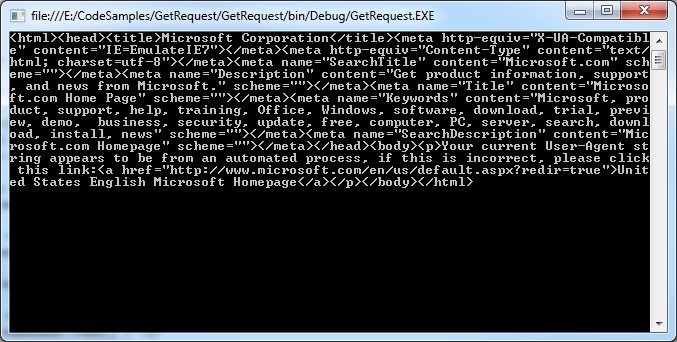
Giving the following console output:
 4. Using timeouts
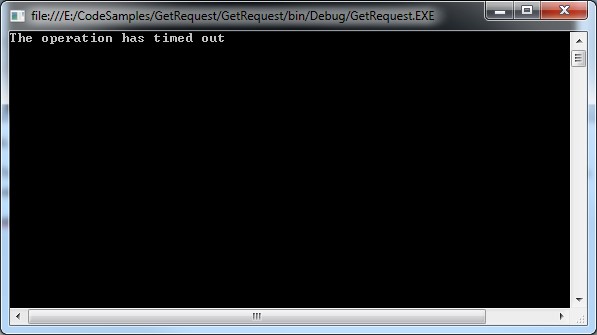
To do this set the Timeout property on the WebRequest object. To demonstrate I have set this value deliberately low, not giving the web request the chance to get the HTTP reponse:
[code language="csharp"]
webRequest.Timeout = 1;
[/code]
Example implementation:
[code language="csharp"]
using System;
using System.IO;
using System.Net;
namespace GetRequest
{
internal class Program
{
private static void Main(string[] args)
{
// Create the http request
const string Url = "http://www.microsoft.com";
var webRequest = WebRequest.Create(Url);
webRequest.Timeout = 1;
try
{
// Send the http request and wait for the response
var responseStream = webRequest.GetResponse().GetResponseStream();
// Displays the response stream text
if (responseStream != null)
{
using(var streamReader = new StreamReader(responseStream))
{
// Return next available character or -1 if there are no characters to be read
while (streamReader.Peek() > -1)
{
Console.WriteLine(streamReader.ReadLine());
}
}
}
Console.ReadLine();
}
catch (Exception ex)
{
Console.WriteLine(ex.Message);
}
}
}
}
[/code]
Giving the following output:
4. Using timeouts
To do this set the Timeout property on the WebRequest object. To demonstrate I have set this value deliberately low, not giving the web request the chance to get the HTTP reponse:
[code language="csharp"]
webRequest.Timeout = 1;
[/code]
Example implementation:
[code language="csharp"]
using System;
using System.IO;
using System.Net;
namespace GetRequest
{
internal class Program
{
private static void Main(string[] args)
{
// Create the http request
const string Url = "http://www.microsoft.com";
var webRequest = WebRequest.Create(Url);
webRequest.Timeout = 1;
try
{
// Send the http request and wait for the response
var responseStream = webRequest.GetResponse().GetResponseStream();
// Displays the response stream text
if (responseStream != null)
{
using(var streamReader = new StreamReader(responseStream))
{
// Return next available character or -1 if there are no characters to be read
while (streamReader.Peek() > -1)
{
Console.WriteLine(streamReader.ReadLine());
}
}
}
Console.ReadLine();
}
catch (Exception ex)
{
Console.WriteLine(ex.Message);
}
}
}
}
[/code]
Giving the following output:
4. Using timeouts
To do this set the Timeout property on the WebRequest object. To demonstrate I have set this value deliberately low, not giving the web request the chance to get the HTTP reponse:
[code language="csharp"]
webRequest.Timeout = 1;
[/code]
Example implementation:
[code language="csharp"]
using System;
using System.IO;
using System.Net;
namespace GetRequest
{
internal class Program
{
private static void Main(string[] args)
{
// Create the http request
const string Url = "http://www.microsoft.com";
var webRequest = WebRequest.Create(Url);
webRequest.Timeout = 1;
try
{
// Send the http request and wait for the response
var responseStream = webRequest.GetResponse().GetResponseStream();
// Displays the response stream text
if (responseStream != null)
{
using(var streamReader = new StreamReader(responseStream))
{
// Return next available character or -1 if there are no characters to be read
while (streamReader.Peek() > -1)
{
Console.WriteLine(streamReader.ReadLine());
}
}
}
Console.ReadLine();
}
catch (Exception ex)
{
Console.WriteLine(ex.Message);
}
}
}
}
[/code]
Giving the following output:


Comments
Post a Comment