Binding a XAML control visibility to a ViewModel variable in WPF
Some instructions on how to bind the visibility of a XAML button control to a boolean value in a ViewModel class.
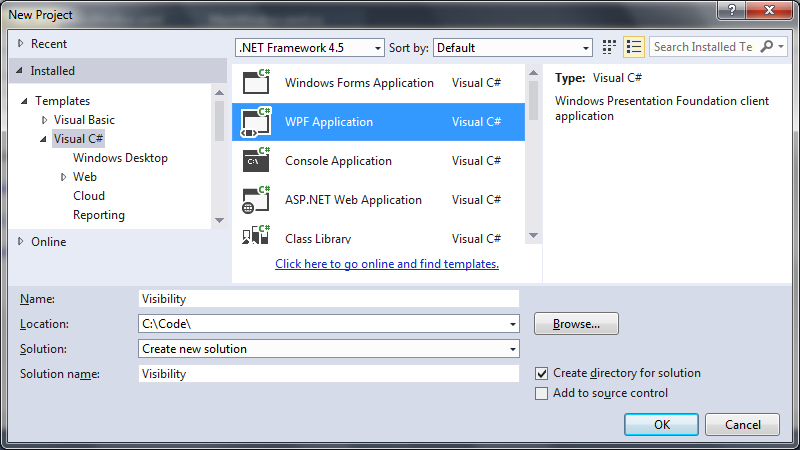
1. Create a new WPF application
 2. Add the View Model class
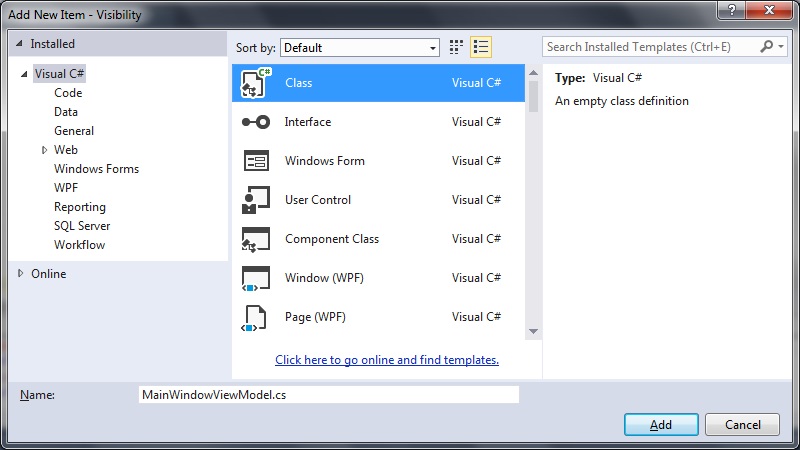
Right click your project folder and select Add > New Item > Class.
Name your class MainWindowViewModel.cs:
2. Add the View Model class
Right click your project folder and select Add > New Item > Class.
Name your class MainWindowViewModel.cs:
 In your ViewModel class include the property to get the visibility setting.
For reasons of simplicity this simply returns a value of true for now, but in your own implementations, feel free to make the getters and setters do what you like.
[code language="csharp"]
using System;
using System.Collections.Generic;
using System.Linq;
using System.Text;
using System.Threading.Tasks;
namespace Visibility
{
public class MainWindowViewModel
{
public bool ButtonVisibility
{
get { return true; }
}
}
}
[/code]
3. Update your MainWindow.xaml code to do the following:
- add a button
- set the DataContext property
- declare and use a BooleanToVisibilityConverter
[code language="xml"]
<Window x:Class="Visibility.MainWindow"
xmlns="http://schemas.microsoft.com/winfx/2006/xaml/presentation"
xmlns:x="http://schemas.microsoft.com/winfx/2006/xaml"
xmlns:d="http://schemas.microsoft.com/expression/blend/2008"
xmlns:mc="http://schemas.openxmlformats.org/markup-compatibility/2006"
mc:Ignorable="d"
xmlns:local="clr-namespace:Visibility"
Title="MainWindow"
Height="150" Width="225">
<Window.DataContext>
<local:MainWindowViewModel />
</Window.DataContext>
<Window.Resources>
<BooleanToVisibilityConverter x:Key="BooleanToVisibilityConverter" />
</Window.Resources>
<Grid>
<Button
Content="Button"
Visibility="{Binding Path=ButtonVisibility, Converter={StaticResource BooleanToVisibilityConverter} }"
HorizontalAlignment="Center"
VerticalAlignment="Center"
Margin="10,10,0,0"
Width="75">
</Button>
</Grid>
</Window>
[/code]
4. Run the example.
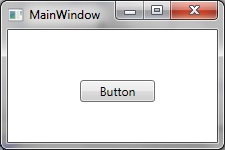
With the ButtonVisibility property set to return true the XAML button control is made visible when running the program as follows:
In your ViewModel class include the property to get the visibility setting.
For reasons of simplicity this simply returns a value of true for now, but in your own implementations, feel free to make the getters and setters do what you like.
[code language="csharp"]
using System;
using System.Collections.Generic;
using System.Linq;
using System.Text;
using System.Threading.Tasks;
namespace Visibility
{
public class MainWindowViewModel
{
public bool ButtonVisibility
{
get { return true; }
}
}
}
[/code]
3. Update your MainWindow.xaml code to do the following:
- add a button
- set the DataContext property
- declare and use a BooleanToVisibilityConverter
[code language="xml"]
<Window x:Class="Visibility.MainWindow"
xmlns="http://schemas.microsoft.com/winfx/2006/xaml/presentation"
xmlns:x="http://schemas.microsoft.com/winfx/2006/xaml"
xmlns:d="http://schemas.microsoft.com/expression/blend/2008"
xmlns:mc="http://schemas.openxmlformats.org/markup-compatibility/2006"
mc:Ignorable="d"
xmlns:local="clr-namespace:Visibility"
Title="MainWindow"
Height="150" Width="225">
<Window.DataContext>
<local:MainWindowViewModel />
</Window.DataContext>
<Window.Resources>
<BooleanToVisibilityConverter x:Key="BooleanToVisibilityConverter" />
</Window.Resources>
<Grid>
<Button
Content="Button"
Visibility="{Binding Path=ButtonVisibility, Converter={StaticResource BooleanToVisibilityConverter} }"
HorizontalAlignment="Center"
VerticalAlignment="Center"
Margin="10,10,0,0"
Width="75">
</Button>
</Grid>
</Window>
[/code]
4. Run the example.
With the ButtonVisibility property set to return true the XAML button control is made visible when running the program as follows:
 And when the ButtonVisibility property is set to false:
[code language="csharp"]
public class MainWindowViewModel
{
public bool ButtonVisibility
{
get { return false; }
}
}
[/code]
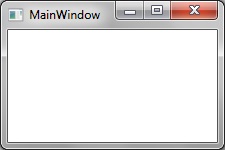
.. the button becomes hidden as shown:
And when the ButtonVisibility property is set to false:
[code language="csharp"]
public class MainWindowViewModel
{
public bool ButtonVisibility
{
get { return false; }
}
}
[/code]
.. the button becomes hidden as shown:
2. Add the View Model class
Right click your project folder and select Add > New Item > Class.
Name your class MainWindowViewModel.cs:
In your ViewModel class include the property to get the visibility setting.
For reasons of simplicity this simply returns a value of true for now, but in your own implementations, feel free to make the getters and setters do what you like.
[code language="csharp"]
using System;
using System.Collections.Generic;
using System.Linq;
using System.Text;
using System.Threading.Tasks;
namespace Visibility
{
public class MainWindowViewModel
{
public bool ButtonVisibility
{
get { return true; }
}
}
}
[/code]
3. Update your MainWindow.xaml code to do the following:
- add a button
- set the DataContext property
- declare and use a BooleanToVisibilityConverter
[code language="xml"]
<Window x:Class="Visibility.MainWindow"
xmlns="http://schemas.microsoft.com/winfx/2006/xaml/presentation"
xmlns:x="http://schemas.microsoft.com/winfx/2006/xaml"
xmlns:d="http://schemas.microsoft.com/expression/blend/2008"
xmlns:mc="http://schemas.openxmlformats.org/markup-compatibility/2006"
mc:Ignorable="d"
xmlns:local="clr-namespace:Visibility"
Title="MainWindow"
Height="150" Width="225">
<Window.DataContext>
<local:MainWindowViewModel />
</Window.DataContext>
<Window.Resources>
<BooleanToVisibilityConverter x:Key="BooleanToVisibilityConverter" />
</Window.Resources>
<Grid>
<Button
Content="Button"
Visibility="{Binding Path=ButtonVisibility, Converter={StaticResource BooleanToVisibilityConverter} }"
HorizontalAlignment="Center"
VerticalAlignment="Center"
Margin="10,10,0,0"
Width="75">
</Button>
</Grid>
</Window>
[/code]
4. Run the example.
With the ButtonVisibility property set to return true the XAML button control is made visible when running the program as follows:
And when the ButtonVisibility property is set to false:
[code language="csharp"]
public class MainWindowViewModel
{
public bool ButtonVisibility
{
get { return false; }
}
}
[/code]
.. the button becomes hidden as shown:


Comments
Post a Comment