Getting started with NSubstitute
Some instructions on how to get you set up and unit testing your .NET code quickly and easily using NSubstitute.
1. Download NSubstitute
Obtain NSubstitute from the following download link:
https://github.com/nsubstitute/NSubstitute/downloads
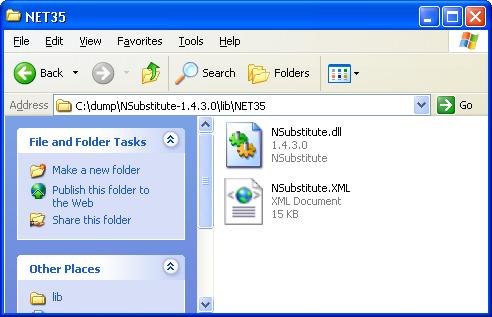
And extract it to a location of your choice. It is basically a dll file which gets referenced in your Visual Studio .NET project:
 2. Create your Visual Studio project
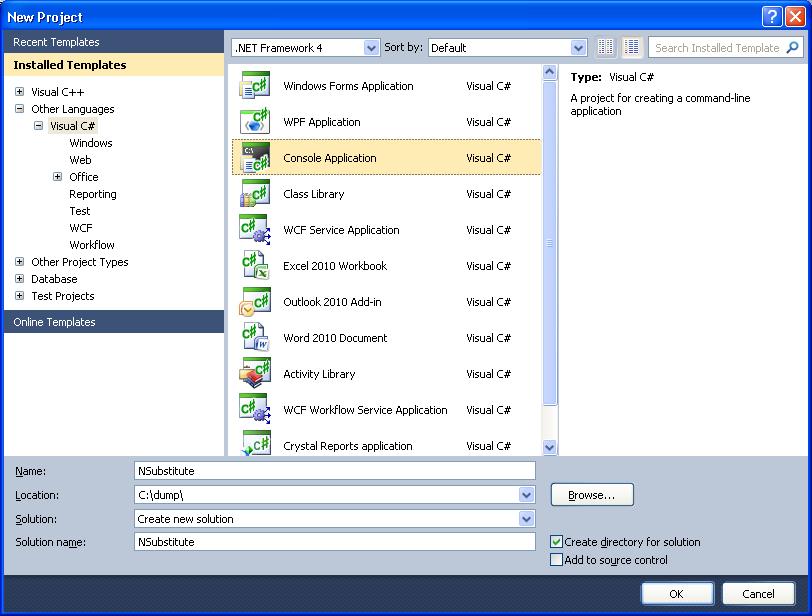
As an easy example we will start with a Console Application:
2. Create your Visual Studio project
As an easy example we will start with a Console Application:
 3. Write the sample code
This is our main program.cs code that implements the unit testing:
[code language="csharp"]
using System;
using System.Collections.Generic;
using System.Linq;
using System.Text;
using System.Diagnostics;
using NSubstitute;
namespace NSubstitute
{
class Program
{
class Calc : ICalc
{
public int Add(int a, int b)
{
return a + b;
}
public string Mode { get; set; }
public event EventHandler PoweringUp;
}
static void Main(string[] args)
{
var calculator = Substitute.For<ICalc>();
calculator.Add(1, 2).Returns(3);
calculator.Mode.Returns("DEC");
calculator.Add(1, 2);
calculator.Received(1).Add(1, 2);
calculator.DidNotReceive().Add(5, 7);
Debug.Assert(calculator.Add(1, 2) == 3);
Debug.Assert(calculator.Mode == "DEC");
bool eventRaised = false;
calculator.PoweringUp += (sender, arguments) => eventRaised = true;
calculator.PoweringUp += Raise.Event();
Debug.Assert(eventRaised == true);
}
}
}
[/code]
And this is the public interface, ICalc, used by the main code:
[code language="csharp"]
using System;
using System.Collections.Generic;
using System.Linq;
using System.Text;
namespace NSubstitute
{
public interface ICalc
{
int Add(int a, int b);
string Mode { get; set; }
event EventHandler PoweringUp;
}
}
[/code]
4. Set the project Reference properties.
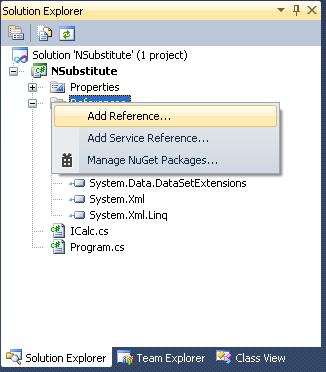
Right-click your project folder and select References:
3. Write the sample code
This is our main program.cs code that implements the unit testing:
[code language="csharp"]
using System;
using System.Collections.Generic;
using System.Linq;
using System.Text;
using System.Diagnostics;
using NSubstitute;
namespace NSubstitute
{
class Program
{
class Calc : ICalc
{
public int Add(int a, int b)
{
return a + b;
}
public string Mode { get; set; }
public event EventHandler PoweringUp;
}
static void Main(string[] args)
{
var calculator = Substitute.For<ICalc>();
calculator.Add(1, 2).Returns(3);
calculator.Mode.Returns("DEC");
calculator.Add(1, 2);
calculator.Received(1).Add(1, 2);
calculator.DidNotReceive().Add(5, 7);
Debug.Assert(calculator.Add(1, 2) == 3);
Debug.Assert(calculator.Mode == "DEC");
bool eventRaised = false;
calculator.PoweringUp += (sender, arguments) => eventRaised = true;
calculator.PoweringUp += Raise.Event();
Debug.Assert(eventRaised == true);
}
}
}
[/code]
And this is the public interface, ICalc, used by the main code:
[code language="csharp"]
using System;
using System.Collections.Generic;
using System.Linq;
using System.Text;
namespace NSubstitute
{
public interface ICalc
{
int Add(int a, int b);
string Mode { get; set; }
event EventHandler PoweringUp;
}
}
[/code]
4. Set the project Reference properties.
Right-click your project folder and select References:
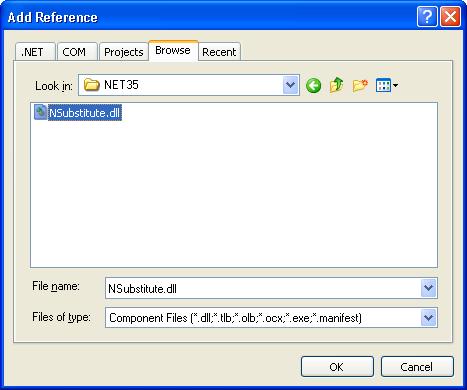
 Select the Browse tab and seek out the location of the NSubstitute dll you have extracted and downloaded:
 And that should be all there is too it!
Testing your .NET code then becomes a simple matter of making calls to Substitute eg
[code language="csharp"]
var calculator = Substitute.For<ICalc>();
[/code]
And that should be all there is too it!
Testing your .NET code then becomes a simple matter of making calls to Substitute eg
[code language="csharp"]
var calculator = Substitute.For<ICalc>();
[/code]
 2. Create your Visual Studio project
As an easy example we will start with a Console Application:
2. Create your Visual Studio project
As an easy example we will start with a Console Application:
 3. Write the sample code
This is our main program.cs code that implements the unit testing:
[code language="csharp"]
using System;
using System.Collections.Generic;
using System.Linq;
using System.Text;
using System.Diagnostics;
using NSubstitute;
namespace NSubstitute
{
class Program
{
class Calc : ICalc
{
public int Add(int a, int b)
{
return a + b;
}
public string Mode { get; set; }
public event EventHandler PoweringUp;
}
static void Main(string[] args)
{
var calculator = Substitute.For<ICalc>();
calculator.Add(1, 2).Returns(3);
calculator.Mode.Returns("DEC");
calculator.Add(1, 2);
calculator.Received(1).Add(1, 2);
calculator.DidNotReceive().Add(5, 7);
Debug.Assert(calculator.Add(1, 2) == 3);
Debug.Assert(calculator.Mode == "DEC");
bool eventRaised = false;
calculator.PoweringUp += (sender, arguments) => eventRaised = true;
calculator.PoweringUp += Raise.Event();
Debug.Assert(eventRaised == true);
}
}
}
[/code]
And this is the public interface, ICalc, used by the main code:
[code language="csharp"]
using System;
using System.Collections.Generic;
using System.Linq;
using System.Text;
namespace NSubstitute
{
public interface ICalc
{
int Add(int a, int b);
string Mode { get; set; }
event EventHandler PoweringUp;
}
}
[/code]
4. Set the project Reference properties.
Right-click your project folder and select References:
3. Write the sample code
This is our main program.cs code that implements the unit testing:
[code language="csharp"]
using System;
using System.Collections.Generic;
using System.Linq;
using System.Text;
using System.Diagnostics;
using NSubstitute;
namespace NSubstitute
{
class Program
{
class Calc : ICalc
{
public int Add(int a, int b)
{
return a + b;
}
public string Mode { get; set; }
public event EventHandler PoweringUp;
}
static void Main(string[] args)
{
var calculator = Substitute.For<ICalc>();
calculator.Add(1, 2).Returns(3);
calculator.Mode.Returns("DEC");
calculator.Add(1, 2);
calculator.Received(1).Add(1, 2);
calculator.DidNotReceive().Add(5, 7);
Debug.Assert(calculator.Add(1, 2) == 3);
Debug.Assert(calculator.Mode == "DEC");
bool eventRaised = false;
calculator.PoweringUp += (sender, arguments) => eventRaised = true;
calculator.PoweringUp += Raise.Event();
Debug.Assert(eventRaised == true);
}
}
}
[/code]
And this is the public interface, ICalc, used by the main code:
[code language="csharp"]
using System;
using System.Collections.Generic;
using System.Linq;
using System.Text;
namespace NSubstitute
{
public interface ICalc
{
int Add(int a, int b);
string Mode { get; set; }
event EventHandler PoweringUp;
}
}
[/code]
4. Set the project Reference properties.
Right-click your project folder and select References:
 Select the Browse tab and seek out the location of the NSubstitute dll you have extracted and downloaded:
 And that should be all there is too it!
Testing your .NET code then becomes a simple matter of making calls to Substitute eg
[code language="csharp"]
var calculator = Substitute.For<ICalc>();
[/code]
And that should be all there is too it!
Testing your .NET code then becomes a simple matter of making calls to Substitute eg
[code language="csharp"]
var calculator = Substitute.For<ICalc>();
[/code]


Comments
Post a Comment