Fixing compiler problems when using smart pointers in NetBeans
I like using NetBeans for C++ development within Linux environments.
Sometimes a gotcha can occur when trying to use the following declaration: [code language="cpp"]#include <memory>[/code]
You may wish use this in order to utilize smart pointers such as 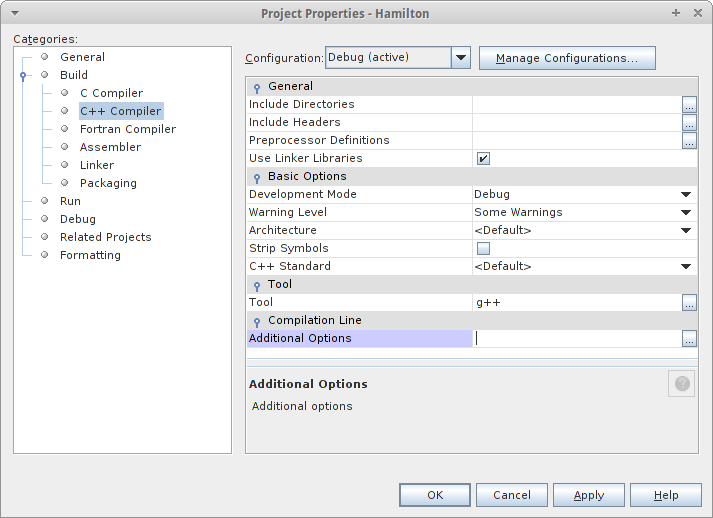 In the Additional Options dialog just set the appropriate compilation flag such as
  Click on OK and then Apply and then you're away. You should now be able to use Standard Library smart pointers in NetBeans in Linux-based environments with no problems.
std::unique_ptr, leaving the user with a compilation error such as this:
error: ‘unique_ptr’ in namespace ‘std’ does not name a template type
It's easy enough to overcome. Just make sure the appropriate compiler flag is set in NetBeans.
In NetBeans right-click your project and select Properties. Then select Additional Options field in Build > C++ Compiler:
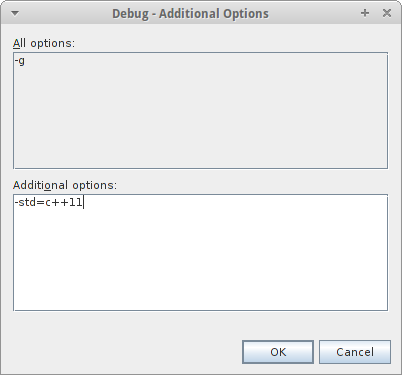
In the Additional Options dialog just set the appropriate compilation flag such as -std=c++11:
Click on OK and then Apply and then you're away. You should now be able to use Standard Library smart pointers in NetBeans in Linux-based environments with no problems.


Comments
Post a Comment