Some C# Basics...
Some C# / .NET techniques as I encounter them. More to follow...
Arrays and Strings
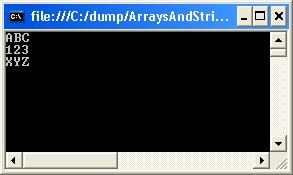
Using an array of strings in a foreach loop:
[code language="csharp"]
using System.IO;
using System;
class Program
{
static void Main()
{
string[] values = new string[]{ "abc", "xyz", "123" };
foreach( string s in values )
{
Console.WriteLine( s );
}
}
}
[/code]
Console output:
 Indexers
Providing array-like access to classes, using the [] array access operator.
[code language="csharp"]
using System.IO;
using System;
class StringIndexer
{
private static int limit = 5;
private string[] values = new string[limit];
public int Limit()
{
return limit;
}
public string this[int index]
{
get
{
if (index < limit && index >= 0)
{
return values[index];
}
else
{
return "";
}
}
set
{
if (index < limit && index >= 0)
{
values[index] = value;
}
}
}
}
class MainProgram
{
public static void Main()
{
StringIndexer stringIndexer = new StringIndexer();
stringIndexer[0] = "The";
stringIndexer[1] = "cat";
stringIndexer[2] = "sat";
stringIndexer[3] = "on";
stringIndexer[4] = "the";
stringIndexer[5] = "mat";
for (int i = 0; i <= 10; i++)
{
Console.WriteLine("String Element #{0} = {1}", i, stringIndexer[i]);
}
}
}
[/code]
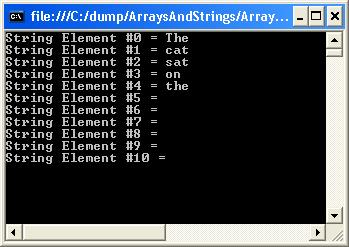
Console output:
Indexers
Providing array-like access to classes, using the [] array access operator.
[code language="csharp"]
using System.IO;
using System;
class StringIndexer
{
private static int limit = 5;
private string[] values = new string[limit];
public int Limit()
{
return limit;
}
public string this[int index]
{
get
{
if (index < limit && index >= 0)
{
return values[index];
}
else
{
return "";
}
}
set
{
if (index < limit && index >= 0)
{
values[index] = value;
}
}
}
}
class MainProgram
{
public static void Main()
{
StringIndexer stringIndexer = new StringIndexer();
stringIndexer[0] = "The";
stringIndexer[1] = "cat";
stringIndexer[2] = "sat";
stringIndexer[3] = "on";
stringIndexer[4] = "the";
stringIndexer[5] = "mat";
for (int i = 0; i <= 10; i++)
{
Console.WriteLine("String Element #{0} = {1}", i, stringIndexer[i]);
}
}
}
[/code]
Console output:
 IEnumerable
An interface specifying that the underlying type implements
IEnumerable
An interface specifying that the underlying type implements 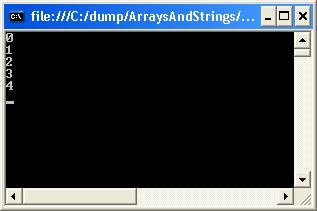 Properties
Example usage of instance, static and read-only properties:
[code language="csharp"]
using System.IO;
using System;
class Employee
{
// static properties
public static int numberOfEmployees;
private static int counter;
private static string name;
// Read-write properties
public string Name
{
get
{
return name;
}
set
{
name = value;
}
}
// Read-only property
public int Counter
{
get
{
return counter;
}
}
// Constructor
public Employee()
{
counter = ++counter + numberOfEmployees;
}
}
class MainProgram
{
public static void Main()
{
Employee.numberOfEmployees = 100;
Employee employee = new Employee();
employee.Name = "Jones";
Console.WriteLine( "Employee number: {0}", employee.Counter);
Console.WriteLine( "Employee name: {0}", employee.Name);
}
}
[/code]
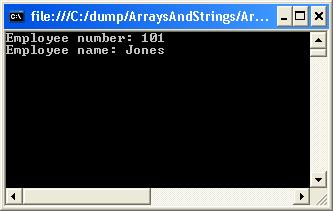
Console output:
Properties
Example usage of instance, static and read-only properties:
[code language="csharp"]
using System.IO;
using System;
class Employee
{
// static properties
public static int numberOfEmployees;
private static int counter;
private static string name;
// Read-write properties
public string Name
{
get
{
return name;
}
set
{
name = value;
}
}
// Read-only property
public int Counter
{
get
{
return counter;
}
}
// Constructor
public Employee()
{
counter = ++counter + numberOfEmployees;
}
}
class MainProgram
{
public static void Main()
{
Employee.numberOfEmployees = 100;
Employee employee = new Employee();
employee.Name = "Jones";
Console.WriteLine( "Employee number: {0}", employee.Counter);
Console.WriteLine( "Employee name: {0}", employee.Name);
}
}
[/code]
Console output:
 Attributes
Lambda Expressions
Use the => token, called the lambda operator, to separate the input variables on the left from the lambda body on the right.
[code language="csharp"]
using System;
using System.Linq;
namespace LambdaExpression
{
public delegate TResult Func<TArg0, TResult>(TArg0 arg0);
class Program
{
static void Main(string[] args)
{
// Using Count to obtain total even numbers
int[] numbers = { 5, 4, 1, 3, 9, 8, 6, 7, 2, 0 };
int oddNumbers = numbers.Count(n => n % 2 == 1);
Console.WriteLine("Number of odd numbers = ", oddNumbers);
// Using delegate to determin if number is a multiple of 5
Func<int, bool> myFunc = x => x % 5 == 0;
bool result = myFunc(15);
Console.WriteLine("result = {0}", result);
// Lambda to get the longest length string
var strings = new string[] { "1", "02", "003", "0004", "00005" };
string longest = strings.OrderByDescending(s => s.Length).First();
Console.WriteLine("Longest string = {0}", longest);
}
}
}
[/code]
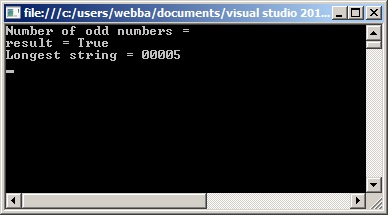
Console output:
Attributes
Lambda Expressions
Use the => token, called the lambda operator, to separate the input variables on the left from the lambda body on the right.
[code language="csharp"]
using System;
using System.Linq;
namespace LambdaExpression
{
public delegate TResult Func<TArg0, TResult>(TArg0 arg0);
class Program
{
static void Main(string[] args)
{
// Using Count to obtain total even numbers
int[] numbers = { 5, 4, 1, 3, 9, 8, 6, 7, 2, 0 };
int oddNumbers = numbers.Count(n => n % 2 == 1);
Console.WriteLine("Number of odd numbers = ", oddNumbers);
// Using delegate to determin if number is a multiple of 5
Func<int, bool> myFunc = x => x % 5 == 0;
bool result = myFunc(15);
Console.WriteLine("result = {0}", result);
// Lambda to get the longest length string
var strings = new string[] { "1", "02", "003", "0004", "00005" };
string longest = strings.OrderByDescending(s => s.Length).First();
Console.WriteLine("Longest string = {0}", longest);
}
}
}
[/code]
Console output:
 Connect to a SQL Server Database
A simple example whereby we connect to the SQL Server database on clicking the WinForms button and setting the SQL connection string:
[code language="csharp"]
using System;
using System.Collections.Generic;
using System.ComponentModel;
using System.Data;
using System.Drawing;
using System.Linq;
using System.Text;
using System.Threading.Tasks;
using System.Windows.Forms;
using System.Data.SqlClient;
namespace WinForm1
{
public partial class Form1 : Form
{
public Form1()
{
InitializeComponent();
}
private void button1_Click(object sender, EventArgs e)
{
SqlConnectionStringBuilder sqlConnBuilder = new SqlConnectionStringBuilder();
sqlConnBuilder.DataSource = "L011035\\DIRDEV";
sqlConnBuilder.InitialCatalog = "IRDB";
sqlConnBuilder.IntegratedSecurity = true;
sqlConnBuilder.UserID = "webba";
sqlConnBuilder.Password = "";
string connectionString = sqlConnBuilder.ConnectionString;
SqlConnection cnn = new SqlConnection(connectionString);
try
{
cnn.Open();
MessageBox.Show ("Connection Open ! ");
cnn.Close();
}
catch (Exception ex)
{
MessageBox.Show("Can not open connection ! ");
}
}
}
}
[/code]
Read an XML attribute
For example, read the "checksum" (SHA-256) and media file name from the following XML:
[code language="xml"]
<?xml version="1.0" encoding="utf-8" ?>
<file name="ZOO.mp4" source="">
<Request Type="AddSegmentable">
<Key CompositeID="53_Ev_CC_10_15" />
<Attachment Name="ZOO.mp4" Update="Y" LocalPath="C:\Symphony\File Drop" Description="MFM" Type=".Supporting File" FileSize="3526921" />
</Request>
<checksum>
<type>SHA 256</type>
<value>8584149da444979c794281007369964d89079b5263972850be05b66354a980e2</value>
</checksum>
<RepositoryPath>2015\03\20\53_Ev_CC_10_15</RepositoryPath>
</file>
[/code]
Use the XDocument object to obtain attributes:
[code language="csharp"]
using System;
using System.Linq;
using System.Text;
using System.Xml.Linq;
class Program
{
static void Main(string[] args)
{
// Using Count to obtain total even numbers
try
{
XDocument xmlDoc = XDocument.Load("C:\\Backup\\xml.xml");
string SHA256 = xmlDoc.Root.Element("checksum").Element("value").Value.ToString();
string mediaFileName = xmlDoc.Root.Attribute("name").Value.ToString();
Console.WriteLine("SHA-256 value = {0}", SHA256);
Console.WriteLine("Media file = {0}", mediaFileName);
}
catch (Exception ex)
{
Console.WriteLine("XML file not found");
}
}
}
[/code]
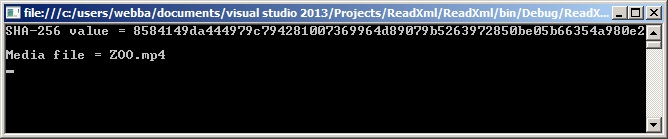
Giving the following output:
Connect to a SQL Server Database
A simple example whereby we connect to the SQL Server database on clicking the WinForms button and setting the SQL connection string:
[code language="csharp"]
using System;
using System.Collections.Generic;
using System.ComponentModel;
using System.Data;
using System.Drawing;
using System.Linq;
using System.Text;
using System.Threading.Tasks;
using System.Windows.Forms;
using System.Data.SqlClient;
namespace WinForm1
{
public partial class Form1 : Form
{
public Form1()
{
InitializeComponent();
}
private void button1_Click(object sender, EventArgs e)
{
SqlConnectionStringBuilder sqlConnBuilder = new SqlConnectionStringBuilder();
sqlConnBuilder.DataSource = "L011035\\DIRDEV";
sqlConnBuilder.InitialCatalog = "IRDB";
sqlConnBuilder.IntegratedSecurity = true;
sqlConnBuilder.UserID = "webba";
sqlConnBuilder.Password = "";
string connectionString = sqlConnBuilder.ConnectionString;
SqlConnection cnn = new SqlConnection(connectionString);
try
{
cnn.Open();
MessageBox.Show ("Connection Open ! ");
cnn.Close();
}
catch (Exception ex)
{
MessageBox.Show("Can not open connection ! ");
}
}
}
}
[/code]
Read an XML attribute
For example, read the "checksum" (SHA-256) and media file name from the following XML:
[code language="xml"]
<?xml version="1.0" encoding="utf-8" ?>
<file name="ZOO.mp4" source="">
<Request Type="AddSegmentable">
<Key CompositeID="53_Ev_CC_10_15" />
<Attachment Name="ZOO.mp4" Update="Y" LocalPath="C:\Symphony\File Drop" Description="MFM" Type=".Supporting File" FileSize="3526921" />
</Request>
<checksum>
<type>SHA 256</type>
<value>8584149da444979c794281007369964d89079b5263972850be05b66354a980e2</value>
</checksum>
<RepositoryPath>2015\03\20\53_Ev_CC_10_15</RepositoryPath>
</file>
[/code]
Use the XDocument object to obtain attributes:
[code language="csharp"]
using System;
using System.Linq;
using System.Text;
using System.Xml.Linq;
class Program
{
static void Main(string[] args)
{
// Using Count to obtain total even numbers
try
{
XDocument xmlDoc = XDocument.Load("C:\\Backup\\xml.xml");
string SHA256 = xmlDoc.Root.Element("checksum").Element("value").Value.ToString();
string mediaFileName = xmlDoc.Root.Attribute("name").Value.ToString();
Console.WriteLine("SHA-256 value = {0}", SHA256);
Console.WriteLine("Media file = {0}", mediaFileName);
}
catch (Exception ex)
{
Console.WriteLine("XML file not found");
}
}
}
[/code]
Giving the following output:
 Use linq to query lists of objects
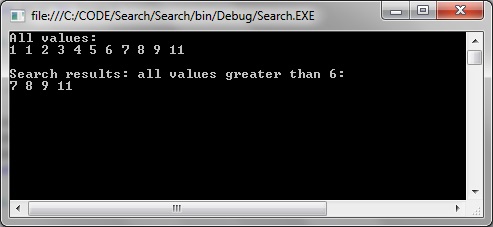
How to return all items that match a given criteria, in this case return a list of all integers greater than 6:
[code language="csharp"]
using System;
using System.Collections.Generic;
using System.Linq;
namespace Search
{
class Program
{
static void Main(string[] args)
{
List<int> items = new List<int>{ 1, 1, 2, 3, 4, 5, 6, 7, 8, 9, 11 };
Console.WriteLine("All values:");
foreach (int item in items)
{
Console.Write(item + " ");
}
var search = items.Where(s => s > 6);
Console.WriteLine();
Console.WriteLine();
Console.WriteLine("Search results: all values greater than 6:");
foreach (int value in search)
{
Console.Write(value + " ");
}
}
}
}
[/code]
Use linq to query lists of objects
How to return all items that match a given criteria, in this case return a list of all integers greater than 6:
[code language="csharp"]
using System;
using System.Collections.Generic;
using System.Linq;
namespace Search
{
class Program
{
static void Main(string[] args)
{
List<int> items = new List<int>{ 1, 1, 2, 3, 4, 5, 6, 7, 8, 9, 11 };
Console.WriteLine("All values:");
foreach (int item in items)
{
Console.Write(item + " ");
}
var search = items.Where(s => s > 6);
Console.WriteLine();
Console.WriteLine();
Console.WriteLine("Search results: all values greater than 6:");
foreach (int value in search)
{
Console.Write(value + " ");
}
}
}
}
[/code]
 Another example, this time searching on a list of objects and searching on object attribute values:
[code language="csharp"]
using System;
using System.Collections.Generic;
using System.Linq;
namespace Search
{
class Data
{
public Data(string title, string description)
{
Description = title;
Value = description;
}
public string Description
{ get; set; }
public string Value
{ get; set; }
}
class Program
{
static void Main(string[] args)
{
List<Data> items = new List<Data>
{
new Data("One", "1"),
new Data("Two", "2"),
new Data("Deux", "2"),
new Data("Three", "3"),
new Data("Four", "4"),
new Data("Five", "5")
};
Console.WriteLine("All values:");
foreach (var item in items)
{
Console.WriteLine(item.Description + " " + item.Value);
}
var search = items.Where(s => s.Value == "2" || s.Description == "Five");
Console.WriteLine();
Console.WriteLine();
Console.WriteLine("Search results: items matching value = 2 OR description = Five");
foreach (var value in search)
{
Console.WriteLine(value.Description + " " + value.Value);
}
}
}
}
[/code]
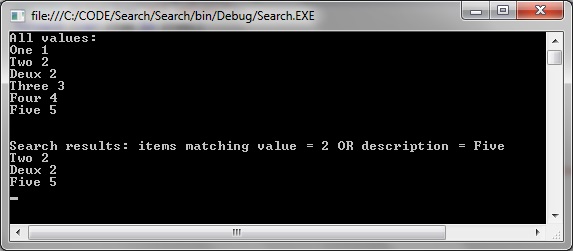
Giving the following search result:
Another example, this time searching on a list of objects and searching on object attribute values:
[code language="csharp"]
using System;
using System.Collections.Generic;
using System.Linq;
namespace Search
{
class Data
{
public Data(string title, string description)
{
Description = title;
Value = description;
}
public string Description
{ get; set; }
public string Value
{ get; set; }
}
class Program
{
static void Main(string[] args)
{
List<Data> items = new List<Data>
{
new Data("One", "1"),
new Data("Two", "2"),
new Data("Deux", "2"),
new Data("Three", "3"),
new Data("Four", "4"),
new Data("Five", "5")
};
Console.WriteLine("All values:");
foreach (var item in items)
{
Console.WriteLine(item.Description + " " + item.Value);
}
var search = items.Where(s => s.Value == "2" || s.Description == "Five");
Console.WriteLine();
Console.WriteLine();
Console.WriteLine("Search results: items matching value = 2 OR description = Five");
foreach (var value in search)
{
Console.WriteLine(value.Description + " " + value.Value);
}
}
}
}
[/code]
Giving the following search result:
 Delegates
A data structure that can be used to refer to a static method or to a class instance and an instance method of that class.
Example:
[code language="csharp"]
using System;
namespace Delegate
{
// Declares a delegate for a method that takes in an int and returns a String.
public delegate string MethodDelegate(int val);
// Defines some methods to which the delegate can point.
public class SampleClass
{
// Defines an instance method.
public static string GetPolarityString(int val)
{
if (val > 0)
return "positive";
return val < 0 ? "negative" : "zero";
}
// Defines a static method.
public static string GetSignString(int val)
{
if (val > 0)
return "+";
return val < 0 ? "-" : "";
}
public string GetValueString(int val)
{
return val.ToString();
}
}
internal static class Program
{
private static void Main()
{
// For the instance method, an instance (sampleClass) must be supplied.
var sampleClass = new SampleClass();
// Creates one delegate for each method.
// For the static method, use the class name.
var delegate1 = new MethodDelegate(SampleClass.GetPolarityString);
var delegate2 = new MethodDelegate(SampleClass.GetSignString);
// Invokes the delegates.
const int val = 5;
Console.WriteLine("{0} is {1}; use the sign \"{2}\".", sampleClass.GetValueString(val), delegate1(val), delegate2(val));
}
}
}
[/code]
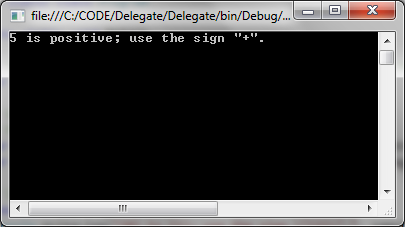
Giving the following output:
Delegates
A data structure that can be used to refer to a static method or to a class instance and an instance method of that class.
Example:
[code language="csharp"]
using System;
namespace Delegate
{
// Declares a delegate for a method that takes in an int and returns a String.
public delegate string MethodDelegate(int val);
// Defines some methods to which the delegate can point.
public class SampleClass
{
// Defines an instance method.
public static string GetPolarityString(int val)
{
if (val > 0)
return "positive";
return val < 0 ? "negative" : "zero";
}
// Defines a static method.
public static string GetSignString(int val)
{
if (val > 0)
return "+";
return val < 0 ? "-" : "";
}
public string GetValueString(int val)
{
return val.ToString();
}
}
internal static class Program
{
private static void Main()
{
// For the instance method, an instance (sampleClass) must be supplied.
var sampleClass = new SampleClass();
// Creates one delegate for each method.
// For the static method, use the class name.
var delegate1 = new MethodDelegate(SampleClass.GetPolarityString);
var delegate2 = new MethodDelegate(SampleClass.GetSignString);
// Invokes the delegates.
const int val = 5;
Console.WriteLine("{0} is {1}; use the sign \"{2}\".", sampleClass.GetValueString(val), delegate1(val), delegate2(val));
}
}
}
[/code]
Giving the following output:
Indexers
Providing array-like access to classes, using the [] array access operator.
[code language="csharp"]
using System.IO;
using System;
class StringIndexer
{
private static int limit = 5;
private string[] values = new string[limit];
public int Limit()
{
return limit;
}
public string this[int index]
{
get
{
if (index < limit && index >= 0)
{
return values[index];
}
else
{
return "";
}
}
set
{
if (index < limit && index >= 0)
{
values[index] = value;
}
}
}
}
class MainProgram
{
public static void Main()
{
StringIndexer stringIndexer = new StringIndexer();
stringIndexer[0] = "The";
stringIndexer[1] = "cat";
stringIndexer[2] = "sat";
stringIndexer[3] = "on";
stringIndexer[4] = "the";
stringIndexer[5] = "mat";
for (int i = 0; i <= 10; i++)
{
Console.WriteLine("String Element #{0} = {1}", i, stringIndexer[i]);
}
}
}
[/code]
Console output:
IEnumerable
An interface specifying that the underlying type implements GetEnumerator(). It allows iteration of non-generic collections, and is returned returned from query expressions
[code language="csharp"]
using System;
using System.Collections.Generic;
using System.Linq;
class Program
{
static void Main()
{
IEnumerable<int> result = from value in Enumerable.Range(0, 5)
select value;
// Loop.
foreach (int value in result)
{
Console.WriteLine(value);
}
// We can use extension methods on IEnumerable<int>
double average = result.Average();
// Extension methods to convert IEnumerable<int> into int array
List<int> list = result.ToList();
int[] array = result.ToArray();
}
}
[/code]
Console output:
Properties
Example usage of instance, static and read-only properties:
[code language="csharp"]
using System.IO;
using System;
class Employee
{
// static properties
public static int numberOfEmployees;
private static int counter;
private static string name;
// Read-write properties
public string Name
{
get
{
return name;
}
set
{
name = value;
}
}
// Read-only property
public int Counter
{
get
{
return counter;
}
}
// Constructor
public Employee()
{
counter = ++counter + numberOfEmployees;
}
}
class MainProgram
{
public static void Main()
{
Employee.numberOfEmployees = 100;
Employee employee = new Employee();
employee.Name = "Jones";
Console.WriteLine( "Employee number: {0}", employee.Counter);
Console.WriteLine( "Employee name: {0}", employee.Name);
}
}
[/code]
Console output:
Attributes
Lambda Expressions
Use the => token, called the lambda operator, to separate the input variables on the left from the lambda body on the right.
[code language="csharp"]
using System;
using System.Linq;
namespace LambdaExpression
{
public delegate TResult Func<TArg0, TResult>(TArg0 arg0);
class Program
{
static void Main(string[] args)
{
// Using Count to obtain total even numbers
int[] numbers = { 5, 4, 1, 3, 9, 8, 6, 7, 2, 0 };
int oddNumbers = numbers.Count(n => n % 2 == 1);
Console.WriteLine("Number of odd numbers = ", oddNumbers);
// Using delegate to determin if number is a multiple of 5
Func<int, bool> myFunc = x => x % 5 == 0;
bool result = myFunc(15);
Console.WriteLine("result = {0}", result);
// Lambda to get the longest length string
var strings = new string[] { "1", "02", "003", "0004", "00005" };
string longest = strings.OrderByDescending(s => s.Length).First();
Console.WriteLine("Longest string = {0}", longest);
}
}
}
[/code]
Console output:
Connect to a SQL Server Database
A simple example whereby we connect to the SQL Server database on clicking the WinForms button and setting the SQL connection string:
[code language="csharp"]
using System;
using System.Collections.Generic;
using System.ComponentModel;
using System.Data;
using System.Drawing;
using System.Linq;
using System.Text;
using System.Threading.Tasks;
using System.Windows.Forms;
using System.Data.SqlClient;
namespace WinForm1
{
public partial class Form1 : Form
{
public Form1()
{
InitializeComponent();
}
private void button1_Click(object sender, EventArgs e)
{
SqlConnectionStringBuilder sqlConnBuilder = new SqlConnectionStringBuilder();
sqlConnBuilder.DataSource = "L011035\\DIRDEV";
sqlConnBuilder.InitialCatalog = "IRDB";
sqlConnBuilder.IntegratedSecurity = true;
sqlConnBuilder.UserID = "webba";
sqlConnBuilder.Password = "";
string connectionString = sqlConnBuilder.ConnectionString;
SqlConnection cnn = new SqlConnection(connectionString);
try
{
cnn.Open();
MessageBox.Show ("Connection Open ! ");
cnn.Close();
}
catch (Exception ex)
{
MessageBox.Show("Can not open connection ! ");
}
}
}
}
[/code]
Read an XML attribute
For example, read the "checksum" (SHA-256) and media file name from the following XML:
[code language="xml"]
<?xml version="1.0" encoding="utf-8" ?>
<file name="ZOO.mp4" source="">
<Request Type="AddSegmentable">
<Key CompositeID="53_Ev_CC_10_15" />
<Attachment Name="ZOO.mp4" Update="Y" LocalPath="C:\Symphony\File Drop" Description="MFM" Type=".Supporting File" FileSize="3526921" />
</Request>
<checksum>
<type>SHA 256</type>
<value>8584149da444979c794281007369964d89079b5263972850be05b66354a980e2</value>
</checksum>
<RepositoryPath>2015\03\20\53_Ev_CC_10_15</RepositoryPath>
</file>
[/code]
Use the XDocument object to obtain attributes:
[code language="csharp"]
using System;
using System.Linq;
using System.Text;
using System.Xml.Linq;
class Program
{
static void Main(string[] args)
{
// Using Count to obtain total even numbers
try
{
XDocument xmlDoc = XDocument.Load("C:\\Backup\\xml.xml");
string SHA256 = xmlDoc.Root.Element("checksum").Element("value").Value.ToString();
string mediaFileName = xmlDoc.Root.Attribute("name").Value.ToString();
Console.WriteLine("SHA-256 value = {0}", SHA256);
Console.WriteLine("Media file = {0}", mediaFileName);
}
catch (Exception ex)
{
Console.WriteLine("XML file not found");
}
}
}
[/code]
Giving the following output:
Use linq to query lists of objects
How to return all items that match a given criteria, in this case return a list of all integers greater than 6:
[code language="csharp"]
using System;
using System.Collections.Generic;
using System.Linq;
namespace Search
{
class Program
{
static void Main(string[] args)
{
List<int> items = new List<int>{ 1, 1, 2, 3, 4, 5, 6, 7, 8, 9, 11 };
Console.WriteLine("All values:");
foreach (int item in items)
{
Console.Write(item + " ");
}
var search = items.Where(s => s > 6);
Console.WriteLine();
Console.WriteLine();
Console.WriteLine("Search results: all values greater than 6:");
foreach (int value in search)
{
Console.Write(value + " ");
}
}
}
}
[/code]
Another example, this time searching on a list of objects and searching on object attribute values:
[code language="csharp"]
using System;
using System.Collections.Generic;
using System.Linq;
namespace Search
{
class Data
{
public Data(string title, string description)
{
Description = title;
Value = description;
}
public string Description
{ get; set; }
public string Value
{ get; set; }
}
class Program
{
static void Main(string[] args)
{
List<Data> items = new List<Data>
{
new Data("One", "1"),
new Data("Two", "2"),
new Data("Deux", "2"),
new Data("Three", "3"),
new Data("Four", "4"),
new Data("Five", "5")
};
Console.WriteLine("All values:");
foreach (var item in items)
{
Console.WriteLine(item.Description + " " + item.Value);
}
var search = items.Where(s => s.Value == "2" || s.Description == "Five");
Console.WriteLine();
Console.WriteLine();
Console.WriteLine("Search results: items matching value = 2 OR description = Five");
foreach (var value in search)
{
Console.WriteLine(value.Description + " " + value.Value);
}
}
}
}
[/code]
Giving the following search result:
Delegates
A data structure that can be used to refer to a static method or to a class instance and an instance method of that class.
Example:
[code language="csharp"]
using System;
namespace Delegate
{
// Declares a delegate for a method that takes in an int and returns a String.
public delegate string MethodDelegate(int val);
// Defines some methods to which the delegate can point.
public class SampleClass
{
// Defines an instance method.
public static string GetPolarityString(int val)
{
if (val > 0)
return "positive";
return val < 0 ? "negative" : "zero";
}
// Defines a static method.
public static string GetSignString(int val)
{
if (val > 0)
return "+";
return val < 0 ? "-" : "";
}
public string GetValueString(int val)
{
return val.ToString();
}
}
internal static class Program
{
private static void Main()
{
// For the instance method, an instance (sampleClass) must be supplied.
var sampleClass = new SampleClass();
// Creates one delegate for each method.
// For the static method, use the class name.
var delegate1 = new MethodDelegate(SampleClass.GetPolarityString);
var delegate2 = new MethodDelegate(SampleClass.GetSignString);
// Invokes the delegates.
const int val = 5;
Console.WriteLine("{0} is {1}; use the sign \"{2}\".", sampleClass.GetValueString(val), delegate1(val), delegate2(val));
}
}
}
[/code]
Giving the following output:


Comments
Post a Comment