Converting a SYSTEMTIME to a std::string in C++
A short recipe outlining how to output a SYSTEMTIME value as a std::string.
The example format will be "YYYY-MM-DD HH:MM:SS.MMM"
I specifically wanted to include milliseconds.
In this example I employ three possible techniques:
1. MFC CString
2. std::ostringstream
3. sprintf
Example code listing shown:
[code lang="cpp"]
#include <windows.h>
#include <atlstr.h>
#include <iostream>
#include <sstream>
#include <iomanip>
int main()
{
SYSTEMTIME st, lt;
GetSystemTime(&st);
std::string strMessage;
// Output a given SYSTEMTIME in the format "
// 1. Using CString
CString cstrMessage;
cstrMessage.Format( "%d-%02d-%02d %02d:%02d:%02d.%03d",
st.wYear,
st.wMonth,
st.wDay,
st.wHour,
st.wMinute,
st.wSecond,
st.wMilliseconds );
strMessage = cstrMessage;
std::cout << "System time = " << strMessage << std::endl;
// 2. Formating using ostringstream
std::ostringstream ossMessage;
ossMessage << st.wYear << "-"
<< std::setw( 2 ) << std::setfill( '0' ) << st.wMonth << "-"
<< std::setw( 2 ) << std::setfill( '0' ) << st.wDay << " "
<< std::setw( 2 ) << std::setfill( '0' ) << st.wHour << ":"
<< std::setw( 2 ) << std::setfill( '0' ) << st.wMinute << ":"
<< std::setw( 2 ) << std::setfill( '0' ) << st.wSecond << "."
<< std::setw( 3 ) << std::setfill( '0' ) << st.wMilliseconds;
strMessage = ossMessage.str();
std::cout << "System time = " << strMessage << std::endl;
// 3. sprintf
char buffer[ 256 ];
sprintf( buffer,
"%d-%02d-%02d %02d:%02d:%02d.%03d",
st.wYear,
st.wMonth,
st.wDay,
st.wHour,
st.wMinute,
st.wSecond,
st.wMilliseconds );
strMessage = buffer;
std::cout << "System time = " << strMessage << std::endl;
return 0;
}
[/code]
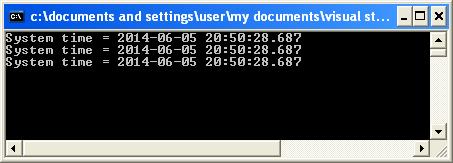
All three techniques giving exactly the same output as shown:
 Here is another example whereby I take a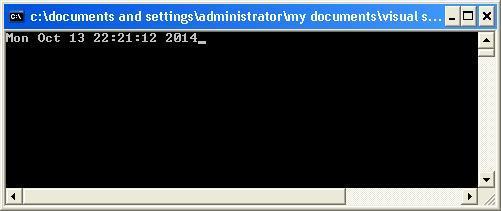
Here is another example whereby I take a SYSTEMTIME as input and output it to a stream in a given date/time format such as "Mon Oct 13 22:21:12 2014". I create a class called TimeFormat which is constructed from the format string and SYSTEMTIME, and outputs the desired output time format via an overloaded insertion (<<) operator that can recognize an ostream object on the left and a TimeFormat object on the right. The overloaded << operator function is declared as a friend of class TimeFormat so it can access the private data within the TimeFormatobject:
[code lang="cpp"]
friend std::ostream& operator <<( std::ostream&, TimeFormat const & );
[/code]
Full code listing as follows:
[code lang="cpp"]
#include <iostream>
#include <iterator>
#include <string>
#include <ctime>
#include <locale>
#include <Windows.h>
const std::string TIME_PATTERN = "%a %b %d %H:%M:%S %Y";
class TimeFormat
{
public:
TimeFormat(const std::string& strFormat, const SYSTEMTIME& stSystemDate) :
m_strFormat( strFormat ),
m_stSystemDate( stSystemDate ) {}
friend std::ostream& operator <<( std::ostream&, TimeFormat const & );
private:
std::string m_strFormat;
SYSTEMTIME m_stSystemDate;
};
std::ostream& operator <<( std::ostream& os, TimeFormat const& format )
{
std::ostream::sentry s(os);
if ( s )
{
std::tm tmSystemDate;
tmSystemDate.tm_sec = format.m_stSystemDate.wSecond;
tmSystemDate.tm_min = format.m_stSystemDate.wMinute;
tmSystemDate.tm_hour = format.m_stSystemDate.wHour;
tmSystemDate.tm_mday = format.m_stSystemDate.wDay;
tmSystemDate.tm_mon = format.m_stSystemDate.wMonth - 1;
tmSystemDate.tm_year = format.m_stSystemDate.wYear - 1900;
tmSystemDate.tm_isdst = -1;
std::time_t t = std::mktime( &tmSystemDate );
std::tm const* tm = std::localtime(&t);
std::ostreambuf_iterator<char> output( os );
std::use_facet<std::time_put<char>>(os.getloc()).put( output,
os,
os.fill(),
tm,
&format.m_strFormat[0],
&format.m_strFormat[0] + format.m_strFormat.size() );
}
os.width( 0 );
return os;
}
int main()
{
SYSTEMTIME stSystemDate;
GetSystemTime( &stSystemDate );
std::cout << TimeFormat( TIME_PATTERN, stSystemDate );
}
[/code]
Which will give the following output:


Comments
Post a Comment