Using boost::filesystem
Examples of using boost::filesystem for various things as and when I encounter them...
Many have been lifted from the StackOverflow site.
For reasons of brevity and clarity I generally avoid extraneous code such as exception handling etc in these examples and just focus on the techniques themselves.
Shortcuts to examples covered in this boost file system tutorial are as follows:
1. Copying a directory
2. Iterating over files in a directory
3. Recursively search for a file within a directory and its subdirectories
4. Counting the number of files in a directory
5. Find out when a file was last modified
6. Rename a file
7. To remove a file or directory
8. To create a directory
9. Obtaining relative paths
10. Recursively find/delete all files in a directory
1. Copying a directory
This recursively uses boost::filesystem::create_directory to create a copy of a directory including its contents, sub-directories etc.
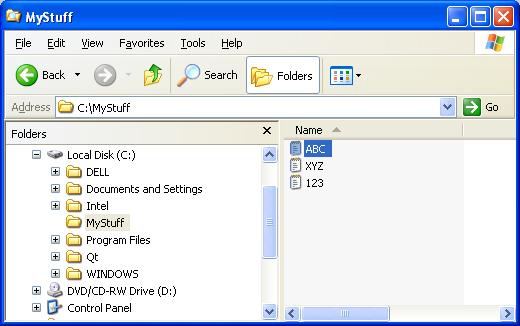
For example the MyStuff folder:
 Use the following code snippet to re-create a copy of the MyStuff folder, and rename it MyStuff2:
[code language="cpp"]
#include <boost/filesystem.hpp>
bool CopyDir( boost::filesystem::path const & source,
boost::filesystem::path const & destination )
{
try
{
// Check whether the function call is valid
if( !boost::filesystem::exists(source) ||
!boost::filesystem::is_directory(source) )
{
std::cerr << "Source directory "
<< source.string()
<< " does not exist or is not a directory."
<< '\n';
return false;
}
if( boost::filesystem::exists( destination ) )
{
std::cerr << "Destination directory "
<< destination.string()
<< " already exists." << '\n';
return false;
}
// Create the destination directory
if( !boost::filesystem::create_directory( destination ) )
{
std::cerr << "Unable to create destination directory"
<< destination.string() << '\n';
return false;
}
}
catch( boost::filesystem::filesystem_error const & e)
{
std::cerr << e.what() << '\n';
return false;
}
// Iterate through the source directory
for( boost::filesystem::directory_iterator file( source );
file != boost::filesystem::directory_iterator();
++file )
{
try
{
boost::filesystem::path current( file->path() );
if( boost::filesystem::is_directory( current ) )
{
// Found directory: Recursion
if( !CopyDir( current, destination / current.filename() ) )
{
return false;
}
}
else
{
// Found file: Copy
boost::filesystem::copy_file( current,
destination / current.filename() );
}
}
catch( boost::filesystem::filesystem_error const & e )
{
std:: cerr << e.what() << '\n';
}
}
return true;
}
int main()
{
// Create a copy of a folder and its contents, for a Windows file path
CopyDir( boost::filesystem::path( "C:\\MyStuff" ),
boost::filesystem::path( "C:\\MyStuff2" ) );
return 0;
}
[/code]
Which gives the copied directory
Use the following code snippet to re-create a copy of the MyStuff folder, and rename it MyStuff2:
[code language="cpp"]
#include <boost/filesystem.hpp>
bool CopyDir( boost::filesystem::path const & source,
boost::filesystem::path const & destination )
{
try
{
// Check whether the function call is valid
if( !boost::filesystem::exists(source) ||
!boost::filesystem::is_directory(source) )
{
std::cerr << "Source directory "
<< source.string()
<< " does not exist or is not a directory."
<< '\n';
return false;
}
if( boost::filesystem::exists( destination ) )
{
std::cerr << "Destination directory "
<< destination.string()
<< " already exists." << '\n';
return false;
}
// Create the destination directory
if( !boost::filesystem::create_directory( destination ) )
{
std::cerr << "Unable to create destination directory"
<< destination.string() << '\n';
return false;
}
}
catch( boost::filesystem::filesystem_error const & e)
{
std::cerr << e.what() << '\n';
return false;
}
// Iterate through the source directory
for( boost::filesystem::directory_iterator file( source );
file != boost::filesystem::directory_iterator();
++file )
{
try
{
boost::filesystem::path current( file->path() );
if( boost::filesystem::is_directory( current ) )
{
// Found directory: Recursion
if( !CopyDir( current, destination / current.filename() ) )
{
return false;
}
}
else
{
// Found file: Copy
boost::filesystem::copy_file( current,
destination / current.filename() );
}
}
catch( boost::filesystem::filesystem_error const & e )
{
std:: cerr << e.what() << '\n';
}
}
return true;
}
int main()
{
// Create a copy of a folder and its contents, for a Windows file path
CopyDir( boost::filesystem::path( "C:\\MyStuff" ),
boost::filesystem::path( "C:\\MyStuff2" ) );
return 0;
}
[/code]
Which gives the copied directory  2. Iterating over files in a directory
Say you wish to examine what files are contained in a directory:
2. Iterating over files in a directory
Say you wish to examine what files are contained in a directory:
 Use
Use 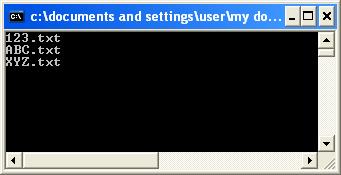 3. Recursively search for a file within a directory and its subdirectories
Use
3. Recursively search for a file within a directory and its subdirectories
Use  Example C++11 code that makes use of
  If your compiler does not have access to the C++11 features just replace the
  4. Counting the number of files in a directory
Getting the number of files in the directory pointed to by the given path:
4. Counting the number of files in a directory
Getting the number of files in the directory pointed to by the given path:
 Code as follows:
[code language="cpp"]
#include <iostream>
#include <boost/filesystem.hpp>
#include <boost/lambda/bind.hpp>
int main()
{
boost::filesystem::path the_path( "C:\\MyStuff" );
// Use static_cast to specify which version of 'is_regular_file' to use
int cnt =
std::count_if( boost::filesystem::directory_iterator(the_path),
boost::filesystem::directory_iterator(),
bind( static_cast<bool(*)(const boost::filesystem::path&)>(boost::filesystem::is_regular_file),
bind( &boost::filesystem::directory_entry::path,
boost::lambda::_1 ) ) );
std::cout << "Number of files in \""
<< the_path.string()
<< "\" = "
<< cnt
<< std::endl;
return 0;
}
[/code]
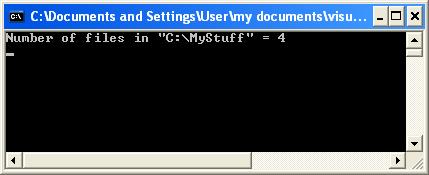
Which gives the output of 4 files found as expected:
Code as follows:
[code language="cpp"]
#include <iostream>
#include <boost/filesystem.hpp>
#include <boost/lambda/bind.hpp>
int main()
{
boost::filesystem::path the_path( "C:\\MyStuff" );
// Use static_cast to specify which version of 'is_regular_file' to use
int cnt =
std::count_if( boost::filesystem::directory_iterator(the_path),
boost::filesystem::directory_iterator(),
bind( static_cast<bool(*)(const boost::filesystem::path&)>(boost::filesystem::is_regular_file),
bind( &boost::filesystem::directory_entry::path,
boost::lambda::_1 ) ) );
std::cout << "Number of files in \""
<< the_path.string()
<< "\" = "
<< cnt
<< std::endl;
return 0;
}
[/code]
Which gives the output of 4 files found as expected:
 5. Find out when a file was last modified
For this we use
5. Find out when a file was last modified
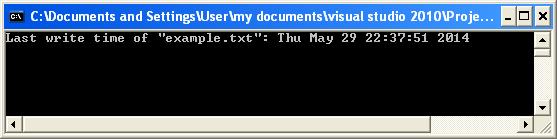
For this we use  The following code outputs the date and time of when "
 6. Rename a file
Suppose we have a file "thisfile.txt":
6. Rename a file
Suppose we have a file "thisfile.txt":
 For example, we wish to rename "thisfile.txt" to "thatfile.txt":
[code language="cpp"]
#include <boost/filesystem.hpp>
int main()
{
boost::filesystem::path path( "C:\\MyStuff\\thisfile.txt" );
const boost::filesystem::path new_path( "C:\\MyStuff\\thatfile.txt" );
if ( boost::filesystem::exists( path ) )
{
boost::filesystem::rename( path, new_path );
}
}
[/code]
So that the "thisfile.txt" is renamed to "thatfile.txt" as shown:
For example, we wish to rename "thisfile.txt" to "thatfile.txt":
[code language="cpp"]
#include <boost/filesystem.hpp>
int main()
{
boost::filesystem::path path( "C:\\MyStuff\\thisfile.txt" );
const boost::filesystem::path new_path( "C:\\MyStuff\\thatfile.txt" );
if ( boost::filesystem::exists( path ) )
{
boost::filesystem::rename( path, new_path );
}
}
[/code]
So that the "thisfile.txt" is renamed to "thatfile.txt" as shown:
 7. To remove a file or directory
For example, remove "thatfile.txt":
Simply use
7. To remove a file or directory
For example, remove "thatfile.txt":
Simply use  We can also use boost::filesystem::remove_all to remove an entire directory plus its file contents, subdirectories etc:
 Just specify the directory you wish to delete:
[code language="cpp"]
#include <boost/filesystem.hpp>
int main()
{
const boost::filesystem::path path( "C:\\MyStuff" );
if ( boost::filesystem::exists( path ) )
{
boost::filesystem::remove_all( path );
}
}
[/code]
So that the entire MyStuff directory disappears:
Just specify the directory you wish to delete:
[code language="cpp"]
#include <boost/filesystem.hpp>
int main()
{
const boost::filesystem::path path( "C:\\MyStuff" );
if ( boost::filesystem::exists( path ) )
{
boost::filesystem::remove_all( path );
}
}
[/code]
So that the entire MyStuff directory disappears:
 8. To create a directory
Again this is simple. Just use
8. To create a directory
Again this is simple. Just use  9. Obtaining relative paths
Lifted from another excellent posting at StackOverflow:
http://stackoverflow.com/questions/10167382/boostfilesystem-get-relative-path
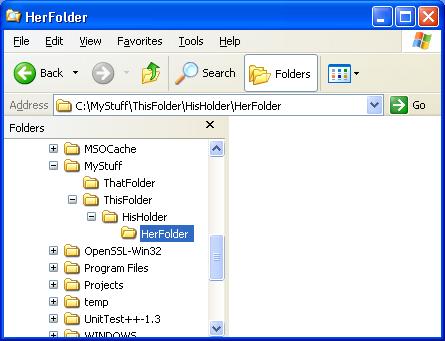
Supposing we wish to obtain the relative path between the folders 'HerFolder' and 'ThatFolder' as shown below:
9. Obtaining relative paths
Lifted from another excellent posting at StackOverflow:
http://stackoverflow.com/questions/10167382/boostfilesystem-get-relative-path
Supposing we wish to obtain the relative path between the folders 'HerFolder' and 'ThatFolder' as shown below:
 [code language="cpp"]
#include <boost/filesystem.hpp>
static boost::filesystem::path relativeTo(boost::filesystem::path from, boost::filesystem::path to)
{
// Start at the root path and while they are the same then do nothing then when they first
// diverge take the remainder of the two path and replace the entire from path with ".."
// segments.
boost::filesystem::path::const_iterator fromIter = from.begin();
boost::filesystem::path::const_iterator toIter = to.begin();
// Loop through both
while (fromIter != from.end() && toIter != to.end() && (*toIter) == (*fromIter))
{
++toIter;
++fromIter;
}
boost::filesystem::path finalPath;
while (fromIter != from.end())
{
finalPath /= "..";
++fromIter;
}
while (toIter != to.end())
{
finalPath /= *toIter;
++toIter;
}
return finalPath;
}
int main()
{
const boost::filesystem::path pathFrom( "C:\\MyStuff\\ThisFolder\\HisHolder\\HerFolder" );
const boost::filesystem::path pathTo( "C:\\MyStuff\\ThatFolder" );
boost::filesystem::path relativePath = relativeTo( pathFrom, pathTo );
std::cout << "From path:\t" << pathFrom.string() << std::endl
<< "To path:\t" << pathTo.string() << std::endl
<< "Relative path:\t" << relativePath.string();
return 0;
}
[/code]
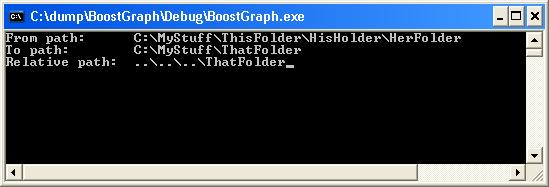
Giving the relative path as shown:
[code language="cpp"]
#include <boost/filesystem.hpp>
static boost::filesystem::path relativeTo(boost::filesystem::path from, boost::filesystem::path to)
{
// Start at the root path and while they are the same then do nothing then when they first
// diverge take the remainder of the two path and replace the entire from path with ".."
// segments.
boost::filesystem::path::const_iterator fromIter = from.begin();
boost::filesystem::path::const_iterator toIter = to.begin();
// Loop through both
while (fromIter != from.end() && toIter != to.end() && (*toIter) == (*fromIter))
{
++toIter;
++fromIter;
}
boost::filesystem::path finalPath;
while (fromIter != from.end())
{
finalPath /= "..";
++fromIter;
}
while (toIter != to.end())
{
finalPath /= *toIter;
++toIter;
}
return finalPath;
}
int main()
{
const boost::filesystem::path pathFrom( "C:\\MyStuff\\ThisFolder\\HisHolder\\HerFolder" );
const boost::filesystem::path pathTo( "C:\\MyStuff\\ThatFolder" );
boost::filesystem::path relativePath = relativeTo( pathFrom, pathTo );
std::cout << "From path:\t" << pathFrom.string() << std::endl
<< "To path:\t" << pathTo.string() << std::endl
<< "Relative path:\t" << relativePath.string();
return 0;
}
[/code]
Giving the relative path as shown:
 10. Recursively find all files in a directory
In this example I want to search and output for all files matching a particular extension.
This is lifted from the stackoverflow site:
http://stackoverflow.com/questions/15182980/list-directory-files-recursively-with-boostfilesystem
If you want to display all files within a chosen directory and all its subdirectories, then just take out the comparison bit. Code listing as follows:
[code language="cpp"]
#include <boost/filesystem.hpp>
#include <vector>
#include <iostream>
void ListFilesRecursively(const char *dir, const char* ext)
{
boost::filesystem::recursive_directory_iterator rdi(dir);
boost::filesystem::recursive_directory_iterator end_rdi;
std::string ext_str0(ext);
for (; rdi != end_rdi; rdi++)
{
//rdi++;
if (ext_str0.compare((*rdi).path().extension().string()) == 0)
{
std::cout << (*rdi).path().string() << std::endl;
}
}
}
int main()
{
ListFilesRecursively("C:\\Documents and Settings\\User\\My Documents\\My Pictures\\Photos", ".THM" );
}
[/code]
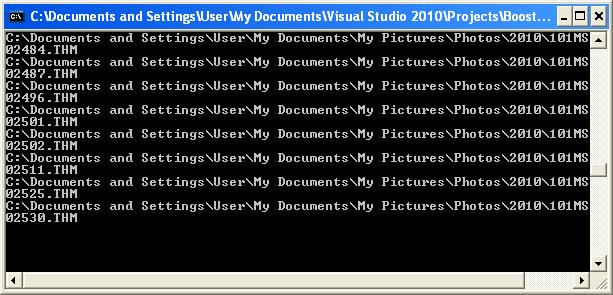
Example console output below:
10. Recursively find all files in a directory
In this example I want to search and output for all files matching a particular extension.
This is lifted from the stackoverflow site:
http://stackoverflow.com/questions/15182980/list-directory-files-recursively-with-boostfilesystem
If you want to display all files within a chosen directory and all its subdirectories, then just take out the comparison bit. Code listing as follows:
[code language="cpp"]
#include <boost/filesystem.hpp>
#include <vector>
#include <iostream>
void ListFilesRecursively(const char *dir, const char* ext)
{
boost::filesystem::recursive_directory_iterator rdi(dir);
boost::filesystem::recursive_directory_iterator end_rdi;
std::string ext_str0(ext);
for (; rdi != end_rdi; rdi++)
{
//rdi++;
if (ext_str0.compare((*rdi).path().extension().string()) == 0)
{
std::cout << (*rdi).path().string() << std::endl;
}
}
}
int main()
{
ListFilesRecursively("C:\\Documents and Settings\\User\\My Documents\\My Pictures\\Photos", ".THM" );
}
[/code]
Example console output below:
 As a further extension, I wished to not only discover all the files with extension ".THM" but delete them as well. This is easily accomplished by making calls to boost::filesystem::remove. Code listing below.
[code language="cpp"]
#include <boost/filesystem.hpp>
#include <vector>
#include <iostream>
void ListAndRemoveFilesRecursively(const char *dir, const char* ext)
{
boost::filesystem::recursive_directory_iterator rdi(dir);
boost::filesystem::recursive_directory_iterator end_rdi;
std::string ext_str0(ext);
for (; rdi != end_rdi; rdi++)
{
if (ext_str0.compare((*rdi).path().extension().string()) == 0)
{
try
{
if( boost::filesystem::is_regular_file(rdi->status()) )
{
boost::filesystem::remove(rdi->path());
}
std::cout << (*rdi).path().string() << std::endl;
}
catch (const std::exception& ex )
{
ex;
}
}
}
}
int main()
{
ListAndRemoveFilesRecursively("C:\\Documents and Settings\\User\\My Documents\\My Pictures\\Photos", ".THM" );
}
[/code]
Zap!
As a further extension, I wished to not only discover all the files with extension ".THM" but delete them as well. This is easily accomplished by making calls to boost::filesystem::remove. Code listing below.
[code language="cpp"]
#include <boost/filesystem.hpp>
#include <vector>
#include <iostream>
void ListAndRemoveFilesRecursively(const char *dir, const char* ext)
{
boost::filesystem::recursive_directory_iterator rdi(dir);
boost::filesystem::recursive_directory_iterator end_rdi;
std::string ext_str0(ext);
for (; rdi != end_rdi; rdi++)
{
if (ext_str0.compare((*rdi).path().extension().string()) == 0)
{
try
{
if( boost::filesystem::is_regular_file(rdi->status()) )
{
boost::filesystem::remove(rdi->path());
}
std::cout << (*rdi).path().string() << std::endl;
}
catch (const std::exception& ex )
{
ex;
}
}
}
}
int main()
{
ListAndRemoveFilesRecursively("C:\\Documents and Settings\\User\\My Documents\\My Pictures\\Photos", ".THM" );
}
[/code]
Zap!
Use the following code snippet to re-create a copy of the MyStuff folder, and rename it MyStuff2:
[code language="cpp"]
#include <boost/filesystem.hpp>
bool CopyDir( boost::filesystem::path const & source,
boost::filesystem::path const & destination )
{
try
{
// Check whether the function call is valid
if( !boost::filesystem::exists(source) ||
!boost::filesystem::is_directory(source) )
{
std::cerr << "Source directory "
<< source.string()
<< " does not exist or is not a directory."
<< '\n';
return false;
}
if( boost::filesystem::exists( destination ) )
{
std::cerr << "Destination directory "
<< destination.string()
<< " already exists." << '\n';
return false;
}
// Create the destination directory
if( !boost::filesystem::create_directory( destination ) )
{
std::cerr << "Unable to create destination directory"
<< destination.string() << '\n';
return false;
}
}
catch( boost::filesystem::filesystem_error const & e)
{
std::cerr << e.what() << '\n';
return false;
}
// Iterate through the source directory
for( boost::filesystem::directory_iterator file( source );
file != boost::filesystem::directory_iterator();
++file )
{
try
{
boost::filesystem::path current( file->path() );
if( boost::filesystem::is_directory( current ) )
{
// Found directory: Recursion
if( !CopyDir( current, destination / current.filename() ) )
{
return false;
}
}
else
{
// Found file: Copy
boost::filesystem::copy_file( current,
destination / current.filename() );
}
}
catch( boost::filesystem::filesystem_error const & e )
{
std:: cerr << e.what() << '\n';
}
}
return true;
}
int main()
{
// Create a copy of a folder and its contents, for a Windows file path
CopyDir( boost::filesystem::path( "C:\\MyStuff" ),
boost::filesystem::path( "C:\\MyStuff2" ) );
return 0;
}
[/code]
Which gives the copied directory MyStuff2 like so:
2. Iterating over files in a directory
Say you wish to examine what files are contained in a directory:
Use BOOST_FOREACH to iterate over the files:
[code language="cpp"]
#include <boost/filesystem.hpp>
#include <boost/foreach.hpp>
int main()
{
boost::filesystem::path targetDir( "C:\\MyStuff" );
boost::filesystem::directory_iterator it( targetDir ), eod;
BOOST_FOREACH( boost::filesystem::path const &p, std::make_pair( it, eod ) )
{
if( is_regular_file( p ) )
{
std::string filename = p.filename().string();
std::cout << filename << std::endl;
}
}
return 0;
}
[/code]
Giving the following output:
3. Recursively search for a file within a directory and its subdirectories
Use std::find_if and boost::filesystem::recursive_directory_iterator.
The file you are looking for ("myfile.txt" ) may be nested deep within some directory structure:
Example C++11 code that makes use of auto and lambda shown here:
[code language="cpp"]
#include <iostream>
#include <algorithm>
#include <functional>
#include <boost/filesystem.hpp>
// Recursively find the location of a file on a given directory
bool FindFile( const boost::filesystem::path& directory,
boost::filesystem::path& path,
const std::string& filename )
{
bool found = false;
const boost::filesystem::path file = filename;
const boost::filesystem::recursive_directory_iterator end;
const boost::filesystem::recursive_directory_iterator dir_iter( directory );
const auto it = std::find_if( dir_iter,
end,
[&file]( const boost::filesystem::directory_entry& e )
{
return e.path().filename() == file;
});
if ( it != end )
{
path = it->path();
found = true;
}
return found;
}
int main()
{
boost::filesystem::path SearchDir( "C:\\MyStuff" );
boost::filesystem::path DirContainingFile;
if ( FindFile( SearchDir, DirContainingFile, "myfile.txt" ) )
{
std::cout << "File location:" << std::endl;
std::cout << DirContainingFile.string();
}
return 0;
}
[/code]
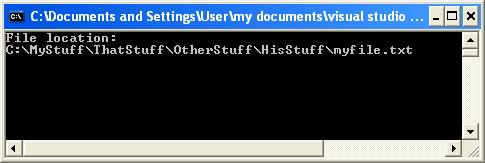
Which prints out the file name plus the full path if successful:
If your compiler does not have access to the C++11 features just replace the lambda by a predicate object and the auto by an explicit type specifier.
Alternative C++ code as shown:
[code language="cpp"]
#include <iostream>
#include <algorithm>
#include <functional>
#include <boost/filesystem.hpp>
class FileEquals: public std::unary_function<boost::filesystem::path, bool>
{
public:
explicit FileEquals( const boost::filesystem::path& fname ) : file_name(fname) {}
bool operator()( const boost::filesystem::directory_entry& entry ) const
{
return entry.path().filename() == file_name;
}
private:
boost::filesystem::path file_name;
};
bool FindFile( const boost::filesystem::path& directory,
boost::filesystem::path& path,
const std::string& filename )
{
bool found = false;
const boost::filesystem::path file = filename;
const boost::filesystem::recursive_directory_iterator end;
const boost::filesystem::recursive_directory_iterator dir_iter( directory );
const boost::filesystem::recursive_directory_iterator it =
std::find_if( boost::filesystem::recursive_directory_iterator( directory ),
end,
FileEquals( filename ) );
if ( it != end )
{
path = it->path();
found = true;
}
return found;
}
int main()
{
boost::filesystem::path SearchDir( "C:\\MyStuff" );
boost::filesystem::path DirContainingFile;
boost::filesystem::path SearchFile( "myfile.txt" );
if ( FindFile( SearchDir, DirContainingFile, "myfile.txt" ) )
{
std::cout << "File location:" << std::endl;
std::cout << DirContainingFile.string();
}
return 0;
}
[/code]
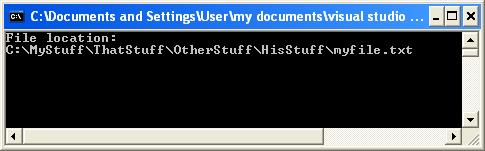
That gives exactly the same result as that using the C++11 features:
4. Counting the number of files in a directory
Getting the number of files in the directory pointed to by the given path:
Code as follows:
[code language="cpp"]
#include <iostream>
#include <boost/filesystem.hpp>
#include <boost/lambda/bind.hpp>
int main()
{
boost::filesystem::path the_path( "C:\\MyStuff" );
// Use static_cast to specify which version of 'is_regular_file' to use
int cnt =
std::count_if( boost::filesystem::directory_iterator(the_path),
boost::filesystem::directory_iterator(),
bind( static_cast<bool(*)(const boost::filesystem::path&)>(boost::filesystem::is_regular_file),
bind( &boost::filesystem::directory_entry::path,
boost::lambda::_1 ) ) );
std::cout << "Number of files in \""
<< the_path.string()
<< "\" = "
<< cnt
<< std::endl;
return 0;
}
[/code]
Which gives the output of 4 files found as expected:
5. Find out when a file was last modified
For this we use boost::filesystem::last_write_time:
The following code outputs the date and time of when "example.txt" was last modified:
[code language="cpp"]
#include <iostream>
#include <ctime>
#include <boost/filesystem.hpp>
int main()
{
boost::filesystem::path path( "C:\\MyStuff\\example.txt" );
if ( boost::filesystem::exists( path ) )
{
std::time_t t = boost::filesystem::last_write_time( path );
std::cout << "Last write time of "
<< path.filename()
<< ": "
<< std::ctime( &t )
<< std::endl;
}
}
[/code]
As shown:
6. Rename a file
Suppose we have a file "thisfile.txt":
For example, we wish to rename "thisfile.txt" to "thatfile.txt":
[code language="cpp"]
#include <boost/filesystem.hpp>
int main()
{
boost::filesystem::path path( "C:\\MyStuff\\thisfile.txt" );
const boost::filesystem::path new_path( "C:\\MyStuff\\thatfile.txt" );
if ( boost::filesystem::exists( path ) )
{
boost::filesystem::rename( path, new_path );
}
}
[/code]
So that the "thisfile.txt" is renamed to "thatfile.txt" as shown:
7. To remove a file or directory
For example, remove "thatfile.txt":
Simply use boost::filesystem::remove_all as shown:
[code language="cpp"]
#include <boost/filesystem.hpp>
int main()
{
const boost::filesystem::path path( "C:\\MyStuff\\thatfile.txt" );
if ( boost::filesystem::exists( path ) )
{
boost::filesystem::remove_all( path );
}
}
[/code]
So that "thatfile.txt" has now disappeared:
We can also use boost::filesystem::remove_all to remove an entire directory plus its file contents, subdirectories etc:
Just specify the directory you wish to delete:
[code language="cpp"]
#include <boost/filesystem.hpp>
int main()
{
const boost::filesystem::path path( "C:\\MyStuff" );
if ( boost::filesystem::exists( path ) )
{
boost::filesystem::remove_all( path );
}
}
[/code]
So that the entire MyStuff directory disappears:
8. To create a directory
Again this is simple. Just use boost::filesystem::create_directories.
Example code to create the directory "C:\MyStuff":
[code language="cpp"]
#include <boost/filesystem.hpp>
int main()
{
const boost::filesystem::path path( "C:\\MyStuff" );
boost::filesystem::create_directories( path );
}
[/code]
Creating the directory as shown:
9. Obtaining relative paths
Lifted from another excellent posting at StackOverflow:
http://stackoverflow.com/questions/10167382/boostfilesystem-get-relative-path
Supposing we wish to obtain the relative path between the folders 'HerFolder' and 'ThatFolder' as shown below:
[code language="cpp"]
#include <boost/filesystem.hpp>
static boost::filesystem::path relativeTo(boost::filesystem::path from, boost::filesystem::path to)
{
// Start at the root path and while they are the same then do nothing then when they first
// diverge take the remainder of the two path and replace the entire from path with ".."
// segments.
boost::filesystem::path::const_iterator fromIter = from.begin();
boost::filesystem::path::const_iterator toIter = to.begin();
// Loop through both
while (fromIter != from.end() && toIter != to.end() && (*toIter) == (*fromIter))
{
++toIter;
++fromIter;
}
boost::filesystem::path finalPath;
while (fromIter != from.end())
{
finalPath /= "..";
++fromIter;
}
while (toIter != to.end())
{
finalPath /= *toIter;
++toIter;
}
return finalPath;
}
int main()
{
const boost::filesystem::path pathFrom( "C:\\MyStuff\\ThisFolder\\HisHolder\\HerFolder" );
const boost::filesystem::path pathTo( "C:\\MyStuff\\ThatFolder" );
boost::filesystem::path relativePath = relativeTo( pathFrom, pathTo );
std::cout << "From path:\t" << pathFrom.string() << std::endl
<< "To path:\t" << pathTo.string() << std::endl
<< "Relative path:\t" << relativePath.string();
return 0;
}
[/code]
Giving the relative path as shown:
10. Recursively find all files in a directory
In this example I want to search and output for all files matching a particular extension.
This is lifted from the stackoverflow site:
http://stackoverflow.com/questions/15182980/list-directory-files-recursively-with-boostfilesystem
If you want to display all files within a chosen directory and all its subdirectories, then just take out the comparison bit. Code listing as follows:
[code language="cpp"]
#include <boost/filesystem.hpp>
#include <vector>
#include <iostream>
void ListFilesRecursively(const char *dir, const char* ext)
{
boost::filesystem::recursive_directory_iterator rdi(dir);
boost::filesystem::recursive_directory_iterator end_rdi;
std::string ext_str0(ext);
for (; rdi != end_rdi; rdi++)
{
//rdi++;
if (ext_str0.compare((*rdi).path().extension().string()) == 0)
{
std::cout << (*rdi).path().string() << std::endl;
}
}
}
int main()
{
ListFilesRecursively("C:\\Documents and Settings\\User\\My Documents\\My Pictures\\Photos", ".THM" );
}
[/code]
Example console output below:
As a further extension, I wished to not only discover all the files with extension ".THM" but delete them as well. This is easily accomplished by making calls to boost::filesystem::remove. Code listing below.
[code language="cpp"]
#include <boost/filesystem.hpp>
#include <vector>
#include <iostream>
void ListAndRemoveFilesRecursively(const char *dir, const char* ext)
{
boost::filesystem::recursive_directory_iterator rdi(dir);
boost::filesystem::recursive_directory_iterator end_rdi;
std::string ext_str0(ext);
for (; rdi != end_rdi; rdi++)
{
if (ext_str0.compare((*rdi).path().extension().string()) == 0)
{
try
{
if( boost::filesystem::is_regular_file(rdi->status()) )
{
boost::filesystem::remove(rdi->path());
}
std::cout << (*rdi).path().string() << std::endl;
}
catch (const std::exception& ex )
{
ex;
}
}
}
}
int main()
{
ListAndRemoveFilesRecursively("C:\\Documents and Settings\\User\\My Documents\\My Pictures\\Photos", ".THM" );
}
[/code]
Zap!


Comments
Post a Comment