Getting Started with TinyXml
Step 1: Download and install TinyXML
Download and extract the library from
http://www.grinninglizard.com/tinyxml/
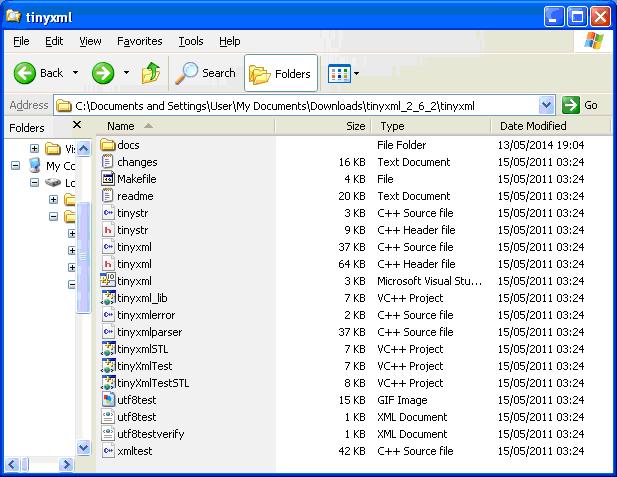
TinyXML source files as shown:
 Step 2: Configure Visual Studio
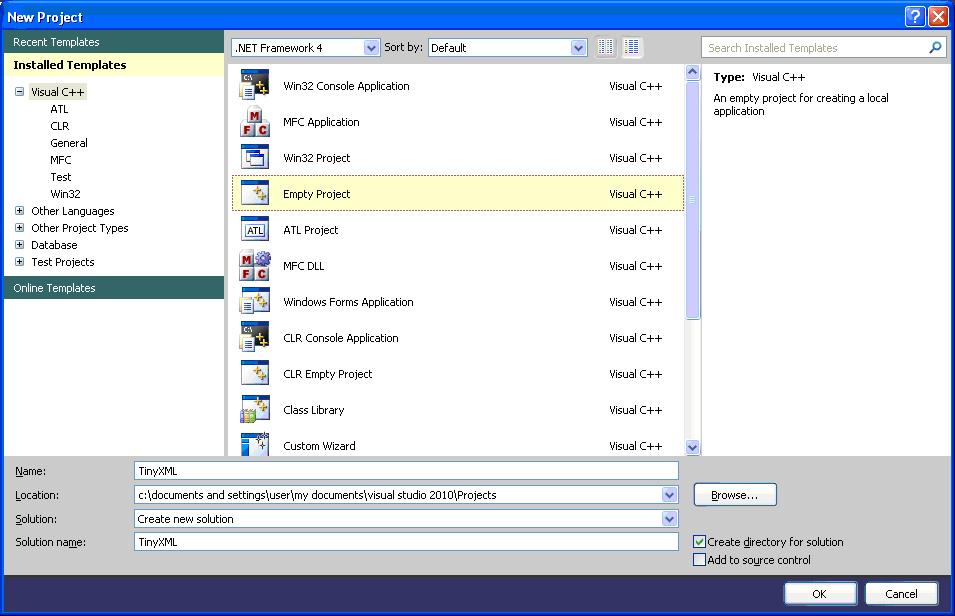
In Visual Studio select File > New > Project. Select Empty Project:
Step 2: Configure Visual Studio
In Visual Studio select File > New > Project. Select Empty Project:
 Then copy the following files to your project folder
tags it contains.
This can be a straightforward matter of using calls to the the 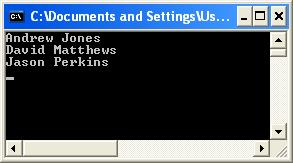 As an alternative, handles have been introduced to make the reading of XML values little cleaner.
Thus our code for reading the set of persons reduces to:
[code lang="cpp"]
TiXmlDocument doc( "test1.xml" );
doc.LoadFile();
TiXmlHandle docHandle( &doc );
TiXmlElement* l_pPerson = docHandle.FirstChild( "file" ).FirstChild( "people" ).Child( "person", 0 ).ToElement();
while( l_pPerson )
{
TiXmlElement *l_pForename = l_pPerson->FirstChildElement( "forename" );
if ( NULL != l_pForename )
{
std::cout << l_pForename->GetText();
}
TiXmlElement *l_pSurname = l_pPerson->FirstChildElement( "surname" );
if ( NULL != l_pSurname )
{
std::cout << " " << l_pSurname->GetText();
}
std::cout << std::endl;
l_pPerson = l_pPerson->NextSiblingElement( "person" );
}
[/code]
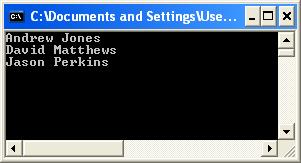
That gives us exactly the same result but with using less code:
As an alternative, handles have been introduced to make the reading of XML values little cleaner.
Thus our code for reading the set of persons reduces to:
[code lang="cpp"]
TiXmlDocument doc( "test1.xml" );
doc.LoadFile();
TiXmlHandle docHandle( &doc );
TiXmlElement* l_pPerson = docHandle.FirstChild( "file" ).FirstChild( "people" ).Child( "person", 0 ).ToElement();
while( l_pPerson )
{
TiXmlElement *l_pForename = l_pPerson->FirstChildElement( "forename" );
if ( NULL != l_pForename )
{
std::cout << l_pForename->GetText();
}
TiXmlElement *l_pSurname = l_pPerson->FirstChildElement( "surname" );
if ( NULL != l_pSurname )
{
std::cout << " " << l_pSurname->GetText();
}
std::cout << std::endl;
l_pPerson = l_pPerson->NextSiblingElement( "person" );
}
[/code]
That gives us exactly the same result but with using less code:
 Download the Visual Studio 2010 project from here.
Programmatically create and save an XML
Same example as given at the Grinning Lizard site, "Writing a document to a file":
[code lang="cpp"]
#include "tinyxml.h"
int main(void)
{
TiXmlDocument doc;
TiXmlElement* msg;
TiXmlDeclaration* decl = new TiXmlDeclaration( "1.0", "", "" );
doc.LinkEndChild( decl );
TiXmlElement * root = new TiXmlElement( "MyApp" );
doc.LinkEndChild( root );
TiXmlComment * comment = new TiXmlComment();
comment->SetValue(" Settings for MyApp " );
root->LinkEndChild( comment );
TiXmlElement * msgs = new TiXmlElement( "Messages" );
root->LinkEndChild( msgs );
msg = new TiXmlElement( "Welcome" );
msg->LinkEndChild( new TiXmlText( "Welcome to MyApp" ));
msgs->LinkEndChild( msg );
msg = new TiXmlElement( "Farewell" );
msg->LinkEndChild( new TiXmlText( "Thank you for using MyApp" ));
msgs->LinkEndChild( msg );
TiXmlElement * windows = new TiXmlElement( "Windows" );
root->LinkEndChild( windows );
TiXmlElement * window;
window = new TiXmlElement( "Window" );
windows->LinkEndChild( window );
window->SetAttribute("name", "MainFrame");
window->SetAttribute("x", 5);
window->SetAttribute("y", 15);
window->SetAttribute("w", 400);
window->SetAttribute("h", 250);
TiXmlElement * cxn = new TiXmlElement( "Connection" );
root->LinkEndChild( cxn );
cxn->SetAttribute("ip", "192.168.0.1");
cxn->SetDoubleAttribute("timeout", 123.456); // floating point attrib
doc.SaveFile( "appsettings.xml" );
return 0;
}
[/code]
Which will generate the "appsettings.xml" file:
[code lang="xml"]
<?xml version="1.0" ?>
<MyApp>
<!-- Settings for MyApp -->
<Messages>
<Welcome>Welcome to MyApp</Welcome>
<Farewell>Thank you for using MyApp</Farewell>
</Messages>
<Windows>
<Window name="MainFrame" x="5" y="15" w="400" h="250" />
</Windows>
<Connection ip="192.168.0.1" timeout="123.456" />
</MyApp>
[/code]
Setting the attribute can be applied anywhere, as in this similar example:
[code lang="cpp"]
#include "tinyxml.h"
int main(void)
{
TiXmlDocument doc;
TiXmlElement* msg;
TiXmlDeclaration* decl = new TiXmlDeclaration( "1.0", "", "" );
doc.LinkEndChild( decl );
TiXmlElement * root = new TiXmlElement( "MyApp" );
root->SetAttribute("name", "MainFrame");
root->SetAttribute("x", 5);
root->SetAttribute("y", 15);
root->SetAttribute("w", 400);
root->SetAttribute("h", 250);
doc.LinkEndChild( root );
TiXmlComment * comment = new TiXmlComment();
comment->SetValue(" Settings for MyApp " );
root->LinkEndChild( comment );
TiXmlElement * msgs = new TiXmlElement( "Messages" );
root->LinkEndChild( msgs );
msg = new TiXmlElement( "Welcome" );
msg->LinkEndChild( new TiXmlText( "Welcome to MyApp" ));
msgs->LinkEndChild( msg );
msg = new TiXmlElement( "Farewell" );
msg->LinkEndChild( new TiXmlText( "Thank you for using MyApp" ));
msgs->LinkEndChild( msg );
doc.SaveFile( "appsettings.xml" );
return 0;
}
[/code]
Which produces the xml file as shown:
[code land="xml"]
<?xml version="1.0" ?>
<MyApp name="MainFrame" x="5" y="15" w="400" h="250">
<!-- Settings for MyApp -->
<Messages>
<Welcome>Welcome to MyApp</Welcome>
<Farewell>Thank you for using MyApp</Farewell>
</Messages>
</MyApp>
[/code]
Download the Visual Studio 2010 project from here.
Programmatically create and save an XML
Same example as given at the Grinning Lizard site, "Writing a document to a file":
[code lang="cpp"]
#include "tinyxml.h"
int main(void)
{
TiXmlDocument doc;
TiXmlElement* msg;
TiXmlDeclaration* decl = new TiXmlDeclaration( "1.0", "", "" );
doc.LinkEndChild( decl );
TiXmlElement * root = new TiXmlElement( "MyApp" );
doc.LinkEndChild( root );
TiXmlComment * comment = new TiXmlComment();
comment->SetValue(" Settings for MyApp " );
root->LinkEndChild( comment );
TiXmlElement * msgs = new TiXmlElement( "Messages" );
root->LinkEndChild( msgs );
msg = new TiXmlElement( "Welcome" );
msg->LinkEndChild( new TiXmlText( "Welcome to MyApp" ));
msgs->LinkEndChild( msg );
msg = new TiXmlElement( "Farewell" );
msg->LinkEndChild( new TiXmlText( "Thank you for using MyApp" ));
msgs->LinkEndChild( msg );
TiXmlElement * windows = new TiXmlElement( "Windows" );
root->LinkEndChild( windows );
TiXmlElement * window;
window = new TiXmlElement( "Window" );
windows->LinkEndChild( window );
window->SetAttribute("name", "MainFrame");
window->SetAttribute("x", 5);
window->SetAttribute("y", 15);
window->SetAttribute("w", 400);
window->SetAttribute("h", 250);
TiXmlElement * cxn = new TiXmlElement( "Connection" );
root->LinkEndChild( cxn );
cxn->SetAttribute("ip", "192.168.0.1");
cxn->SetDoubleAttribute("timeout", 123.456); // floating point attrib
doc.SaveFile( "appsettings.xml" );
return 0;
}
[/code]
Which will generate the "appsettings.xml" file:
[code lang="xml"]
<?xml version="1.0" ?>
<MyApp>
<!-- Settings for MyApp -->
<Messages>
<Welcome>Welcome to MyApp</Welcome>
<Farewell>Thank you for using MyApp</Farewell>
</Messages>
<Windows>
<Window name="MainFrame" x="5" y="15" w="400" h="250" />
</Windows>
<Connection ip="192.168.0.1" timeout="123.456" />
</MyApp>
[/code]
Setting the attribute can be applied anywhere, as in this similar example:
[code lang="cpp"]
#include "tinyxml.h"
int main(void)
{
TiXmlDocument doc;
TiXmlElement* msg;
TiXmlDeclaration* decl = new TiXmlDeclaration( "1.0", "", "" );
doc.LinkEndChild( decl );
TiXmlElement * root = new TiXmlElement( "MyApp" );
root->SetAttribute("name", "MainFrame");
root->SetAttribute("x", 5);
root->SetAttribute("y", 15);
root->SetAttribute("w", 400);
root->SetAttribute("h", 250);
doc.LinkEndChild( root );
TiXmlComment * comment = new TiXmlComment();
comment->SetValue(" Settings for MyApp " );
root->LinkEndChild( comment );
TiXmlElement * msgs = new TiXmlElement( "Messages" );
root->LinkEndChild( msgs );
msg = new TiXmlElement( "Welcome" );
msg->LinkEndChild( new TiXmlText( "Welcome to MyApp" ));
msgs->LinkEndChild( msg );
msg = new TiXmlElement( "Farewell" );
msg->LinkEndChild( new TiXmlText( "Thank you for using MyApp" ));
msgs->LinkEndChild( msg );
doc.SaveFile( "appsettings.xml" );
return 0;
}
[/code]
Which produces the xml file as shown:
[code land="xml"]
<?xml version="1.0" ?>
<MyApp name="MainFrame" x="5" y="15" w="400" h="250">
<!-- Settings for MyApp -->
<Messages>
<Welcome>Welcome to MyApp</Welcome>
<Farewell>Thank you for using MyApp</Farewell>
</Messages>
</MyApp>
[/code]
Step 2: Configure Visual Studio
In Visual Studio select File > New > Project. Select Empty Project:
Then copy the following files to your project folder
•	tinystr.h
•	tinyxml.h
•	tinyxmlparser.cpp
•	tinystr.cpp
•	tinyxml.cpp
•	tinyxmlerror.cpp
From solution explorer you can then add these file to your project.
Right-click the project folder and select Add > Existing Item...
Step 3: Try it!
That is all there is to it.
You should now be in a position to try some examples.
For example, consider the following example XML:
[code lang="xml"]
<?xml version="1.0" ?>
<file>
<people>
<person>
<forename>Andrew</forename>
<surname>Jones</surname>
</person>
<person>
<forename>David</forename>
<surname>Matthews</surname>
</person>
<person>
<forename>Jason</forename>
<surname>Perkins</surname>
</person>
</people>
</file>
[/code]
We may wish to interrogate the XML and read the values inside the FirstChildElement method. Notice the use of checking for NULL values when using every method call, for additional robustness:
[code lang="cpp"]
TiXmlDocument doc( "test1.xml" );
doc.LoadFile();
TiXmlElement *l_pRootElement = doc.RootElement();
if( NULL != l_pRootElement )
{
// set of <person> tags
TiXmlElement *l_pPeople = l_pRootElement->FirstChildElement( "people" );
if ( NULL != l_pPeople )
{
TiXmlElement *l_pPerson = l_pPeople->FirstChildElement( "person" );
while( l_pPerson )
{
TiXmlElement *l_pForename = l_pPerson->FirstChildElement( "forename" );
if ( NULL != l_pForename )
{
std::cout << l_pForename->GetText();
}
TiXmlElement *l_pSurname = l_pPerson->FirstChildElement( "surname" );
if ( NULL != l_pSurname )
{
std::cout << " " << l_pSurname->GetText();
}
std::cout << std::endl;
l_pPerson = l_pPerson->NextSiblingElement( "person" );
}
}
}
[/code]
Giving the following output:
As an alternative, handles have been introduced to make the reading of XML values little cleaner.
Thus our code for reading the set of persons reduces to:
[code lang="cpp"]
TiXmlDocument doc( "test1.xml" );
doc.LoadFile();
TiXmlHandle docHandle( &doc );
TiXmlElement* l_pPerson = docHandle.FirstChild( "file" ).FirstChild( "people" ).Child( "person", 0 ).ToElement();
while( l_pPerson )
{
TiXmlElement *l_pForename = l_pPerson->FirstChildElement( "forename" );
if ( NULL != l_pForename )
{
std::cout << l_pForename->GetText();
}
TiXmlElement *l_pSurname = l_pPerson->FirstChildElement( "surname" );
if ( NULL != l_pSurname )
{
std::cout << " " << l_pSurname->GetText();
}
std::cout << std::endl;
l_pPerson = l_pPerson->NextSiblingElement( "person" );
}
[/code]
That gives us exactly the same result but with using less code:
Download the Visual Studio 2010 project from here.
Programmatically create and save an XML
Same example as given at the Grinning Lizard site, "Writing a document to a file":
[code lang="cpp"]
#include "tinyxml.h"
int main(void)
{
TiXmlDocument doc;
TiXmlElement* msg;
TiXmlDeclaration* decl = new TiXmlDeclaration( "1.0", "", "" );
doc.LinkEndChild( decl );
TiXmlElement * root = new TiXmlElement( "MyApp" );
doc.LinkEndChild( root );
TiXmlComment * comment = new TiXmlComment();
comment->SetValue(" Settings for MyApp " );
root->LinkEndChild( comment );
TiXmlElement * msgs = new TiXmlElement( "Messages" );
root->LinkEndChild( msgs );
msg = new TiXmlElement( "Welcome" );
msg->LinkEndChild( new TiXmlText( "Welcome to MyApp" ));
msgs->LinkEndChild( msg );
msg = new TiXmlElement( "Farewell" );
msg->LinkEndChild( new TiXmlText( "Thank you for using MyApp" ));
msgs->LinkEndChild( msg );
TiXmlElement * windows = new TiXmlElement( "Windows" );
root->LinkEndChild( windows );
TiXmlElement * window;
window = new TiXmlElement( "Window" );
windows->LinkEndChild( window );
window->SetAttribute("name", "MainFrame");
window->SetAttribute("x", 5);
window->SetAttribute("y", 15);
window->SetAttribute("w", 400);
window->SetAttribute("h", 250);
TiXmlElement * cxn = new TiXmlElement( "Connection" );
root->LinkEndChild( cxn );
cxn->SetAttribute("ip", "192.168.0.1");
cxn->SetDoubleAttribute("timeout", 123.456); // floating point attrib
doc.SaveFile( "appsettings.xml" );
return 0;
}
[/code]
Which will generate the "appsettings.xml" file:
[code lang="xml"]
<?xml version="1.0" ?>
<MyApp>
<!-- Settings for MyApp -->
<Messages>
<Welcome>Welcome to MyApp</Welcome>
<Farewell>Thank you for using MyApp</Farewell>
</Messages>
<Windows>
<Window name="MainFrame" x="5" y="15" w="400" h="250" />
</Windows>
<Connection ip="192.168.0.1" timeout="123.456" />
</MyApp>
[/code]
Setting the attribute can be applied anywhere, as in this similar example:
[code lang="cpp"]
#include "tinyxml.h"
int main(void)
{
TiXmlDocument doc;
TiXmlElement* msg;
TiXmlDeclaration* decl = new TiXmlDeclaration( "1.0", "", "" );
doc.LinkEndChild( decl );
TiXmlElement * root = new TiXmlElement( "MyApp" );
root->SetAttribute("name", "MainFrame");
root->SetAttribute("x", 5);
root->SetAttribute("y", 15);
root->SetAttribute("w", 400);
root->SetAttribute("h", 250);
doc.LinkEndChild( root );
TiXmlComment * comment = new TiXmlComment();
comment->SetValue(" Settings for MyApp " );
root->LinkEndChild( comment );
TiXmlElement * msgs = new TiXmlElement( "Messages" );
root->LinkEndChild( msgs );
msg = new TiXmlElement( "Welcome" );
msg->LinkEndChild( new TiXmlText( "Welcome to MyApp" ));
msgs->LinkEndChild( msg );
msg = new TiXmlElement( "Farewell" );
msg->LinkEndChild( new TiXmlText( "Thank you for using MyApp" ));
msgs->LinkEndChild( msg );
doc.SaveFile( "appsettings.xml" );
return 0;
}
[/code]
Which produces the xml file as shown:
[code land="xml"]
<?xml version="1.0" ?>
<MyApp name="MainFrame" x="5" y="15" w="400" h="250">
<!-- Settings for MyApp -->
<Messages>
<Welcome>Welcome to MyApp</Welcome>
<Farewell>Thank you for using MyApp</Farewell>
</Messages>
</MyApp>
[/code]


Comments
Post a Comment