Reading the status of DVD drives in C++
A short and to-the-point C++ recipe for determining the status of your PC / laptop DVD.
To study this area in more depth, follow this link for more information, which is where I got much of this inspiration for this code snippet. It works.
http://ws0.org/windows-how-to-get-the-tray-status-of-the-optical-drive/
Full code listing
[code language="cpp"]
// http://ws0.org/windows-how-to-get-the-tray-status-of-the-optical-drive/
#include <Windows.h>
#include <string>
#include <iostream>
#define SCSI_IOCTL_DATA_OUT 0 // Give data to SCSI device (e.g. for writing)
#define SCSI_IOCTL_DATA_IN 1 // Get data from SCSI device (e.g. for reading)
#define SCSI_IOCTL_DATA_UNSPECIFIED 2 // No data (e.g. for ejecting)
#define MAX_SENSE_LEN 18 //Sense data max length
#define IOCTL_SCSI_PASS_THROUGH_DIRECT 0x4D014
typedef unsigned short USHORT;
typedef unsigned char UCHAR;
typedef unsigned long ULONG;
typedef void* PVOID;
typedef struct _SCSI_PASS_THROUGH_DIRECT
{
USHORT Length;
UCHAR ScsiStatus;
UCHAR PathId;
UCHAR TargetId;
UCHAR Lun;
UCHAR CdbLength;
UCHAR SenseInfoLength;
UCHAR DataIn;
ULONG DataTransferLength;
ULONG TimeOutValue;
PVOID DataBuffer;
ULONG SenseInfoOffset;
UCHAR Cdb[16];
}
SCSI_PASS_THROUGH_DIRECT, *PSCSI_PASS_THROUGH_DIRECT;
typedef struct _SCSI_PASS_THROUGH_DIRECT_AND_SENSE_BUFFER
{
SCSI_PASS_THROUGH_DIRECT sptd;
UCHAR SenseBuf[MAX_SENSE_LEN];
}
T_SPDT_SBUF;
// Get the drive letter of the first DVD device encountered
std::string GetDvdDriveLetter()
{
std::string dvdDriveLetter = "";
DWORD drives = GetLogicalDrives();
DWORD dwSize = MAX_PATH;
char szLogicalDrives[MAX_PATH] = { 0 };
DWORD dwResult = GetLogicalDriveStrings( dwSize, szLogicalDrives );
if ( dwResult > 0 && dwResult <= MAX_PATH )
{
char* szSingleDrive = szLogicalDrives;
while( *szSingleDrive )
{
const UINT driveType = GetDriveType( szSingleDrive );
if ( driveType == 5 )
{
dvdDriveLetter = szSingleDrive;
dvdDriveLetter = dvdDriveLetter.substr( 0, 2 );
break;
}
// Get the next drive
szSingleDrive += strlen(szSingleDrive) + 1;
}
}
return dvdDriveLetter;
}
int GetDvdStatus()
{
const std::string dvdDriveLetter = GetDvdDriveLetter();
if ( dvdDriveLetter.empty() ) return -1;
const std::string strDvdPath = "\\\\.\\"
+ dvdDriveLetter;
HANDLE hDevice; // handle to the drive to be examined
int iResult = -1; // results flag
ULONG ulChanges = 0;
DWORD dwBytesReturned;
T_SPDT_SBUF sptd_sb; //SCSI Pass Through Direct variable.
byte DataBuf[ 8 ]; //Buffer for holding data to/from drive.
hDevice = CreateFile( strDvdPath.c_str(), // drive
0, // no access to the drive
FILE_SHARE_READ, // share mode
NULL, // default security attributes
OPEN_EXISTING, // disposition
FILE_ATTRIBUTE_READONLY, // file attributes
NULL);
// If we cannot access the DVD drive
if (hDevice == INVALID_HANDLE_VALUE)
{
return -1;
}
// A check to see determine if a DVD has been inserted into the drive only when iResult = 1.
// This will do it more quickly than by sending target commands to the SCSI
iResult = DeviceIoControl((HANDLE) hDevice, // handle to device
IOCTL_STORAGE_CHECK_VERIFY2, // dwIoControlCode
NULL, // lpInBuffer
0, // nInBufferSize
&ulChanges, // lpOutBuffer
sizeof(ULONG), // nOutBufferSize
&dwBytesReturned , // number of bytes returned
NULL ); // OVERLAPPED structure
CloseHandle( hDevice );
// Don't request the tray status as we often don't need it
if( iResult == 1 ) return 2;
hDevice = CreateFile( strDvdPath.c_str(),
GENERIC_READ | GENERIC_WRITE,
FILE_SHARE_READ | FILE_SHARE_WRITE,
NULL,
OPEN_EXISTING,
FILE_ATTRIBUTE_READONLY,
NULL);
if (hDevice == INVALID_HANDLE_VALUE)
{
return -1;
}
sptd_sb.sptd.Length = sizeof( SCSI_PASS_THROUGH_DIRECT );
sptd_sb.sptd.PathId = 0;
sptd_sb.sptd.TargetId = 0;
sptd_sb.sptd.Lun = 0;
sptd_sb.sptd.CdbLength = 10;
sptd_sb.sptd.SenseInfoLength = MAX_SENSE_LEN;
sptd_sb.sptd.DataIn = SCSI_IOCTL_DATA_IN;
sptd_sb.sptd.DataTransferLength = sizeof(DataBuf);
sptd_sb.sptd.TimeOutValue = 2;
sptd_sb.sptd.DataBuffer = (PVOID) &( DataBuf );
sptd_sb.sptd.SenseInfoOffset = sizeof( SCSI_PASS_THROUGH_DIRECT );
sptd_sb.sptd.Cdb[ 0 ] = 0x4a;
sptd_sb.sptd.Cdb[ 1 ] = 1;
sptd_sb.sptd.Cdb[ 2 ] = 0;
sptd_sb.sptd.Cdb[ 3 ] = 0;
sptd_sb.sptd.Cdb[ 4 ] = 0x10;
sptd_sb.sptd.Cdb[ 5 ] = 0;
sptd_sb.sptd.Cdb[ 6 ] = 0;
sptd_sb.sptd.Cdb[ 7 ] = 0;
sptd_sb.sptd.Cdb[ 8 ] = 8;
sptd_sb.sptd.Cdb[ 9 ] = 0;
sptd_sb.sptd.Cdb[ 10 ] = 0;
sptd_sb.sptd.Cdb[ 11 ] = 0;
sptd_sb.sptd.Cdb[ 12 ] = 0;
sptd_sb.sptd.Cdb[ 13 ] = 0;
sptd_sb.sptd.Cdb[ 14 ] = 0;
sptd_sb.sptd.Cdb[ 15 ] = 0;
ZeroMemory(DataBuf, 8);
ZeroMemory(sptd_sb.SenseBuf, MAX_SENSE_LEN);
//Send the command to drive - request tray status for drive
iResult = DeviceIoControl((HANDLE) hDevice,
IOCTL_SCSI_PASS_THROUGH_DIRECT,
(PVOID)&sptd_sb,
(DWORD)sizeof(sptd_sb),
(PVOID)&sptd_sb,
(DWORD)sizeof(sptd_sb),
&dwBytesReturned,
NULL);
CloseHandle(hDevice);
if(iResult)
{
if (DataBuf[5] == 0 ) iResult = 0; // DVD tray closed
else if( DataBuf[5] == 1 ) iResult = 1; // DVD tray open
else return iResult =2; // DVD tray closed, media present
}
return iResult;
}
int main()
{
// Uses the following information to obtain the status of a DVD/CD-ROM drive:
// 1. GetLogicalDriveStrings() to list all logical drives
// 2. GetDriveType() to obtain the type of drive
// 3. DeviceIoControl() to obtain the device status
//
switch( GetDvdStatus() )
{
case 0:
std::cout << "DVD tray closed, no media" << std::endl;
break;
case 1:
std::cout << "DVD tray open" << std::endl;
break;
case 2:
std::cout << "DVD tray closed, media present" << std::endl;
break;
default:
std::cout << "Drive not ready" << std::endl;
break;
}
return 0;
}
[/code]
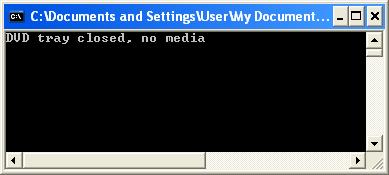
Example output:


Comments
Post a Comment