Using Win32 static libraries in Visual Studio projects
A static library is simply a file that contains functionality that can be made available to other programs. Static libraries end with the .lib extension and are made available to other Visual Studio projects (console applications, MFC applications etc) by creating links to them. Please follow the steps described below in order to create and use your own static libraries.
1. Create a static library application in Visual Studio
For this example I am using Visual Studio 2003, but these instructions should be equally applicable to other versions of Visual Studio as well.
In File > New > Project, select Win32 Project. Give it a name ('StaticLib' in this example) and check the 'Create directory for Solution' checkbox:
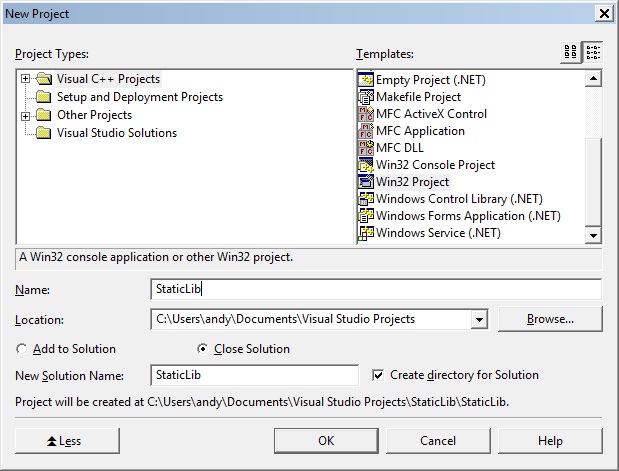 Click OK.
In the Win32 Application Wizard that then appears, select the 'Static library' radio button, and set the 'Precompiled header' checkbox:
Click OK.
In the Win32 Application Wizard that then appears, select the 'Static library' radio button, and set the 'Precompiled header' checkbox:
 Click Finish.
2. Create the header file(s) for the static library project
Select Project > Add New Item.
Select Header file (.h) and give it a name (MyFunction.h):
Click Finish.
2. Create the header file(s) for the static library project
Select Project > Add New Item.
Select Header file (.h) and give it a name (MyFunction.h):
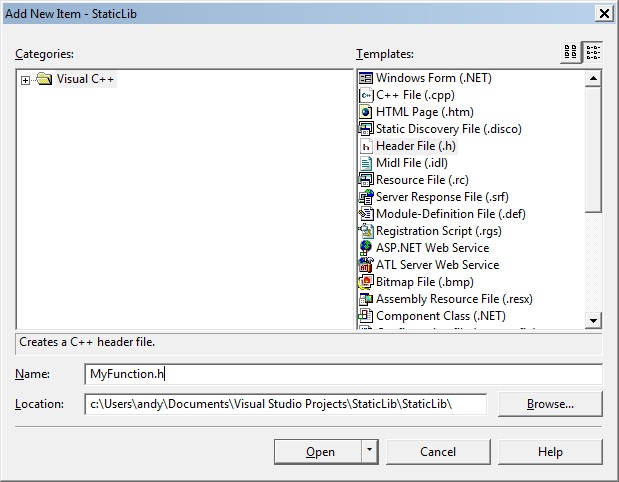 As an example, insert the following code into your header file:
Insert the following code into your header file:
As an example, insert the following code into your header file:
Insert the following code into your header file:
 And then add the source code to MyFunction.cpp:
 Click OK.
And then in the application settings, click the 'Console application' radio button set the 'Empty project' checkbox:
Click OK.
And then in the application settings, click the 'Console application' radio button set the 'Empty project' checkbox:
 Click Finish.
Create a new C++ source file for your console application (Project > Add New Item… > C++ File (.cpp)), and give it a name, UseMyFunction, for example:
Click Finish.
Create a new C++ source file for your console application (Project > Add New Item… > C++ File (.cpp)), and give it a name, UseMyFunction, for example:
 Now open Windows Explorer.
Locate the folder that contains the project for the static library file you created as a result of building the previous Visual Studio project:
Now open Windows Explorer.
Locate the folder that contains the project for the static library file you created as a result of building the previous Visual Studio project:
 This is usually inside the Debug folder. Copy the StaticLib.lib file that was created as a result of building the project, then go to the Windows console project folder that you are now working on ('UseStaticLib' in this example), and paste the StaticLib.lib file into here:
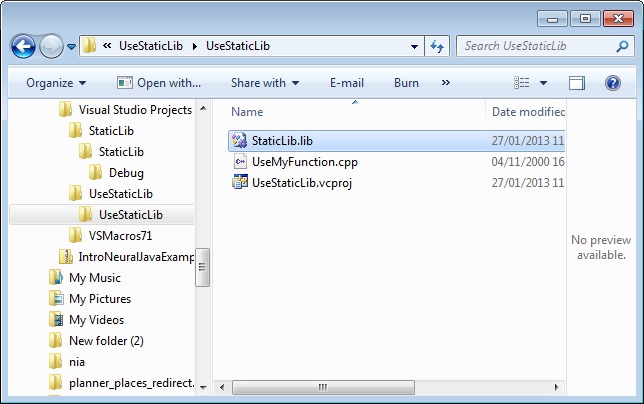 Observe that this folder contains the UseMyFunction.cpp recently created.
Also from the StaticLib project, copy the MyFunction.h header file that was created, and paste it into the same 'UseStaticLib' project folder:
Observe that this folder contains the UseMyFunction.cpp recently created.
Also from the StaticLib project, copy the MyFunction.h header file that was created, and paste it into the same 'UseStaticLib' project folder:
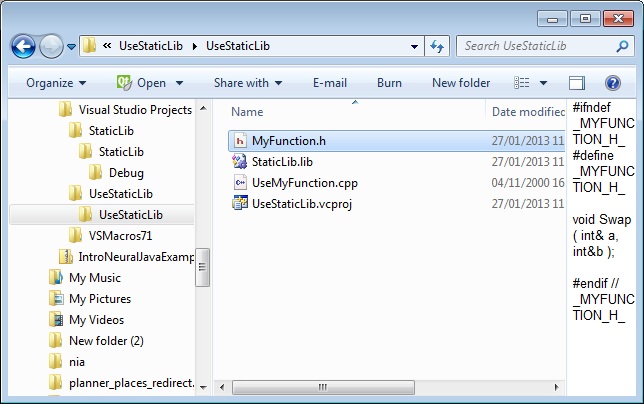 6. Add the static library to the application that will use it
Go to the Visual Studio console application you have open, and add the library to the current project.
6. Add the static library to the application that will use it
Go to the Visual Studio console application you have open, and add the library to the current project.
 Add the StaticLib.lib file to the project.
In Project > Properties > Linker > Input, set the Additional Dependencies to the nbame of the static library file name:
Add the StaticLib.lib file to the project.
In Project > Properties > Linker > Input, set the Additional Dependencies to the nbame of the static library file name:
 7. Make use of the imported static library in your code
Edit UseMyFunction.cpp in this example console application to make use of the 'Swap' function we created in the static library library:
7. Make use of the imported static library in your code
Edit UseMyFunction.cpp in this example console application to make use of the 'Swap' function we created in the static library library:
 That's it!
Your first static library project. Any comments or feedback are welcome.
That's it!
Your first static library project. Any comments or feedback are welcome.
Click OK.
In the Win32 Application Wizard that then appears, select the 'Static library' radio button, and set the 'Precompiled header' checkbox:
Click Finish.
2. Create the header file(s) for the static library project
Select Project > Add New Item.
Select Header file (.h) and give it a name (MyFunction.h):
As an example, insert the following code into your header file:
Insert the following code into your header file:
#ifndef _MYFUNCTION_H_
#define _MYFUNCTION_H_

void Swap( int& a, int&b );

#endif // _MYFUNCTION_H_
3. Add the source code for the header file In this case, add the MyFunction.cpp file by selecting Add New Item > C++ file (.cpp):
And then add the source code to MyFunction.cpp:
#include "StdAfx.h"
#include "MyFunction.h"

void Swap( int& a, int&b )
{
	int tmp = b;
	b = a;
	a = tmp;
}
4. Create the static library
Build your static library project by selecting Build -> Build MyFunction.
This will create the .lib file, probably inside the Debug/Release folders, which you will subsequently use.
5. Use your static library
Close the static library project you are working on and create a new console application, called UseStaticLib for example:
Click OK.
And then in the application settings, click the 'Console application' radio button set the 'Empty project' checkbox:
Click Finish.
Create a new C++ source file for your console application (Project > Add New Item… > C++ File (.cpp)), and give it a name, UseMyFunction, for example:
Now open Windows Explorer.
Locate the folder that contains the project for the static library file you created as a result of building the previous Visual Studio project:
This is usually inside the Debug folder. Copy the StaticLib.lib file that was created as a result of building the project, then go to the Windows console project folder that you are now working on ('UseStaticLib' in this example), and paste the StaticLib.lib file into here:
Observe that this folder contains the UseMyFunction.cpp recently created.
Also from the StaticLib project, copy the MyFunction.h header file that was created, and paste it into the same 'UseStaticLib' project folder:
6. Add the static library to the application that will use it
Go to the Visual Studio console application you have open, and add the library to the current project.
Add the StaticLib.lib file to the project.
In Project > Properties > Linker > Input, set the Additional Dependencies to the nbame of the static library file name:
7. Make use of the imported static library in your code
Edit UseMyFunction.cpp in this example console application to make use of the 'Swap' function we created in the static library library:
#include <iostream>
#include "MyFunction.h"
using namespace std;

int main()
{
	int a = 11;
	int b = 22;

	std::cout << "a = " << a << " b = " << b << std::endl;

	Swap( a, b );

	std::cout << "a = " << a << " b = " << b << std::endl;

	return 0;
}
And then test the imported library by running the console application:
That's it!
Your first static library project. Any comments or feedback are welcome.


Comments
Post a Comment