Getting started with the Boost libraries in Cygwin
This post assumes that the boost libraries have been downloaded and extracted to the directory of your choice. See this previous posting for more details on how to download and extract the Boost libraries.
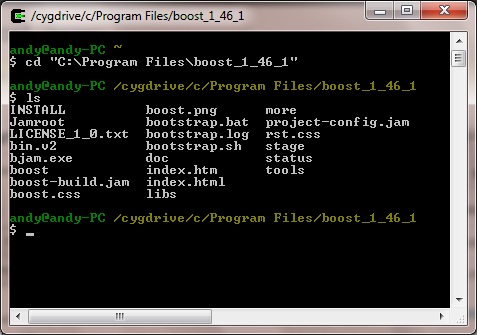
Open Cygwin and cd to the location where your Boost libraries have been installed. For Windows directories with white spaces please enclose it in quotes, eg:
 If so, run the bootstrap:
$ cd "C:\Program Files\boost_1_46_1"
Check to see that the boost/ folder lives at this location using $ ls:
If so, run the bootstrap:
$ ./bootstrap.sh –prefix=boost/
Then run the bjam executable (takes a while)
$ ./bjam
And run bjam installer (takes a very long while):
$ ./bjam install
After this has completed you will find that within the boost/ folder, three other folders have been created, namely bin, include and lib. Recursively copy these 3 folders to the /usr/local/ destination:
$ cp -r boost/bin /usr/local/
$ cp -r boost/include /usr/local/
$ cp -r boost/lib /usr/local/
Create a sample C++ project and program for utilizing the Boost libraries. This following test example for main.cpp makes use of boost::format for printing hexadecimal numbers nicely:
[code language="cpp"]
#include <iostream>
#include <boost/format.hpp>
using namespace std;
using namespace boost;
int main()
{
unsigned int arr[5] = { 0x05, 0x04, 0xAA, 0x0F, 0x0D };
cout << format("%02X-%02X-%02X-%02X-%02X")
% arr[0]
% arr[1]
% arr[2]
% arr[3]
% arr[4]
<< endl;
}
[/code]
Inside your test project folder create a makefile:
$ cat > makefile &
And using the text editor of your choice copy this text into it. Alternatively, download it from here.
[code language="txt"]
CPP = g++
OFLAG = -Wall -o
LFLAG = -l
IFLAG = -I
LIBFLAG = -L
LIBDIR = /usr/local/lib/
INCLUDEDIR = /usr/local/include/
DEBUGF = -g -D DEBUG
DEBUG = no
.SUFFIXES: .exe .cpp
.cpp.exe:
$(CPP) $(OFLAG) $@ $<
$@
main.exe: main.cpp
$(CPP) $(IFLAG) $(INCLUDEDIR) $(OFLAG) boost.exe main.cpp $(LIBFLAG)$(LIBDIR) $(LFLAG)libboost_regex
[/code]
cd into your test project directory and build it:
$ make
and then run it:
$ ./main
Giving the following output:
05-04-AA-0F-0D
Problems with makefiles
Sometimes when attempting to run the make command, you may get an error message similar to the following:
makefile:13: *** missing separator (did you mean TAB instead of 8 spaces?). Stop.
If this is the case, then open and edit the makefile in your text editor, and go to the line number it is complaining about, in this case line number 13 which is
$(CPP) $(OFLAG) $@ $<
Make sure the beginning of that particular line is separated by a proper TAB, and not just 8 whitespaces. Save the makefile and try running the make command again, and it should then work.
Download the sample project from here.
Related posts
Getting started with the Boost libraries in Ubuntu Linux
How to Install the Boost Libraries in Visual Studio


Comments
Post a Comment