Getting Started with FFMPEG for Windows
Some pointers on how to get ffmpeg installed for use in Windows environments.
1. Some pre-requisites needed to run Linux commands
This will involve running Linux type commands in Windows, so make sure that you have installed CygWin if you have not done so already.
And also make sure you have installed MinGW. This you will need in order to run GNU compilers within Windows environments.
2. Install YASM
Get the yasm tarball from: http://www.tortall.net/projects/yasm/releases/yasm-1.0.1.tar.gz and install it to your C drive.
Open the MinGW shell and enter the commands:
 Then run the make and make install commands:
 4. Install x264
From the DOS command prompt, use the git package to check out x264 to the C:\ directory:
4. Install x264
From the DOS command prompt, use the git package to check out x264 to the C:\ directory:
 Then run the MinGW shell, cd to the x264 directory and compile the project:
 6. Configure FFMPEG
Open the MinGW Shell from the shortcut or from the Start Menu, cd to the ffmpeg directory and configure the project (this can take a while) and don't forget to make:
6. Configure FFMPEG
Open the MinGW Shell from the shortcut or from the Start Menu, cd to the ffmpeg directory and configure the project (this can take a while) and don't forget to make:

$cd c:\  (you may have to press enter again)
$gunzip yasm-1.0.1.tar.gz
$tar –xvf tasm-1.0.1.tar.gz
Then cd to the yasm-1.0.1 directory you have just created and build in the conventional way:
$cd c:\yasm-1.0.1
$./configure
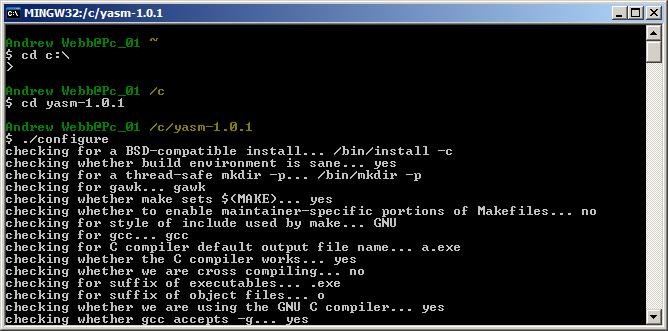 Then run the make and make install commands:
$make
$make install
3. Install GIT
If you have not yet done so, make sure the git package has been installed with your CygWin, which is needed to check out the latest versions of the ffmpeg software. The CygWin setup.exe allows you to install additional things on top of what you have already installed (such as git), but without the need for a fresh re-install. Run the CygWin setup.exe again, locate git in the 'Devel' subsection and install:
 4. Install x264
From the DOS command prompt, use the git package to check out x264 to the C:\ directory:
4. Install x264
From the DOS command prompt, use the git package to check out x264 to the C:\ directory:
$git clone git://git.videolan.org/x264
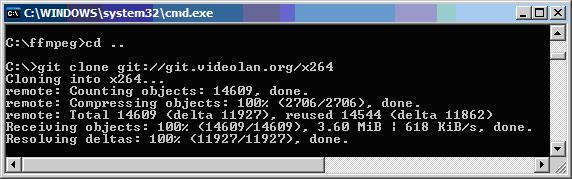 Then run the MinGW shell, cd to the x264 directory and compile the project:
$cd c:\x264
$ ./configure --enable-static
$make
5. Install ffmpeg
Use git to check out the latest ffmpeg software, from any of these cloned URLs. I chose git://git.khirnov.net/git/libav as my cloned URL. I then installed ffmpeg to the C drive from the command prompt (not MinGW):
$git clone git://git.khirnov.net/git/libav ffmpeg
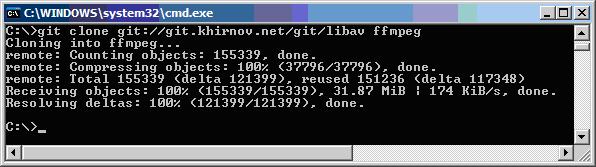 6. Configure FFMPEG
Open the MinGW Shell from the shortcut or from the Start Menu, cd to the ffmpeg directory and configure the project (this can take a while) and don't forget to make:
6. Configure FFMPEG
Open the MinGW Shell from the shortcut or from the Start Menu, cd to the ffmpeg directory and configure the project (this can take a while) and don't forget to make:
$cd c:\ffmpeg
$./configure --enable-memalign-hack
$make


Comments
Post a Comment