General Windows How-Tos...
Starting from today, any useful Windows-related tips I encounter. I anticpate this post will grow as and when I come across any other Windows-related stuff... First off:
Removing that [expletive deleted] Beep Sound
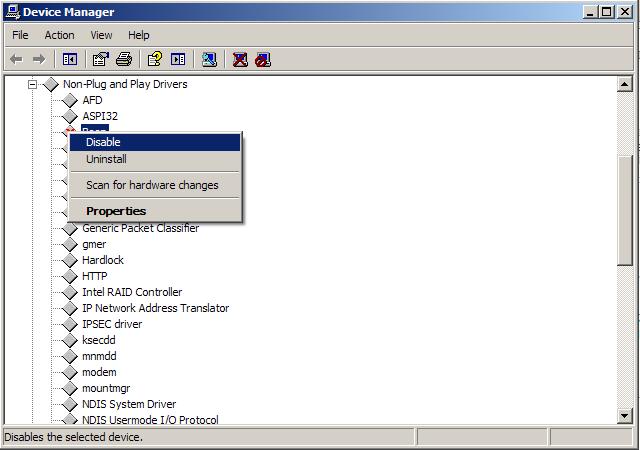
Go into the Control Panel -> System -> Hardware tab ->Device Manager. Be sure that Show Hidden Devices has been set:
 In the Non-Plug and Play section, right-click the Beep icon and select the disable option:
 You will probably need to re-start your machine for this take effect.
How to tell if you're running 32 or 64 bit versions of Windows
1. Click the Windows start button:
You will probably need to re-start your machine for this take effect.
How to tell if you're running 32 or 64 bit versions of Windows
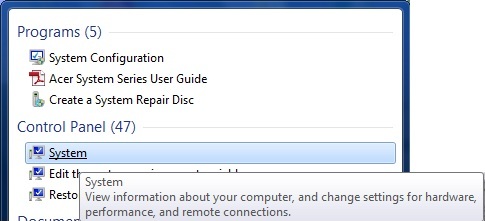
1. Click the Windows start button:  2. Type system in the start search box that appears and select system from the programs list:
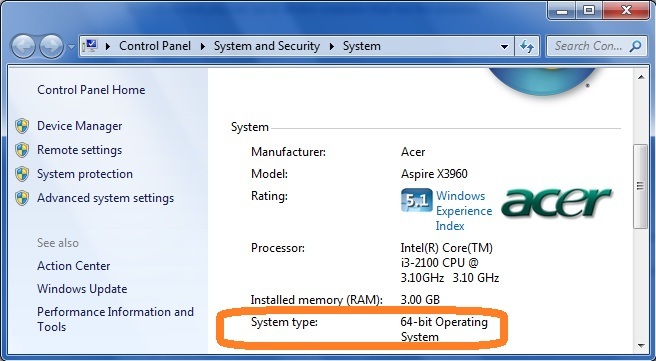
 3. The type of operating system you are running gets displayed similar to as follows:

 In the Non-Plug and Play section, right-click the Beep icon and select the disable option:
 You will probably need to re-start your machine for this take effect.
How to tell if you're running 32 or 64 bit versions of Windows
1. Click the Windows start button:
2. Type system in the start search box that appears and select system from the programs list:
You will probably need to re-start your machine for this take effect.
How to tell if you're running 32 or 64 bit versions of Windows
1. Click the Windows start button:
2. Type system in the start search box that appears and select system from the programs list:
 3. The type of operating system you are running gets displayed similar to as follows:


Comments
Post a Comment