How to Create Resizable Dialogs in MFC
Example 1: Using Paulo Messina's Code Project sample
A minimalist use of the CResizeableDialog class as described by Paulo Messina at CodeProject . Hope you find the following recipe useful. Visual Studio 2003 source code is downloadable from here.
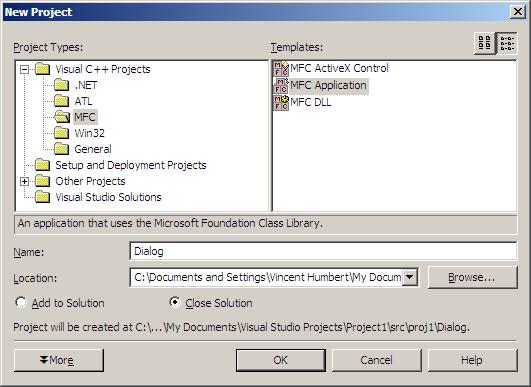
1. Create a new MFC Project
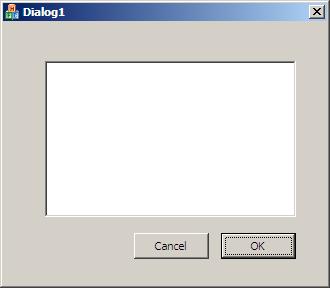
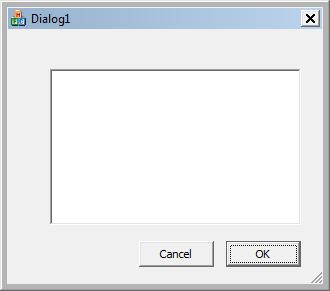
 2. In the resource editor, add a simple edit control that will be used to demonstrate how this resizing works:
 3. Download the CodeProject library to a location of your choice.
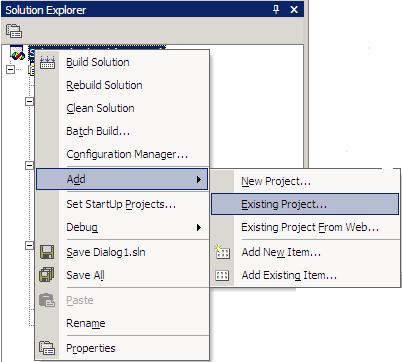
4. Add this downloaded project to the same dialog project you are working on. To do this, right-click the topmost solution folder and select Add Existing Project:
3. Download the CodeProject library to a location of your choice.
4. Add this downloaded project to the same dialog project you are working on. To do this, right-click the topmost solution folder and select Add Existing Project:
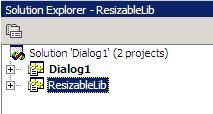
 So that the extra project is added:
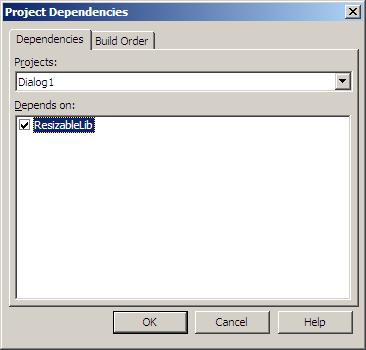
 5. Right-click on the Dialog (or whatever you called your project) folder and select "Set Project Dependencies", making sure ResizableLib is checked:
 6. In the Dialog code make sure CDialog is replaced with CResizeableDialog at the following appropriate points.
2. In the resource editor, add a simple edit control that will be used to demonstrate how this resizing works:
3. Download the CodeProject library to a location of your choice.
4. Add this downloaded project to the same dialog project you are working on. To do this, right-click the topmost solution folder and select Add Existing Project:
So that the extra project is added:
5. Right-click on the Dialog (or whatever you called your project) folder and select "Set Project Dependencies", making sure ResizableLib is checked:
6. In the Dialog code make sure CDialog is replaced with CResizeableDialog at the following appropriate points.(i) In the Dialog class (header file) be sure to insert #include "ResizableDialog.h". In this Dialog class, replace CDialog with CResizableDialog:
[code language="cpp"]
#include "ResizableDialog.h"
// CDialogDlg dialog
class CDialogDlg : public CResizableDialog
{
// Construction
public:
CDialogDlg(CWnd* pParent = NULL); // constructor
// Dialog Data
enum { IDD = IDD_DIALOG_DIALOG };
protected:
// DDX/DDV support
virtual void DoDataExchange(CDataExchange* pDX);
// Implementation
protected:
HICON m_hIcon;
// Generated message map functions
virtual BOOL OnInitDialog();
afx_msg void OnSysCommand(UINT nID, LPARAM lParam);
afx_msg void OnPaint();
afx_msg HCURSOR OnQueryDragIcon();
DECLARE_MESSAGE_MAP()
};
[/code]
Basically replace all instances of CDialog with CResizableDialog, except in CAboutDlg of course.
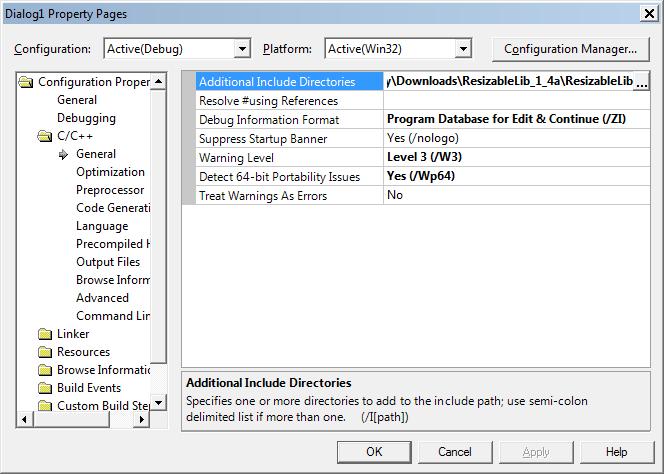
7. Add the dependencies needed to build the project. In Project Properties-> C/C++ -> General -> Additional Include Directories:
 8. Finally, In OnInitDialog() add the extra initialization needed make the gripper visible, set maximum dialog size, add anchors to control items etc and we’re done.
8. Finally, In OnInitDialog() add the extra initialization needed make the gripper visible, set maximum dialog size, add anchors to control items etc and we’re done.
[code language="cpp"]
// Initialize anchor points
AddAnchor(IDOK, BOTTOM_RIGHT);
AddAnchor(IDCANCEL, BOTTOM_RIGHT);
AddAnchor(IDC_EDIT1, TOP_LEFT, BOTTOM_RIGHT);
// Set max tracking size to half a screen
CRect rc;
GetDesktopWindow()->GetClientRect(&rc);
SetMaxTrackSize(CSize(rc.Width(), rc.Height()));
// Set max. position and size on top of the screen
rc.bottom = 200;
SetMaximizedRect( rc );
[/code]
 Example 2: Stack Overflow posting
Courtesy of Mark Ransom. Some things things needed to use this class are:
1. Set your dialog style to include WS_THICKFRAME:
[code language="cpp"]
IDD_DIALOGRESIZE_DIALOG DIALOGEX 0, 0, 215, 178
STYLE DS_SETFONT | DS_MODALFRAME | DS_FIXEDSYS | WS_POPUP |
WS_VISIBLE | WS_CAPTION | WS_SYSMENU | WS_THICKFRAME
EXSTYLE WS_EX_APPWINDOW
CAPTION "DialogResize"
FONT 8, "MS Shell Dlg", 0, 0, 0x1
BEGIN
LISTBOX IDC_LIST1,35,35,143,99,LBS_SORT |
LBS_NOINTEGRALHEIGHT |
WS_VSCROLL | WS_TABSTOP
END
[/code]
2. Make your dialog class derive from the CResizableDialog base class instead of CDialog or CDialogEx:
[code language="cpp"]
// CDialogResizeDlg dialog
class CDialogResizeDlg : public CResizableDialog
[/code]
3. In your OnInitDialog function call the AutoMove function for each child control to define how much it should move and how much it should resize relative to the parent dialog. Use this example to 'stretch' the dialog child controls from a fixed position:
[code language="cpp"]
AutoMove( IDC_LIST1, 0, 0, 100, 100 );
[/code]
4. In the dialog class you are using (not the CResizable base class), replace all instances of CDialog with CBaseDialog.
Example VS2003 code downloadable from here.
Example VS2010 code downloadable from here.
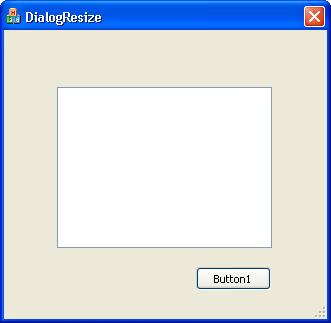
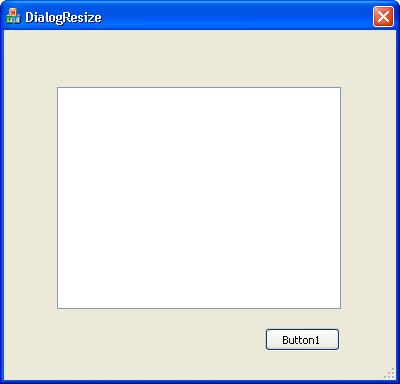
Another VS2010 project is available this time incorporating a list control that is resized and repositioned upon stretching the dialog and a button control that is repositioned only. We achieve this by specifying how much we wish to allow the button control to be repositioned, while leaving its resizing parameters set to zero:
[code language="cpp"]
AutoMove( IDC_LIST1, 0, 0, 100, 100 );
AutoMove( IDC_BUTTON1, 100, 100, 0, 0 );
[/code]
This is the dialog before repositioning:
Example 2: Stack Overflow posting
Courtesy of Mark Ransom. Some things things needed to use this class are:
1. Set your dialog style to include WS_THICKFRAME:
[code language="cpp"]
IDD_DIALOGRESIZE_DIALOG DIALOGEX 0, 0, 215, 178
STYLE DS_SETFONT | DS_MODALFRAME | DS_FIXEDSYS | WS_POPUP |
WS_VISIBLE | WS_CAPTION | WS_SYSMENU | WS_THICKFRAME
EXSTYLE WS_EX_APPWINDOW
CAPTION "DialogResize"
FONT 8, "MS Shell Dlg", 0, 0, 0x1
BEGIN
LISTBOX IDC_LIST1,35,35,143,99,LBS_SORT |
LBS_NOINTEGRALHEIGHT |
WS_VSCROLL | WS_TABSTOP
END
[/code]
2. Make your dialog class derive from the CResizableDialog base class instead of CDialog or CDialogEx:
[code language="cpp"]
// CDialogResizeDlg dialog
class CDialogResizeDlg : public CResizableDialog
[/code]
3. In your OnInitDialog function call the AutoMove function for each child control to define how much it should move and how much it should resize relative to the parent dialog. Use this example to 'stretch' the dialog child controls from a fixed position:
[code language="cpp"]
AutoMove( IDC_LIST1, 0, 0, 100, 100 );
[/code]
4. In the dialog class you are using (not the CResizable base class), replace all instances of CDialog with CBaseDialog.
Example VS2003 code downloadable from here.
Example VS2010 code downloadable from here.
Another VS2010 project is available this time incorporating a list control that is resized and repositioned upon stretching the dialog and a button control that is repositioned only. We achieve this by specifying how much we wish to allow the button control to be repositioned, while leaving its resizing parameters set to zero:
[code language="cpp"]
AutoMove( IDC_LIST1, 0, 0, 100, 100 );
AutoMove( IDC_BUTTON1, 100, 100, 0, 0 );
[/code]
This is the dialog before repositioning:
 And this is the dialog after repositioning:
 Updated VS2010 code downloadable from here.
Example 2: Stack Overflow posting
Courtesy of Mark Ransom. Some things things needed to use this class are:
1. Set your dialog style to include WS_THICKFRAME:
[code language="cpp"]
IDD_DIALOGRESIZE_DIALOG DIALOGEX 0, 0, 215, 178
STYLE DS_SETFONT | DS_MODALFRAME | DS_FIXEDSYS | WS_POPUP |
WS_VISIBLE | WS_CAPTION | WS_SYSMENU | WS_THICKFRAME
EXSTYLE WS_EX_APPWINDOW
CAPTION "DialogResize"
FONT 8, "MS Shell Dlg", 0, 0, 0x1
BEGIN
LISTBOX IDC_LIST1,35,35,143,99,LBS_SORT |
LBS_NOINTEGRALHEIGHT |
WS_VSCROLL | WS_TABSTOP
END
[/code]
2. Make your dialog class derive from the CResizableDialog base class instead of CDialog or CDialogEx:
[code language="cpp"]
// CDialogResizeDlg dialog
class CDialogResizeDlg : public CResizableDialog
[/code]
3. In your OnInitDialog function call the AutoMove function for each child control to define how much it should move and how much it should resize relative to the parent dialog. Use this example to 'stretch' the dialog child controls from a fixed position:
[code language="cpp"]
AutoMove( IDC_LIST1, 0, 0, 100, 100 );
[/code]
4. In the dialog class you are using (not the CResizable base class), replace all instances of CDialog with CBaseDialog.
Example VS2003 code downloadable from here.
Example VS2010 code downloadable from here.
Another VS2010 project is available this time incorporating a list control that is resized and repositioned upon stretching the dialog and a button control that is repositioned only. We achieve this by specifying how much we wish to allow the button control to be repositioned, while leaving its resizing parameters set to zero:
[code language="cpp"]
AutoMove( IDC_LIST1, 0, 0, 100, 100 );
AutoMove( IDC_BUTTON1, 100, 100, 0, 0 );
[/code]
This is the dialog before repositioning:
And this is the dialog after repositioning:
Updated VS2010 code downloadable from here.


Comments
Post a Comment