Dynamically Created MFC Controls and their Notifications
I was required to create a dialog application with dynamically created checkboxes (CButtons). Given that selection of a certain hardware types in the software would result in completely different checkbox layouts. In these situations, it is the software that has to automatically do the work normally done by using the Dialog Editor toolbox to insert static controls. This involves the following steps:
1. Define the control ID numbers
These ID numbers are the identifiers for the checkboxes are are set in resource.h, making sure they are unique:
[code language="cpp"]
#define IDC_CHK12_1 1519
[/code]
2. Use Create() to set up each control:
Using the control IDs created in the CButton’s Create() method in OnInitDialog() to set up each checkbox:
[code language="cpp"]
BOOL SampleDialog::OnInitDialog()
{
CDialog::OnInitDialog();
m_pMyButton->Create( "",
WS_CHILD | WS_VISIBLE | BS_AUTOCHECKBOX | BS_LEFTTEXT,
chkRect,
this,
IDC_CHK12_1);
// etc
}
[/code]
... where chkRect is the CRect used to locate the position of a particular checkbox.
3. Define handlers
Defining a handler with the correct signature in the *.h file, making sure to provide a body for that function in the corresponding *.cpp file of course:
[code language="cpp"]
afx_msg void OnBnClickedChk12_1();
[/code]
4. Add Message Map entries
Adding an entry to the message map of that class. To ensure that the handler function is called when notification arrives is to add an entry to the message map of your Dialog class, specifying the control’s ID and the function used to handle the notification:
[code language="cpp"]
BEGIN_MESSAGE_MAP(CJetSpyderProperties, PrintrunPropertyPage)
ON_BN_CLICKED(IDC_CHK12_1, OnBnClickedChk12_1)
ON_BN_CLICKED(IDC_CHK12_2, OnBnClickedChk12_2)
END_MESSAGE_MAP()
[/code]
And that is pretty much all there is to it. So one particular checkbox layout, depending on hardware selections would like this one below:
 while the other would look like this:

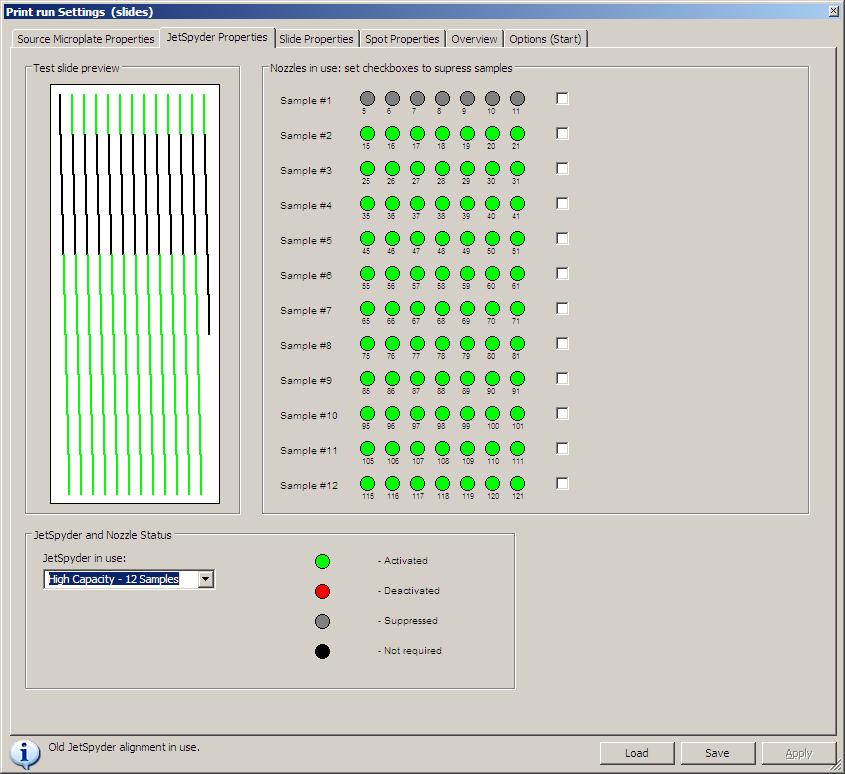 while the other would look like this:


Comments
Post a Comment